Featured in:Best AI Image Generation Tools
Get featured →🚀 Zaprep: Your Socials on Steroids. Start free — automate 1,000 DMs/month & turn engagement into leads. with 1,000 automated DMs/month.



✦
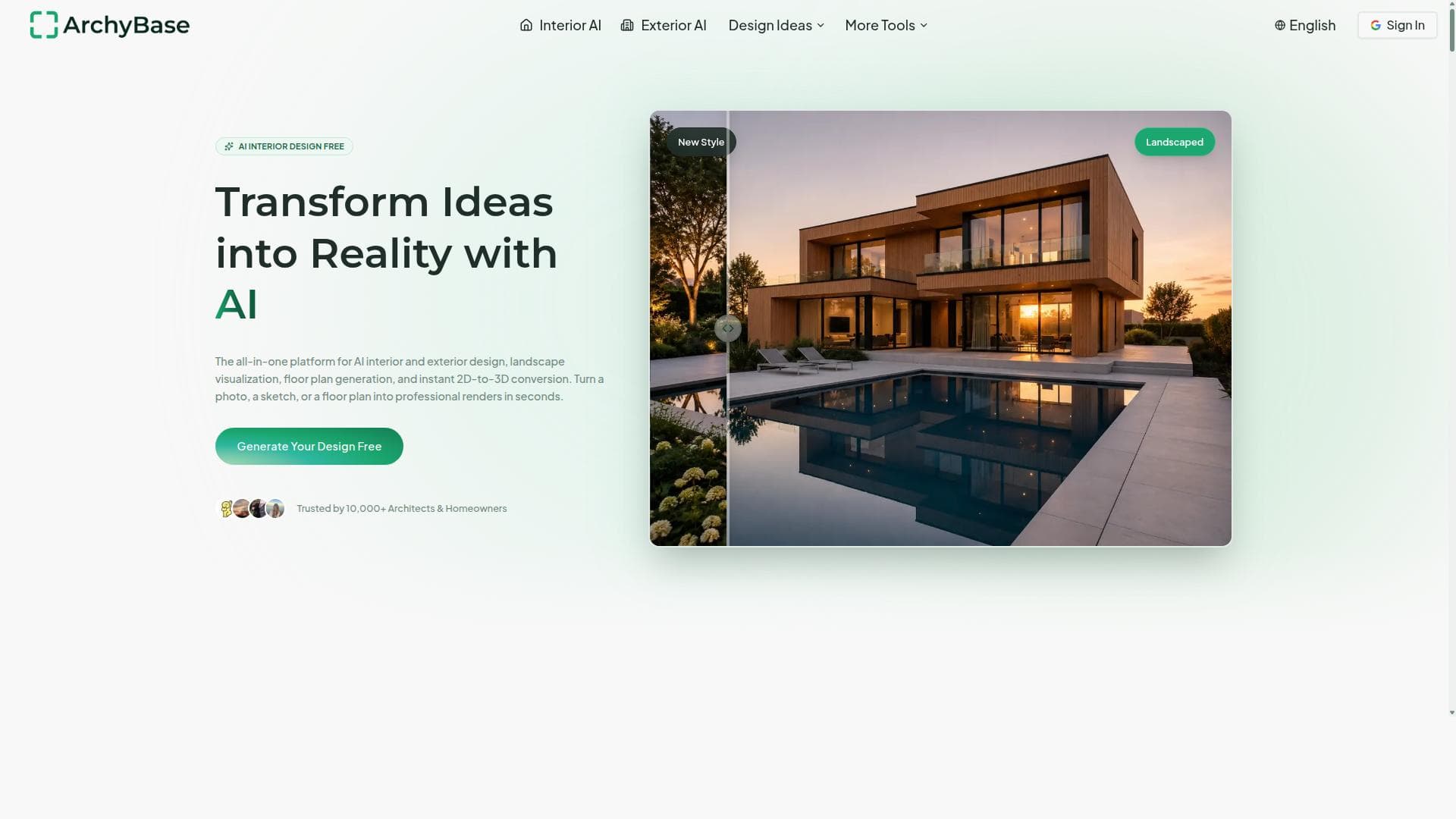
ArchyBase is an innovative AI design platform that transforms photos and sketches into professional interior, exterior, and landscape renders within seconds. Ideal for architects, designers, and homeowners, it streamlines the visualization process, making high-quality architectural design accessible and efficient.
Description
ArchyBase is an all-in-one AI design platform tailored for architects and homeowners. It enables users to generate professional interior, exterior, and landscape renders from photos or sketches within seconds, streamlining the design process with AI technology.
Detailed Description
ArchyBase is a cutting-edge AI-powered design platform specifically crafted to meet the needs of architects, interior designers, landscape professionals, and homeowners seeking to visualize architectural concepts quickly and professionally. Its core purpose is to streamline and accelerate the design process by transforming simple inputs such as photos or sketches into high-quality interior, exterior, and landscape renders within seconds. This capability significantly reduces the time and effort traditionally required for architectural visualization, enabling users to iterate and refine designs more efficiently. At the heart of ArchyBase lies its ability to generate professional-grade renders from minimal input. Users can upload photos of existing spaces or rough sketches, and the AI engine interprets these to produce detailed, realistic visualizations. This includes interior spaces, where lighting, textures, and spatial arrangements are rendered with precision; exterior designs, where building facades, materials, and environmental context are accurately depicted; and landscape renders, which showcase outdoor elements such as gardens, pathways, and terrain features. The platform’s all-in-one nature means users do not need to switch between multiple tools or software, consolidating the entire architectural visualization workflow into a single interface. ArchyBase supports a wide range of use cases. For professional architects and design firms, it serves as a rapid prototyping tool to present concepts to clients or stakeholders, allowing for quick adjustments based on feedback. Interior designers can experiment with different styles and layouts without the need for extensive manual rendering work. Homeowners and DIY enthusiasts benefit from the platform’s user-friendly approach, enabling them to visualize renovations or new construction projects with professional quality without specialized skills. The platform’s speed and ease of use make it ideal for early-stage design exploration, client presentations, and marketing materials. Regarding pricing, ArchyBase offers tiered subscription plans tailored to different user needs, although specific pricing details are available on their website. Typically, plans range from basic access for individual users or homeowners to more comprehensive packages for professional firms that require higher render limits, priority processing, and additional features. Some plans may include free trials or demo versions to allow users to evaluate the platform before committing. When compared to alternative architectural visualization tools, ArchyBase stands out due to its AI-driven automation and all-in-one design approach. Traditional rendering software often requires extensive manual input, technical expertise, and significant processing time. In contrast, ArchyBase’s AI technology drastically reduces these barriers, making professional-quality renders accessible to non-experts while maintaining high visual fidelity. However, unlike some specialized CAD or BIM software, ArchyBase focuses primarily on visualization rather than detailed architectural modeling or construction documentation. Potential limitations include the reliance on AI interpretation, which may occasionally produce results that require manual refinement or adjustment, especially for highly complex or unconventional designs. Additionally, while the platform supports photos and sketches, the quality and accuracy of the input can affect the final render output. Users should also consider that advanced customization options might be less extensive compared to traditional 3D modeling tools. Nevertheless, ArchyBase offers a compelling balance of speed, ease of use, and quality, making it a valuable asset for a broad spectrum of architectural visualization needs.
Tool Features
- Generate professional interior renders from photos or sketches
- Create exterior design renders quickly using AI
- Produce landscape renders in seconds
- All-in-one platform for architectural design
- Supports input from photos and sketches
Description
✦
ArchyBase is an innovative AI design platform that transforms photos and sketches into professional interior, exterior, and landscape renders within seconds. Ideal for architects, designers, and homeowners, it streamlines the visualization process, making high-quality architectural design accessible and efficient.
ArchyBase is an all-in-one AI design platform tailored for architects and homeowners. It enables users to generate professional interior, exterior, and landscape renders from photos or sketches within seconds, streamlining the design process with AI technology.
Detailed Description
ArchyBase is a cutting-edge AI-powered design platform specifically crafted to meet the needs of architects, interior designers, landscape professionals, and homeowners seeking to visualize architectural concepts quickly and professionally. Its core purpose is to streamline and accelerate the design process by transforming simple inputs such as photos or sketches into high-quality interior, exterior, and landscape renders within seconds. This capability significantly reduces the time and effort traditionally required for architectural visualization, enabling users to iterate and refine designs more efficiently. At the heart of ArchyBase lies its ability to generate professional-grade renders from minimal input. Users can upload photos of existing spaces or rough sketches, and the AI engine interprets these to produce detailed, realistic visualizations. This includes interior spaces, where lighting, textures, and spatial arrangements are rendered with precision; exterior designs, where building facades, materials, and environmental context are accurately depicted; and landscape renders, which showcase outdoor elements such as gardens, pathways, and terrain features. The platform’s all-in-one nature means users do not need to switch between multiple tools or software, consolidating the entire architectural visualization workflow into a single interface. ArchyBase supports a wide range of use cases. For professional architects and design firms, it serves as a rapid prototyping tool to present concepts to clients or stakeholders, allowing for quick adjustments based on feedback. Interior designers can experiment with different styles and layouts without the need for extensive manual rendering work. Homeowners and DIY enthusiasts benefit from the platform’s user-friendly approach, enabling them to visualize renovations or new construction projects with professional quality without specialized skills. The platform’s speed and ease of use make it ideal for early-stage design exploration, client presentations, and marketing materials. Regarding pricing, ArchyBase offers tiered subscription plans tailored to different user needs, although specific pricing details are available on their website. Typically, plans range from basic access for individual users or homeowners to more comprehensive packages for professional firms that require higher render limits, priority processing, and additional features. Some plans may include free trials or demo versions to allow users to evaluate the platform before committing. When compared to alternative architectural visualization tools, ArchyBase stands out due to its AI-driven automation and all-in-one design approach. Traditional rendering software often requires extensive manual input, technical expertise, and significant processing time. In contrast, ArchyBase’s AI technology drastically reduces these barriers, making professional-quality renders accessible to non-experts while maintaining high visual fidelity. However, unlike some specialized CAD or BIM software, ArchyBase focuses primarily on visualization rather than detailed architectural modeling or construction documentation. Potential limitations include the reliance on AI interpretation, which may occasionally produce results that require manual refinement or adjustment, especially for highly complex or unconventional designs. Additionally, while the platform supports photos and sketches, the quality and accuracy of the input can affect the final render output. Users should also consider that advanced customization options might be less extensive compared to traditional 3D modeling tools. Nevertheless, ArchyBase offers a compelling balance of speed, ease of use, and quality, making it a valuable asset for a broad spectrum of architectural visualization needs.
Frequently Asked Questions
What is ArchyBase?
ArchyBase is an all-in-one AI-powered design platform that enables users to generate professional interior, exterior, and landscape renders from photos or sketches quickly and easily, streamlining the architectural visualization process.
How much does ArchyBase cost?
ArchyBase offers tiered subscription plans tailored to different user needs, ranging from basic individual access to professional packages. Specific pricing details and any available free trials can be found on their official website.
Who is ArchyBase best for?
ArchyBase is ideal for architects, interior designers, landscape professionals, and homeowners who want to quickly create high-quality architectural visualizations without extensive technical expertise.
What are the main features of ArchyBase?
Key features include AI-generated professional interior, exterior, and landscape renders from photos or sketches, an all-in-one platform for architectural design visualization, and rapid render generation within seconds.
Does ArchyBase offer a free trial?
ArchyBase may offer free trials or demo versions to allow users to test the platform before subscribing. Details about free trials are available on their website.
What integrations does ArchyBase support?
ArchyBase primarily focuses on AI-driven rendering from photos and sketches. While specific third-party integrations are not detailed, it supports common image input formats for seamless workflow integration.
How does ArchyBase work?
Users upload photos or sketches of interior, exterior, or landscape designs, and ArchyBase’s AI engine processes these inputs to generate realistic, professional-quality renders within seconds, simplifying the design visualization process.
Reviews
0 reviews
No reviews yet. Be the first to share your experience.
Sponsored Tools











































Recommended Tools
Stay updated on latest Ai tools
Get the latest insights, Join our newsletter
Read and trusted by 50,000+ readers
Join the biggest AI Community
Our community and staff are here to help!
Your feedback will help Alice AI improve in future versions.








Submit your Tool


PoweredByAI.app is an AI Tools Directory helping individuals, businesses, and creators discover the best AI tools for writing, coding, design, productivity, and more.
© 2026 , Product of011BQ. All rights reserved.