🚀 Zaprep: Your Socials on Steroids. Start free — automate 1,000 DMs/month & turn engagement into leads. with 1,000 automated DMs/month.

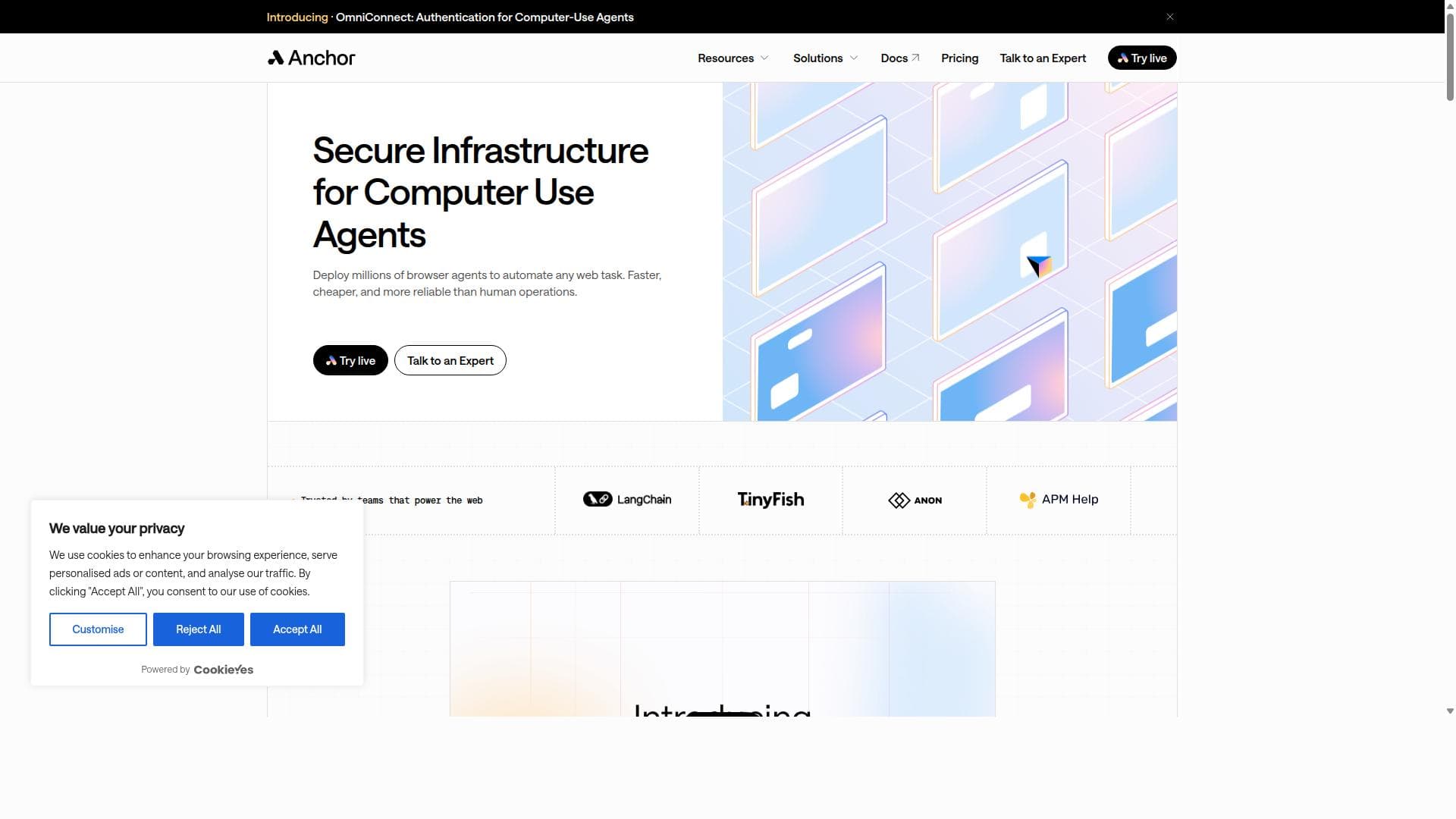


Anchor Browser is a cutting-edge AI-powered platform that transforms complex browser interactions into simple API endpoints, enabling seamless automation of web workflows without relying on APIs. Ideal for businesses facing limited API coverage, it offers cloud-hosted automation with advanced features like MFA handling, captcha solving, and self-healing workflows to reduce maintenance and boost efficiency.

Description
Anchor Browser is the platform for AI Agentic browser automation, which solves challenge of automating workflows for web applications without APIs or with limited API coverage. It simplifies the creation, deployment, and management of browser-based automations, transforming complex web interactions into simple API endpoints. Anchor Browser allows to lower the total-cost-of-ownership of automations by making the automation building process simpler, and massively reducing the amount of maintenance work associated with automations.
Detailed Description
Anchor Browser is an advanced platform designed to revolutionize browser automation by leveraging AI-driven agentic technology. Its core purpose is to address the common challenges faced when automating workflows for web applications that either lack APIs or have limited API coverage. Traditional automation tools often struggle with complex web interactions, especially when APIs are unavailable or insufficient. Anchor Browser simplifies this by transforming intricate browser-based tasks into straightforward API endpoints, making automation more accessible and manageable. This approach not only streamlines the automation creation process but also significantly reduces the ongoing maintenance burden typically associated with browser automation. One of the standout features of Anchor Browser is its cloud-hosted browser automation environment, which allows users to deploy and manage automations without the need for local infrastructure. This cloud-based setup ensures scalability and reliability, enabling businesses to run multiple automated workflows concurrently with ease. The platform employs AI-powered web agents that intelligently navigate and interact with web pages, mimicking human behavior to handle dynamic content and complex user interfaces effectively. These agents support authenticated browser sessions, including Single Sign-On (SSO) integration and Multi-Factor Authentication (MFA) handling, which are critical for automating secure and protected web applications. Additionally, Anchor Browser includes built-in capabilities for solving captchas and managing proxy configurations, which are essential for maintaining uninterrupted automation workflows in environments with anti-bot protections. Its Cloudflare verified bot access further enhances its ability to operate seamlessly on websites protected by advanced security measures. The platform also offers self-healing automation features, allowing workflows to adapt automatically to minor changes in web page structures, thereby minimizing downtime and manual intervention. Enterprise-grade security compliance ensures that sensitive data and automation processes remain secure and adhere to industry standards. Anchor Browser is ideally suited for businesses and developers who need to automate complex web interactions without relying on APIs. This includes industries such as e-commerce, finance, marketing, and data aggregation, where web scraping, data entry, and workflow automation are common but often hindered by limited API availability. Use cases range from automating order processing and customer support tasks to monitoring competitor pricing and aggregating market data. Its ease of use and robust feature set make it a valuable tool for both technical users and business teams looking to reduce operational costs and improve efficiency. The platform follows a freemium pricing model, allowing users to start with a free tier to explore its capabilities before upgrading to paid plans for enhanced features and higher usage limits. This approach provides flexibility for small teams and enterprises alike to scale their automation efforts according to their needs. Compared to traditional browser automation tools, Anchor Browser stands out by integrating AI-driven agents and cloud hosting, which reduce the complexity and maintenance overhead typically associated with such solutions. While many alternatives require extensive scripting and manual updates to keep automations functional, Anchor Browser’s self-healing and AI-powered features offer a more resilient and user-friendly experience. However, potential users should consider that, like all browser automation platforms, it may face limitations when dealing with highly dynamic or heavily protected websites that employ advanced bot detection techniques beyond current capabilities. In summary, Anchor Browser offers a comprehensive, AI-enhanced solution for browser automation that simplifies complex workflows, reduces total cost of ownership, and supports secure, scalable deployment. Its rich feature set and cloud-based architecture make it an excellent choice for organizations aiming to automate web interactions efficiently without the constraints of traditional API dependencies.
Tool Features
- Cloud-hosted browser automation
- AI-powered web agents
- Authenticated browser sessions
- SSO integration
- MFA handling
- Captcha solving
- Proxy support
- Cloudflare verified bot access
- Self-healing automation
- Enterprise security compliance
Description
Anchor Browser is a cutting-edge AI-powered platform that transforms complex browser interactions into simple API endpoints, enabling seamless automation of web workflows without relying on APIs. Ideal for businesses facing limited API coverage, it offers cloud-hosted automation with advanced features like MFA handling, captcha solving, and self-healing workflows to reduce maintenance and boost efficiency.
Anchor Browser is the platform for AI Agentic browser automation, which solves challenge of automating workflows for web applications without APIs or with limited API coverage. It simplifies the creation, deployment, and management of browser-based automations, transforming complex web interactions into simple API endpoints. Anchor Browser allows to lower the total-cost-of-ownership of automations by making the automation building process simpler, and massively reducing the amount of maintenance work associated with automations.
Detailed Description
Anchor Browser is an advanced platform designed to revolutionize browser automation by leveraging AI-driven agentic technology. Its core purpose is to address the common challenges faced when automating workflows for web applications that either lack APIs or have limited API coverage. Traditional automation tools often struggle with complex web interactions, especially when APIs are unavailable or insufficient. Anchor Browser simplifies this by transforming intricate browser-based tasks into straightforward API endpoints, making automation more accessible and manageable. This approach not only streamlines the automation creation process but also significantly reduces the ongoing maintenance burden typically associated with browser automation. One of the standout features of Anchor Browser is its cloud-hosted browser automation environment, which allows users to deploy and manage automations without the need for local infrastructure. This cloud-based setup ensures scalability and reliability, enabling businesses to run multiple automated workflows concurrently with ease. The platform employs AI-powered web agents that intelligently navigate and interact with web pages, mimicking human behavior to handle dynamic content and complex user interfaces effectively. These agents support authenticated browser sessions, including Single Sign-On (SSO) integration and Multi-Factor Authentication (MFA) handling, which are critical for automating secure and protected web applications. Additionally, Anchor Browser includes built-in capabilities for solving captchas and managing proxy configurations, which are essential for maintaining uninterrupted automation workflows in environments with anti-bot protections. Its Cloudflare verified bot access further enhances its ability to operate seamlessly on websites protected by advanced security measures. The platform also offers self-healing automation features, allowing workflows to adapt automatically to minor changes in web page structures, thereby minimizing downtime and manual intervention. Enterprise-grade security compliance ensures that sensitive data and automation processes remain secure and adhere to industry standards. Anchor Browser is ideally suited for businesses and developers who need to automate complex web interactions without relying on APIs. This includes industries such as e-commerce, finance, marketing, and data aggregation, where web scraping, data entry, and workflow automation are common but often hindered by limited API availability. Use cases range from automating order processing and customer support tasks to monitoring competitor pricing and aggregating market data. Its ease of use and robust feature set make it a valuable tool for both technical users and business teams looking to reduce operational costs and improve efficiency. The platform follows a freemium pricing model, allowing users to start with a free tier to explore its capabilities before upgrading to paid plans for enhanced features and higher usage limits. This approach provides flexibility for small teams and enterprises alike to scale their automation efforts according to their needs. Compared to traditional browser automation tools, Anchor Browser stands out by integrating AI-driven agents and cloud hosting, which reduce the complexity and maintenance overhead typically associated with such solutions. While many alternatives require extensive scripting and manual updates to keep automations functional, Anchor Browser’s self-healing and AI-powered features offer a more resilient and user-friendly experience. However, potential users should consider that, like all browser automation platforms, it may face limitations when dealing with highly dynamic or heavily protected websites that employ advanced bot detection techniques beyond current capabilities. In summary, Anchor Browser offers a comprehensive, AI-enhanced solution for browser automation that simplifies complex workflows, reduces total cost of ownership, and supports secure, scalable deployment. Its rich feature set and cloud-based architecture make it an excellent choice for organizations aiming to automate web interactions efficiently without the constraints of traditional API dependencies.
Frequently Asked Questions
What is Anchor Browser?
Anchor Browser is an AI-driven platform designed for browser automation that enables users to automate workflows for web applications without APIs or with limited API coverage. It transforms complex web interactions into simple API endpoints, simplifying the creation, deployment, and management of browser-based automations.
How much does Anchor Browser cost?
Anchor Browser operates on a freemium pricing model, offering a free tier for users to explore its features, with paid plans available for enhanced capabilities and higher usage limits. Specific pricing details can be found on their website.
Who is Anchor Browser best for?
Anchor Browser is best suited for businesses, developers, and teams that need to automate complex web workflows where APIs are unavailable or limited. It is particularly useful in industries like e-commerce, finance, marketing, and data aggregation.
What are the main features of Anchor Browser?
Key features include cloud-hosted browser automation, AI-powered web agents, authenticated browser sessions with SSO and MFA support, captcha solving, proxy support, Cloudflare verified bot access, self-healing automation, and enterprise security compliance.
Does Anchor Browser offer a free trial?
Yes, Anchor Browser offers a freemium plan that allows users to try the platform for free before committing to paid plans.
What integrations does Anchor Browser support?
Anchor Browser supports integrations such as Single Sign-On (SSO) for authenticated sessions and can be connected with various proxy services. It also transforms browser workflows into API endpoints, allowing integration with other software systems via APIs.
How does Anchor Browser work?
Anchor Browser uses AI-powered web agents hosted in the cloud to automate browser interactions. These agents navigate web pages, handle authentication (including MFA and SSO), solve captchas, and manage proxies. The platform converts these browser workflows into simple API endpoints, enabling easy deployment and management of automations.
Socials
Use ToolReviews
No reviews yet. Be the first to share your experience.
Sponsored Tools












































Recommended Tools
Stay updated on latest Ai tools
Get the latest insights, Join our newsletter
Read and trusted by 50,000+ readers
Join the biggest AI Community
Our community and staff are here to help!
Your feedback will help Alice AI improve in future versions.








Submit your Tool


PoweredByAI.app is an AI Tools Directory helping individuals, businesses, and creators discover the best AI tools for writing, coding, design, productivity, and more.
© 2026 , Product of011BQ. All rights reserved.