

Is this your AI tool? Claim it today.
Verify ownership, manage your profile, and unlock growth features.
AI Toolbox is a versatile Chrome extension that unifies AI chat management across ChatGPT, Claude, Gemini, and Grok, offering powerful organizational tools like folders, search, and prompt chaining. Ideal for professionals and AI enthusiasts, it streamlines workflows and boosts productivity by consolidating multiple AI platforms into one seamless interface.

Description
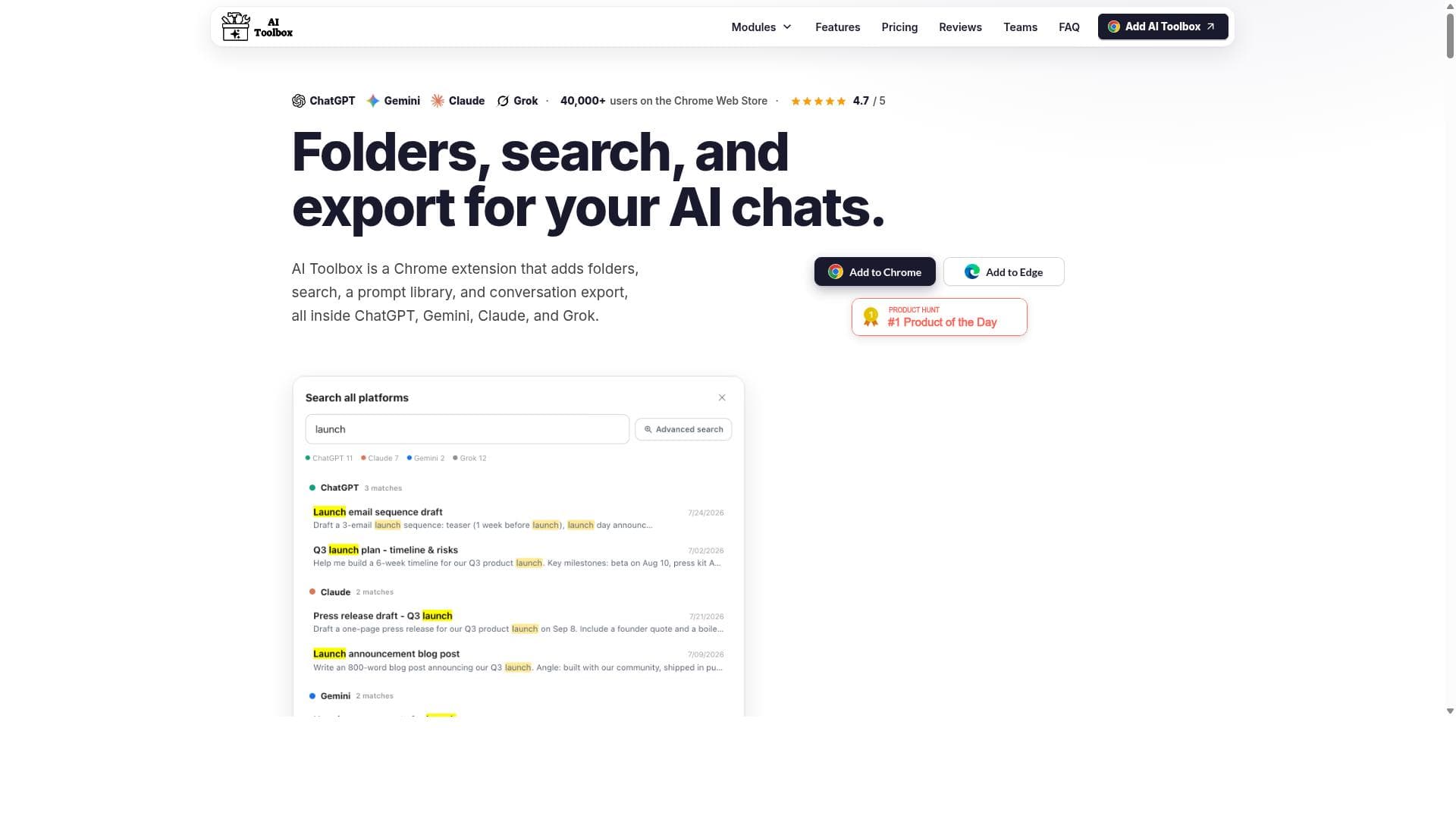
AI Toolbox is the missing layer on top of ChatGPT, Claude, Gemini and Grok: folders and subfolders, full-text search across every conversation (even all four platforms at once), a prompt library with // insert and multi-step chains, bulk export to Markdown/PDF/JSON, bookmarks, and a live context meter. One install covers all four AIs. Local-first: your chats stay in your browser. Trusted by 40,000+ users in 150+ countries, rated 4.5 stars on the Chrome Web Store.
Detailed Description
AI Toolbox, formerly known as ChatGPT Toolbox, is a comprehensive AI productivity extension designed for Chrome that consolidates and enhances the management of AI chat conversations across multiple platforms. Its core purpose is to streamline the user experience when interacting with various AI chatbots such as ChatGPT, Claude, Gemini, and Grok by providing organizational and workflow tools that improve efficiency and accessibility. With over 40,000 users trusting the extension, AI Toolbox addresses the growing need to manage the increasing volume of AI-generated conversations in a structured and productive manner. One of the standout features of AI Toolbox is its folder system, which allows users to categorize and organize their AI chat conversations neatly. This is particularly useful for professionals and enthusiasts who engage in multiple projects or topics simultaneously and need a way to keep their dialogues sorted. The search functionality is another critical capability, enabling users to quickly locate specific conversations or information across all supported AI platforms. This cross-platform search saves time and reduces the frustration of sifting through numerous chat logs manually. AI Toolbox also supports bulk export of conversations, making it easy to back up, share, or archive important dialogues. This feature is invaluable for users who need to maintain records of their AI interactions for work, research, or personal reference. Smart tags further enhance conversation management by allowing users to label chats with meaningful keywords or categories, facilitating faster retrieval and better organization. A particularly innovative feature is prompt chaining, which enables users to link multiple prompts together to create seamless workflows. This capability is ideal for complex tasks that require step-by-step AI interactions, improving productivity by automating the flow of information between prompts. The extension’s compatibility with multiple AI platforms means users can leverage the strengths of different AI models within a single interface, without switching between separate apps or browser tabs. AI Toolbox is best suited for professionals, researchers, content creators, and AI enthusiasts who regularly interact with AI chatbots and require a robust system to manage their conversations efficiently. Use cases include organizing client communications, managing research data, streamlining content generation workflows, and enhancing collaborative projects involving AI tools. Its multi-platform support makes it a versatile choice for anyone looking to unify their AI interactions in one place. Regarding pricing, AI Toolbox offers a free tier that allows users to access basic organizational features and limited usage. For more advanced capabilities such as bulk export, smart tags, and prompt chaining, users can upgrade to premium plans. These paid plans are competitively priced and designed to cater to both individual users and teams, providing scalable options depending on the volume of usage and feature requirements. Compared to alternatives, AI Toolbox stands out by offering a unified solution that works across several leading AI chat platforms, rather than focusing on a single AI service. Many competing tools are limited to ChatGPT or one other AI, whereas AI Toolbox’s cross-platform approach provides greater flexibility and convenience. Additionally, its combination of organizational tools, search, export, and workflow automation features in one extension is relatively unique, making it a comprehensive productivity enhancer. However, some limitations include its dependency on Chrome as a browser, which may exclude users who prefer other browsers. Also, while it supports multiple AI platforms, the depth of integration may vary depending on the APIs and capabilities of each AI service. Users should also consider privacy and data security implications when exporting and storing AI conversations externally. In summary, AI Toolbox is a powerful all-in-one Chrome extension that significantly improves how users interact with and manage AI chat conversations across multiple platforms. Its rich feature set, including folders, search, bulk export, smart tags, and prompt chaining, addresses the needs of a broad user base seeking productivity and organization in their AI workflows.
Tool Features
- Folders to organize AI chat conversations
- Search functionality across ChatGPT, Claude, Gemini, and Grok
- Bulk export of conversations
- Smart tags for better management
- Prompt chaining to streamline workflows
Description
AI Toolbox is a versatile Chrome extension that unifies AI chat management across ChatGPT, Claude, Gemini, and Grok, offering powerful organizational tools like folders, search, and prompt chaining. Ideal for professionals and AI enthusiasts, it streamlines workflows and boosts productivity by consolidating multiple AI platforms into one seamless interface.
AI Toolbox is the missing layer on top of ChatGPT, Claude, Gemini and Grok: folders and subfolders, full-text search across every conversation (even all four platforms at once), a prompt library with // insert and multi-step chains, bulk export to Markdown/PDF/JSON, bookmarks, and a live context meter. One install covers all four AIs. Local-first: your chats stay in your browser. Trusted by 40,000+ users in 150+ countries, rated 4.5 stars on the Chrome Web Store.
Detailed Description
AI Toolbox, formerly known as ChatGPT Toolbox, is a comprehensive AI productivity extension designed for Chrome that consolidates and enhances the management of AI chat conversations across multiple platforms. Its core purpose is to streamline the user experience when interacting with various AI chatbots such as ChatGPT, Claude, Gemini, and Grok by providing organizational and workflow tools that improve efficiency and accessibility. With over 40,000 users trusting the extension, AI Toolbox addresses the growing need to manage the increasing volume of AI-generated conversations in a structured and productive manner. One of the standout features of AI Toolbox is its folder system, which allows users to categorize and organize their AI chat conversations neatly. This is particularly useful for professionals and enthusiasts who engage in multiple projects or topics simultaneously and need a way to keep their dialogues sorted. The search functionality is another critical capability, enabling users to quickly locate specific conversations or information across all supported AI platforms. This cross-platform search saves time and reduces the frustration of sifting through numerous chat logs manually. AI Toolbox also supports bulk export of conversations, making it easy to back up, share, or archive important dialogues. This feature is invaluable for users who need to maintain records of their AI interactions for work, research, or personal reference. Smart tags further enhance conversation management by allowing users to label chats with meaningful keywords or categories, facilitating faster retrieval and better organization. A particularly innovative feature is prompt chaining, which enables users to link multiple prompts together to create seamless workflows. This capability is ideal for complex tasks that require step-by-step AI interactions, improving productivity by automating the flow of information between prompts. The extension’s compatibility with multiple AI platforms means users can leverage the strengths of different AI models within a single interface, without switching between separate apps or browser tabs. AI Toolbox is best suited for professionals, researchers, content creators, and AI enthusiasts who regularly interact with AI chatbots and require a robust system to manage their conversations efficiently. Use cases include organizing client communications, managing research data, streamlining content generation workflows, and enhancing collaborative projects involving AI tools. Its multi-platform support makes it a versatile choice for anyone looking to unify their AI interactions in one place. Regarding pricing, AI Toolbox offers a free tier that allows users to access basic organizational features and limited usage. For more advanced capabilities such as bulk export, smart tags, and prompt chaining, users can upgrade to premium plans. These paid plans are competitively priced and designed to cater to both individual users and teams, providing scalable options depending on the volume of usage and feature requirements. Compared to alternatives, AI Toolbox stands out by offering a unified solution that works across several leading AI chat platforms, rather than focusing on a single AI service. Many competing tools are limited to ChatGPT or one other AI, whereas AI Toolbox’s cross-platform approach provides greater flexibility and convenience. Additionally, its combination of organizational tools, search, export, and workflow automation features in one extension is relatively unique, making it a comprehensive productivity enhancer. However, some limitations include its dependency on Chrome as a browser, which may exclude users who prefer other browsers. Also, while it supports multiple AI platforms, the depth of integration may vary depending on the APIs and capabilities of each AI service. Users should also consider privacy and data security implications when exporting and storing AI conversations externally. In summary, AI Toolbox is a powerful all-in-one Chrome extension that significantly improves how users interact with and manage AI chat conversations across multiple platforms. Its rich feature set, including folders, search, bulk export, smart tags, and prompt chaining, addresses the needs of a broad user base seeking productivity and organization in their AI workflows.
Frequently Asked Questions
What is AI Toolbox?
AI Toolbox is an all-in-one AI Chrome extension designed to organize, search, and manage AI chat conversations across multiple platforms including ChatGPT, Claude, Gemini, and Grok. It enhances productivity by providing features such as folders, bulk export, smart tags, and prompt chaining.
How much does AI Toolbox cost?
AI Toolbox offers a free tier with basic features and limited usage. For advanced features like bulk export, smart tags, and prompt chaining, users can subscribe to premium plans that are competitively priced and suitable for individuals and teams.
Who is AI Toolbox best for?
AI Toolbox is ideal for professionals, researchers, content creators, and AI enthusiasts who frequently interact with multiple AI chat platforms and need an efficient way to organize, search, and manage their AI conversations.
What are the main features of AI Toolbox?
Key features include folders to organize conversations, cross-platform search across ChatGPT, Claude, Gemini, and Grok, bulk export of chat histories, smart tags for better management, and prompt chaining to create streamlined AI workflows.
Does AI Toolbox offer a free trial?
Yes, AI Toolbox provides a free tier that allows users to try out basic organizational features and get familiar with the extension before upgrading to paid plans for advanced functionalities.
What integrations does AI Toolbox support?
AI Toolbox integrates with multiple AI chat platforms including ChatGPT, Claude, Gemini, and Grok, enabling users to manage conversations from all these services within a single Chrome extension.
How does AI Toolbox work?
AI Toolbox works by connecting to your AI chat sessions across supported platforms and providing an interface within Chrome to organize conversations into folders, search across chats, tag conversations, export data in bulk, and chain prompts to automate workflows.
Socials
Use Tool
Reviews
No reviews yet. Be the first to share your experience.




















































