Featured in:Best AI Audio Tools
Get featured →🚀 Zaprep: Your Socials on Steroids. Start free — automate 1,000 DMs/month & turn engagement into leads. with 1,000 automated DMs/month.
Accurate PDF Narration


Is this your AI tool? Claim it today.
Verify ownership, manage your profile, and unlock growth features.
✦
Read PDF Out Loud is a free, web-based AI tool that reads PDFs aloud with natural voices while highlighting each word, expertly handling complex layouts like research papers and math. Perfect for students, researchers, and anyone needing accessible, hands-free PDF consumption, it supports multiple voices, adjustable speeds, and provides spoken summaries of figures and equations.

Description
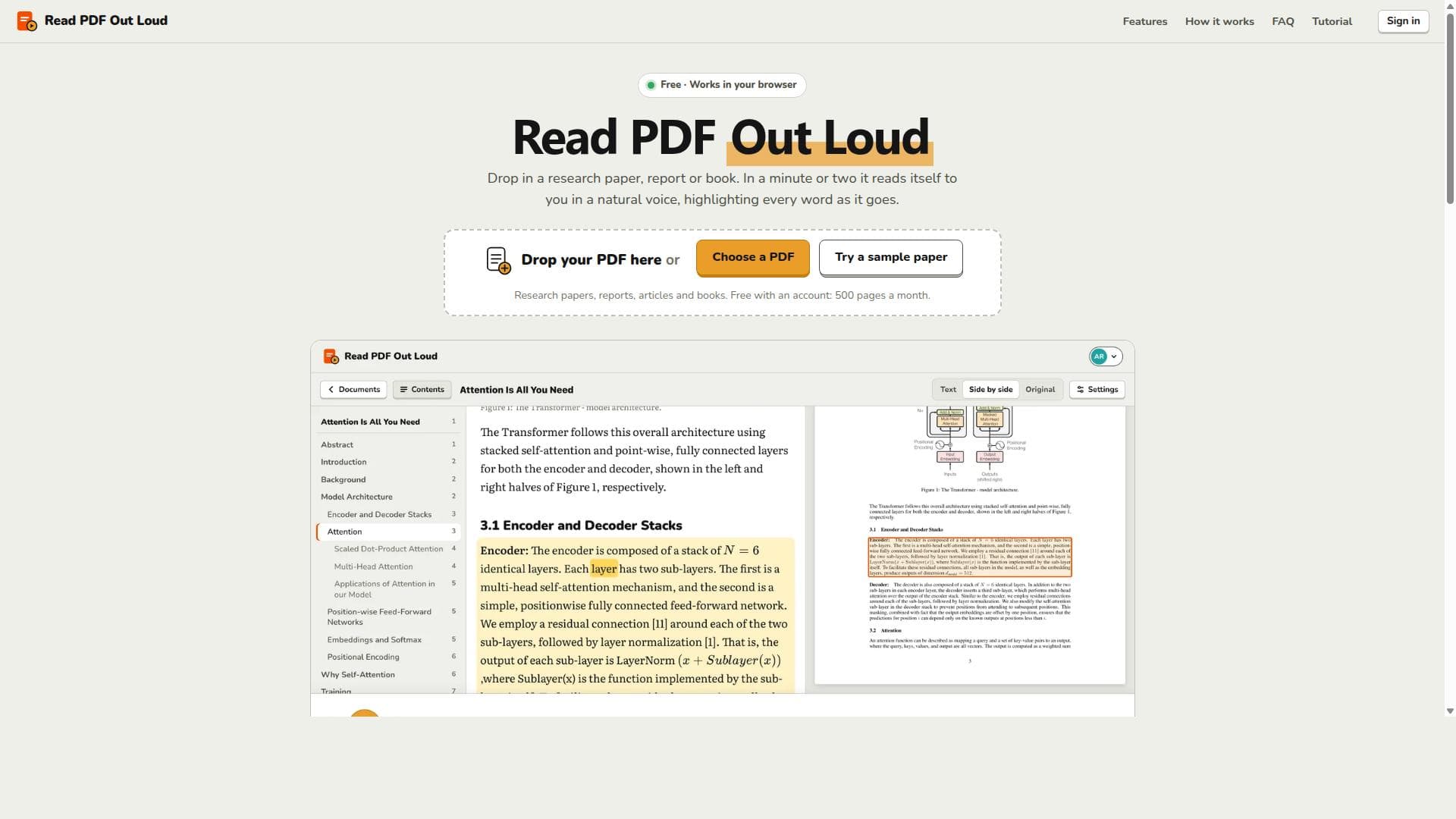
Drop in any PDF and listen in a natural voice while every word lights up. Built for the hard ones: two-column research papers read in order, equations and code read by meaning, figures and tables explained, and page numbers and citations skipped. Free for 500 pages a month.
Detailed Description
Read PDF Out Loud is a sophisticated free web application designed to transform the way users interact with PDF documents by reading them aloud using natural AI voices. Its core purpose is to provide an accessible, efficient, and user-friendly experience for consuming complex PDF content, especially research papers, technical documents, and books, without the need to visually read the text. By leveraging advanced text-to-speech technology, it highlights every word as it is spoken, allowing users to follow along easily and enhancing comprehension and retention. One of the standout capabilities of Read PDF Out Loud is its ability to handle intricate document structures such as two-column layouts commonly found in academic papers, mathematical equations, tables, figures, and code snippets. Unlike many other text-to-speech tools, it reads equations by their meaning rather than just spelling out symbols, and it provides spoken summaries of figures, tables, code blocks, and equations, making the content more understandable. The tool intelligently skips non-essential elements like headers, footnotes, page numbers, citation numbers, and reference lists to maintain a smooth and logical reading flow. Users can choose from four distinct natural AI voices and adjust the reading speed anywhere between 0.75x and 2x, catering to personal preferences and listening speeds. Additionally, the interface displays the original PDF page alongside the text being read, preserving context and visual reference. Read PDF Out Loud is ideal for students, researchers, academics, professionals, and anyone who regularly engages with dense or technical PDF documents. It is especially beneficial for individuals with visual impairments or reading difficulties, as well as those who prefer auditory learning or need to multitask while consuming written content. The tool supports a wide range of PDFs including research papers, reports, manuals, articles, and books, making it versatile across many fields and disciplines. It works seamlessly on computers, tablets, and smartphones, ensuring accessibility across devices. Regarding pricing, Read PDF Out Loud is free to use with a simple sign-in via Google or email. Free accounts allow users to upload and listen to up to 500 pages per month, with no limits on listening time. This generous free tier makes it accessible to a broad audience without financial barriers. There are no paid plans mentioned, indicating the tool is fully functional at no cost, which is a significant advantage compared to many paid text-to-speech services. Compared to alternatives, Read PDF Out Loud excels in handling complex PDF formats and academic content, where many other tools struggle with layout, equations, or tables. Its ability to read two-column documents in the correct order and provide meaningful summaries of non-text elements sets it apart. Many other text-to-speech tools offer generic reading without highlighting or skip important structural elements, which can confuse listeners. However, unlike some commercial solutions, it currently supports only English and requires a modern web browser with JavaScript enabled. Notable limitations include the page and file size restrictions—up to 200 pages and 20 MB per PDF—and the current support for English language only. While it can read scanned PDFs, clean digital PDFs yield the best experience. Users should also be aware that the tool requires an internet connection and a modern browser. Privacy is well-handled, as documents remain private within the user’s library until deleted, and deleting the account removes all stored files. Overall, Read PDF Out Loud offers a powerful, accessible, and free solution for listening to PDFs, especially suited for academic and technical content consumption.
Tool Features
- Four natural AI voices
- Every word highlighted as it's read
- Click any word to start reading there
- Speeds from 0.75x to 2x
- Equations read by meaning
- Spoken summaries of figures, tables, code and equations
- Two-column research papers read in order, with headers, footnotes and references skipped
- The original PDF page beside the text
- Table of contents and automatic page turns
- A library of your PDFs, kept until you delete them
- Works on computers, tablets and phones
Description
✦
Read PDF Out Loud is a free, web-based AI tool that reads PDFs aloud with natural voices while highlighting each word, expertly handling complex layouts like research papers and math. Perfect for students, researchers, and anyone needing accessible, hands-free PDF consumption, it supports multiple voices, adjustable speeds, and provides spoken summaries of figures and equations.
Drop in any PDF and listen in a natural voice while every word lights up. Built for the hard ones: two-column research papers read in order, equations and code read by meaning, figures and tables explained, and page numbers and citations skipped. Free for 500 pages a month.
Detailed Description
Read PDF Out Loud is a sophisticated free web application designed to transform the way users interact with PDF documents by reading them aloud using natural AI voices. Its core purpose is to provide an accessible, efficient, and user-friendly experience for consuming complex PDF content, especially research papers, technical documents, and books, without the need to visually read the text. By leveraging advanced text-to-speech technology, it highlights every word as it is spoken, allowing users to follow along easily and enhancing comprehension and retention. One of the standout capabilities of Read PDF Out Loud is its ability to handle intricate document structures such as two-column layouts commonly found in academic papers, mathematical equations, tables, figures, and code snippets. Unlike many other text-to-speech tools, it reads equations by their meaning rather than just spelling out symbols, and it provides spoken summaries of figures, tables, code blocks, and equations, making the content more understandable. The tool intelligently skips non-essential elements like headers, footnotes, page numbers, citation numbers, and reference lists to maintain a smooth and logical reading flow. Users can choose from four distinct natural AI voices and adjust the reading speed anywhere between 0.75x and 2x, catering to personal preferences and listening speeds. Additionally, the interface displays the original PDF page alongside the text being read, preserving context and visual reference. Read PDF Out Loud is ideal for students, researchers, academics, professionals, and anyone who regularly engages with dense or technical PDF documents. It is especially beneficial for individuals with visual impairments or reading difficulties, as well as those who prefer auditory learning or need to multitask while consuming written content. The tool supports a wide range of PDFs including research papers, reports, manuals, articles, and books, making it versatile across many fields and disciplines. It works seamlessly on computers, tablets, and smartphones, ensuring accessibility across devices. Regarding pricing, Read PDF Out Loud is free to use with a simple sign-in via Google or email. Free accounts allow users to upload and listen to up to 500 pages per month, with no limits on listening time. This generous free tier makes it accessible to a broad audience without financial barriers. There are no paid plans mentioned, indicating the tool is fully functional at no cost, which is a significant advantage compared to many paid text-to-speech services. Compared to alternatives, Read PDF Out Loud excels in handling complex PDF formats and academic content, where many other tools struggle with layout, equations, or tables. Its ability to read two-column documents in the correct order and provide meaningful summaries of non-text elements sets it apart. Many other text-to-speech tools offer generic reading without highlighting or skip important structural elements, which can confuse listeners. However, unlike some commercial solutions, it currently supports only English and requires a modern web browser with JavaScript enabled. Notable limitations include the page and file size restrictions—up to 200 pages and 20 MB per PDF—and the current support for English language only. While it can read scanned PDFs, clean digital PDFs yield the best experience. Users should also be aware that the tool requires an internet connection and a modern browser. Privacy is well-handled, as documents remain private within the user’s library until deleted, and deleting the account removes all stored files. Overall, Read PDF Out Loud offers a powerful, accessible, and free solution for listening to PDFs, especially suited for academic and technical content consumption.
Frequently Asked Questions
What is Read PDF Out Loud?
Read PDF Out Loud is a free web application that reads PDF documents aloud using natural AI voices, highlighting each word as it is spoken. It is designed to handle complex documents such as research papers, math, tables, and two-column layouts, providing spoken summaries of figures, tables, code, and equations.
How much does Read PDF Out Loud cost?
Read PDF Out Loud is completely free to use. Users can sign in with Google or email to upload and listen to up to 500 pages per month without any charge. There are no paid plans, and listening time is unlimited.
Who is Read PDF Out Loud best for?
This tool is ideal for students, researchers, academics, professionals, and anyone who frequently reads complex PDF documents, especially research papers and technical materials. It is also highly beneficial for people with visual impairments or reading difficulties and those who prefer auditory learning.
What are the main features of Read PDF Out Loud?
Key features include four natural AI voices, word-by-word highlighting during reading, clickable words to start reading from any point, adjustable reading speeds from 0.75x to 2x, meaningful reading of equations, spoken summaries of figures, tables, code, and equations, proper reading order for two-column research papers with headers and footnotes skipped, and displaying the original PDF page alongside the text.
Does Read PDF Out Loud offer a free trial?
Since Read PDF Out Loud is free to use, there is no separate trial period. Users can sign in and immediately start uploading and listening to PDFs within the monthly page limits.
What integrations does Read PDF Out Loud support?
Read PDF Out Loud does not currently list any third-party integrations. It operates as a standalone web application accessible via modern web browsers on computers, tablets, and phones.
How does Read PDF Out Loud work?
Users sign in with Google or email, upload a PDF document, and the tool processes it to extract text and structure. It then reads the document aloud using AI voices, highlighting each word as it is spoken. The tool intelligently handles complex layouts, equations, and figures, providing summaries and skipping non-essential elements to ensure a smooth listening experience.
Reviews
0 reviews
No reviews yet. Be the first to share your experience.
Sponsored Tools











































Recommended Tools
Stay updated on latest Ai tools
Get the latest insights, Join our newsletter
Read and trusted by 50,000+ readers
Join the biggest AI Community
Our community and staff are here to help!
Your feedback will help Alice AI improve in future versions.








Submit your Tool


PoweredByAI.app is an AI Tools Directory helping individuals, businesses, and creators discover the best AI tools for writing, coding, design, productivity, and more.
© 2026 , Product of011BQ. All rights reserved.