

¿Es esta tu herramienta de IA? Reclámala hoy.
Verifica la propiedad, gestiona tu perfil y desbloquea funciones de crecimiento.
Clipnote is a powerful notepad tool that preserves and organizes AI-generated HTML, Markdown, and plain text exactly as they appear, enabling easy saving, sharing, and revisiting of AI conversations. Ideal for professionals and creators who rely on AI outputs, its unique MCP technology allows AI to directly create and update clips, streamlining note-taking and collaboration.

Descripción
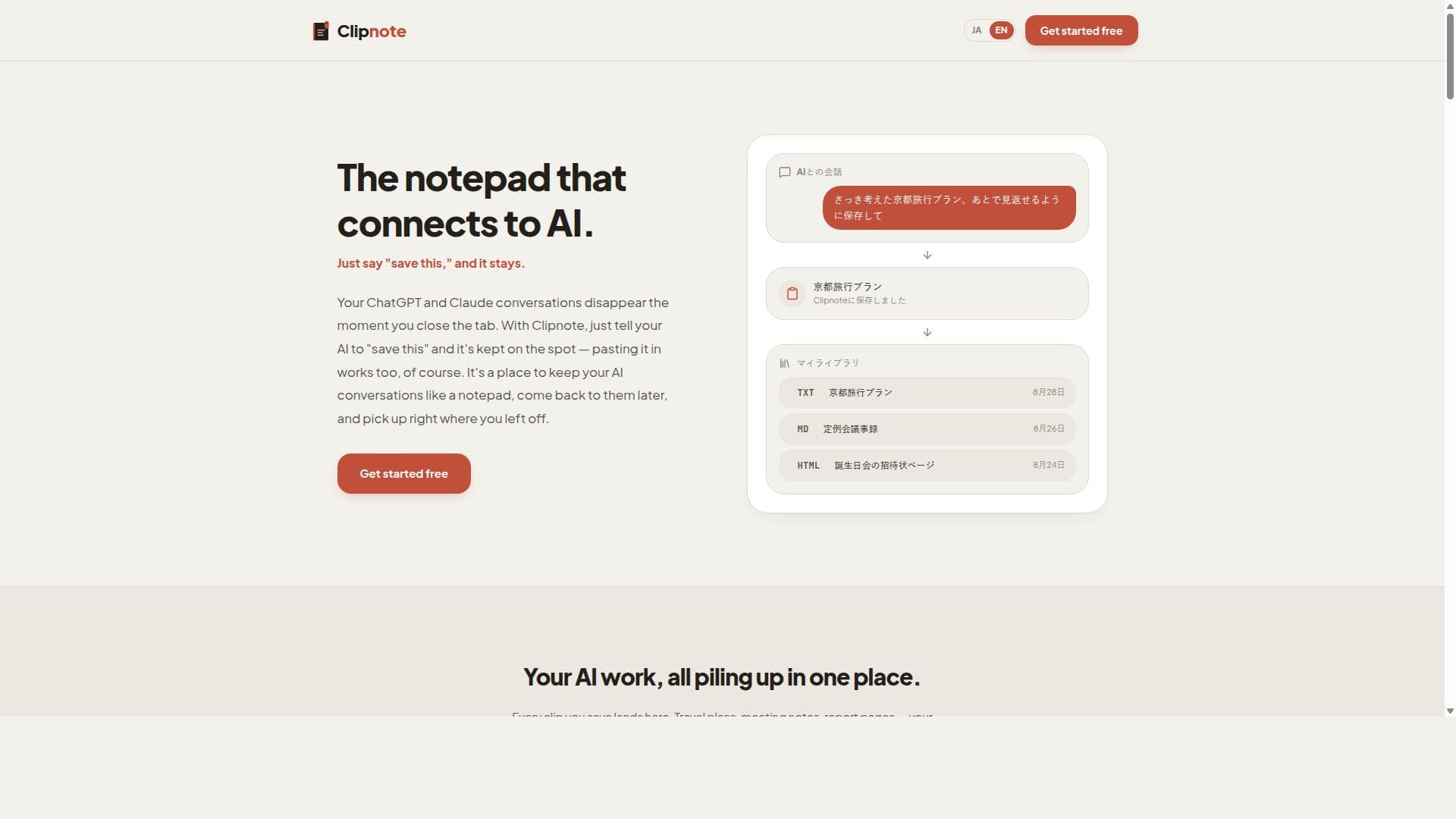
Your ChatGPT and Claude conversations disappear the moment you close the tab. With Clipnote, just tell your AI to "save this" and it's kept on the spot — pasting it in works too, of course. It's a place to keep your AI conversations like a notepad, come back to them later, and pick up right where you left off.
Descripción detallada
Clipnote is a specialized digital notepad designed to save, organize, and preserve the content generated during AI conversations, such as those with ChatGPT or Claude. Its core purpose is to ensure that valuable AI-generated outputs—whether in HTML, Markdown, or plain text—are retained exactly as they appear, overcoming the common issue where AI chat histories vanish once the browser tab is closed. By allowing users to save these snippets or "clips," Clipnote provides a seamless way to revisit, manage, and share AI conversation content without losing formatting or context. This makes it an indispensable tool for anyone who relies on AI for research, writing, brainstorming, or project collaboration and wants to maintain an organized archive of their interactions. The platform's standout features include the ability to save and organize multiple content formats—HTML, Markdown, and plain text—while preserving the original look and feel of AI-generated outputs. This fidelity ensures that code blocks, lists, tables, and other formatted elements remain intact, which is crucial for developers, writers, and content creators. Clipnote also enables sharing of saved clips through unique public URLs, making collaboration and dissemination straightforward without exposing entire chat histories. A key technological innovation behind Clipnote is its use of MCP (Multi-Channel Protocol) technology, which empowers AI models themselves to create and update clips directly within the platform. This integration streamlines workflows by allowing users to command their AI to "save this" during conversations, instantly archiving important information without manual copying or pasting. Clipnote is best suited for professionals, students, researchers, developers, and content creators who engage extensively with AI tools and need a reliable method to capture and organize their outputs. For example, software developers can save code snippets generated during AI-assisted debugging sessions, marketers can archive creative copy drafts, and academics can preserve research notes and references. The tool is also valuable for anyone who wants to maintain a searchable, well-organized repository of AI interactions for future reference or team sharing. Regarding pricing, Clipnote offers a free tier that allows users to get started without upfront costs, making it accessible to casual users and those wanting to test its capabilities. For more advanced needs, such as increased storage, enhanced sharing options, or priority support, premium plans are available, though specific pricing details should be checked on the official website as they may evolve. The free plan already provides significant value by enabling users to save and share clips with ease. Compared to alternatives, Clipnote stands out by focusing specifically on preserving the exact formatting of AI-generated content and integrating MCP technology for direct AI-driven clip management. While other note-taking or clipping tools may require manual copy-pasting or lack support for multiple content formats, Clipnote automates and streamlines this process. Its public URL sharing is also more tailored to AI conversation outputs than generic document sharing platforms. However, unlike some comprehensive knowledge management systems, Clipnote is more narrowly focused on AI conversation content, which can be a limitation for users seeking an all-in-one workspace. Notable limitations include its current dependence on web access, as it is a web-based tool without dedicated desktop or mobile apps, which might affect offline accessibility. Additionally, while MCP integration is powerful, it requires compatible AI models and workflows to fully leverage AI-driven clip creation and updates. Users should also consider privacy and data security implications when sharing clips publicly, ensuring sensitive information is not inadvertently exposed. Overall, Clipnote offers a unique, highly specialized solution for anyone looking to capture and organize AI-generated content efficiently and accurately.
Características de la herramienta
- Save and organize HTML, Markdown, and plain text from AI conversations
- Share saved clips with unique public URLs
- AI can create and update clips directly using MCP
- Preserves the exact look of AI conversation outputs
- Acts as a notepad for AI conversations to revisit later
Descripción
Clipnote is a powerful notepad tool that preserves and organizes AI-generated HTML, Markdown, and plain text exactly as they appear, enabling easy saving, sharing, and revisiting of AI conversations. Ideal for professionals and creators who rely on AI outputs, its unique MCP technology allows AI to directly create and update clips, streamlining note-taking and collaboration.
Your ChatGPT and Claude conversations disappear the moment you close the tab. With Clipnote, just tell your AI to "save this" and it's kept on the spot — pasting it in works too, of course. It's a place to keep your AI conversations like a notepad, come back to them later, and pick up right where you left off.
Descripción detallada
Clipnote is a specialized digital notepad designed to save, organize, and preserve the content generated during AI conversations, such as those with ChatGPT or Claude. Its core purpose is to ensure that valuable AI-generated outputs—whether in HTML, Markdown, or plain text—are retained exactly as they appear, overcoming the common issue where AI chat histories vanish once the browser tab is closed. By allowing users to save these snippets or "clips," Clipnote provides a seamless way to revisit, manage, and share AI conversation content without losing formatting or context. This makes it an indispensable tool for anyone who relies on AI for research, writing, brainstorming, or project collaboration and wants to maintain an organized archive of their interactions. The platform's standout features include the ability to save and organize multiple content formats—HTML, Markdown, and plain text—while preserving the original look and feel of AI-generated outputs. This fidelity ensures that code blocks, lists, tables, and other formatted elements remain intact, which is crucial for developers, writers, and content creators. Clipnote also enables sharing of saved clips through unique public URLs, making collaboration and dissemination straightforward without exposing entire chat histories. A key technological innovation behind Clipnote is its use of MCP (Multi-Channel Protocol) technology, which empowers AI models themselves to create and update clips directly within the platform. This integration streamlines workflows by allowing users to command their AI to "save this" during conversations, instantly archiving important information without manual copying or pasting. Clipnote is best suited for professionals, students, researchers, developers, and content creators who engage extensively with AI tools and need a reliable method to capture and organize their outputs. For example, software developers can save code snippets generated during AI-assisted debugging sessions, marketers can archive creative copy drafts, and academics can preserve research notes and references. The tool is also valuable for anyone who wants to maintain a searchable, well-organized repository of AI interactions for future reference or team sharing. Regarding pricing, Clipnote offers a free tier that allows users to get started without upfront costs, making it accessible to casual users and those wanting to test its capabilities. For more advanced needs, such as increased storage, enhanced sharing options, or priority support, premium plans are available, though specific pricing details should be checked on the official website as they may evolve. The free plan already provides significant value by enabling users to save and share clips with ease. Compared to alternatives, Clipnote stands out by focusing specifically on preserving the exact formatting of AI-generated content and integrating MCP technology for direct AI-driven clip management. While other note-taking or clipping tools may require manual copy-pasting or lack support for multiple content formats, Clipnote automates and streamlines this process. Its public URL sharing is also more tailored to AI conversation outputs than generic document sharing platforms. However, unlike some comprehensive knowledge management systems, Clipnote is more narrowly focused on AI conversation content, which can be a limitation for users seeking an all-in-one workspace. Notable limitations include its current dependence on web access, as it is a web-based tool without dedicated desktop or mobile apps, which might affect offline accessibility. Additionally, while MCP integration is powerful, it requires compatible AI models and workflows to fully leverage AI-driven clip creation and updates. Users should also consider privacy and data security implications when sharing clips publicly, ensuring sensitive information is not inadvertently exposed. Overall, Clipnote offers a unique, highly specialized solution for anyone looking to capture and organize AI-generated content efficiently and accurately.
Preguntas frecuentes
What is Clipnote?
Clipnote is a web-based tool designed to save, organize, and preserve AI-generated content from conversations in formats like HTML, Markdown, and plain text, maintaining the exact formatting and allowing users to share clips via unique public URLs.
How much does Clipnote cost?
Clipnote offers a free plan that lets users get started with saving and sharing clips. For advanced features, increased storage, and additional sharing options, premium plans are available. For the latest pricing details, visit the official Clipnote website.
Who is Clipnote best for?
Clipnote is ideal for professionals, students, developers, researchers, and content creators who frequently interact with AI tools and need a reliable way to save, organize, and revisit AI-generated outputs with preserved formatting.
What are the main features of Clipnote?
Key features include saving and organizing AI conversation outputs in HTML, Markdown, and plain text formats; preserving the exact look and feel of the content; sharing saved clips via unique public URLs; and leveraging MCP technology that enables AI to create and update clips directly.
Does Clipnote offer a free trial?
Yes, Clipnote provides a free tier that allows users to start saving and sharing AI-generated clips without any initial cost, making it easy to try out the platform before considering premium plans.
What integrations does Clipnote support?
Clipnote integrates with AI models that support MCP (Multi-Channel Protocol), allowing AI to directly create and update clips. It primarily works as a web-based platform compatible with AI chat tools like ChatGPT and Claude, facilitating seamless saving of conversation content.
How does Clipnote work?
Users can save AI conversation snippets by either instructing their AI to 'save this' or by manually pasting content into Clipnote. The tool preserves the formatting and stores the clips, which can then be organized, revisited, and shared through unique public URLs. MCP technology enables AI to interact directly with Clipnote for clip creation and updates.
Reseñas
Aún no hay reseñas. Sé el primero en compartir tu experiencia.




















































