🚀 Zaprep: Your Socials on Steroids. Start free — automate 1,000 DMs/month & turn engagement into leads. with 1,000 automated DMs/month.
BlogHow to Create UGC-Style Product Videos with Hailuo AI Video Generator on Pollo AI
How to Create UGC-Style Product Videos with Hailuo AI Video Generator on Pollo AI
 Shashank Jain
29 Jul 2026
7 min read
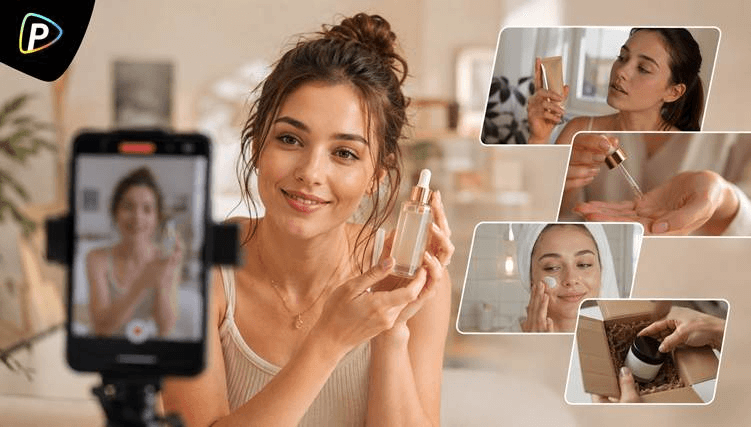
Many ecommerce businesses already have high-quality product photos but lack enough video content for product pages, social media, or seasonal campaigns. Producing new videos for every launch can quickly become expensive and time-consuming. Instead of organizing another video shoot, existing product images can be animated into short promotional clips with AI.
The Hailuo AI video generator on Pollo AI combines Hailuo AI's image-to-video technology with Pollo AI's multi-model platform, allowing users to create product videos from one workspace while comparing results with other AI video models when needed.
This guide explains how to use the Hailuo AI video generator on Pollo AI to create practical UGC-style product videos for ecommerce listings, social media, and product marketing.
What Is Hailuo AI Video Generator on Pollo AI?
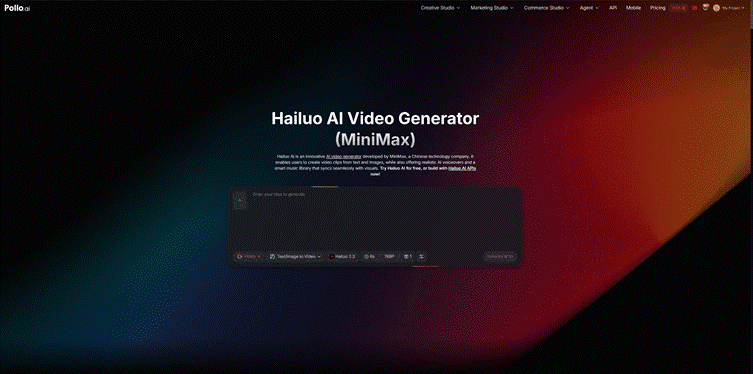
Hailuo AI video generator on Pollo AI combines Hailuo AI's video generation model with Pollo AI's multi-model creative platform. Hailuo AI itself is designed to generate short videos from either text prompts or reference images, producing realistic motion, cinematic camera movement, and dynamic scenes suitable for product showcases, lifestyle videos, and other short-form content.
Within Pollo AI, users can access Hailuo AI alongside other leading AI video models from the same workspace. This makes it easy to compare different outputs or switch models for a particular project without moving between multiple platforms or rebuilding the workflow.
For UGC-style product videos, the Image-to-Video workflow is often the most practical option. Rather than creating a product entirely from a text description, it animates an uploaded product image by adding natural movement, camera motion, and environmental details while keeping the product's appearance relatively consistent. This approach works well for businesses that already have professional product photos but want to turn them into engaging video content.
Why Use Hailuo AI Video Generator on Pollo AI for UGC Product Videos?
Create More Content from Existing Product Assets
Many businesses already invest in professional product photography but do not have the budget to film matching videos for every product or campaign. Image-to-video generation makes it possible to reuse those existing assets, allowing marketing teams to produce additional content for product launches, seasonal promotions, or ecommerce listings without arranging another shoot.
Test Different Creative Concepts Before Publishing
A single product video rarely works for every audience or platform. Marketing teams often need several variations before deciding which one to publish. With Hailuo AI on Pollo AI, they can experiment with different prompts, camera movements, or scenes, and even compare outputs from different AI video models before moving into an AI UGC video ads generator workflow for campaign production. This makes it easier to evaluate creative ideas before investing time in editing and distribution.
Adapt Videos for Different Marketing Channels
Short-form video platforms, online stores, and advertising campaigns often require different formats and presentation styles. Instead of creating separate videos from the beginning each time, users can generate multiple short scenes from the same product image and adapt them for TikTok, Instagram Reels, YouTube Shorts, product pages, or paid advertising. This approach also makes it easier to update campaigns later without recreating all video assets from scratch.
How to Create UGC-Style Product Videos with Hailuo AI Video Generator on Pollo AI
Step 1. Prepare a Product Image That Works Well for Animation
Start with a clear, high-resolution product image. Since the AI uses this image as the foundation of the video, the quality of the input has a direct impact on the final result.
Images generally work best when they:
- Show one clearly identifiable product.
- Are evenly lit and in sharp focus.
- Use a clean or minimally distracting background.
- Leave enough space around the product for natural camera movement.
If the video is intended for TikTok, Instagram Reels, or YouTube Shorts, selecting a 9:16 aspect ratio before generation can reduce the amount of cropping needed later.
One common mistake is uploading heavily edited marketing images with dramatic reflections, complex shadows, or excessive text overlays. While these images may look attractive as advertisements, they can make it more difficult for the AI to generate stable, natural-looking motion.
Step 2. Choose the Image-to-Video Workflow
Open Hailuo AI video generator on Pollo AI and select the Image-to-Video mode.
Upload the product image, then adjust settings such as the aspect ratio, video duration, and resolution according to where the video will be published.
For product marketing, Image-to-Video usually produces more consistent results than Text-to-Video because the AI builds movement around an existing product instead of generating it entirely from a written description. This helps preserve details such as the product's shape, color, and packaging throughout the clip.
If multiple video lengths are available, it is often worth starting with a shorter clip. Short scenes are generally easier to refine and can later be combined into a longer video if needed.
Step 3. Focus the Prompt on Motion Rather Than Appearance
A common mistake is using most of the prompt to describe what the product looks like. Since the uploaded image already defines its appearance, the prompt should mainly describe what happens after the video begins.
A practical prompt usually includes four elements:
- Subject interaction – Who is using or holding the product?
- Action – What happens during the scene?
- Environment – Where does the action take place?
- Camera movement – How should the camera behave?
For example:
A young woman casually picks up the ceramic coffee mug in a bright kitchen, smiles while taking a sip, then places it beside her laptop. Handheld selfie camera, gentle movement, warm morning light, authentic phone video style.
Simple camera instructions such as handheld, close-up, slow push-in, slight camera shake, or selfie angle often help create videos that feel more like genuine UGC than polished commercials.
It is also worth keeping the action simple. Asking the subject to unbox the product, walk across the room, smile, point at the camera, and demonstrate multiple features within a few seconds can produce less stable results than focusing on one or two natural movements.
Step 4. Generate Several Short Scenarios Instead of One Long Video
Most UGC advertisements are made up of several short shots rather than one continuous scene. Instead of trying to generate an entire advertisement in one attempt, create multiple clips that each focus on a single interaction.
For example, separate clips could show:
- Picking up the product
- Unboxing the package
- Demonstrating one key feature
- Using the product naturally
- Placing it on a desk, kitchen counter, or vanity
When comparing different generations, don't judge them only by visual quality. Check whether the product's logo, colors, proportions, and packaging remain consistent throughout the clip. This is especially important if the video will be used on ecommerce product pages, where accuracy matters as much as presentation.
Step 5. Edit the Clips into a Complete UGC Video
After exporting the generated clips, combine them in a video editor to create a complete product story.
Adding subtitles, voiceovers, background music, or simple text overlays can make the video easier to follow without losing the casual feel that makes UGC effective. Many successful product videos rely on straightforward editing rather than complex visual effects.
Before publishing, review the finished video carefully and check that:
- Product details remain consistent between clips.
- Camera movement looks natural rather than exaggerated.
- Any AI-generated artifacts are not distracting.
- Branding elements, such as logos or packaging text, remain recognizable.
If one scene doesn't look convincing, regenerate that individual clip instead of trying to fix the entire sequence. Replacing a few seconds of footage is usually faster than rebuilding the whole video.
Common Mistakes to Avoid
Even with a strong prompt, AI-generated videos often require a few iterations before they are ready to publish. Keeping these common issues in mind can help improve the results.
Don't spend too much of the prompt describing the product itself. The uploaded image already provides most of that information, so it is generally more useful to describe movement, interaction, lighting, and camera behavior.
Avoid trying to fit too many actions into one short clip. A simple scene with one clear action usually looks more natural than a sequence where the subject performs several different movements within a few seconds.
Finally, keep expectations realistic. AI video generation has improved significantly, but occasional inconsistencies—such as unnatural hand movements, reflections, or small changes in product details—can still appear. Reviewing each clip before publishing remains an important part of the workflow, particularly for ecommerce content where accurate product representation matters.
Conclusion
Creating UGC-style product videos no longer requires a dedicated filming setup for every campaign. By combining existing product photos with motion prompts, the Hailuo AI video generator on Pollo AI offers a practical way to produce short promotional videos for ecommerce stores, social media, and product launches.
Rather than relying on a single generation, users generally achieve better results by creating several short clips, refining prompts based on each output, and assembling the strongest scenes during editing. Combined with Pollo AI's access to multiple AI video models, this workflow provides flexibility for testing different creative approaches while making better use of existing product assets.
Related Tags
AI ToolsRelated Categories
AI ToolsGet your AI tool featured in articles like this
Reach users actively discovering AI tools on PoweredbyAI and build SEO backlinks that improve your visibility on Google.
Trusted by 25,000+ AI tools and growing startups
Get Your AI Tool Featured in High-Traffic Blogs & Articles
Get featured on PoweredByAI and reach users actively discovering tools like yours. Build powerful SEO backlinks that help you rank on Google and drive consistent organic traffic.
Sponsored blog features with targeted reach
Guest articles with do-follow backlinks
Contextual link placements for SEO boost
Trusted by 25,000+ AI tools and growing startups
Enjoyed this? Talk AI tools with other founders and builders.
Join our Slack communityRecent Blogs



Submit your Tool


PoweredByAI.app is an AI Tools Directory helping individuals, businesses, and creators discover the best AI tools for writing, coding, design, productivity, and more.
© 2026 , Product of011BQ. All rights reserved.