🚀 Zaprep: Your Socials on Steroids. 免费开始 — 每月自动发送 1,000 条私信,将互动转化为潜在客户。 ,每月 1,000 条自动私信。


这是您的 AI 工具吗?立即认领。
验证所有权、管理资料,并解锁增长功能。
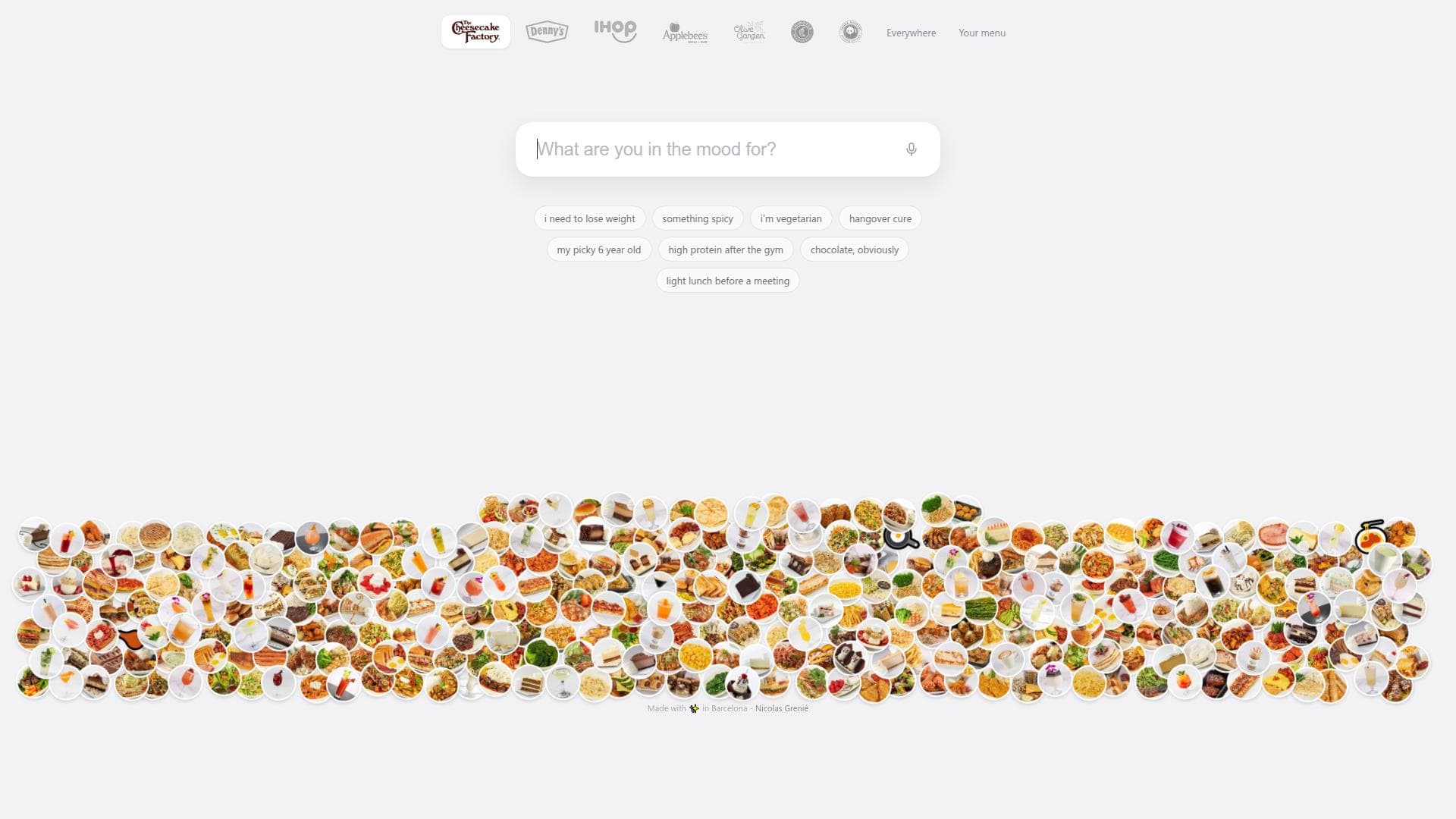
What to Order is a smart dining assistant that suggests dishes based on your mood or dietary preferences, supporting menus from top restaurants like The Cheesecake Factory and Olive Garden. Ideal for indecisive eaters and those with specific cravings, it even lets you upload menu photos for personalized recommendations, making meal decisions effortless and fun.

描述
Ever sat down at The Cheesecake Factory and been handed the menu? 331 items. You flip through it, get nowhere, and order the same thing as last time. What to Order works the other way around. Tell it what you’re in the mood for and it checks every dish on the menu for you. “Spicy” works. “Spicy vegetarian” too. Ask for “Thanksgiving dinner for 2” and you get a whole order, pumpkin cheesecake included. We have 7 US chains so far. Eating somewhere else? Snap a photo of the menu. It’s free.
详细描述
What to Order is an innovative application designed to simplify the often overwhelming decision of what to eat by providing personalized dish recommendations based on a user's mood, dietary preferences, or specific cravings. Its core purpose is to help users navigate extensive restaurant menus with ease, making meal choices more enjoyable and less stressful. By leveraging a vast database of menus from popular restaurants such as The Cheesecake Factory, Olive Garden, IHOP, Chipotle, Denny's, Applebee's, Panda Express, and more, What to Order offers tailored suggestions that align with what the user is in the mood for, whether it’s something spicy, vegetarian, low-calorie, or high-protein. This makes it a versatile tool for a wide range of dining occasions and preferences. The application boasts several key features that enhance the user experience. First, it allows users to input their mood or food preferences through text or voice commands, making it accessible and convenient. For example, users can say or type phrases like "I need to lose weight," "something spicy," or "hangover cure," and the app will surface matching dishes from supported menus. Another standout feature is the ability to upload photos of any menu, enabling users to get dish recommendations even from restaurants not preloaded in the app’s database. This photo recognition capability broadens the app’s utility beyond its curated restaurant list. The interface is user-friendly, with visual elements such as dish thumbnails and playful animations that make browsing suggestions engaging. Additionally, the app supports voice input, allowing users to verbally express their cravings or dietary needs, which is particularly handy when users are on the go or prefer hands-free interaction. What to Order is ideal for a diverse audience. It is perfect for indecisive diners who struggle to pick a meal from large menus, people with specific dietary restrictions or goals, and those who want to discover new dishes tailored to their current mood. Families can use it to find kid-friendly options, fitness enthusiasts can find high-protein meals post-workout, and anyone looking to try something new can benefit from its curated suggestions. The app is also useful for frequent restaurant visitors who want to explore menu items they might otherwise overlook. Its ability to handle menus from multiple popular chains makes it a versatile companion for casual dining, special occasions, or even quick meal decisions. Regarding pricing, What to Order is currently offered as a free application, making it accessible to a broad user base without financial commitment. There is no mention of premium plans or subscription fees, which suggests that users can enjoy the full range of features at no cost. This free access enhances its appeal, especially for casual users who want to experiment with meal choices without investing in paid tools. When compared to alternatives, What to Order stands out due to its unique combination of mood-based dish suggestions, voice input, and the ability to upload photos of any menu for recommendations. While other food recommendation apps often rely on user reviews or general cuisine preferences, What to Order focuses on personalized, context-driven suggestions that consider the user's current feelings and dietary needs. Its support for a wide range of popular restaurant menus and the innovative photo upload feature provide a level of flexibility and convenience that many competitors lack. However, unlike apps that offer delivery or ordering services, What to Order is primarily a decision-making aid rather than a full-service food ordering platform. Notable limitations include the reliance on JavaScript and browser compatibility, which means users need a modern web environment to access the app effectively. Additionally, while the app supports many popular restaurants, its database may not cover all dining establishments, potentially limiting recommendations for less common or local eateries unless the user uploads a menu photo. The app also does not appear to integrate directly with food delivery or reservation services, so users will need to transition to other platforms to place orders after deciding what to eat. Despite these considerations, What to Order remains a powerful and user-friendly tool for enhancing the dining decision process with personalized, mood-based dish recommendations.
工具功能
- Suggests dishes based on user mood or preferences
- Supports menus from multiple popular restaurants
- Allows uploading photos of any menu for dish recommendations
- Voice input to say what you're in the mood for
- Provides suggestions like 'i need to lose weight', 'something spicy', 'i'm vegetarian', etc.
描述
What to Order is a smart dining assistant that suggests dishes based on your mood or dietary preferences, supporting menus from top restaurants like The Cheesecake Factory and Olive Garden. Ideal for indecisive eaters and those with specific cravings, it even lets you upload menu photos for personalized recommendations, making meal decisions effortless and fun.
Ever sat down at The Cheesecake Factory and been handed the menu? 331 items. You flip through it, get nowhere, and order the same thing as last time. What to Order works the other way around. Tell it what you’re in the mood for and it checks every dish on the menu for you. “Spicy” works. “Spicy vegetarian” too. Ask for “Thanksgiving dinner for 2” and you get a whole order, pumpkin cheesecake included. We have 7 US chains so far. Eating somewhere else? Snap a photo of the menu. It’s free.
详细描述
What to Order is an innovative application designed to simplify the often overwhelming decision of what to eat by providing personalized dish recommendations based on a user's mood, dietary preferences, or specific cravings. Its core purpose is to help users navigate extensive restaurant menus with ease, making meal choices more enjoyable and less stressful. By leveraging a vast database of menus from popular restaurants such as The Cheesecake Factory, Olive Garden, IHOP, Chipotle, Denny's, Applebee's, Panda Express, and more, What to Order offers tailored suggestions that align with what the user is in the mood for, whether it’s something spicy, vegetarian, low-calorie, or high-protein. This makes it a versatile tool for a wide range of dining occasions and preferences. The application boasts several key features that enhance the user experience. First, it allows users to input their mood or food preferences through text or voice commands, making it accessible and convenient. For example, users can say or type phrases like "I need to lose weight," "something spicy," or "hangover cure," and the app will surface matching dishes from supported menus. Another standout feature is the ability to upload photos of any menu, enabling users to get dish recommendations even from restaurants not preloaded in the app’s database. This photo recognition capability broadens the app’s utility beyond its curated restaurant list. The interface is user-friendly, with visual elements such as dish thumbnails and playful animations that make browsing suggestions engaging. Additionally, the app supports voice input, allowing users to verbally express their cravings or dietary needs, which is particularly handy when users are on the go or prefer hands-free interaction. What to Order is ideal for a diverse audience. It is perfect for indecisive diners who struggle to pick a meal from large menus, people with specific dietary restrictions or goals, and those who want to discover new dishes tailored to their current mood. Families can use it to find kid-friendly options, fitness enthusiasts can find high-protein meals post-workout, and anyone looking to try something new can benefit from its curated suggestions. The app is also useful for frequent restaurant visitors who want to explore menu items they might otherwise overlook. Its ability to handle menus from multiple popular chains makes it a versatile companion for casual dining, special occasions, or even quick meal decisions. Regarding pricing, What to Order is currently offered as a free application, making it accessible to a broad user base without financial commitment. There is no mention of premium plans or subscription fees, which suggests that users can enjoy the full range of features at no cost. This free access enhances its appeal, especially for casual users who want to experiment with meal choices without investing in paid tools. When compared to alternatives, What to Order stands out due to its unique combination of mood-based dish suggestions, voice input, and the ability to upload photos of any menu for recommendations. While other food recommendation apps often rely on user reviews or general cuisine preferences, What to Order focuses on personalized, context-driven suggestions that consider the user's current feelings and dietary needs. Its support for a wide range of popular restaurant menus and the innovative photo upload feature provide a level of flexibility and convenience that many competitors lack. However, unlike apps that offer delivery or ordering services, What to Order is primarily a decision-making aid rather than a full-service food ordering platform. Notable limitations include the reliance on JavaScript and browser compatibility, which means users need a modern web environment to access the app effectively. Additionally, while the app supports many popular restaurants, its database may not cover all dining establishments, potentially limiting recommendations for less common or local eateries unless the user uploads a menu photo. The app also does not appear to integrate directly with food delivery or reservation services, so users will need to transition to other platforms to place orders after deciding what to eat. Despite these considerations, What to Order remains a powerful and user-friendly tool for enhancing the dining decision process with personalized, mood-based dish recommendations.
常见问题
What is What to Order?
What to Order is an application that helps users decide what to eat by suggesting dishes based on their mood, dietary preferences, or specific cravings. It supports menus from popular restaurants and allows users to upload photos of any menu to receive personalized dish recommendations.
How much does What to Order cost?
What to Order is currently available for free, providing full access to its features without any subscription or payment requirements.
Who is What to Order best for?
The app is ideal for anyone who finds it difficult to choose meals from large menus, people with dietary restrictions or specific food preferences, families seeking kid-friendly options, fitness enthusiasts looking for high-protein meals, and anyone wanting personalized dish suggestions based on their mood.
What are the main features of What to Order?
Key features include mood and preference-based dish suggestions, support for menus from multiple popular restaurants, the ability to upload photos of any menu for recommendations, voice input for hands-free interaction, and curated suggestions like 'I need to lose weight,' 'something spicy,' or 'I'm vegetarian.'
Does What to Order offer a free trial?
Yes, What to Order is free to use with no mention of paid plans or trials, so users can access all features without any trial restrictions.
What integrations does What to Order support?
What to Order integrates with menus from popular restaurant chains such as The Cheesecake Factory, Olive Garden, IHOP, Chipotle, Denny's, Applebee's, and Panda Express. It also supports user-uploaded menu photos for recommendations but does not currently integrate with food delivery or reservation platforms.
How does What to Order work?
Users input their mood or food preferences via text or voice, or upload a photo of any menu. The app then analyzes the input and suggests dishes from supported restaurant menus that match the user's criteria, helping them decide what to eat quickly and easily.
评价
暂无评价。成为第一个分享使用体验的人。
赞助工具











































推荐工具
及时了解最新 AI 工具
获取最新资讯,订阅我们的新闻通讯
已有 50,000+ 位读者阅读并信赖
加入最大的 AI 社区
我们的社区和团队随时为您提供帮助!
您的反馈将帮助 Alice AI 在未来版本中不断改进。









