🚀 Zaprep: Your Socials on Steroids. 免费开始 — 每月自动发送 1,000 条私信,将互动转化为潜在客户。 ,每月 1,000 条自动私信。


这是您的 AI 工具吗?立即认领。
验证所有权、管理资料,并解锁增长功能。
Voice Studio Companion is a Mac-exclusive app tailored for voice professionals and enthusiasts, offering streamlined voice recording, editing, and management tools. Its specialized focus on voice tasks and seamless Mac integration make it an ideal productivity booster for podcasters, voice-over artists, and content creators seeking an efficient, user-friendly solution.

描述
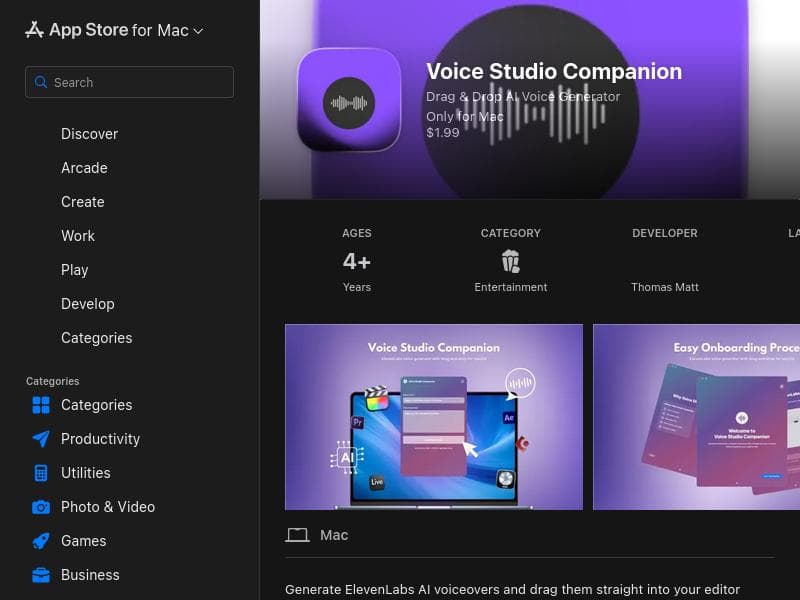
Voice Studio Companion is a macOS menu bar app that turns text into professional AI voiceovers using ElevenLabs technology. Ideal for creators and editors, it lets you choose from 20+ high-quality voices and generate audio in seconds. Drag and drop directly into Final Cut Pro, Premiere Pro, DaVinci Resolve, Logic Pro, GarageBand, Keynote, PowerPoint, and any app that accepts audio files.
详细描述
Voice Studio Companion is a dedicated Mac application designed to streamline and enhance voice-related workflows for both professionals and enthusiasts. Its core purpose is to serve as a powerful companion tool that supports voice recording, editing, and management, all within a user-friendly interface optimized for the macOS environment. By focusing specifically on voice tasks, the app provides an integrated solution that helps users capture high-quality audio, make precise edits, and organize their voice projects efficiently, ultimately boosting productivity and workflow effectiveness. The app’s key features include robust voice recording capabilities that allow users to capture clear, high-fidelity audio directly on their Mac. It supports various recording settings to accommodate different environments and user needs, ensuring optimal sound quality. Beyond recording, Voice Studio Companion offers editing tools that enable users to trim, cut, and refine their audio clips with precision. These editing features are designed to be intuitive yet powerful, allowing for quick adjustments without the need for complex audio engineering knowledge. Additionally, the app facilitates easy management of voice files, helping users organize recordings, label them appropriately, and access them quickly when needed. Voice Studio Companion is tailored specifically for the Mac platform, leveraging macOS’s native capabilities to deliver smooth performance and seamless integration with other Mac applications. This focus on the Mac ecosystem means users benefit from optimized resource usage and a consistent user experience that aligns with other Mac software. This tool is ideal for voice professionals such as podcasters, voice-over artists, audiobook narrators, and broadcasters who require a reliable and efficient way to handle their voice recordings and edits. It is also well-suited for educators, content creators, and hobbyists who want to improve their voice recording workflow without investing in overly complex or expensive software. Use cases include recording podcast episodes, editing voice-over tracks for video projects, managing audiobook narration sessions, and organizing voice memos or interviews. Regarding pricing, Voice Studio Companion is available on the Mac App Store. While the exact pricing details are not specified here, users can visit the official App Store page to view current costs and any available in-app purchases or subscription options. The app’s availability on the App Store also suggests it benefits from Apple’s secure and trusted distribution platform. When compared to alternatives, Voice Studio Companion stands out due to its Mac-specific design and focus on voice tasks. Unlike generic audio editors that cater to a broad range of audio production needs, this app hones in on voice recording and editing, providing a streamlined experience without unnecessary complexity. This specialization makes it more accessible for users focused solely on voice work, whereas other tools might require steeper learning curves or additional configuration. However, some limitations to consider include its platform exclusivity; it is only available for Mac users, which excludes those on Windows or Linux. Additionally, while it covers essential recording and editing features, it may lack some advanced audio processing capabilities found in professional digital audio workstations (DAWs). Users seeking extensive multi-track editing, advanced effects, or music production features might need to complement this app with other software. In summary, Voice Studio Companion is a focused, efficient, and user-friendly Mac app designed to support voice professionals and enthusiasts in recording, editing, and managing their voice projects. Its Mac-centric approach, combined with essential voice-focused features, makes it a valuable tool for improving productivity and workflow in voice-related tasks.
工具功能
- Companion app for voice-related tasks
- Supports voice recording and editing
- Enhances productivity for voice professionals
- Designed specifically for Mac platform
描述
Voice Studio Companion is a Mac-exclusive app tailored for voice professionals and enthusiasts, offering streamlined voice recording, editing, and management tools. Its specialized focus on voice tasks and seamless Mac integration make it an ideal productivity booster for podcasters, voice-over artists, and content creators seeking an efficient, user-friendly solution.
Voice Studio Companion is a macOS menu bar app that turns text into professional AI voiceovers using ElevenLabs technology. Ideal for creators and editors, it lets you choose from 20+ high-quality voices and generate audio in seconds. Drag and drop directly into Final Cut Pro, Premiere Pro, DaVinci Resolve, Logic Pro, GarageBand, Keynote, PowerPoint, and any app that accepts audio files.
详细描述
Voice Studio Companion is a dedicated Mac application designed to streamline and enhance voice-related workflows for both professionals and enthusiasts. Its core purpose is to serve as a powerful companion tool that supports voice recording, editing, and management, all within a user-friendly interface optimized for the macOS environment. By focusing specifically on voice tasks, the app provides an integrated solution that helps users capture high-quality audio, make precise edits, and organize their voice projects efficiently, ultimately boosting productivity and workflow effectiveness. The app’s key features include robust voice recording capabilities that allow users to capture clear, high-fidelity audio directly on their Mac. It supports various recording settings to accommodate different environments and user needs, ensuring optimal sound quality. Beyond recording, Voice Studio Companion offers editing tools that enable users to trim, cut, and refine their audio clips with precision. These editing features are designed to be intuitive yet powerful, allowing for quick adjustments without the need for complex audio engineering knowledge. Additionally, the app facilitates easy management of voice files, helping users organize recordings, label them appropriately, and access them quickly when needed. Voice Studio Companion is tailored specifically for the Mac platform, leveraging macOS’s native capabilities to deliver smooth performance and seamless integration with other Mac applications. This focus on the Mac ecosystem means users benefit from optimized resource usage and a consistent user experience that aligns with other Mac software. This tool is ideal for voice professionals such as podcasters, voice-over artists, audiobook narrators, and broadcasters who require a reliable and efficient way to handle their voice recordings and edits. It is also well-suited for educators, content creators, and hobbyists who want to improve their voice recording workflow without investing in overly complex or expensive software. Use cases include recording podcast episodes, editing voice-over tracks for video projects, managing audiobook narration sessions, and organizing voice memos or interviews. Regarding pricing, Voice Studio Companion is available on the Mac App Store. While the exact pricing details are not specified here, users can visit the official App Store page to view current costs and any available in-app purchases or subscription options. The app’s availability on the App Store also suggests it benefits from Apple’s secure and trusted distribution platform. When compared to alternatives, Voice Studio Companion stands out due to its Mac-specific design and focus on voice tasks. Unlike generic audio editors that cater to a broad range of audio production needs, this app hones in on voice recording and editing, providing a streamlined experience without unnecessary complexity. This specialization makes it more accessible for users focused solely on voice work, whereas other tools might require steeper learning curves or additional configuration. However, some limitations to consider include its platform exclusivity; it is only available for Mac users, which excludes those on Windows or Linux. Additionally, while it covers essential recording and editing features, it may lack some advanced audio processing capabilities found in professional digital audio workstations (DAWs). Users seeking extensive multi-track editing, advanced effects, or music production features might need to complement this app with other software. In summary, Voice Studio Companion is a focused, efficient, and user-friendly Mac app designed to support voice professionals and enthusiasts in recording, editing, and managing their voice projects. Its Mac-centric approach, combined with essential voice-focused features, makes it a valuable tool for improving productivity and workflow in voice-related tasks.
常见问题
What is Voice Studio Companion?
Voice Studio Companion is a Mac application designed to assist users with voice-related tasks such as recording, editing, and managing audio files, providing a streamlined workflow specifically for voice professionals and enthusiasts.
How much does Voice Studio Companion cost?
Pricing details for Voice Studio Companion are available on the Mac App Store. Users should check the official app page for the most current pricing, including any in-app purchases or subscription options.
Who is Voice Studio Companion best for?
This app is best suited for voice professionals like podcasters, voice-over artists, audiobook narrators, and broadcasters, as well as educators and content creators who want a simple yet effective tool for voice recording and editing on Mac.
What are the main features of Voice Studio Companion?
Key features include high-quality voice recording, intuitive editing tools for trimming and refining audio, and efficient management of voice files, all optimized for the Mac platform.
Does Voice Studio Companion offer a free trial?
Information about a free trial is not specified. Users should visit the Mac App Store listing or the developer’s website to confirm if a trial version is available.
What integrations does Voice Studio Companion support?
While specific integrations are not detailed, the app is designed for macOS and likely integrates smoothly with other Mac applications and system features to enhance voice workflow.
How does Voice Studio Companion work?
The app works by providing a dedicated interface on Mac for recording voice audio, editing the recordings with built-in tools, and organizing voice files, enabling users to efficiently manage their voice projects in one place.
社交媒体
使用工具评价
暂无评价。成为第一个分享使用体验的人。
赞助工具











































推荐工具
及时了解最新 AI 工具
获取最新资讯,订阅我们的新闻通讯
已有 50,000+ 位读者阅读并信赖
加入最大的 AI 社区
我们的社区和团队随时为您提供帮助!
您的反馈将帮助 Alice AI 在未来版本中不断改进。









