

这是您的 AI 工具吗?立即认领。
验证所有权、管理资料,并解锁增长功能。
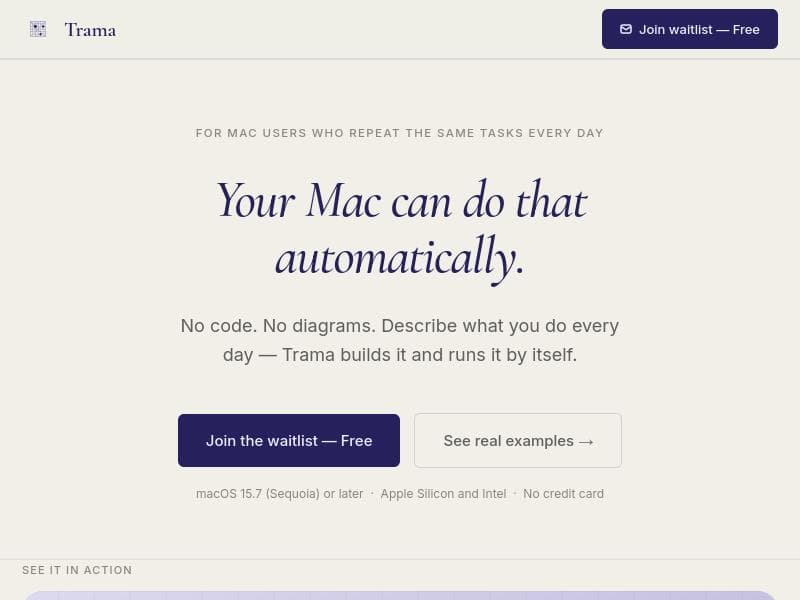
Trama revolutionizes macOS automation by listening to your repeated actions and creating workflows using plain English—no coding or diagrams needed. Perfect for Mac users who want to save time and automate tasks effortlessly without technical hurdles.

描述
Zapier and Shortcuts make you think like a programmer: blocks, flows, conditions. Trama removes that layer. Press Cmd+Option+X, describe what you repeat in your own words, and it runs in the background. What is different: · Your language, not just English · Native Mac reach: AppleScript, shell, OCR, screen awareness · It notices what you repeat and suggests the automation · If it breaks, AI explains the error and fixes it in one tap · Your key: Claude, GPT, Gemini, Groq.
详细描述
Trama is an innovative macOS application designed to simplify and automate repetitive tasks by intelligently observing user behavior and creating automation workflows without requiring any coding knowledge. Its core purpose is to empower users to streamline their daily computer interactions by converting repeated actions into automated processes using plain English commands. This approach eliminates the complexity traditionally associated with automation tools, such as scripting or flowchart design, making automation accessible to a broader audience. At the heart of Trama's functionality is its ability to listen to the user's repeated actions quietly in the background and then build corresponding automations automatically. Unlike many automation platforms that require users to manually design workflows using diagrams or write code, Trama leverages natural language processing to allow users to create workflows simply by describing what they want to automate in everyday English. This no-code, no-diagram approach significantly lowers the barrier to entry for automation, enabling users to save time and reduce errors without technical expertise. Trama is a native macOS application, ensuring seamless integration with the operating system and a smooth user experience. It supports a variety of automation scenarios, from simple repetitive tasks like file organization and text manipulation to more complex multi-step workflows. Users can effortlessly create, edit, and manage their automations within an intuitive interface that prioritizes clarity and ease of use. The app also provides real-time previews of workflows, helping users understand and refine their automations before deployment. This tool is particularly well-suited for professionals, creatives, and everyday Mac users who frequently perform repetitive tasks that can be automated but lack the coding skills or time to learn traditional automation tools. For example, content creators can automate formatting and publishing workflows, office workers can streamline data entry and report generation, and developers can reduce mundane setup tasks. Its natural language interface makes it ideal for users who prefer conversational interaction over technical configuration. Regarding pricing, Trama is currently available as a macOS application with details on specific pricing plans typically provided on its official website or distribution platform. Potential users are encouraged to visit the product page for the most up-to-date information on licensing, subscription options, or free trial availability. Compared to alternatives like AppleScript, Automator, or other no-code automation platforms, Trama stands out by combining the ease of plain English input with intelligent action detection. While AppleScript and Automator require some learning curve and manual workflow design, Trama reduces setup time by automatically identifying repeated tasks and building workflows accordingly. This makes it more approachable for non-technical users while still offering powerful automation capabilities. However, as a relatively new tool focused on macOS, Trama may have limitations in terms of integration breadth compared to more established automation ecosystems. Users relying on cross-platform automation or extensive third-party app integrations might find it less comprehensive. Additionally, the reliance on natural language processing means that very complex or highly customized workflows might require manual adjustments or may not be fully supported yet. Users should consider these factors when evaluating Trama for their specific needs. In summary, Trama offers a fresh, user-friendly approach to automation on macOS by listening to user behavior and enabling workflow creation through plain English commands without coding or diagrams. It is ideal for Mac users looking to save time and reduce repetitive tasks effortlessly. While it may not yet cover all integration scenarios, its innovative design and ease of use make it a compelling choice for those new to automation or seeking a simpler alternative to traditional tools.
工具功能
- No code required to build automations
- Uses plain English to create workflows
- Listens to repeated actions to build automation
- macOS native application
- No diagrams needed for automation design
描述
Trama revolutionizes macOS automation by listening to your repeated actions and creating workflows using plain English—no coding or diagrams needed. Perfect for Mac users who want to save time and automate tasks effortlessly without technical hurdles.
Zapier and Shortcuts make you think like a programmer: blocks, flows, conditions. Trama removes that layer. Press Cmd+Option+X, describe what you repeat in your own words, and it runs in the background. What is different: · Your language, not just English · Native Mac reach: AppleScript, shell, OCR, screen awareness · It notices what you repeat and suggests the automation · If it breaks, AI explains the error and fixes it in one tap · Your key: Claude, GPT, Gemini, Groq.
详细描述
Trama is an innovative macOS application designed to simplify and automate repetitive tasks by intelligently observing user behavior and creating automation workflows without requiring any coding knowledge. Its core purpose is to empower users to streamline their daily computer interactions by converting repeated actions into automated processes using plain English commands. This approach eliminates the complexity traditionally associated with automation tools, such as scripting or flowchart design, making automation accessible to a broader audience. At the heart of Trama's functionality is its ability to listen to the user's repeated actions quietly in the background and then build corresponding automations automatically. Unlike many automation platforms that require users to manually design workflows using diagrams or write code, Trama leverages natural language processing to allow users to create workflows simply by describing what they want to automate in everyday English. This no-code, no-diagram approach significantly lowers the barrier to entry for automation, enabling users to save time and reduce errors without technical expertise. Trama is a native macOS application, ensuring seamless integration with the operating system and a smooth user experience. It supports a variety of automation scenarios, from simple repetitive tasks like file organization and text manipulation to more complex multi-step workflows. Users can effortlessly create, edit, and manage their automations within an intuitive interface that prioritizes clarity and ease of use. The app also provides real-time previews of workflows, helping users understand and refine their automations before deployment. This tool is particularly well-suited for professionals, creatives, and everyday Mac users who frequently perform repetitive tasks that can be automated but lack the coding skills or time to learn traditional automation tools. For example, content creators can automate formatting and publishing workflows, office workers can streamline data entry and report generation, and developers can reduce mundane setup tasks. Its natural language interface makes it ideal for users who prefer conversational interaction over technical configuration. Regarding pricing, Trama is currently available as a macOS application with details on specific pricing plans typically provided on its official website or distribution platform. Potential users are encouraged to visit the product page for the most up-to-date information on licensing, subscription options, or free trial availability. Compared to alternatives like AppleScript, Automator, or other no-code automation platforms, Trama stands out by combining the ease of plain English input with intelligent action detection. While AppleScript and Automator require some learning curve and manual workflow design, Trama reduces setup time by automatically identifying repeated tasks and building workflows accordingly. This makes it more approachable for non-technical users while still offering powerful automation capabilities. However, as a relatively new tool focused on macOS, Trama may have limitations in terms of integration breadth compared to more established automation ecosystems. Users relying on cross-platform automation or extensive third-party app integrations might find it less comprehensive. Additionally, the reliance on natural language processing means that very complex or highly customized workflows might require manual adjustments or may not be fully supported yet. Users should consider these factors when evaluating Trama for their specific needs. In summary, Trama offers a fresh, user-friendly approach to automation on macOS by listening to user behavior and enabling workflow creation through plain English commands without coding or diagrams. It is ideal for Mac users looking to save time and reduce repetitive tasks effortlessly. While it may not yet cover all integration scenarios, its innovative design and ease of use make it a compelling choice for those new to automation or seeking a simpler alternative to traditional tools.
常见问题
What is Trama?
Trama is a macOS application that automates repetitive tasks by observing your repeated actions and quietly building automation workflows for you using plain English commands, requiring no coding or diagrams.
How much does Trama cost?
Pricing details for Trama are available on its official product page. Users should visit the website to find the latest information on subscription plans, licenses, or free trial options.
Who is Trama best for?
Trama is best suited for Mac users who perform repetitive tasks and want to automate them without learning to code, including professionals, creatives, and everyday users seeking an easy automation solution.
What are the main features of Trama?
Key features include no-code automation creation, use of plain English to build workflows, automatic detection of repeated actions, a native macOS application interface, and no need for diagrams to design automations.
Does Trama offer a free trial?
Information about a free trial is typically provided on Trama's official website or product page. Interested users should check there for current trial availability.
What integrations does Trama support?
Trama is a macOS native app that integrates seamlessly with the operating system. While specific third-party app integrations are not extensively detailed, it supports automations involving common macOS tasks and applications.
How does Trama work?
Trama works by listening to the tasks you repeat on your Mac and then automatically building automation workflows based on those actions. You can also create or modify workflows using plain English commands without any coding or diagrams.
评价
暂无评价。成为第一个分享使用体验的人。




















































