

这是您的 AI 工具吗?立即认领。
验证所有权、管理资料,并解锁增长功能。
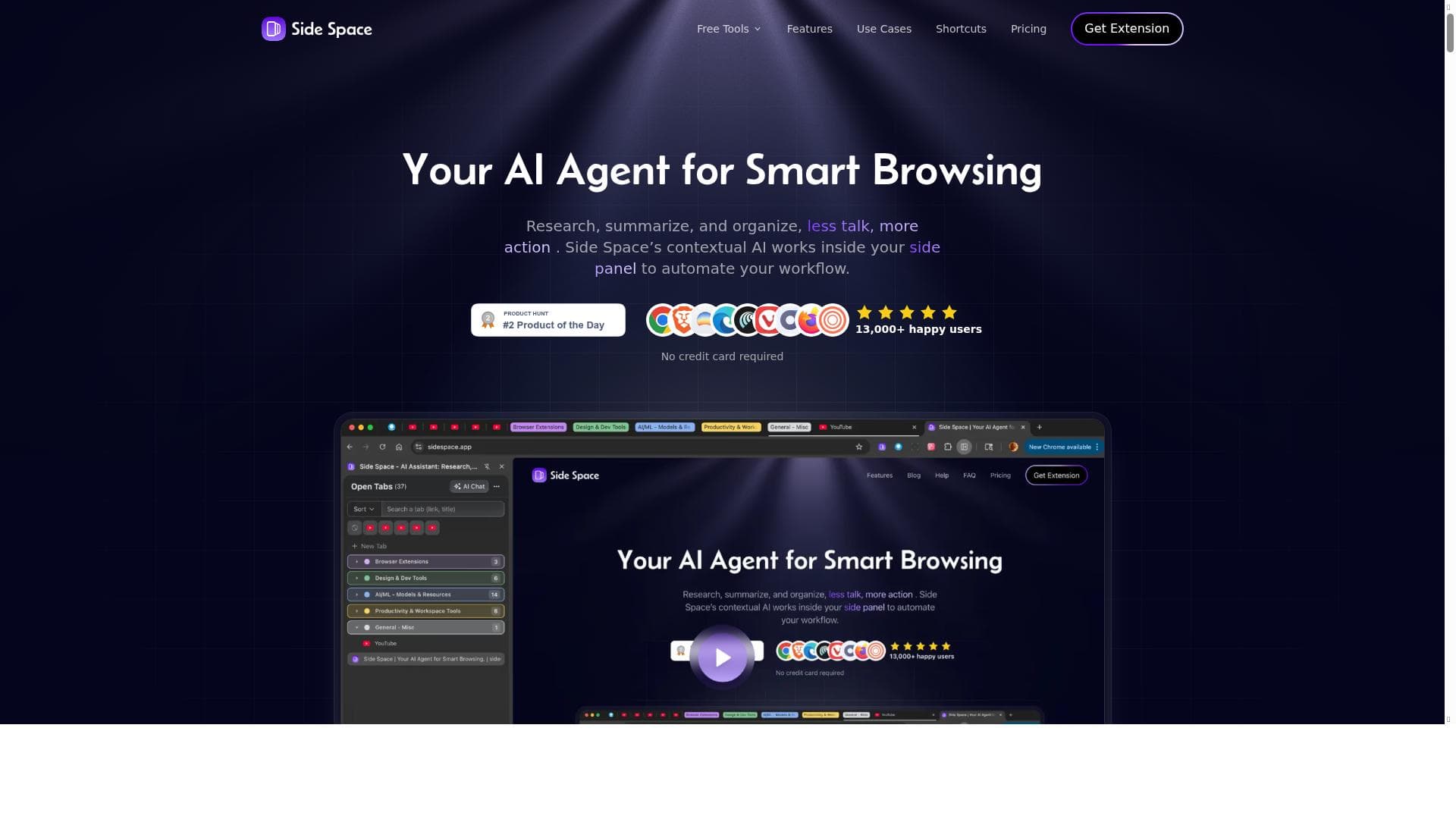
Side Space is a cutting-edge AI-powered vertical tab manager that transforms chaotic browsing into an organized, efficient experience by intelligently grouping tabs and automating online tasks. Ideal for professionals and heavy web users, it boosts productivity by simplifying navigation and reducing tab overload.

描述
Side Space is an AI-powered vertical tab manager extension that organizes multiple tabs in a side panel for seamless browsing. With a simple design and smart AI, it ensures your tabs are not only well-arranged but also logically grouped for maximum efficiency.
详细描述
Side Space is an innovative AI-powered vertical tab manager designed to revolutionize the way users handle multiple browser tabs. Its core purpose is to streamline web browsing by organizing tabs efficiently within a side panel, rather than the traditional horizontal tab bar. This approach not only declutters the browser interface but also enhances user productivity by providing a clear, logical structure to tab management. The tool leverages smart AI algorithms to automatically group related tabs, making it easier for users to navigate between tasks and projects without losing track of important web pages. By integrating AI-driven intelligence, Side Space transforms the browsing experience into a more organized, efficient, and less overwhelming activity. One of the standout features of Side Space is its AI-powered smart browsing assistance. This capability allows the extension to understand user behavior and browsing patterns, offering intelligent suggestions that improve web navigation. For example, it can recommend grouping tabs based on content similarity or usage frequency, enabling users to access relevant information faster. Additionally, Side Space automates routine online tasks, such as opening frequently visited sites or managing tab sessions, which saves time and reduces manual effort. The extension’s simple and intuitive design ensures that even users unfamiliar with advanced tab management tools can quickly adapt and benefit from its functionalities. Furthermore, by enhancing productivity during web use, Side Space helps users maintain focus and reduce the cognitive load associated with managing numerous tabs simultaneously. Side Space is particularly well-suited for professionals, students, researchers, and anyone who regularly works with multiple tabs open in their browser. Digital marketers, developers, content creators, and remote workers can all benefit from its ability to logically group tabs by project or topic, facilitating smoother multitasking and workflow management. For example, a researcher juggling various sources can keep all related tabs neatly organized in one group, while a developer can separate tabs by different coding projects or documentation. The tool’s AI-driven suggestions also aid users who may struggle with tab overload, helping them regain control and improve their browsing efficiency. Regarding pricing, Side Space operates on a freemium model. This means users can access a basic set of features for free, which includes the core tab management and AI-assisted browsing capabilities. For more advanced functionalities, such as enhanced automation, priority support, or additional customization options, users can opt for paid plans. This flexible pricing structure allows individuals and organizations to choose a plan that best fits their needs and budget, making Side Space accessible to a wide range of users. When compared to alternative tab management tools, Side Space stands out due to its integration of AI technology for smart tab grouping and task automation. While many tab managers offer simple organization features, few incorporate intelligent suggestions or automate online workflows to the same extent. This gives Side Space a competitive edge, especially for users seeking a more proactive and adaptive browsing assistant. However, some alternatives may offer deeper integration with specific browsers or additional collaboration features, which could be a consideration depending on user requirements. Despite its strengths, Side Space has some limitations to consider. As a browser extension, its performance and compatibility depend on the browser environment and updates. Users with extremely high numbers of tabs or very complex workflows might find occasional lag or require manual adjustments to AI groupings. Additionally, while the freemium model is generous, some advanced features are locked behind paid tiers, which might limit access for users on a tight budget. Finally, the tool’s AI suggestions, while helpful, may not always perfectly align with every user’s unique browsing habits, necessitating occasional manual intervention. Overall, Side Space offers a powerful, AI-enhanced solution for managing browser tabs more effectively. Its combination of vertical tab organization, intelligent grouping, and automation makes it a valuable tool for anyone looking to optimize their web browsing and increase productivity.
工具功能
- AI-powered smart browsing assistance
- Intelligent suggestions to improve web navigation
- Automation of online tasks
- Enhances productivity during web use
描述
Side Space is a cutting-edge AI-powered vertical tab manager that transforms chaotic browsing into an organized, efficient experience by intelligently grouping tabs and automating online tasks. Ideal for professionals and heavy web users, it boosts productivity by simplifying navigation and reducing tab overload.
Side Space is an AI-powered vertical tab manager extension that organizes multiple tabs in a side panel for seamless browsing. With a simple design and smart AI, it ensures your tabs are not only well-arranged but also logically grouped for maximum efficiency.
详细描述
Side Space is an innovative AI-powered vertical tab manager designed to revolutionize the way users handle multiple browser tabs. Its core purpose is to streamline web browsing by organizing tabs efficiently within a side panel, rather than the traditional horizontal tab bar. This approach not only declutters the browser interface but also enhances user productivity by providing a clear, logical structure to tab management. The tool leverages smart AI algorithms to automatically group related tabs, making it easier for users to navigate between tasks and projects without losing track of important web pages. By integrating AI-driven intelligence, Side Space transforms the browsing experience into a more organized, efficient, and less overwhelming activity. One of the standout features of Side Space is its AI-powered smart browsing assistance. This capability allows the extension to understand user behavior and browsing patterns, offering intelligent suggestions that improve web navigation. For example, it can recommend grouping tabs based on content similarity or usage frequency, enabling users to access relevant information faster. Additionally, Side Space automates routine online tasks, such as opening frequently visited sites or managing tab sessions, which saves time and reduces manual effort. The extension’s simple and intuitive design ensures that even users unfamiliar with advanced tab management tools can quickly adapt and benefit from its functionalities. Furthermore, by enhancing productivity during web use, Side Space helps users maintain focus and reduce the cognitive load associated with managing numerous tabs simultaneously. Side Space is particularly well-suited for professionals, students, researchers, and anyone who regularly works with multiple tabs open in their browser. Digital marketers, developers, content creators, and remote workers can all benefit from its ability to logically group tabs by project or topic, facilitating smoother multitasking and workflow management. For example, a researcher juggling various sources can keep all related tabs neatly organized in one group, while a developer can separate tabs by different coding projects or documentation. The tool’s AI-driven suggestions also aid users who may struggle with tab overload, helping them regain control and improve their browsing efficiency. Regarding pricing, Side Space operates on a freemium model. This means users can access a basic set of features for free, which includes the core tab management and AI-assisted browsing capabilities. For more advanced functionalities, such as enhanced automation, priority support, or additional customization options, users can opt for paid plans. This flexible pricing structure allows individuals and organizations to choose a plan that best fits their needs and budget, making Side Space accessible to a wide range of users. When compared to alternative tab management tools, Side Space stands out due to its integration of AI technology for smart tab grouping and task automation. While many tab managers offer simple organization features, few incorporate intelligent suggestions or automate online workflows to the same extent. This gives Side Space a competitive edge, especially for users seeking a more proactive and adaptive browsing assistant. However, some alternatives may offer deeper integration with specific browsers or additional collaboration features, which could be a consideration depending on user requirements. Despite its strengths, Side Space has some limitations to consider. As a browser extension, its performance and compatibility depend on the browser environment and updates. Users with extremely high numbers of tabs or very complex workflows might find occasional lag or require manual adjustments to AI groupings. Additionally, while the freemium model is generous, some advanced features are locked behind paid tiers, which might limit access for users on a tight budget. Finally, the tool’s AI suggestions, while helpful, may not always perfectly align with every user’s unique browsing habits, necessitating occasional manual intervention. Overall, Side Space offers a powerful, AI-enhanced solution for managing browser tabs more effectively. Its combination of vertical tab organization, intelligent grouping, and automation makes it a valuable tool for anyone looking to optimize their web browsing and increase productivity.
常见问题
What is Side Space?
Side Space is an AI-powered vertical tab manager browser extension that organizes multiple tabs in a side panel, using smart AI to group tabs logically and enhance browsing efficiency.
How much does Side Space cost?
Side Space offers a freemium pricing model, providing basic features for free, with optional paid plans that unlock advanced automation, customization, and priority support.
Who is Side Space best for?
Side Space is ideal for professionals, students, researchers, developers, and anyone who frequently manages multiple browser tabs and wants to improve productivity and organization.
What are the main features of Side Space?
Key features include AI-powered smart browsing assistance, intelligent tab grouping and suggestions, automation of routine online tasks, and an intuitive vertical tab management interface.
Does Side Space offer a free trial?
Side Space provides a freemium version with core functionalities available for free, allowing users to try the tool without commitment before opting for paid plans.
What integrations does Side Space support?
Side Space primarily functions as a browser extension and integrates seamlessly with supported browsers to manage tabs; specific third-party integrations are not highlighted.
How does Side Space work?
Side Space works by organizing open browser tabs into a vertical side panel, using AI to analyze and group tabs logically, provide navigation suggestions, and automate repetitive browsing tasks.
社交媒体
使用工具评价
暂无评价。成为第一个分享使用体验的人。




















































