🚀 Zaprep: Your Socials on Steroids. 免费开始 — 每月自动发送 1,000 条私信,将互动转化为潜在客户。 ,每月 1,000 条自动私信。


这是您的 AI 工具吗?立即认领。
验证所有权、管理资料,并解锁增长功能。
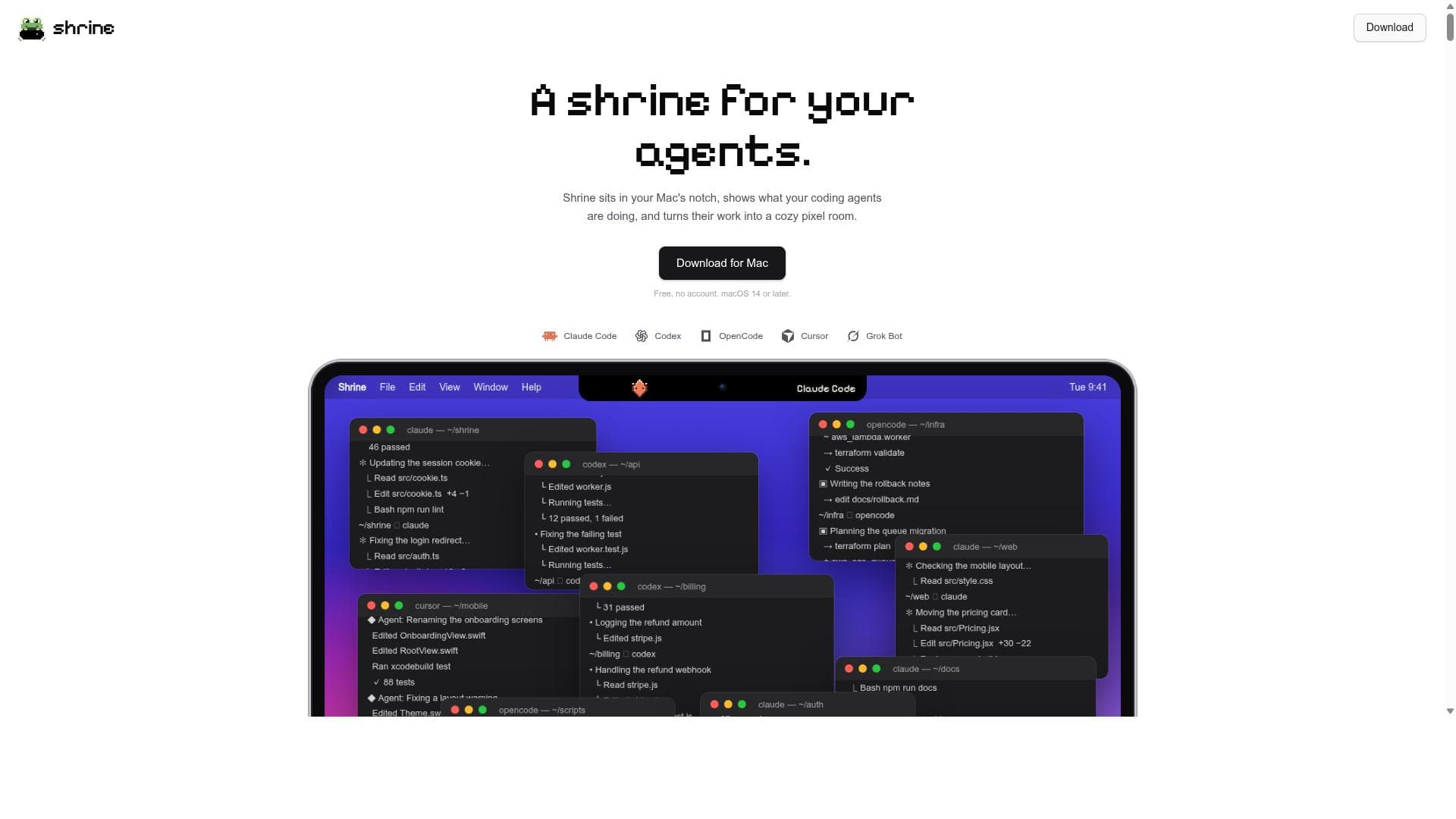
Shrine is a free macOS app that visualizes the real-time activity of your AI coding agents like Claude Code and Codex as a cozy pixel art room in your Mac’s notch. Perfect for developers who want an engaging, account-free way to monitor multiple AI coding sessions simultaneously without interrupting their workflow.

描述
Shrine lives in your Mac's notch. A glance shows how many Claude Code, Codex and OpenCode sessions are working and which one needs you, so there is no dashboard window to keep open. Each push, pull request and research session earns a piece of pixel art for a small room that fills up as you work. Find the joy in your agents work.
详细描述
Shrine is a unique Mac application designed to provide developers with a real-time, visual insight into what their AI coding agents are doing. Its core purpose is to transform the typically invisible processes of AI-assisted coding into an engaging, tangible experience by displaying these activities as a cozy pixel art room situated in the Mac's notch area. This innovative visualization not only adds an aesthetic appeal but also serves as a practical dashboard for monitoring multiple AI coding sessions simultaneously without interrupting the developer's workflow. At its heart, Shrine supports a variety of popular AI coding agents including Claude Code, Codex, OpenCode, Cursor, and Grok Bot. By connecting with these agents, Shrine captures their ongoing tasks such as code edits, pull requests, testing outcomes, and other coding activities. It then translates these actions into pixel art elements that furnish a charming virtual room, effectively turning your Mac’s notch into a dynamic shrine dedicated to your coding agents’ work. This real-time visualization allows users to stay informed about their AI agents’ progress at a glance, without needing to switch contexts or open additional windows. Key features of Shrine include its support for multiple AI coding agents, enabling developers who use different tools to consolidate their monitoring in one place. The pixel art room is not just a static display but evolves as the agents perform tasks like pushing code, merging pull requests, or running tests, making the experience both informative and visually appealing. Importantly, Shrine requires no user account or sign-in, ensuring privacy and ease of use. It is designed exclusively for macOS 14 or later, leveraging the latest system capabilities to integrate seamlessly with the Mac notch. Additionally, Shrine is completely free to download and use, lowering the barrier for developers to adopt this novel monitoring tool. Shrine is best suited for developers, software engineers, and coding teams who actively use AI-powered coding assistants to enhance their productivity. It is particularly valuable for those who juggle multiple AI agents or want a low-friction way to keep track of their AI workflows without disrupting their coding environment. Use cases include monitoring code generation, debugging sessions, automated testing, and pull request management. By providing a continuous visual update, Shrine helps users maintain situational awareness of their AI agents’ activities, which can improve coordination and reduce the cognitive load of managing multiple AI tools. In terms of pricing, Shrine stands out by offering its full functionality completely free of charge. There are no subscription plans or premium tiers, making it an accessible option for individual developers and teams alike. This free model encourages widespread adoption and experimentation without financial commitment. Compared to alternative solutions that may require web dashboards, accounts, or complex integrations, Shrine’s approach is refreshingly straightforward and visually unique. While many AI coding tools focus solely on code generation or assistance, Shrine complements these by providing a dedicated, real-time visualization layer. This sets it apart from traditional IDE plugins or standalone AI coding assistants by emphasizing user experience and ambient awareness. However, Shrine does have some limitations. Its exclusivity to macOS 14 or later restricts usage to users with compatible Apple hardware and software. Additionally, its focus on visualization means it does not provide direct coding assistance or editing capabilities itself; it is purely a monitoring tool. Users who prefer integrated IDE solutions or require cross-platform support may find Shrine’s scope limited. Furthermore, as it relies on supported AI agents, its utility depends on the user’s existing AI coding ecosystem. Overall, Shrine offers a novel, free, and visually delightful way for Mac users to keep track of their AI coding agents’ activities in real time. Its pixel art room concept transforms routine coding updates into an engaging experience, making it a valuable companion for developers leveraging multiple AI assistants in their workflow.
工具功能
- Shows real-time activity of coding agents on your Mac
- Supports multiple AI coding agents including Claude Code, Codex, OpenCode, Cursor, and Grok Bot
- Visualizes agent work as a pixel art room in the Mac notch
- No account required to use
- Free to download and use on macOS 14 or later
描述
Shrine is a free macOS app that visualizes the real-time activity of your AI coding agents like Claude Code and Codex as a cozy pixel art room in your Mac’s notch. Perfect for developers who want an engaging, account-free way to monitor multiple AI coding sessions simultaneously without interrupting their workflow.
Shrine lives in your Mac's notch. A glance shows how many Claude Code, Codex and OpenCode sessions are working and which one needs you, so there is no dashboard window to keep open. Each push, pull request and research session earns a piece of pixel art for a small room that fills up as you work. Find the joy in your agents work.
详细描述
Shrine is a unique Mac application designed to provide developers with a real-time, visual insight into what their AI coding agents are doing. Its core purpose is to transform the typically invisible processes of AI-assisted coding into an engaging, tangible experience by displaying these activities as a cozy pixel art room situated in the Mac's notch area. This innovative visualization not only adds an aesthetic appeal but also serves as a practical dashboard for monitoring multiple AI coding sessions simultaneously without interrupting the developer's workflow. At its heart, Shrine supports a variety of popular AI coding agents including Claude Code, Codex, OpenCode, Cursor, and Grok Bot. By connecting with these agents, Shrine captures their ongoing tasks such as code edits, pull requests, testing outcomes, and other coding activities. It then translates these actions into pixel art elements that furnish a charming virtual room, effectively turning your Mac’s notch into a dynamic shrine dedicated to your coding agents’ work. This real-time visualization allows users to stay informed about their AI agents’ progress at a glance, without needing to switch contexts or open additional windows. Key features of Shrine include its support for multiple AI coding agents, enabling developers who use different tools to consolidate their monitoring in one place. The pixel art room is not just a static display but evolves as the agents perform tasks like pushing code, merging pull requests, or running tests, making the experience both informative and visually appealing. Importantly, Shrine requires no user account or sign-in, ensuring privacy and ease of use. It is designed exclusively for macOS 14 or later, leveraging the latest system capabilities to integrate seamlessly with the Mac notch. Additionally, Shrine is completely free to download and use, lowering the barrier for developers to adopt this novel monitoring tool. Shrine is best suited for developers, software engineers, and coding teams who actively use AI-powered coding assistants to enhance their productivity. It is particularly valuable for those who juggle multiple AI agents or want a low-friction way to keep track of their AI workflows without disrupting their coding environment. Use cases include monitoring code generation, debugging sessions, automated testing, and pull request management. By providing a continuous visual update, Shrine helps users maintain situational awareness of their AI agents’ activities, which can improve coordination and reduce the cognitive load of managing multiple AI tools. In terms of pricing, Shrine stands out by offering its full functionality completely free of charge. There are no subscription plans or premium tiers, making it an accessible option for individual developers and teams alike. This free model encourages widespread adoption and experimentation without financial commitment. Compared to alternative solutions that may require web dashboards, accounts, or complex integrations, Shrine’s approach is refreshingly straightforward and visually unique. While many AI coding tools focus solely on code generation or assistance, Shrine complements these by providing a dedicated, real-time visualization layer. This sets it apart from traditional IDE plugins or standalone AI coding assistants by emphasizing user experience and ambient awareness. However, Shrine does have some limitations. Its exclusivity to macOS 14 or later restricts usage to users with compatible Apple hardware and software. Additionally, its focus on visualization means it does not provide direct coding assistance or editing capabilities itself; it is purely a monitoring tool. Users who prefer integrated IDE solutions or require cross-platform support may find Shrine’s scope limited. Furthermore, as it relies on supported AI agents, its utility depends on the user’s existing AI coding ecosystem. Overall, Shrine offers a novel, free, and visually delightful way for Mac users to keep track of their AI coding agents’ activities in real time. Its pixel art room concept transforms routine coding updates into an engaging experience, making it a valuable companion for developers leveraging multiple AI assistants in their workflow.
常见问题
What is Shrine?
Shrine is a Mac application that visualizes the real-time activities of AI coding agents such as Claude Code, Codex, OpenCode, Cursor, and Grok Bot by displaying their work as a pixel art room in the Mac's notch.
How much does Shrine cost?
Shrine is completely free to download and use with no subscription or payment required.
Who is Shrine best for?
Shrine is ideal for developers and software engineers using AI coding assistants on macOS 14 or later who want a unique, visual way to monitor multiple AI coding sessions without needing to switch apps or create accounts.
What are the main features of Shrine?
Shrine supports multiple AI coding agents including Claude Code, Codex, OpenCode, Cursor, and Grok Bot; shows their real-time activity; visualizes their work as a pixel art room in the Mac notch; requires no account; and is free to use on macOS 14 or later.
Does Shrine offer a free trial?
Shrine is free to download and use with no trial period or paid plans, so you can use all features immediately upon installation.
What integrations does Shrine support?
Shrine integrates with popular AI coding agents including Claude Code, Codex, OpenCode, Cursor, and Grok Bot.
How does Shrine work?
Shrine connects to your AI coding agents running on your Mac and captures their coding activities such as code edits, tests, and pull requests. It then visualizes these actions as elements furnishing a pixel art room displayed in your Mac’s notch, providing a real-time, ambient view of your AI coding sessions.
社交媒体
使用工具评价
暂无评价。成为第一个分享使用体验的人。
赞助工具











































推荐工具
及时了解最新 AI 工具
获取最新资讯,订阅我们的新闻通讯
已有 50,000+ 位读者阅读并信赖
加入最大的 AI 社区
我们的社区和团队随时为您提供帮助!
您的反馈将帮助 Alice AI 在未来版本中不断改进。









