

这是您的 AI 工具吗?立即认领。
验证所有权、管理资料,并解锁增长功能。
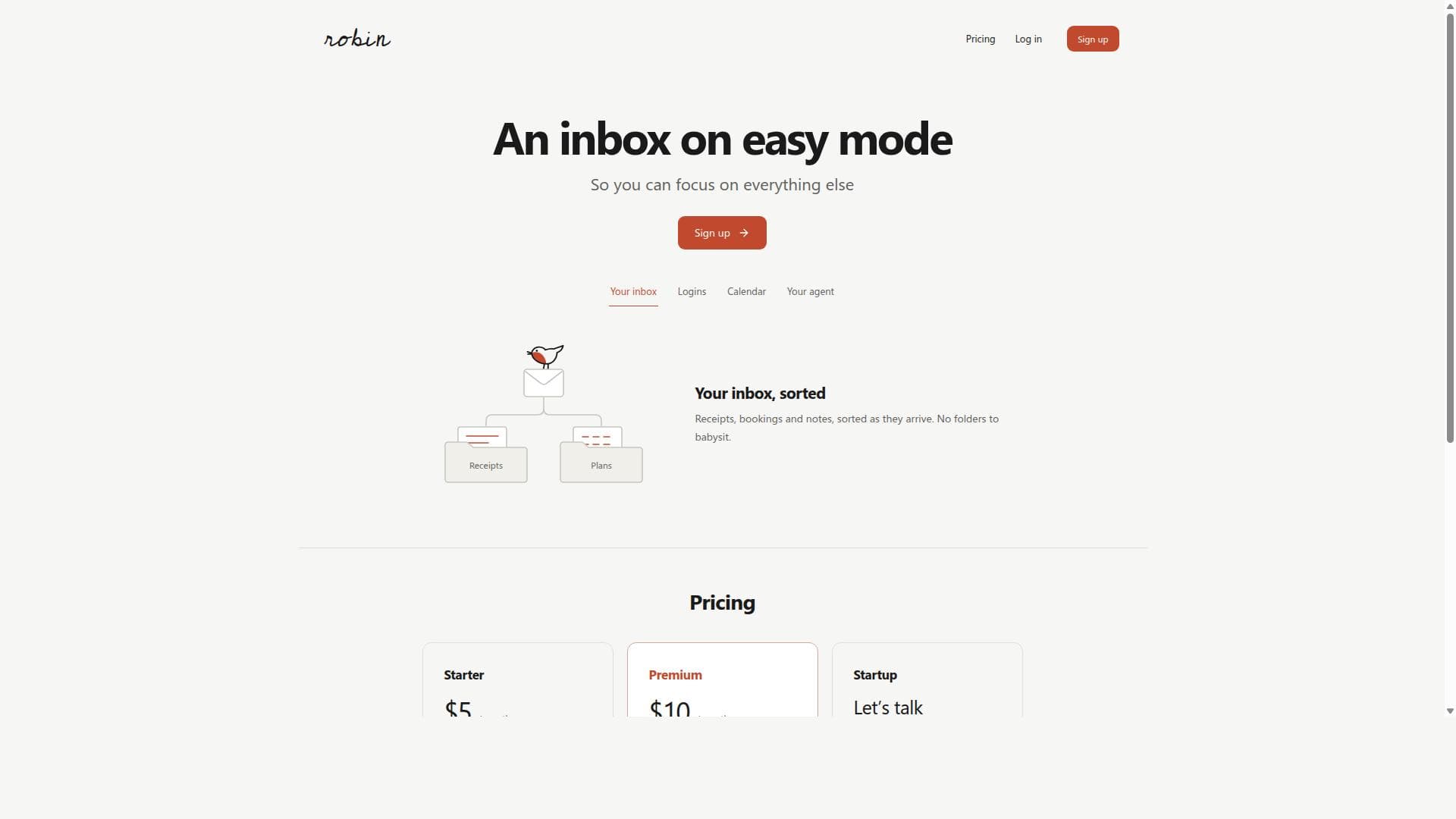
Robin transforms your email inbox into an effortlessly organized space by automatically sorting receipts, bookings, and notes as they arrive. Perfect for busy professionals and frequent online users, it ensures critical emails like sign-in codes never get lost in spam, letting you focus on what matters most.

描述
Robin gives you an email inbox that organises itself. Use it for signups or forward your mail: login codes reach you, purchases and subscriptions get classified, and invitations land in your calendar. Gathers all your newsletter like a magazine. The point is liberating from email a bit. Agents should work in the background with the inbox for us. Inbox should be smarter by default.
详细描述
Robin is an innovative email inbox management solution designed to revolutionize how users handle their incoming emails by simplifying and automating the sorting process. At its core, Robin aims to reduce the clutter and overwhelm commonly associated with traditional email inboxes by automatically categorizing emails such as receipts, bookings, and notes as they arrive. This allows users to focus on more important tasks without the constant need to manually organize their inbox or manage multiple folders. Robin’s unique approach centers around providing a seamless, easy-to-use experience that eliminates the hassle of email management and follow-ups. One of the standout features of Robin is its automatic sorting capability. Rather than requiring users to create and maintain complex folder structures, Robin intelligently detects and sorts incoming emails into relevant categories like receipts, bookings, and notes. This automation not only saves time but also ensures important transactional emails are never lost or buried under marketing or spam messages. Additionally, Robin provides a unique email address through its Robin MCP (Mail Control Protocol) specifically for your agent, which acts as an intelligent intermediary to handle mail, sign-in codes, and plans. This feature ensures that critical emails such as sign-in codes bypass spam filters and avoid getting mixed with sales pitches or promotional content, streamlining the signup and login processes for various services. Robin integrates mail, codes, and plans into a unified inbox experience, making it easier to manage different types of communication without switching between apps or folders. This integration is particularly useful for users who frequently deal with online bookings, receipts, and authentication codes, as it consolidates these essential emails in one place. The tool’s design philosophy emphasizes minimal user intervention, allowing users to enjoy a clean, organized inbox without the traditional overhead of manual sorting or follow-up reminders. Robin is best suited for busy professionals, frequent online shoppers, and anyone who receives a high volume of transactional emails that need to be organized efficiently. It is also ideal for users who struggle with managing multiple email folders or who want to avoid missing important sign-in codes and booking confirmations. Use cases include managing personal and work-related receipts for expense tracking, organizing travel and event bookings, and simplifying the process of handling authentication codes during online signups or security verifications. Regarding pricing, Robin offers a straightforward signup process accessible via its website. While specific pricing tiers and plans are not detailed in the provided information, the presence of a signup call-to-action suggests a freemium or subscription-based model may be in place. Interested users should visit the official Robin website to explore current pricing options and any available free trial periods. Compared to traditional email clients and other inbox management tools, Robin stands out by focusing exclusively on automating the sorting of transactional emails and providing a dedicated email address for agent handling. Unlike generic email filters or folder systems, Robin’s approach reduces user effort significantly and enhances the reliability of receiving critical emails like sign-in codes. This specialization makes Robin a compelling choice for users overwhelmed by cluttered inboxes and those who prioritize security and ease of access for authentication emails. However, potential users should consider that Robin’s niche focus on receipts, bookings, and codes may not cover all email management needs, such as handling personal correspondence or complex business communications. Additionally, the reliance on a unique email address for agent handling may require users to adjust their existing workflows or notify contacts of the new address. As with any specialized tool, users should evaluate how Robin fits within their broader email ecosystem and whether it integrates smoothly with their preferred email providers and platforms. In summary, Robin offers a fresh, automated approach to email management that minimizes manual sorting and maximizes inbox clarity. Its unique agent email address and automatic categorization of transactional emails provide a streamlined experience ideal for busy individuals seeking to simplify their digital communication. While it may not replace full-featured email clients, Robin serves as a powerful complementary tool for managing receipts, bookings, and sign-in codes efficiently.
工具功能
- Automatically sorts receipts, bookings, and notes as they arrive
- No need to manage folders manually
- Provides a unique email address through Robin MCP for your agent
- Ensures sign-in codes get through without spam or sales pitches
- Simplifies signups by separating codes from marketing emails
- Integrates mail, codes, and plans for easy management
描述
Robin transforms your email inbox into an effortlessly organized space by automatically sorting receipts, bookings, and notes as they arrive. Perfect for busy professionals and frequent online users, it ensures critical emails like sign-in codes never get lost in spam, letting you focus on what matters most.
Robin gives you an email inbox that organises itself. Use it for signups or forward your mail: login codes reach you, purchases and subscriptions get classified, and invitations land in your calendar. Gathers all your newsletter like a magazine. The point is liberating from email a bit. Agents should work in the background with the inbox for us. Inbox should be smarter by default.
详细描述
Robin is an innovative email inbox management solution designed to revolutionize how users handle their incoming emails by simplifying and automating the sorting process. At its core, Robin aims to reduce the clutter and overwhelm commonly associated with traditional email inboxes by automatically categorizing emails such as receipts, bookings, and notes as they arrive. This allows users to focus on more important tasks without the constant need to manually organize their inbox or manage multiple folders. Robin’s unique approach centers around providing a seamless, easy-to-use experience that eliminates the hassle of email management and follow-ups. One of the standout features of Robin is its automatic sorting capability. Rather than requiring users to create and maintain complex folder structures, Robin intelligently detects and sorts incoming emails into relevant categories like receipts, bookings, and notes. This automation not only saves time but also ensures important transactional emails are never lost or buried under marketing or spam messages. Additionally, Robin provides a unique email address through its Robin MCP (Mail Control Protocol) specifically for your agent, which acts as an intelligent intermediary to handle mail, sign-in codes, and plans. This feature ensures that critical emails such as sign-in codes bypass spam filters and avoid getting mixed with sales pitches or promotional content, streamlining the signup and login processes for various services. Robin integrates mail, codes, and plans into a unified inbox experience, making it easier to manage different types of communication without switching between apps or folders. This integration is particularly useful for users who frequently deal with online bookings, receipts, and authentication codes, as it consolidates these essential emails in one place. The tool’s design philosophy emphasizes minimal user intervention, allowing users to enjoy a clean, organized inbox without the traditional overhead of manual sorting or follow-up reminders. Robin is best suited for busy professionals, frequent online shoppers, and anyone who receives a high volume of transactional emails that need to be organized efficiently. It is also ideal for users who struggle with managing multiple email folders or who want to avoid missing important sign-in codes and booking confirmations. Use cases include managing personal and work-related receipts for expense tracking, organizing travel and event bookings, and simplifying the process of handling authentication codes during online signups or security verifications. Regarding pricing, Robin offers a straightforward signup process accessible via its website. While specific pricing tiers and plans are not detailed in the provided information, the presence of a signup call-to-action suggests a freemium or subscription-based model may be in place. Interested users should visit the official Robin website to explore current pricing options and any available free trial periods. Compared to traditional email clients and other inbox management tools, Robin stands out by focusing exclusively on automating the sorting of transactional emails and providing a dedicated email address for agent handling. Unlike generic email filters or folder systems, Robin’s approach reduces user effort significantly and enhances the reliability of receiving critical emails like sign-in codes. This specialization makes Robin a compelling choice for users overwhelmed by cluttered inboxes and those who prioritize security and ease of access for authentication emails. However, potential users should consider that Robin’s niche focus on receipts, bookings, and codes may not cover all email management needs, such as handling personal correspondence or complex business communications. Additionally, the reliance on a unique email address for agent handling may require users to adjust their existing workflows or notify contacts of the new address. As with any specialized tool, users should evaluate how Robin fits within their broader email ecosystem and whether it integrates smoothly with their preferred email providers and platforms. In summary, Robin offers a fresh, automated approach to email management that minimizes manual sorting and maximizes inbox clarity. Its unique agent email address and automatic categorization of transactional emails provide a streamlined experience ideal for busy individuals seeking to simplify their digital communication. While it may not replace full-featured email clients, Robin serves as a powerful complementary tool for managing receipts, bookings, and sign-in codes efficiently.
常见问题
What is Robin?
Robin is an innovative email inbox solution that automatically sorts your incoming emails such as receipts, bookings, and notes. It provides a unique email address through Robin MCP for your agent to handle mail, sign-in codes, and plans seamlessly, simplifying email management and reducing clutter.
How much does Robin cost?
Specific pricing details for Robin are not provided in the available information. However, users can sign up on the official Robin website to learn about current pricing plans, which may include free trials or subscription options.
Who is Robin best for?
Robin is ideal for busy professionals, frequent online shoppers, and anyone who receives a high volume of transactional emails like receipts, bookings, and sign-in codes. It’s especially useful for those who want to avoid managing folders manually and ensure important emails bypass spam filters.
What are the main features of Robin?
Key features include automatic sorting of receipts, bookings, and notes as they arrive; a unique email address via Robin MCP for your agent to handle mail and codes; ensuring sign-in codes get through without spam or sales pitches; simplifying signups by separating codes from marketing emails; and integrating mail, codes, and plans for easy management.
Does Robin offer a free trial?
The available information does not explicitly mention a free trial. Interested users should visit Robin’s official website to check for any trial offers or introductory plans.
What integrations does Robin support?
Robin integrates mail, codes, and plans into a unified inbox experience. While specific third-party integrations are not detailed, its unique email address system suggests compatibility with standard email services to manage transactional emails effectively.
How does Robin work?
Robin works by providing you with a unique email address through Robin MCP that acts as an agent to receive your emails. It automatically sorts incoming emails into categories like receipts, bookings, and notes, and ensures important sign-in codes bypass spam filters. This automation removes the need for manual folder management and helps keep your inbox organized.
社交媒体
使用工具评价
暂无评价。成为第一个分享使用体验的人。




















































