🚀 Zaprep: Your Socials on Steroids. 免费开始 — 每月自动发送 1,000 条私信,将互动转化为潜在客户。 ,每月 1,000 条自动私信。


这是您的 AI 工具吗?立即认领。
验证所有权、管理资料,并解锁增长功能。
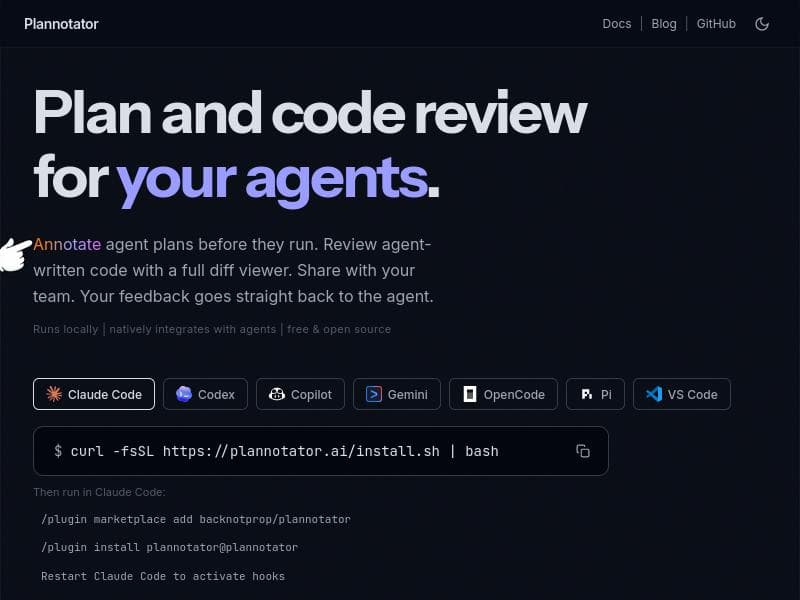
Plannotator is a free, open-source annotation tool that runs locally to help users review and provide structured feedback on AI-generated plans, code, and documents. Ideal for developers and teams seeking privacy and seamless collaboration, it integrates natively with multiple AI coding agents and supports a wide range of content types.

描述
You can now use Plannotator to annotate anything! Free, open source, and private (runs local). Use the skill `/plannotator-annotate` (or cli) - followed by a folder, URL, document, markdown, your book, a recipe, a plan, etc - to annotate anything and send feedback directly into your integrated agent. Use `/plannotator-last` to annotate the last message an agent sent you too. I like using it for my own version of Karpathy’s "LLM Wiki" in obsidian. https://github.com/backnotprop/plannotator
详细描述
Plannotator is a versatile annotation tool designed to enhance interaction with AI agents by allowing users to annotate virtually any type of content. Its core purpose is to facilitate detailed review and feedback on agent-generated plans, code, documents, and other materials, all within a private, local environment. As an open-source tool, Plannotator emphasizes user privacy and control, running entirely on the user's local machine without requiring cloud-based processing. This makes it an ideal solution for developers, researchers, and teams who need to maintain confidentiality while collaborating on AI-driven projects. One of Plannotator's standout features is its ability to annotate a wide range of inputs, including folders, URLs, documents, markdown files, books, recipes, and plans. Users can invoke the annotation process via the `/plannotator-annotate` command or through a command-line interface, making it highly flexible and accessible. Additionally, the `/plannotator-last` command enables users to quickly annotate the last message sent by an integrated AI agent, streamlining the feedback loop. This capability is particularly useful for those building knowledge bases or wikis, such as the creator’s personal adaptation of Karpathy’s "LLM Wiki" in Obsidian. Plannotator also excels in code review and collaboration. It offers a full diff viewer that highlights changes and annotations in agent-written code, allowing users to review plans before execution and provide structured feedback directly back to the AI agent. This feedback mechanism supports iterative improvement and refinement of AI-generated outputs. The tool natively integrates with multiple AI coding agents, enhancing its utility for developers who rely on AI assistance for coding tasks. Moreover, Plannotator supports team sharing and collaboration, enabling groups to work together seamlessly on annotations and feedback, which is crucial for distributed or remote teams. The tool is completely free to use, reflecting its open-source nature and commitment to accessibility. Users can download and run Plannotator locally without any subscription or licensing fees, making it an attractive option for individuals and organizations with budget constraints or strict data privacy requirements. Compared to other annotation and AI feedback tools, Plannotator’s local-first approach sets it apart by ensuring data never leaves the user's environment, unlike many cloud-based solutions. Its broad annotation capabilities, combined with deep integration into AI coding workflows, provide a unique blend of flexibility and power. While some alternatives may offer cloud collaboration or more extensive AI model integrations, they often do so at the expense of privacy or require paid plans. Plannotator strikes a balance by offering robust features without compromising security or cost. However, there are some considerations to keep in mind. Since Plannotator runs locally, users need to have the technical know-how to install and manage the software on their machines. This may pose a barrier for non-technical users or those unfamiliar with command-line interfaces. Additionally, while it integrates with multiple AI coding agents, the range of supported agents may be limited compared to larger commercial platforms. Users should verify compatibility with their preferred AI tools before fully committing. Lastly, as an open-source project, ongoing support and updates depend on community contributions, which may affect long-term maintenance and feature development. In summary, Plannotator is a powerful, privacy-focused annotation tool ideal for developers, AI researchers, and collaborative teams who want to review, annotate, and provide structured feedback on AI-generated content locally. Its free, open-source model combined with flexible annotation capabilities and native AI integrations make it a compelling choice for those prioritizing data privacy and control.
工具功能
- Review agent plans before they execute
- Annotate agent-written code
- Send structured feedback back to the agent
- Runs locally
- Natively integrates with multiple AI coding agents
- Full diff viewer for code review
- Supports team sharing and collaboration
描述
Plannotator is a free, open-source annotation tool that runs locally to help users review and provide structured feedback on AI-generated plans, code, and documents. Ideal for developers and teams seeking privacy and seamless collaboration, it integrates natively with multiple AI coding agents and supports a wide range of content types.
You can now use Plannotator to annotate anything! Free, open source, and private (runs local). Use the skill `/plannotator-annotate` (or cli) - followed by a folder, URL, document, markdown, your book, a recipe, a plan, etc - to annotate anything and send feedback directly into your integrated agent. Use `/plannotator-last` to annotate the last message an agent sent you too. I like using it for my own version of Karpathy’s "LLM Wiki" in obsidian. https://github.com/backnotprop/plannotator
详细描述
Plannotator is a versatile annotation tool designed to enhance interaction with AI agents by allowing users to annotate virtually any type of content. Its core purpose is to facilitate detailed review and feedback on agent-generated plans, code, documents, and other materials, all within a private, local environment. As an open-source tool, Plannotator emphasizes user privacy and control, running entirely on the user's local machine without requiring cloud-based processing. This makes it an ideal solution for developers, researchers, and teams who need to maintain confidentiality while collaborating on AI-driven projects. One of Plannotator's standout features is its ability to annotate a wide range of inputs, including folders, URLs, documents, markdown files, books, recipes, and plans. Users can invoke the annotation process via the `/plannotator-annotate` command or through a command-line interface, making it highly flexible and accessible. Additionally, the `/plannotator-last` command enables users to quickly annotate the last message sent by an integrated AI agent, streamlining the feedback loop. This capability is particularly useful for those building knowledge bases or wikis, such as the creator’s personal adaptation of Karpathy’s "LLM Wiki" in Obsidian. Plannotator also excels in code review and collaboration. It offers a full diff viewer that highlights changes and annotations in agent-written code, allowing users to review plans before execution and provide structured feedback directly back to the AI agent. This feedback mechanism supports iterative improvement and refinement of AI-generated outputs. The tool natively integrates with multiple AI coding agents, enhancing its utility for developers who rely on AI assistance for coding tasks. Moreover, Plannotator supports team sharing and collaboration, enabling groups to work together seamlessly on annotations and feedback, which is crucial for distributed or remote teams. The tool is completely free to use, reflecting its open-source nature and commitment to accessibility. Users can download and run Plannotator locally without any subscription or licensing fees, making it an attractive option for individuals and organizations with budget constraints or strict data privacy requirements. Compared to other annotation and AI feedback tools, Plannotator’s local-first approach sets it apart by ensuring data never leaves the user's environment, unlike many cloud-based solutions. Its broad annotation capabilities, combined with deep integration into AI coding workflows, provide a unique blend of flexibility and power. While some alternatives may offer cloud collaboration or more extensive AI model integrations, they often do so at the expense of privacy or require paid plans. Plannotator strikes a balance by offering robust features without compromising security or cost. However, there are some considerations to keep in mind. Since Plannotator runs locally, users need to have the technical know-how to install and manage the software on their machines. This may pose a barrier for non-technical users or those unfamiliar with command-line interfaces. Additionally, while it integrates with multiple AI coding agents, the range of supported agents may be limited compared to larger commercial platforms. Users should verify compatibility with their preferred AI tools before fully committing. Lastly, as an open-source project, ongoing support and updates depend on community contributions, which may affect long-term maintenance and feature development. In summary, Plannotator is a powerful, privacy-focused annotation tool ideal for developers, AI researchers, and collaborative teams who want to review, annotate, and provide structured feedback on AI-generated content locally. Its free, open-source model combined with flexible annotation capabilities and native AI integrations make it a compelling choice for those prioritizing data privacy and control.
常见问题
What is Plannotator?
Plannotator is an open-source annotation tool designed to help users review, annotate, and provide structured feedback on AI-generated plans, code, and various types of documents. It runs locally to ensure privacy and integrates with multiple AI coding agents.
How much does Plannotator cost?
Plannotator is completely free to use, with no subscription or licensing fees, reflecting its open-source nature.
Who is Plannotator best for?
Plannotator is best suited for developers, AI researchers, and collaborative teams who need to annotate and review AI-generated content privately and efficiently, especially those working with AI coding agents.
What are the main features of Plannotator?
Key features include the ability to annotate any content type (folders, URLs, documents, markdown, books, recipes, plans), review agent plans before execution, annotate agent-written code with a full diff viewer, send structured feedback back to AI agents, run locally for privacy, integrate natively with multiple AI coding agents, and support team sharing and collaboration.
Does Plannotator offer a free trial?
Plannotator is fully free and open source, so there is no need for a free trial.
What integrations does Plannotator support?
Plannotator natively integrates with multiple AI coding agents, allowing seamless annotation and feedback within AI-assisted coding workflows. Specific supported agents can be found in its documentation and GitHub repository.
How does Plannotator work?
Plannotator runs locally on your machine and allows you to annotate a wide variety of content using commands like `/plannotator-annotate` followed by the target content. It provides a full diff viewer for code review and sends structured feedback directly to integrated AI agents, facilitating iterative improvements.
社交媒体
使用工具评价
暂无评价。成为第一个分享使用体验的人。
赞助工具











































推荐工具
及时了解最新 AI 工具
获取最新资讯,订阅我们的新闻通讯
已有 50,000+ 位读者阅读并信赖
加入最大的 AI 社区
我们的社区和团队随时为您提供帮助!
您的反馈将帮助 Alice AI 在未来版本中不断改进。









