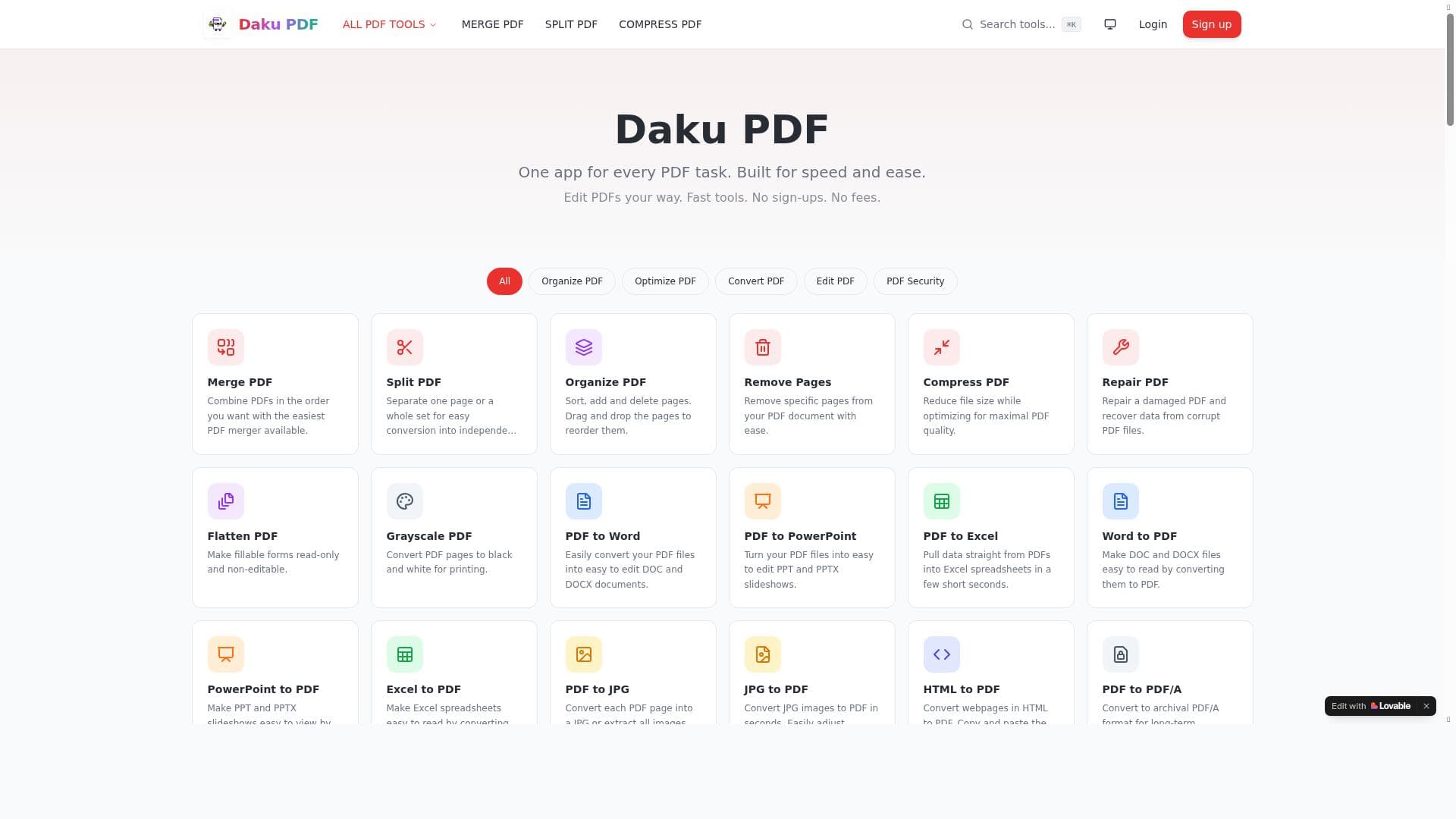


PDFDaaku is a comprehensive online PDF toolkit that streamlines document management by offering fast, reliable tools for merging, splitting, compressing, and converting PDFs. Ideal for students, professionals, and small businesses, it delivers essential PDF functions without the complexity of traditional software, all accessible through a user-friendly web platform.

描述
Effortlessly master your digital documents with PDFDaaku, the comprehensive online toolkit designed to solve all your PDF challenges. In an era where digital paperwork is essential, PDFDaaku provides a fast, reliable, and accessible solution for users who need to manage files without the complexity of advanced software. This platform serves as a one-stop destination for all essential PDF operations—allowing you to Merge distinct files into one, Split large documents into manageable pages, Compress file sizes for easy sharing, and Convert various formats like Word, Excel, and JPG into polished PDFs.
详细描述
PDFDaaku is a versatile online platform designed to simplify the management of digital documents, specifically PDFs. Its core purpose is to provide users with an all-in-one solution for handling common PDF-related tasks without the need for complex or expensive software installations. In today’s digital age, where paperwork and document sharing are predominantly conducted electronically, PDFDaaku addresses the growing demand for accessible, fast, and reliable PDF tools. Whether you need to merge multiple files into a single document, split large PDFs into smaller sections, compress files to reduce size for easier sharing, or convert documents from various formats such as Word, Excel, and JPG into professional-quality PDFs, PDFDaaku offers these capabilities through an intuitive online interface. The platform’s key features include comprehensive PDF editing tools that allow users to modify content within their documents, add annotations, or rearrange pages. Its compression feature efficiently reduces file sizes without significant loss of quality, making it ideal for users who need to send documents via email or upload them to websites with size restrictions. PDFDaaku also supports a wide range of file conversions, enabling seamless transformation between popular formats and PDFs, which is essential for maintaining document consistency across different platforms and devices. Additionally, the tool facilitates easy sharing of PDFs, streamlining collaboration and distribution. One of the standout attributes of PDFDaaku is its fast and reliable performance, ensuring that users can complete their tasks quickly without frustrating delays. PDFDaaku is best suited for a broad audience including students, professionals, small business owners, and anyone who frequently works with digital documents. For students, it offers a convenient way to compile research papers or split lengthy textbooks into manageable sections. Professionals benefit from its ability to compress and convert files for presentations, reports, or client communications. Small businesses can leverage its merging and sharing features to streamline document workflows without investing in costly software. Its user-friendly design makes it accessible even to those with limited technical expertise, providing a practical solution for everyday PDF challenges. The platform operates on a freemium pricing model, allowing users to access essential features for free with the option to upgrade for additional capabilities or higher usage limits. This approach makes PDFDaaku accessible to casual users while offering scalability for those with more demanding needs. Compared to traditional desktop PDF software, PDFDaaku eliminates the need for downloads and installations, offering instant access from any device with internet connectivity. While some advanced PDF editors may provide more specialized features, PDFDaaku’s strength lies in its simplicity, speed, and comprehensive coverage of fundamental PDF tasks. However, users should consider that as a web-based tool, PDFDaaku requires an active internet connection to function, which may be a limitation in offline scenarios. Additionally, while it covers a broad range of PDF operations, it may not support highly specialized editing or security features found in premium desktop applications. Despite these considerations, PDFDaaku remains a valuable resource for users seeking an efficient, all-encompassing online PDF toolkit that balances functionality with ease of use.
工具功能
- PDF editing
- PDF compression
- PDF conversion
- PDF sharing
- Fast and reliable performance
描述
PDFDaaku is a comprehensive online PDF toolkit that streamlines document management by offering fast, reliable tools for merging, splitting, compressing, and converting PDFs. Ideal for students, professionals, and small businesses, it delivers essential PDF functions without the complexity of traditional software, all accessible through a user-friendly web platform.
Effortlessly master your digital documents with PDFDaaku, the comprehensive online toolkit designed to solve all your PDF challenges. In an era where digital paperwork is essential, PDFDaaku provides a fast, reliable, and accessible solution for users who need to manage files without the complexity of advanced software. This platform serves as a one-stop destination for all essential PDF operations—allowing you to Merge distinct files into one, Split large documents into manageable pages, Compress file sizes for easy sharing, and Convert various formats like Word, Excel, and JPG into polished PDFs.
详细描述
PDFDaaku is a versatile online platform designed to simplify the management of digital documents, specifically PDFs. Its core purpose is to provide users with an all-in-one solution for handling common PDF-related tasks without the need for complex or expensive software installations. In today’s digital age, where paperwork and document sharing are predominantly conducted electronically, PDFDaaku addresses the growing demand for accessible, fast, and reliable PDF tools. Whether you need to merge multiple files into a single document, split large PDFs into smaller sections, compress files to reduce size for easier sharing, or convert documents from various formats such as Word, Excel, and JPG into professional-quality PDFs, PDFDaaku offers these capabilities through an intuitive online interface. The platform’s key features include comprehensive PDF editing tools that allow users to modify content within their documents, add annotations, or rearrange pages. Its compression feature efficiently reduces file sizes without significant loss of quality, making it ideal for users who need to send documents via email or upload them to websites with size restrictions. PDFDaaku also supports a wide range of file conversions, enabling seamless transformation between popular formats and PDFs, which is essential for maintaining document consistency across different platforms and devices. Additionally, the tool facilitates easy sharing of PDFs, streamlining collaboration and distribution. One of the standout attributes of PDFDaaku is its fast and reliable performance, ensuring that users can complete their tasks quickly without frustrating delays. PDFDaaku is best suited for a broad audience including students, professionals, small business owners, and anyone who frequently works with digital documents. For students, it offers a convenient way to compile research papers or split lengthy textbooks into manageable sections. Professionals benefit from its ability to compress and convert files for presentations, reports, or client communications. Small businesses can leverage its merging and sharing features to streamline document workflows without investing in costly software. Its user-friendly design makes it accessible even to those with limited technical expertise, providing a practical solution for everyday PDF challenges. The platform operates on a freemium pricing model, allowing users to access essential features for free with the option to upgrade for additional capabilities or higher usage limits. This approach makes PDFDaaku accessible to casual users while offering scalability for those with more demanding needs. Compared to traditional desktop PDF software, PDFDaaku eliminates the need for downloads and installations, offering instant access from any device with internet connectivity. While some advanced PDF editors may provide more specialized features, PDFDaaku’s strength lies in its simplicity, speed, and comprehensive coverage of fundamental PDF tasks. However, users should consider that as a web-based tool, PDFDaaku requires an active internet connection to function, which may be a limitation in offline scenarios. Additionally, while it covers a broad range of PDF operations, it may not support highly specialized editing or security features found in premium desktop applications. Despite these considerations, PDFDaaku remains a valuable resource for users seeking an efficient, all-encompassing online PDF toolkit that balances functionality with ease of use.
常见问题
What is Pdf daku?
Pdf daku is an online PDF toolkit designed to help users easily manage their digital documents by providing tools to merge, split, compress, convert, and share PDF files quickly and reliably.
How much does Pdf daku cost?
Pdf daku operates on a freemium model, offering basic features for free with optional paid plans that unlock additional capabilities and higher usage limits.
Who is Pdf daku best for?
Pdf daku is ideal for students, professionals, small business owners, and anyone who regularly works with PDFs and needs a simple, efficient way to manage their documents online.
What are the main features of Pdf daku?
The main features include PDF editing, compression to reduce file size, conversion between formats like Word, Excel, and JPG to PDF, merging multiple files, splitting large documents, and easy sharing options.
Does Pdf daku offer a free trial?
Pdf daku offers free access to its basic features without the need for a trial, allowing users to utilize essential tools at no cost before deciding to upgrade.
What integrations does Pdf daku support?
Pdf daku primarily functions as a standalone online platform and does not currently advertise integrations with third-party applications or services.
How does Pdf daku work?
Pdf daku works through a web-based interface where users upload their documents, select the desired PDF operation such as merge or convert, and then download the processed file, all without needing to install software.
评价
暂无评价。成为第一个分享使用体验的人。




















































