🚀 Zaprep: Your Socials on Steroids. 免费开始 — 每月自动发送 1,000 条私信,将互动转化为潜在客户。 ,每月 1,000 条自动私信。


这是您的 AI 工具吗?立即认领。
验证所有权、管理资料,并解锁增长功能。
MiniMax Hub is a powerful desktop AI creative workstation that enables users to create and edit images, videos, audio, and text simultaneously through multi-agent AI workflows. Ideal for multimedia creators and digital marketers, it simplifies complex production processes with natural language automation and reusable AI Skills—all available free to download.

描述
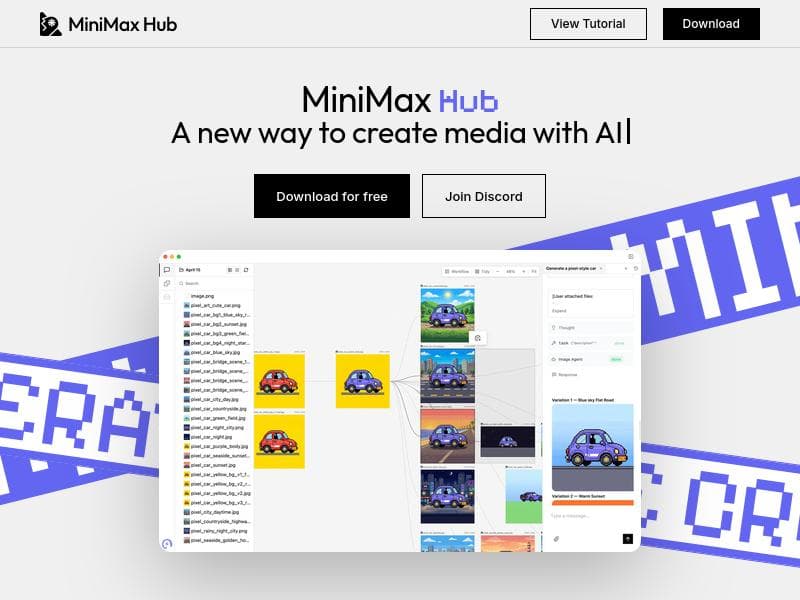
MiniMax Hub is a desktop AI creative workstation that combines an AI agent, multimodal generation, visual canvas, workflow view, and reusable Skills. It can create and edit images, videos, audio, and text, work with local files, and automate creative workflows from natural language.
详细描述
MiniMax Hub is an innovative desktop AI creative workstation designed to streamline and enhance multimedia content creation through advanced artificial intelligence technologies. At its core, MiniMax Hub integrates an AI agent with multimodal generation capabilities, enabling users to create and edit a wide range of media types including images, videos, audio, and text—all within a single unified platform. This comprehensive approach allows creators to handle complex multimedia projects efficiently without needing to switch between multiple specialized tools. The platform also supports working with local files and automates creative workflows using natural language commands, making it highly accessible and intuitive for users of varying technical expertise. One of the standout features of MiniMax Hub is its multi-agent AI workflow system. This means that multiple AI agents operate in parallel to handle different aspects of the creative process simultaneously, such as generating video content while editing audio and crafting text copy. This parallel processing capability significantly reduces production time and simplifies the management of multifaceted projects. The visual canvas and workflow view provide users with a clear, interactive interface to organize and visualize their creative tasks and assets, enhancing productivity and creative control. Additionally, MiniMax Hub includes reusable Skills—predefined AI-powered modules or actions that can be applied repeatedly across projects to automate routine tasks and maintain consistency. MiniMax Hub is particularly well-suited for creative professionals, digital marketers, content creators, and multimedia producers who require a versatile and powerful tool to manage diverse content formats in one place. For example, video editors can simultaneously generate background music and voiceovers while refining video clips, while graphic designers can create images and accompanying text content seamlessly. Its ability to automate workflows from natural language input also makes it accessible to users who may not have extensive technical skills but need to produce high-quality multimedia content quickly and efficiently. In terms of pricing, MiniMax Hub is free to download and use, which lowers the barrier to entry for individuals and small teams looking to experiment with AI-driven multimedia creation. This free access makes it an attractive option compared to other AI creative tools that often require subscription fees or usage-based payments. While the platform currently offers a robust set of features at no cost, users should keep an eye on future updates or premium offerings that may introduce additional capabilities or enterprise-level support. Compared to alternative AI creative tools, MiniMax Hub stands out due to its desktop-based environment that supports multimodal content creation in parallel, rather than focusing on a single media type or operating solely as a cloud service. This local workspace approach can offer faster processing speeds and greater control over files, which is beneficial for users concerned about privacy or internet dependency. However, some competing platforms may provide more extensive integrations with third-party services or cloud collaboration features, which MiniMax Hub may lack at this stage. Notable considerations include the learning curve associated with mastering the multi-agent workflow system and effectively leveraging reusable Skills for automation. While the natural language interface simplifies many tasks, users may need time to explore the full potential of the platform’s capabilities. Additionally, as a free tool, support options might be limited compared to paid solutions, so users should be prepared to rely on community resources or self-guided learning. Overall, MiniMax Hub offers a powerful, flexible, and cost-effective solution for multimedia creators seeking to harness AI to accelerate and enrich their creative workflows.
工具功能
- Desktop workspace for multimedia creation
- Powered by multi-agent AI workflows
- Supports parallel creation of video, image, audio, and copy
- Simplifies complex multimedia production
- Free to download
描述
MiniMax Hub is a powerful desktop AI creative workstation that enables users to create and edit images, videos, audio, and text simultaneously through multi-agent AI workflows. Ideal for multimedia creators and digital marketers, it simplifies complex production processes with natural language automation and reusable AI Skills—all available free to download.
MiniMax Hub is a desktop AI creative workstation that combines an AI agent, multimodal generation, visual canvas, workflow view, and reusable Skills. It can create and edit images, videos, audio, and text, work with local files, and automate creative workflows from natural language.
详细描述
MiniMax Hub is an innovative desktop AI creative workstation designed to streamline and enhance multimedia content creation through advanced artificial intelligence technologies. At its core, MiniMax Hub integrates an AI agent with multimodal generation capabilities, enabling users to create and edit a wide range of media types including images, videos, audio, and text—all within a single unified platform. This comprehensive approach allows creators to handle complex multimedia projects efficiently without needing to switch between multiple specialized tools. The platform also supports working with local files and automates creative workflows using natural language commands, making it highly accessible and intuitive for users of varying technical expertise. One of the standout features of MiniMax Hub is its multi-agent AI workflow system. This means that multiple AI agents operate in parallel to handle different aspects of the creative process simultaneously, such as generating video content while editing audio and crafting text copy. This parallel processing capability significantly reduces production time and simplifies the management of multifaceted projects. The visual canvas and workflow view provide users with a clear, interactive interface to organize and visualize their creative tasks and assets, enhancing productivity and creative control. Additionally, MiniMax Hub includes reusable Skills—predefined AI-powered modules or actions that can be applied repeatedly across projects to automate routine tasks and maintain consistency. MiniMax Hub is particularly well-suited for creative professionals, digital marketers, content creators, and multimedia producers who require a versatile and powerful tool to manage diverse content formats in one place. For example, video editors can simultaneously generate background music and voiceovers while refining video clips, while graphic designers can create images and accompanying text content seamlessly. Its ability to automate workflows from natural language input also makes it accessible to users who may not have extensive technical skills but need to produce high-quality multimedia content quickly and efficiently. In terms of pricing, MiniMax Hub is free to download and use, which lowers the barrier to entry for individuals and small teams looking to experiment with AI-driven multimedia creation. This free access makes it an attractive option compared to other AI creative tools that often require subscription fees or usage-based payments. While the platform currently offers a robust set of features at no cost, users should keep an eye on future updates or premium offerings that may introduce additional capabilities or enterprise-level support. Compared to alternative AI creative tools, MiniMax Hub stands out due to its desktop-based environment that supports multimodal content creation in parallel, rather than focusing on a single media type or operating solely as a cloud service. This local workspace approach can offer faster processing speeds and greater control over files, which is beneficial for users concerned about privacy or internet dependency. However, some competing platforms may provide more extensive integrations with third-party services or cloud collaboration features, which MiniMax Hub may lack at this stage. Notable considerations include the learning curve associated with mastering the multi-agent workflow system and effectively leveraging reusable Skills for automation. While the natural language interface simplifies many tasks, users may need time to explore the full potential of the platform’s capabilities. Additionally, as a free tool, support options might be limited compared to paid solutions, so users should be prepared to rely on community resources or self-guided learning. Overall, MiniMax Hub offers a powerful, flexible, and cost-effective solution for multimedia creators seeking to harness AI to accelerate and enrich their creative workflows.
常见问题
What is MiniMax Hub?
MiniMax Hub is a desktop AI creative workstation that combines an AI agent, multimodal generation, a visual canvas, workflow view, and reusable Skills to create and edit images, videos, audio, and text, while automating creative workflows from natural language.
How much does MiniMax Hub cost?
MiniMax Hub is free to download and use, providing access to its full range of multimedia creation features without any subscription or usage fees.
Who is MiniMax Hub best for?
MiniMax Hub is ideal for creative professionals, digital marketers, content creators, and multimedia producers who need a versatile tool to manage and automate complex multimedia projects efficiently.
What are the main features of MiniMax Hub?
Key features include a desktop workspace for multimedia creation, multi-agent AI workflows that enable parallel creation of video, image, audio, and copy, a visual canvas and workflow view for project management, reusable AI Skills for automation, and support for working with local files.
Does MiniMax Hub offer a free trial?
MiniMax Hub is completely free to download and use, so there is no need for a separate free trial.
What integrations does MiniMax Hub support?
MiniMax Hub primarily operates as a standalone desktop application with support for local file management. Specific third-party integrations are not detailed, but the platform focuses on AI-powered automation and multimodal content creation within its environment.
How does MiniMax Hub work?
MiniMax Hub uses multi-agent AI workflows to simultaneously generate and edit various media types. Users interact with the platform through a visual canvas and workflow view, leveraging reusable Skills and natural language commands to automate and streamline complex multimedia production tasks.
社交媒体
使用工具评价
暂无评价。成为第一个分享使用体验的人。
赞助工具











































推荐工具
及时了解最新 AI 工具
获取最新资讯,订阅我们的新闻通讯
已有 50,000+ 位读者阅读并信赖
加入最大的 AI 社区
我们的社区和团队随时为您提供帮助!
您的反馈将帮助 Alice AI 在未来版本中不断改进。









