

这是您的 AI 工具吗?立即认领。
验证所有权、管理资料,并解锁增长功能。
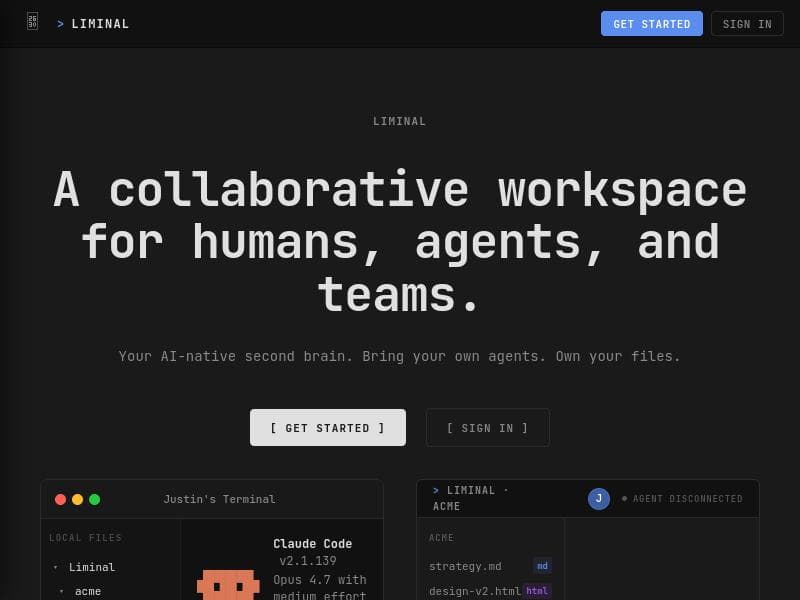
Liminal offers a sleek, flexible sidebar workspace designed to boost productivity by simplifying file and project management with intuitive controls and visual cues. Ideal for professionals managing complex workflows, it combines responsive design with user-friendly navigation to keep projects organized and accessible across devices.

描述
Your agent writes files locally in markdown and HTML, the formats it already speaks. Liminal renders them as clean UI instantly and syncs to your team in real time. Share a link and everyone sees the same live workspace, editable in the browser. No sending markdown over Slack, no hosting your own HTML, no waiting on Google Drive. No MCP calls, no proprietary formats, no wasted tokens. Over time, it becomes a shared second brain for your team and every agent working with you.
详细描述
Liminal is a sophisticated workspace management tool designed to streamline and enhance the way users organize, access, and manage their projects and files. At its core, Liminal provides a flexible sidebar navigation system that integrates workspace, folder, and file management into a single, cohesive interface. This design allows users to maintain a clear overview of their work environment while facilitating quick navigation and efficient file handling. The tool is built to support complex projects and workflows, making it an ideal solution for professionals who require both structure and flexibility in their digital workspace. One of the standout features of Liminal is its flexible sidebar navigation. This sidebar is not only customizable but also responsive, adapting seamlessly to different screen sizes and devices. Users can easily switch between workspaces, expand or collapse folders, and access individual files with intuitive controls. Visual cues such as badges and color-coded indicators provide immediate information about file types and statuses, enhancing user awareness and reducing the time spent searching for specific documents. The interface supports both keyboard and mouse interactions, catering to a wide range of user preferences and improving overall productivity. Liminal’s user-friendly interface is designed with attention to detail, ensuring that even complex project structures remain manageable. The sidebar includes hover effects and subtle animations that improve usability without overwhelming the user. For example, file rows highlight on hover, revealing additional options like more actions or file badges, which help users quickly identify file formats such as HTML or Markdown. This level of interactivity makes file management more engaging and less cumbersome. The tool is particularly well-suited for teams and individuals working on multifaceted projects that involve numerous files and folders. Creative professionals, developers, project managers, and knowledge workers can all benefit from Liminal’s organizational capabilities. It supports workflows that require frequent switching between different project components, enabling users to maintain focus and reduce context switching. Moreover, its responsive design ensures that users can stay productive whether they are working on a desktop, laptop, or tablet. Regarding pricing, Liminal offers a straightforward approach with options to get started quickly via their website. While specific pricing tiers are not detailed in the available information, the presence of signup and login options suggests a freemium or subscription-based model. Interested users can visit the official site to explore current plans and any available trials or demos. When compared to alternatives, Liminal stands out due to its combination of a clean, minimalistic interface and powerful organizational features. Unlike some workspace tools that focus solely on file storage or collaboration, Liminal emphasizes ease of navigation and visual clarity, which helps reduce cognitive load. However, it may not yet offer extensive integrations with third-party apps or advanced collaboration features found in some competitors, which could be a consideration for teams requiring those capabilities. Potential limitations include the lack of detailed public information on integrations and pricing, which may require users to explore the platform firsthand to assess fit. Additionally, users heavily reliant on cloud storage synchronization or real-time collaboration might find Liminal’s current feature set more focused on individual productivity and project organization rather than team communication. In summary, Liminal is a powerful, visually intuitive workspace management tool that caters to users needing an efficient way to organize and access complex project files. Its flexible sidebar navigation, visual cues, and responsive design make it a compelling choice for professionals who value streamlined workflows and clarity in their digital work environment.
工具功能
- Flexible sidebar navigation with workspace, folder, and file management
- Visual cues and badges for file types and statuses
- Intuitive controls for quick access and management of files
- Responsive design supporting different screen sizes
- User-friendly interface with keyboard and mouse interaction support
描述
Liminal offers a sleek, flexible sidebar workspace designed to boost productivity by simplifying file and project management with intuitive controls and visual cues. Ideal for professionals managing complex workflows, it combines responsive design with user-friendly navigation to keep projects organized and accessible across devices.
Your agent writes files locally in markdown and HTML, the formats it already speaks. Liminal renders them as clean UI instantly and syncs to your team in real time. Share a link and everyone sees the same live workspace, editable in the browser. No sending markdown over Slack, no hosting your own HTML, no waiting on Google Drive. No MCP calls, no proprietary formats, no wasted tokens. Over time, it becomes a shared second brain for your team and every agent working with you.
详细描述
Liminal is a sophisticated workspace management tool designed to streamline and enhance the way users organize, access, and manage their projects and files. At its core, Liminal provides a flexible sidebar navigation system that integrates workspace, folder, and file management into a single, cohesive interface. This design allows users to maintain a clear overview of their work environment while facilitating quick navigation and efficient file handling. The tool is built to support complex projects and workflows, making it an ideal solution for professionals who require both structure and flexibility in their digital workspace. One of the standout features of Liminal is its flexible sidebar navigation. This sidebar is not only customizable but also responsive, adapting seamlessly to different screen sizes and devices. Users can easily switch between workspaces, expand or collapse folders, and access individual files with intuitive controls. Visual cues such as badges and color-coded indicators provide immediate information about file types and statuses, enhancing user awareness and reducing the time spent searching for specific documents. The interface supports both keyboard and mouse interactions, catering to a wide range of user preferences and improving overall productivity. Liminal’s user-friendly interface is designed with attention to detail, ensuring that even complex project structures remain manageable. The sidebar includes hover effects and subtle animations that improve usability without overwhelming the user. For example, file rows highlight on hover, revealing additional options like more actions or file badges, which help users quickly identify file formats such as HTML or Markdown. This level of interactivity makes file management more engaging and less cumbersome. The tool is particularly well-suited for teams and individuals working on multifaceted projects that involve numerous files and folders. Creative professionals, developers, project managers, and knowledge workers can all benefit from Liminal’s organizational capabilities. It supports workflows that require frequent switching between different project components, enabling users to maintain focus and reduce context switching. Moreover, its responsive design ensures that users can stay productive whether they are working on a desktop, laptop, or tablet. Regarding pricing, Liminal offers a straightforward approach with options to get started quickly via their website. While specific pricing tiers are not detailed in the available information, the presence of signup and login options suggests a freemium or subscription-based model. Interested users can visit the official site to explore current plans and any available trials or demos. When compared to alternatives, Liminal stands out due to its combination of a clean, minimalistic interface and powerful organizational features. Unlike some workspace tools that focus solely on file storage or collaboration, Liminal emphasizes ease of navigation and visual clarity, which helps reduce cognitive load. However, it may not yet offer extensive integrations with third-party apps or advanced collaboration features found in some competitors, which could be a consideration for teams requiring those capabilities. Potential limitations include the lack of detailed public information on integrations and pricing, which may require users to explore the platform firsthand to assess fit. Additionally, users heavily reliant on cloud storage synchronization or real-time collaboration might find Liminal’s current feature set more focused on individual productivity and project organization rather than team communication. In summary, Liminal is a powerful, visually intuitive workspace management tool that caters to users needing an efficient way to organize and access complex project files. Its flexible sidebar navigation, visual cues, and responsive design make it a compelling choice for professionals who value streamlined workflows and clarity in their digital work environment.
常见问题
What is Liminal?
Liminal is a workspace management tool that provides a streamlined interface for organizing, navigating, and managing workspaces, folders, and files through a flexible sidebar navigation system.
How much does Liminal cost?
Specific pricing details are not publicly listed, but Liminal offers signup and login options on its website, suggesting a freemium or subscription-based pricing model. Users should visit the official site for the most current pricing information.
Who is Liminal best for?
Liminal is best suited for professionals such as developers, creative workers, project managers, and knowledge workers who manage complex projects and require efficient file organization and quick access to multiple workspaces.
What are the main features of Liminal?
Key features include a flexible sidebar navigation system for managing workspaces, folders, and files; visual badges indicating file types and statuses; intuitive keyboard and mouse controls; responsive design for various screen sizes; and a user-friendly interface with interactive elements.
Does Liminal offer a free trial?
While the exact details about a free trial are not specified, the website provides options to get started, which may include free access or trial periods. Prospective users should check the official website for current offers.
What integrations does Liminal support?
There is no detailed public information about third-party integrations at this time. Liminal primarily focuses on workspace and file management within its own interface.
How does Liminal work?
Liminal works by providing a sidebar-based navigation system that lets users organize multiple workspaces, folders, and files in a visually intuitive way. Users can quickly access and manage their projects with visual cues, badges, and interactive controls optimized for both keyboard and mouse use.
评价
暂无评价。成为第一个分享使用体验的人。