🚀 Zaprep: Your Socials on Steroids. 免费开始 — 每月自动发送 1,000 条私信,将互动转化为潜在客户。 ,每月 1,000 条自动私信。


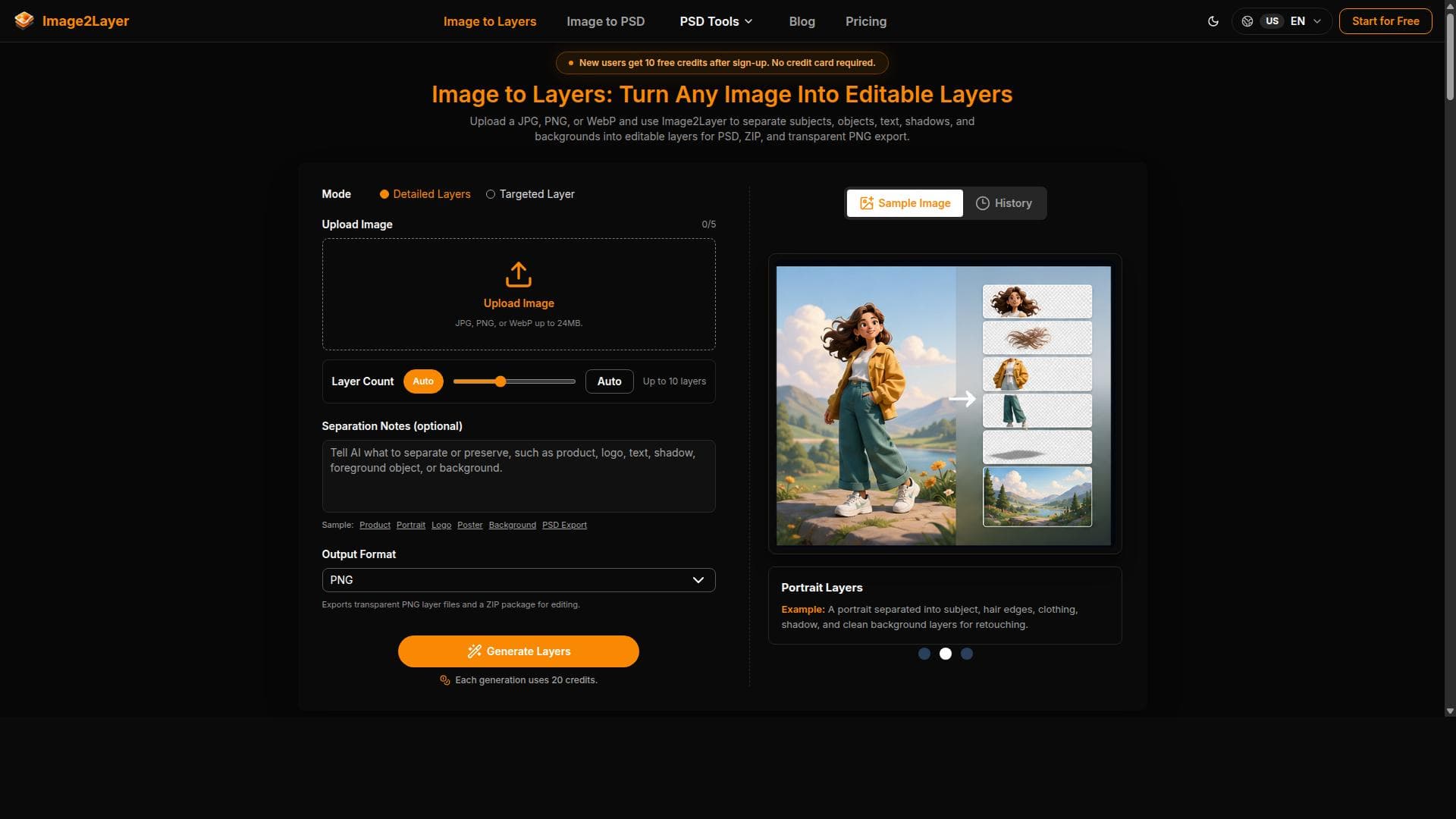



Image2Layer leverages AI to effortlessly convert flat images into editable layers, enabling detailed editing and background reconstruction. Ideal for designers, artists, and photographers, it supports exporting layers as PNGs, ZIPs, or PSDs, streamlining complex image manipulation workflows.
描述
Image2Layer is an AI-powered tool that converts flat images into editable layers, enabling users to separate image components for detailed editing. It supports exporting these layers as PNG files, ZIP packages, or layered PSD files, facilitating advanced image manipulation and background reconstruction.
详细描述
Image2Layer is an advanced AI-powered tool designed to transform flat, single-layer images into fully editable multi-layer files. Its core purpose is to enable users to separate distinct components within an image into individual layers, facilitating detailed and precise editing workflows that are typically challenging with standard flat images. By leveraging artificial intelligence, Image2Layer automates the complex process of layer separation, saving users significant time and effort compared to manual layer extraction methods. The tool’s key features include AI-driven image to layers separation, which intelligently identifies and isolates different elements within an image. This capability allows for granular control over each component, such as characters, objects, or backgrounds, making it ideal for detailed graphic design, digital art, and photo editing projects. Image2Layer supports exporting these separated layers in multiple formats: individual PNG files for each layer, ZIP packages containing all layers, and layered PSD files compatible with Adobe Photoshop and other professional editing software. This flexibility ensures seamless integration into existing workflows and software ecosystems. Additionally, Image2Layer offers background reconstruction, a feature that intelligently fills in or reconstructs the background once foreground elements are separated, enabling users to modify or replace backgrounds without disrupting the overall image integrity. Image2Layer is best suited for graphic designers, digital artists, photographers, and marketing professionals who require detailed image manipulation capabilities. It is particularly valuable for those working on complex compositions, character art, product photography, or any project where separating image elements into layers can enhance creativity and precision. For example, designers can isolate product images from backgrounds for e-commerce catalogs, artists can separate character layers for animation or retouching, and photographers can reconstruct backgrounds for enhanced visual storytelling. Regarding pricing, Image2Layer offers various plans tailored to different user needs, including options for individual users and professional teams. While specific pricing details are available on their website, the tool typically provides tiered subscriptions based on usage volume, export options, and access to advanced features like PSD export and background reconstruction. Some plans may include free trials or limited free usage to allow users to evaluate the tool before committing. Compared to alternatives, Image2Layer stands out due to its AI-driven automation and multi-format export capabilities. Many traditional tools require manual masking and layering, which is time-consuming and requires advanced skills. Image2Layer’s AI technology accelerates this process and delivers high-quality layered outputs compatible with industry-standard formats. While some competitors may offer similar features, Image2Layer’s combination of ease of use, export flexibility, and background reconstruction provides a comprehensive solution for layered image editing. Notable limitations include the potential for imperfect layer separation depending on image complexity, lighting, and color blending. Highly intricate images with overlapping elements or subtle gradients may require manual refinement post-export. Additionally, users should consider the learning curve associated with integrating layered PSD files into their existing editing workflows if unfamiliar with layered image editing software. Finally, as an AI-powered tool, its performance and accuracy may vary based on ongoing updates and improvements to the underlying algorithms. Overall, Image2Layer is a powerful and innovative tool that significantly streamlines the process of converting flat images into editable layers, empowering creative professionals to achieve more detailed and flexible image manipulations with less effort.
工具功能
- AI image to layers separation
- Export PNG layers
- Export ZIP packages
- Export layered PSD files
- Background reconstruction
描述
Image2Layer leverages AI to effortlessly convert flat images into editable layers, enabling detailed editing and background reconstruction. Ideal for designers, artists, and photographers, it supports exporting layers as PNGs, ZIPs, or PSDs, streamlining complex image manipulation workflows.
Image2Layer is an AI-powered tool that converts flat images into editable layers, enabling users to separate image components for detailed editing. It supports exporting these layers as PNG files, ZIP packages, or layered PSD files, facilitating advanced image manipulation and background reconstruction.
详细描述
Image2Layer is an advanced AI-powered tool designed to transform flat, single-layer images into fully editable multi-layer files. Its core purpose is to enable users to separate distinct components within an image into individual layers, facilitating detailed and precise editing workflows that are typically challenging with standard flat images. By leveraging artificial intelligence, Image2Layer automates the complex process of layer separation, saving users significant time and effort compared to manual layer extraction methods. The tool’s key features include AI-driven image to layers separation, which intelligently identifies and isolates different elements within an image. This capability allows for granular control over each component, such as characters, objects, or backgrounds, making it ideal for detailed graphic design, digital art, and photo editing projects. Image2Layer supports exporting these separated layers in multiple formats: individual PNG files for each layer, ZIP packages containing all layers, and layered PSD files compatible with Adobe Photoshop and other professional editing software. This flexibility ensures seamless integration into existing workflows and software ecosystems. Additionally, Image2Layer offers background reconstruction, a feature that intelligently fills in or reconstructs the background once foreground elements are separated, enabling users to modify or replace backgrounds without disrupting the overall image integrity. Image2Layer is best suited for graphic designers, digital artists, photographers, and marketing professionals who require detailed image manipulation capabilities. It is particularly valuable for those working on complex compositions, character art, product photography, or any project where separating image elements into layers can enhance creativity and precision. For example, designers can isolate product images from backgrounds for e-commerce catalogs, artists can separate character layers for animation or retouching, and photographers can reconstruct backgrounds for enhanced visual storytelling. Regarding pricing, Image2Layer offers various plans tailored to different user needs, including options for individual users and professional teams. While specific pricing details are available on their website, the tool typically provides tiered subscriptions based on usage volume, export options, and access to advanced features like PSD export and background reconstruction. Some plans may include free trials or limited free usage to allow users to evaluate the tool before committing. Compared to alternatives, Image2Layer stands out due to its AI-driven automation and multi-format export capabilities. Many traditional tools require manual masking and layering, which is time-consuming and requires advanced skills. Image2Layer’s AI technology accelerates this process and delivers high-quality layered outputs compatible with industry-standard formats. While some competitors may offer similar features, Image2Layer’s combination of ease of use, export flexibility, and background reconstruction provides a comprehensive solution for layered image editing. Notable limitations include the potential for imperfect layer separation depending on image complexity, lighting, and color blending. Highly intricate images with overlapping elements or subtle gradients may require manual refinement post-export. Additionally, users should consider the learning curve associated with integrating layered PSD files into their existing editing workflows if unfamiliar with layered image editing software. Finally, as an AI-powered tool, its performance and accuracy may vary based on ongoing updates and improvements to the underlying algorithms. Overall, Image2Layer is a powerful and innovative tool that significantly streamlines the process of converting flat images into editable layers, empowering creative professionals to achieve more detailed and flexible image manipulations with less effort.
常见问题
What is Image2Layer?
Image2Layer is an AI-powered tool that converts flat images into editable layers, allowing users to separate different components of an image for detailed editing and manipulation.
How much does Image2Layer cost?
Image2Layer offers tiered pricing plans based on usage and features, including options for individuals and professionals. Detailed pricing information is available on their website.
Who is Image2Layer best for?
It is best suited for graphic designers, digital artists, photographers, and marketing professionals who need to separate image elements into layers for advanced editing and creative projects.
What are the main features of Image2Layer?
Key features include AI-driven image to layers separation, exporting layers as PNG files, ZIP packages, or layered PSD files, and background reconstruction to fill in backgrounds after separating foreground elements.
Does Image2Layer offer a free trial?
Image2Layer typically offers free trials or limited free usage options to allow users to test the tool before purchasing, though specific details should be checked on their website.
What integrations does Image2Layer support?
Image2Layer exports layered PSD files compatible with Adobe Photoshop and other professional image editing software, enabling easy integration into existing creative workflows.
How does Image2Layer work?
Image2Layer uses AI algorithms to analyze flat images, identify distinct components, and separate them into editable layers, which can then be exported in various formats for further editing.
评价
暂无评价。成为第一个分享使用体验的人。
赞助工具











































推荐工具
及时了解最新 AI 工具
获取最新资讯,订阅我们的新闻通讯
已有 50,000+ 位读者阅读并信赖
加入最大的 AI 社区
我们的社区和团队随时为您提供帮助!
您的反馈将帮助 Alice AI 在未来版本中不断改进。









