🚀 Zaprep: Your Socials on Steroids. 免费开始 — 每月自动发送 1,000 条私信,将互动转化为潜在客户。 ,每月 1,000 条自动私信。

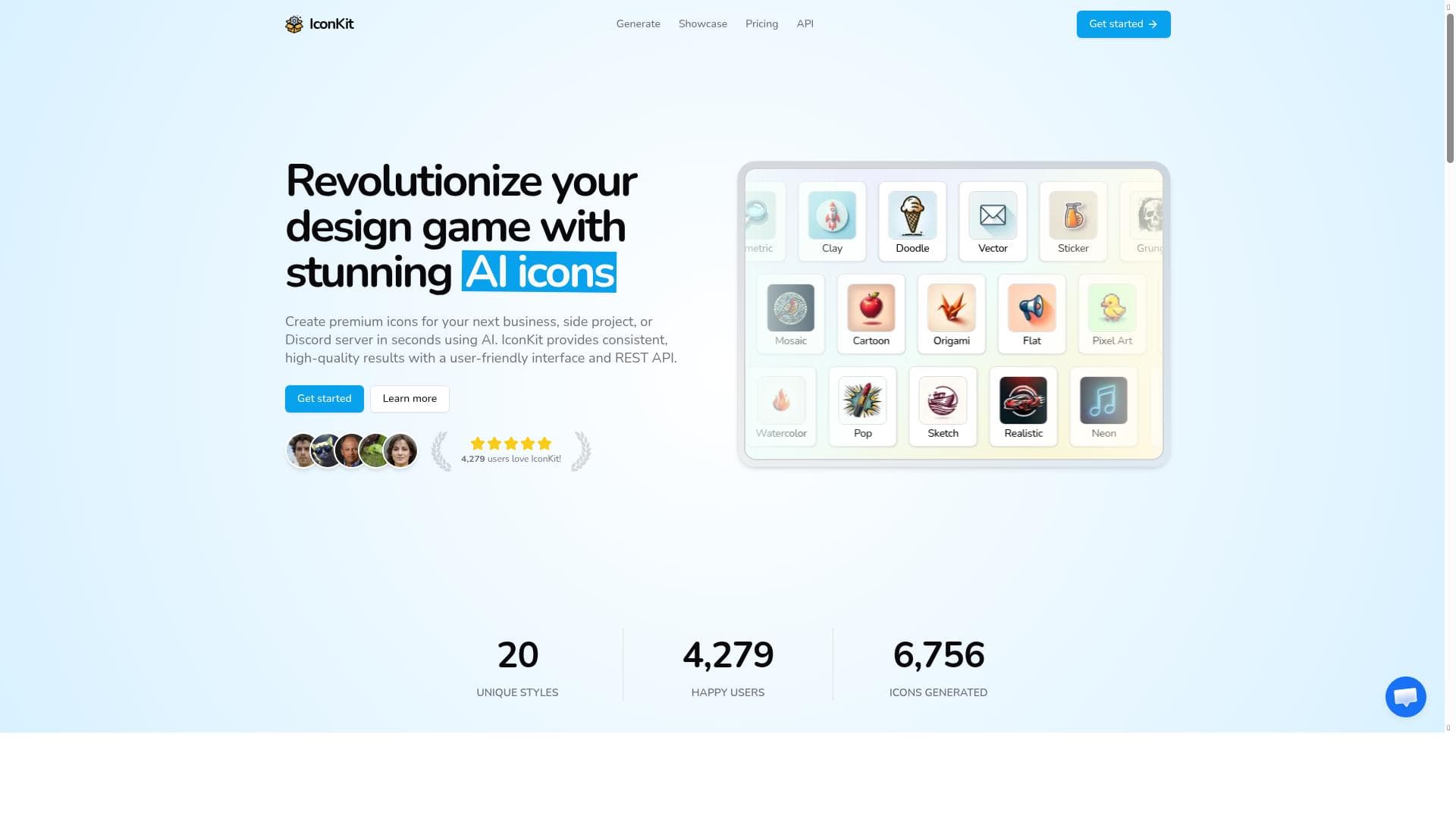


IconKit is a fast, AI-driven icon generator that creates unique, high-quality icons tailored for businesses, Discord servers, and side projects. Its intuitive interface and customizable options make it ideal for users seeking professional icons without the hassle of traditional design methods.

Views84
Impression179
Tool Pricingfreemium • 1 credit free then $9.99/100 credits
描述
IconKit is a high-quality AI icon generator that can craft unique icons for whatever you desire, whether that be your Discord server, business application, or next side project! Fine-tune colors and styles to create icons that perfectly align with your vision. Icons generated by IconKit are yours to keep and can be used for commercial purposes without any limitations.
详细描述
IconKit is an advanced AI-powered icon generator designed to help users create unique, high-quality icons tailored to their specific needs. Whether you are managing a Discord server, developing a business application, or working on a personal side project, IconKit offers a seamless solution to generate custom icons that perfectly match your vision. The core purpose of IconKit is to simplify and accelerate the icon creation process by leveraging artificial intelligence to produce visually appealing and professional-grade icons in seconds, eliminating the need for manual design skills or expensive graphic design software. One of the standout features of IconKit is its AI-powered icon generation engine, which intelligently crafts icons based on user inputs and preferences. Users can fine-tune various aspects such as colors, styles, and themes to ensure the final icon aligns precisely with their brand identity or project requirements. The platform supports rapid icon creation, allowing users to generate multiple icon options quickly and select the best fit without delays. IconKit emphasizes premium quality, delivering crisp, scalable icons suitable for a wide range of digital and print applications. Additionally, the user-friendly interface makes the tool accessible to both novices and experienced designers, streamlining the creative process with intuitive controls and straightforward customization options. IconKit is ideal for a diverse audience, including entrepreneurs, developers, content creators, and community managers. For businesses, it provides a cost-effective way to produce branded icons for apps, websites, and marketing materials without hiring professional designers. Discord server owners can create distinctive server icons that enhance their community’s identity and engagement. Side project creators and hobbyists benefit from the tool’s ease of use and speed, enabling them to focus on their projects without getting bogged down by graphic design challenges. The icons generated are royalty-free and come with commercial usage rights, making them suitable for any professional or personal project without legal concerns. The pricing model for IconKit follows a freemium approach, allowing users to access basic features and generate icons at no cost, which is perfect for casual users or those wanting to test the service. Premium plans unlock additional capabilities such as higher resolution exports, more customization options, and priority support. This tiered pricing ensures that IconKit remains accessible while providing advanced features for users with more demanding icon design needs. Compared to traditional icon design tools or hiring graphic designers, IconKit offers a faster, more affordable, and scalable alternative. Unlike generic icon libraries, IconKit’s AI-generated icons are unique and customizable, reducing the risk of repetitive or overused designs. While some competitors may offer AI-based icon generation, IconKit’s combination of speed, quality, and user control sets it apart. However, users should consider that AI-generated designs might occasionally require minor manual adjustments to perfectly fit highly specialized branding guidelines. In terms of limitations, IconKit currently focuses exclusively on icon creation, so users needing broader graphic design functionalities will need to complement it with other tools. Integration options are limited, so exporting icons and importing them into other platforms might require manual steps. Additionally, while the AI is powerful, the creative input from users is essential to guide the generation process effectively. Overall, IconKit is a robust, efficient, and user-friendly solution for anyone needing custom icons quickly and affordably, with commercial rights included, making it a valuable asset in the modern digital design toolkit.
工具功能
- AI-powered icon generation
- Create icons for business, side projects, or Discord servers
- Fast icon creation in seconds
- Premium quality icons
- User-friendly interface
描述
IconKit is a fast, AI-driven icon generator that creates unique, high-quality icons tailored for businesses, Discord servers, and side projects. Its intuitive interface and customizable options make it ideal for users seeking professional icons without the hassle of traditional design methods.
IconKit is a high-quality AI icon generator that can craft unique icons for whatever you desire, whether that be your Discord server, business application, or next side project! Fine-tune colors and styles to create icons that perfectly align with your vision. Icons generated by IconKit are yours to keep and can be used for commercial purposes without any limitations.
详细描述
IconKit is an advanced AI-powered icon generator designed to help users create unique, high-quality icons tailored to their specific needs. Whether you are managing a Discord server, developing a business application, or working on a personal side project, IconKit offers a seamless solution to generate custom icons that perfectly match your vision. The core purpose of IconKit is to simplify and accelerate the icon creation process by leveraging artificial intelligence to produce visually appealing and professional-grade icons in seconds, eliminating the need for manual design skills or expensive graphic design software. One of the standout features of IconKit is its AI-powered icon generation engine, which intelligently crafts icons based on user inputs and preferences. Users can fine-tune various aspects such as colors, styles, and themes to ensure the final icon aligns precisely with their brand identity or project requirements. The platform supports rapid icon creation, allowing users to generate multiple icon options quickly and select the best fit without delays. IconKit emphasizes premium quality, delivering crisp, scalable icons suitable for a wide range of digital and print applications. Additionally, the user-friendly interface makes the tool accessible to both novices and experienced designers, streamlining the creative process with intuitive controls and straightforward customization options. IconKit is ideal for a diverse audience, including entrepreneurs, developers, content creators, and community managers. For businesses, it provides a cost-effective way to produce branded icons for apps, websites, and marketing materials without hiring professional designers. Discord server owners can create distinctive server icons that enhance their community’s identity and engagement. Side project creators and hobbyists benefit from the tool’s ease of use and speed, enabling them to focus on their projects without getting bogged down by graphic design challenges. The icons generated are royalty-free and come with commercial usage rights, making them suitable for any professional or personal project without legal concerns. The pricing model for IconKit follows a freemium approach, allowing users to access basic features and generate icons at no cost, which is perfect for casual users or those wanting to test the service. Premium plans unlock additional capabilities such as higher resolution exports, more customization options, and priority support. This tiered pricing ensures that IconKit remains accessible while providing advanced features for users with more demanding icon design needs. Compared to traditional icon design tools or hiring graphic designers, IconKit offers a faster, more affordable, and scalable alternative. Unlike generic icon libraries, IconKit’s AI-generated icons are unique and customizable, reducing the risk of repetitive or overused designs. While some competitors may offer AI-based icon generation, IconKit’s combination of speed, quality, and user control sets it apart. However, users should consider that AI-generated designs might occasionally require minor manual adjustments to perfectly fit highly specialized branding guidelines. In terms of limitations, IconKit currently focuses exclusively on icon creation, so users needing broader graphic design functionalities will need to complement it with other tools. Integration options are limited, so exporting icons and importing them into other platforms might require manual steps. Additionally, while the AI is powerful, the creative input from users is essential to guide the generation process effectively. Overall, IconKit is a robust, efficient, and user-friendly solution for anyone needing custom icons quickly and affordably, with commercial rights included, making it a valuable asset in the modern digital design toolkit.
常见问题
What is IconKit?
IconKit is an AI-powered icon generator that creates unique, high-quality icons tailored to your specific needs, whether for business applications, Discord servers, or personal projects.
How much does IconKit cost?
IconKit offers a freemium pricing model, allowing free access to basic features with premium plans available for advanced customization, higher resolution exports, and priority support.
Who is IconKit best for?
IconKit is ideal for entrepreneurs, developers, content creators, Discord server owners, and anyone needing fast, customizable, and commercially usable icons without graphic design expertise.
What are the main features of IconKit?
Key features include AI-powered icon generation, fast creation in seconds, fine-tuning of colors and styles, premium quality icons, and a user-friendly interface.
Does IconKit offer a free trial?
Yes, IconKit’s freemium model allows users to try the basic icon generation features for free without a time-limited trial.
What integrations does IconKit support?
Currently, IconKit focuses on icon creation and does not offer direct integrations, but icons can be exported and used across various platforms and applications.
How does IconKit work?
IconKit uses AI algorithms to generate icons based on user inputs such as desired style and color preferences, producing unique, high-quality icons quickly and allowing further customization.
评价
暂无评价。成为第一个分享使用体验的人。
赞助工具











































推荐工具
及时了解最新 AI 工具
获取最新资讯,订阅我们的新闻通讯
已有 50,000+ 位读者阅读并信赖
加入最大的 AI 社区
我们的社区和团队随时为您提供帮助!
您的反馈将帮助 Alice AI 在未来版本中不断改进。









