Drifty - Context Aware AI Time Tracker


这是您的 AI 工具吗?立即认领。
验证所有权、管理资料,并解锁增长功能。
drifty is a macOS-exclusive AI-powered time tracker that intelligently distinguishes focused work from distractions by analyzing detailed session context inside each app. Perfect for professionals seeking deeper, privacy-conscious insights into their productivity without manual timers or intrusive screen recording.

描述
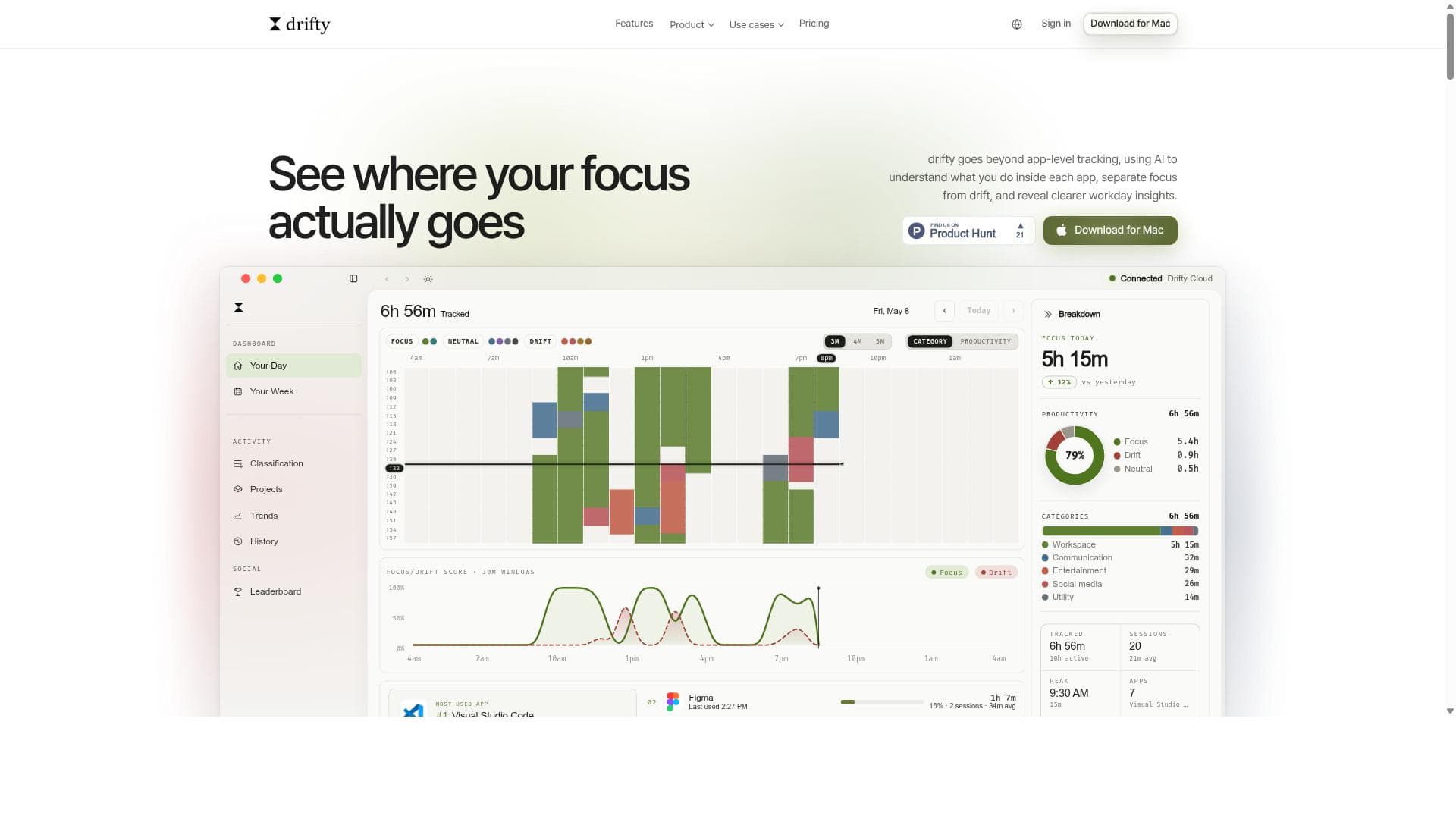
Drifty is an AI time tracker for Mac that shows where your workday actually goes. Automatically track your work with no timers or manual tracking. AI understands the context behind your activity, separates focus from distraction, visualizes your daily workflow, and helps you understand your attention patterns. Need a little help staying focused? Drifty detects sustained distractions and gently nudges you back to work. Runs locally for privacy, with the option to use the cloud when you want.
详细描述
drifty is an advanced AI-powered time tracking application designed exclusively for macOS users who want a deeper understanding of how they spend their workday. Unlike traditional time trackers that simply log app usage or require manual input, drifty leverages artificial intelligence to analyze user activity within each application, distinguishing between focused work and distractions. This nuanced approach allows users to gain clearer insights into their productivity patterns by considering session context such as the specific app, website, and window title. The core purpose of drifty is to provide an intelligent, unobtrusive way to track time that reflects actual work behavior rather than just surface-level app usage. One of drifty's standout features is its ability to run quietly in the background on your Mac, capturing detailed activity context without interrupting your workflow. It records not only which applications you use but also the site URLs and session titles, providing rich metadata for the AI to classify your work sessions accurately. This classification goes beyond mere app names by analyzing the context around each session to determine whether you are focused or drifting. The tool smartly separates focus time from drift time, helping users identify when they are truly productive versus when they are distracted or multitasking inefficiently. Privacy is a key consideration for drifty. It does not record your screen or save screenshots, focusing solely on activity context to respect user confidentiality and avoid intrusive surveillance. Users have flexibility in how the AI classification runs: it can be processed through drifty’s cloud service, locally on the Mac using a local AI model, or via the user’s own OpenRouter key. This choice allows users to balance convenience, privacy, and control according to their preferences. Additionally, drifty supports offline activity capture, storing data locally when there is no internet connection and syncing classifications once connectivity is restored. drifty is ideal for professionals, freelancers, knowledge workers, and teams who rely heavily on digital tools and want to optimize their time management with minimal manual effort. It is especially useful for those who struggle to differentiate between productive work and distractions within the same app, such as toggling between research and social media in a browser. Project managers and remote teams can also benefit from the clearer insights drifty provides into how time is spent across various tasks and sessions. While drifty’s website does not explicitly list pricing details, its advanced AI capabilities and cloud/local classification options suggest a tiered subscription model may be in place, possibly with a free trial or limited free tier to evaluate the service. Compared to alternatives like RescueTime or Toggl, drifty’s unique selling point is its AI-driven session context analysis that goes beyond app-level tracking, offering more granular and meaningful productivity insights without compromising privacy. Potential limitations include its macOS exclusivity, which restricts usage to Apple desktop users and excludes Windows or mobile platforms. Also, reliance on AI classification means some users may need to spend time training or adjusting settings to ensure accurate session categorization. Offline classification requires setting up a local AI model, which might be technically challenging for some users. Despite these considerations, drifty stands out as a sophisticated, privacy-conscious tool that delivers a more intelligent and insightful approach to time tracking for focused work and managing drift.
工具功能
- Runs quietly on your Mac recording app, site, and session context in the background
- Uses AI to classify work sessions by analyzing activity context, not just app names
- Separates focus time from drift to reveal clearer workday insights
- Does not record screen or save screenshots, focusing on activity context only
- Supports classification via drifty Cloud, local AI on Mac, or user’s own OpenRouter key
- Captures activity locally when offline and syncs classification when back online
描述
drifty is a macOS-exclusive AI-powered time tracker that intelligently distinguishes focused work from distractions by analyzing detailed session context inside each app. Perfect for professionals seeking deeper, privacy-conscious insights into their productivity without manual timers or intrusive screen recording.
Drifty is an AI time tracker for Mac that shows where your workday actually goes. Automatically track your work with no timers or manual tracking. AI understands the context behind your activity, separates focus from distraction, visualizes your daily workflow, and helps you understand your attention patterns. Need a little help staying focused? Drifty detects sustained distractions and gently nudges you back to work. Runs locally for privacy, with the option to use the cloud when you want.
详细描述
drifty is an advanced AI-powered time tracking application designed exclusively for macOS users who want a deeper understanding of how they spend their workday. Unlike traditional time trackers that simply log app usage or require manual input, drifty leverages artificial intelligence to analyze user activity within each application, distinguishing between focused work and distractions. This nuanced approach allows users to gain clearer insights into their productivity patterns by considering session context such as the specific app, website, and window title. The core purpose of drifty is to provide an intelligent, unobtrusive way to track time that reflects actual work behavior rather than just surface-level app usage. One of drifty's standout features is its ability to run quietly in the background on your Mac, capturing detailed activity context without interrupting your workflow. It records not only which applications you use but also the site URLs and session titles, providing rich metadata for the AI to classify your work sessions accurately. This classification goes beyond mere app names by analyzing the context around each session to determine whether you are focused or drifting. The tool smartly separates focus time from drift time, helping users identify when they are truly productive versus when they are distracted or multitasking inefficiently. Privacy is a key consideration for drifty. It does not record your screen or save screenshots, focusing solely on activity context to respect user confidentiality and avoid intrusive surveillance. Users have flexibility in how the AI classification runs: it can be processed through drifty’s cloud service, locally on the Mac using a local AI model, or via the user’s own OpenRouter key. This choice allows users to balance convenience, privacy, and control according to their preferences. Additionally, drifty supports offline activity capture, storing data locally when there is no internet connection and syncing classifications once connectivity is restored. drifty is ideal for professionals, freelancers, knowledge workers, and teams who rely heavily on digital tools and want to optimize their time management with minimal manual effort. It is especially useful for those who struggle to differentiate between productive work and distractions within the same app, such as toggling between research and social media in a browser. Project managers and remote teams can also benefit from the clearer insights drifty provides into how time is spent across various tasks and sessions. While drifty’s website does not explicitly list pricing details, its advanced AI capabilities and cloud/local classification options suggest a tiered subscription model may be in place, possibly with a free trial or limited free tier to evaluate the service. Compared to alternatives like RescueTime or Toggl, drifty’s unique selling point is its AI-driven session context analysis that goes beyond app-level tracking, offering more granular and meaningful productivity insights without compromising privacy. Potential limitations include its macOS exclusivity, which restricts usage to Apple desktop users and excludes Windows or mobile platforms. Also, reliance on AI classification means some users may need to spend time training or adjusting settings to ensure accurate session categorization. Offline classification requires setting up a local AI model, which might be technically challenging for some users. Despite these considerations, drifty stands out as a sophisticated, privacy-conscious tool that delivers a more intelligent and insightful approach to time tracking for focused work and managing drift.
常见问题
What is drifty?
drifty is an AI-powered time tracking application for macOS that goes beyond simple app-level tracking by analyzing user activity context within each app to distinguish focused work from distractions and provide clearer insights into the workday.
How much does drifty cost?
Pricing details are not explicitly listed on drifty’s website, but it likely offers subscription plans with options for cloud or local AI classification. Interested users should visit the official website for the most current pricing and trial information.
Who is drifty best for?
drifty is best suited for macOS users such as professionals, freelancers, and remote teams who want detailed, AI-driven insights into how they spend their time, especially those who need to differentiate between focused work and distractions within the same applications.
What are the main features of drifty?
Key features include background activity tracking of apps, sites, and session context; AI classification of work sessions based on context rather than just app names; separation of focus time from drift; privacy-focused design with no screen recording or screenshots; flexible AI classification options via drifty Cloud, local AI, or OpenRouter; and offline activity capture with later syncing.
Does drifty offer a free trial?
While the website does not explicitly confirm a free trial, many AI-powered productivity tools offer trial periods. Users should check drifty’s official site or contact support to confirm availability of a free trial or demo.
What integrations does drifty support?
drifty primarily integrates with macOS by running quietly in the background to capture app, site, and session context. It supports AI classification through drifty Cloud, local AI models on Mac, or user-provided OpenRouter keys, but specific third-party app integrations are not detailed.
How does drifty work?
drifty runs silently on your Mac, recording detailed activity context such as the app, website, and window title. It uses AI to analyze this context and classify your work sessions into focused work or drift, providing a timeline of your day with clearer productivity insights without recording your screen or saving screenshots.
评价
暂无评价。成为第一个分享使用体验的人。




















































