🚀 Zaprep: Your Socials on Steroids. 免费开始 — 每月自动发送 1,000 条私信,将互动转化为潜在客户。 ,每月 1,000 条自动私信。


这是您的 AI 工具吗?立即认领。
验证所有权、管理资料,并解锁增长功能。
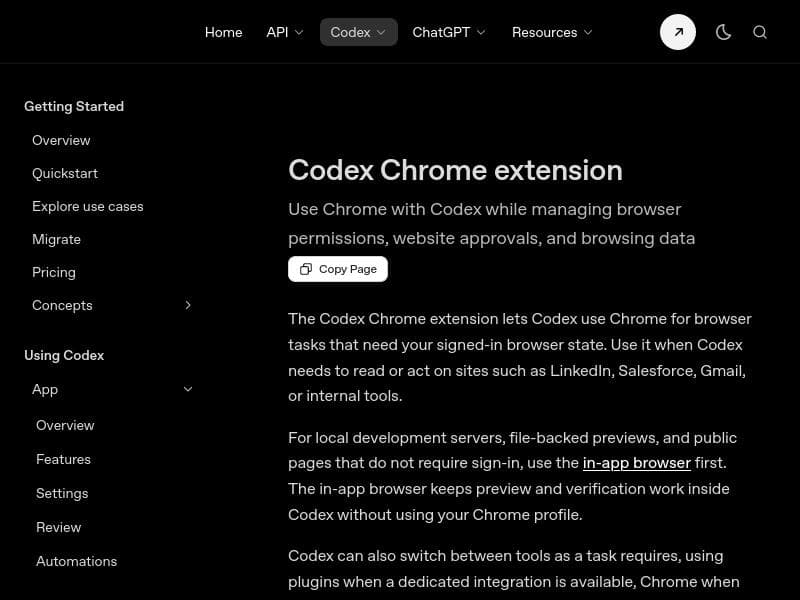
Codex in Chrome uniquely integrates OpenAI's Codex AI directly into the Chrome browser, enabling intelligent automation of web tasks like navigation and form filling using your active logins. Ideal for developers, testers, and power users, it offers seamless, code-driven browser control with granular permission management—all for free.

描述
Codex in Chrome is an extension that lets the Codex app control your browser. It writes code to navigate websites, fill forms, and complete tasks in background tab groups using your active logins.
详细描述
Codex in Chrome is a powerful browser extension designed to integrate the capabilities of OpenAI's Codex directly into the Chrome web browser. Its core purpose is to enable the Codex app to autonomously control browser activities by writing and executing code that navigates websites, fills out forms, and completes various online tasks. This automation occurs within background tab groups, leveraging the user's active logins to streamline workflows without manual intervention. By embedding AI-driven coding capabilities into the browser environment, Codex in Chrome transforms routine web interactions into efficient, automated processes. One of the standout features of Codex in Chrome is its seamless integration with the Chrome browser, ensuring a smooth user experience without the need for complex setup. The extension manages browser permissions carefully, giving users control over what Codex can access and operate on. This includes granular website approval controls, allowing users to specify which sites Codex is permitted to interact with, thereby enhancing security and privacy. Additionally, browsing data management features ensure that user data is handled responsibly, with options to control how data is stored and used during automated tasks. The extension provides seamless access to the full range of Codex capabilities, enabling it to write code on the fly that can perform complex interactions such as multi-step form completions, data extraction, and navigation sequences. This makes it particularly useful for developers, testers, and power users who require automation for repetitive web tasks or who want to prototype web-based workflows quickly. For example, QA engineers can automate testing scenarios across multiple tabs, marketers can automate data entry into CRM systems, and developers can streamline debugging or data scraping processes. Codex in Chrome is offered completely free of charge, making it accessible to a wide range of users without financial barriers. This pricing model encourages experimentation and adoption by individuals and teams looking to enhance productivity through AI-powered browser automation. Unlike some AI tools that require subscription fees or usage-based pricing, Codex in Chrome provides full functionality at no cost, which is a significant advantage for budget-conscious users. When compared to alternative browser automation tools, Codex in Chrome stands out due to its AI-driven coding approach. Traditional automation extensions often rely on predefined scripts or macros, which can be rigid and require manual updates. In contrast, Codex dynamically generates code based on the task context, allowing for more flexible and intelligent automation that adapts to changes in website structure or user requirements. However, this advanced capability also means users need some familiarity with how AI-generated code operates and may need to monitor the automation to ensure it behaves as expected. Despite its strengths, there are some considerations to keep in mind. Because Codex in Chrome operates with access to active logins and sensitive browsing data, users must trust the extension and manage permissions carefully to avoid unintended data exposure. Additionally, as an AI-driven tool, it may occasionally produce code that requires user review or adjustment, especially for complex or highly dynamic websites. Users should also be aware that while the extension is free, it depends on the Codex backend services, which may have usage limits or require an OpenAI account for full functionality. In summary, Codex in Chrome is a cutting-edge extension that brings AI-powered coding automation directly into the browser, enabling users to automate web tasks efficiently and intelligently. Its rich feature set, free pricing, and deep integration with Chrome make it an excellent choice for developers, testers, and professionals seeking to enhance their web workflows. Users should consider security and monitoring aspects to maximize the benefits of this innovative tool.
工具功能
- Integration with Chrome browser
- Management of browser permissions
- Website approval controls
- Browsing data management
- Seamless access to Codex capabilities
描述
Codex in Chrome uniquely integrates OpenAI's Codex AI directly into the Chrome browser, enabling intelligent automation of web tasks like navigation and form filling using your active logins. Ideal for developers, testers, and power users, it offers seamless, code-driven browser control with granular permission management—all for free.
Codex in Chrome is an extension that lets the Codex app control your browser. It writes code to navigate websites, fill forms, and complete tasks in background tab groups using your active logins.
详细描述
Codex in Chrome is a powerful browser extension designed to integrate the capabilities of OpenAI's Codex directly into the Chrome web browser. Its core purpose is to enable the Codex app to autonomously control browser activities by writing and executing code that navigates websites, fills out forms, and completes various online tasks. This automation occurs within background tab groups, leveraging the user's active logins to streamline workflows without manual intervention. By embedding AI-driven coding capabilities into the browser environment, Codex in Chrome transforms routine web interactions into efficient, automated processes. One of the standout features of Codex in Chrome is its seamless integration with the Chrome browser, ensuring a smooth user experience without the need for complex setup. The extension manages browser permissions carefully, giving users control over what Codex can access and operate on. This includes granular website approval controls, allowing users to specify which sites Codex is permitted to interact with, thereby enhancing security and privacy. Additionally, browsing data management features ensure that user data is handled responsibly, with options to control how data is stored and used during automated tasks. The extension provides seamless access to the full range of Codex capabilities, enabling it to write code on the fly that can perform complex interactions such as multi-step form completions, data extraction, and navigation sequences. This makes it particularly useful for developers, testers, and power users who require automation for repetitive web tasks or who want to prototype web-based workflows quickly. For example, QA engineers can automate testing scenarios across multiple tabs, marketers can automate data entry into CRM systems, and developers can streamline debugging or data scraping processes. Codex in Chrome is offered completely free of charge, making it accessible to a wide range of users without financial barriers. This pricing model encourages experimentation and adoption by individuals and teams looking to enhance productivity through AI-powered browser automation. Unlike some AI tools that require subscription fees or usage-based pricing, Codex in Chrome provides full functionality at no cost, which is a significant advantage for budget-conscious users. When compared to alternative browser automation tools, Codex in Chrome stands out due to its AI-driven coding approach. Traditional automation extensions often rely on predefined scripts or macros, which can be rigid and require manual updates. In contrast, Codex dynamically generates code based on the task context, allowing for more flexible and intelligent automation that adapts to changes in website structure or user requirements. However, this advanced capability also means users need some familiarity with how AI-generated code operates and may need to monitor the automation to ensure it behaves as expected. Despite its strengths, there are some considerations to keep in mind. Because Codex in Chrome operates with access to active logins and sensitive browsing data, users must trust the extension and manage permissions carefully to avoid unintended data exposure. Additionally, as an AI-driven tool, it may occasionally produce code that requires user review or adjustment, especially for complex or highly dynamic websites. Users should also be aware that while the extension is free, it depends on the Codex backend services, which may have usage limits or require an OpenAI account for full functionality. In summary, Codex in Chrome is a cutting-edge extension that brings AI-powered coding automation directly into the browser, enabling users to automate web tasks efficiently and intelligently. Its rich feature set, free pricing, and deep integration with Chrome make it an excellent choice for developers, testers, and professionals seeking to enhance their web workflows. Users should consider security and monitoring aspects to maximize the benefits of this innovative tool.
常见问题
What is Codex in Chrome?
Codex in Chrome is a browser extension that allows the OpenAI Codex app to control your Chrome browser by writing and executing code to navigate websites, fill out forms, and complete tasks automatically using your active logins.
How much does Codex in Chrome cost?
Codex in Chrome is completely free to use, with no subscription or usage fees.
Who is Codex in Chrome best for?
It is best suited for developers, QA testers, marketers, and power users who want to automate repetitive web tasks, streamline workflows, or prototype web interactions efficiently.
What are the main features of Codex in Chrome?
Key features include seamless integration with Chrome, management of browser permissions, website approval controls, browsing data management, and on-demand access to Codex's AI coding capabilities for automated web interactions.
Does Codex in Chrome offer a free trial?
Since Codex in Chrome is free to use, there is no separate free trial; users can install and use the extension without cost immediately.
What integrations does Codex in Chrome support?
Codex in Chrome integrates directly with the Chrome browser and leverages the Codex AI backend to generate and execute code for browser automation tasks.
How does Codex in Chrome work?
The extension enables the Codex AI to write and run code within your browser that automates navigation, form filling, and other tasks using your active logins, operating in background tab groups with user-controlled permissions and website approvals.
社交媒体
使用工具评价
暂无评价。成为第一个分享使用体验的人。
赞助工具











































推荐工具
及时了解最新 AI 工具
获取最新资讯,订阅我们的新闻通讯
已有 50,000+ 位读者阅读并信赖
加入最大的 AI 社区
我们的社区和团队随时为您提供帮助!
您的反馈将帮助 Alice AI 在未来版本中不断改进。









