🚀 Zaprep: Your Socials on Steroids. 免费开始 — 每月自动发送 1,000 条私信,将互动转化为潜在客户。 ,每月 1,000 条自动私信。


这是您的 AI 工具吗?立即认领。
验证所有权、管理资料,并解锁增长功能。
Capture.dev revolutionizes bug reporting by enabling users to annotate any website directly from their browser and automatically capturing detailed, developer-friendly reports. Its AI-powered summaries help teams prioritize bugs faster, making it an essential tool for developers, testers, and product teams seeking efficient, accurate feedback management.

描述
The easiest way to capture bugs and feedback directly from your website. Annotate any website, from any browser, and auto-capture everything your team needs to action feedback effectively. Plus AI summaries that make prioritising bugs faster than ever.
详细描述
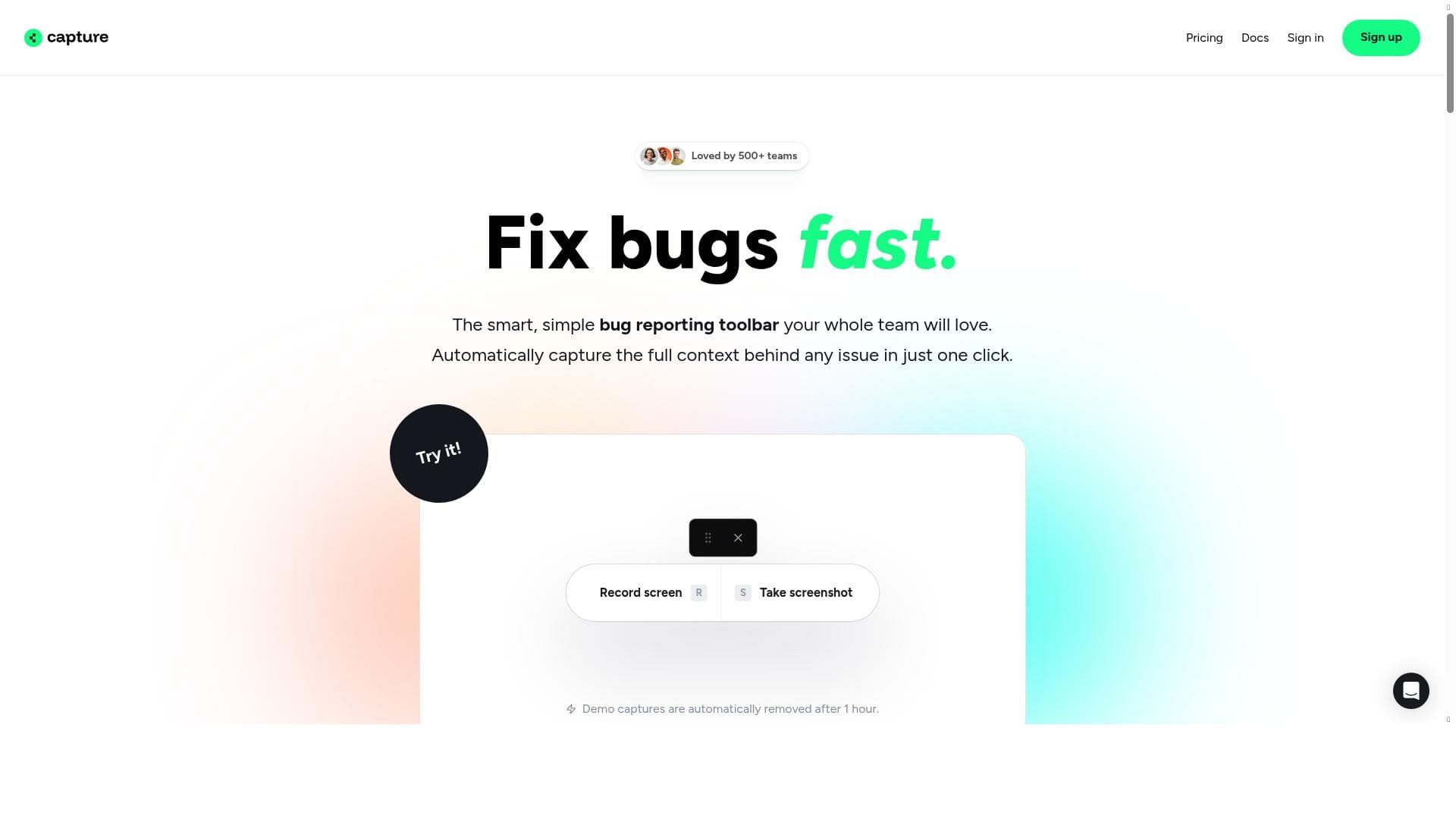
Capture.dev is a cutting-edge tool designed to streamline the process of capturing bugs and user feedback directly from any website. Its core purpose is to simplify and enhance the communication between users, testers, and development teams by enabling real-time annotation and detailed bug reporting from within the browser. This eliminates the traditional back-and-forth often encountered in bug tracking, allowing teams to gather precise, actionable information quickly and efficiently. Capture.dev supports annotation on any website and from any browser, making it versatile and accessible for diverse development environments. One of the standout features of Capture.dev is its developer-friendly bug reports. These reports are designed to provide all the necessary technical details that developers need to diagnose and fix issues without requiring additional follow-up. The tool includes a tiny yet powerful bug reporting toolbar that users can easily access without disrupting their workflow. This toolbar allows users to highlight, comment, and annotate directly on the webpage, capturing screenshots, console logs, and other relevant data automatically. The integration process is straightforward, enabling teams to embed Capture.dev into their existing workflows with minimal effort. Capture.dev also leverages AI to generate summaries of the captured bugs and feedback. These AI-generated summaries help teams prioritize issues more effectively by distilling complex reports into concise, understandable insights. This feature significantly accelerates the debugging process, allowing teams to focus on the most critical problems first. Additionally, the tool’s detailed bug capture capabilities ensure that no vital information is missed, improving overall debugging accuracy and efficiency. This tool is ideal for software development teams, QA testers, product managers, and UX designers who require a seamless way to collect and act on feedback from live websites. It is particularly useful for remote teams or organizations that manage multiple websites and need a unified platform for bug tracking. Use cases include live website testing, user feedback collection during beta releases, and ongoing maintenance of web applications. Capture.dev’s ability to work on any website and browser makes it a flexible solution for diverse project needs. Capture.dev offers a freemium pricing model, allowing users to get started with essential features at no cost. This makes it accessible for small teams and individual developers who want to improve their bug reporting process without upfront investment. For larger teams or enterprises requiring advanced features and higher usage limits, premium plans are available. These plans typically include enhanced support, additional integrations, and more comprehensive reporting capabilities. Compared to traditional bug tracking tools, Capture.dev stands out due to its direct website annotation and AI-powered summarization. While many bug trackers rely on manual input and separate reporting interfaces, Capture.dev integrates the reporting process into the user’s browser experience, reducing friction and improving data accuracy. However, some limitations include dependency on browser compatibility for the toolbar and potential challenges in capturing bugs on highly dynamic or complex web applications where annotations might interfere with page functionality. In summary, Capture.dev is a powerful, user-friendly tool that transforms how teams capture and manage bugs and feedback. Its combination of detailed capture, easy integration, and AI-driven insights makes it an invaluable asset for any web development project aiming to enhance quality and accelerate issue resolution.
工具功能
- Developer friendly bug reports
- Tiny yet powerful bug reporting toolbar
- Works on any website
- Easy integration
- Detailed bug capture
- Improves debugging process
描述
Capture.dev revolutionizes bug reporting by enabling users to annotate any website directly from their browser and automatically capturing detailed, developer-friendly reports. Its AI-powered summaries help teams prioritize bugs faster, making it an essential tool for developers, testers, and product teams seeking efficient, accurate feedback management.
The easiest way to capture bugs and feedback directly from your website. Annotate any website, from any browser, and auto-capture everything your team needs to action feedback effectively. Plus AI summaries that make prioritising bugs faster than ever.
详细描述
Capture.dev is a cutting-edge tool designed to streamline the process of capturing bugs and user feedback directly from any website. Its core purpose is to simplify and enhance the communication between users, testers, and development teams by enabling real-time annotation and detailed bug reporting from within the browser. This eliminates the traditional back-and-forth often encountered in bug tracking, allowing teams to gather precise, actionable information quickly and efficiently. Capture.dev supports annotation on any website and from any browser, making it versatile and accessible for diverse development environments. One of the standout features of Capture.dev is its developer-friendly bug reports. These reports are designed to provide all the necessary technical details that developers need to diagnose and fix issues without requiring additional follow-up. The tool includes a tiny yet powerful bug reporting toolbar that users can easily access without disrupting their workflow. This toolbar allows users to highlight, comment, and annotate directly on the webpage, capturing screenshots, console logs, and other relevant data automatically. The integration process is straightforward, enabling teams to embed Capture.dev into their existing workflows with minimal effort. Capture.dev also leverages AI to generate summaries of the captured bugs and feedback. These AI-generated summaries help teams prioritize issues more effectively by distilling complex reports into concise, understandable insights. This feature significantly accelerates the debugging process, allowing teams to focus on the most critical problems first. Additionally, the tool’s detailed bug capture capabilities ensure that no vital information is missed, improving overall debugging accuracy and efficiency. This tool is ideal for software development teams, QA testers, product managers, and UX designers who require a seamless way to collect and act on feedback from live websites. It is particularly useful for remote teams or organizations that manage multiple websites and need a unified platform for bug tracking. Use cases include live website testing, user feedback collection during beta releases, and ongoing maintenance of web applications. Capture.dev’s ability to work on any website and browser makes it a flexible solution for diverse project needs. Capture.dev offers a freemium pricing model, allowing users to get started with essential features at no cost. This makes it accessible for small teams and individual developers who want to improve their bug reporting process without upfront investment. For larger teams or enterprises requiring advanced features and higher usage limits, premium plans are available. These plans typically include enhanced support, additional integrations, and more comprehensive reporting capabilities. Compared to traditional bug tracking tools, Capture.dev stands out due to its direct website annotation and AI-powered summarization. While many bug trackers rely on manual input and separate reporting interfaces, Capture.dev integrates the reporting process into the user’s browser experience, reducing friction and improving data accuracy. However, some limitations include dependency on browser compatibility for the toolbar and potential challenges in capturing bugs on highly dynamic or complex web applications where annotations might interfere with page functionality. In summary, Capture.dev is a powerful, user-friendly tool that transforms how teams capture and manage bugs and feedback. Its combination of detailed capture, easy integration, and AI-driven insights makes it an invaluable asset for any web development project aiming to enhance quality and accelerate issue resolution.
常见问题
What is Capture.dev?
Capture.dev is a bug and feedback capturing tool that allows users to annotate any website directly from their browser, automatically generating detailed reports to help development teams address issues efficiently.
How much does Capture.dev cost?
Capture.dev offers a freemium pricing model with essential features available for free, and premium plans providing advanced capabilities and higher usage limits for larger teams and enterprises.
Who is Capture.dev best for?
Capture.dev is ideal for software developers, QA testers, product managers, and UX designers who need an easy and effective way to capture, report, and prioritize bugs and user feedback on live websites.
What are the main features of Capture.dev?
Key features include developer-friendly bug reports, a compact bug reporting toolbar, compatibility with any website and browser, easy integration, detailed bug capture, and AI-generated summaries to speed up prioritization.
Does Capture.dev offer a free trial?
Capture.dev provides a freemium plan that allows users to start using the tool for free with core features, effectively serving as a free trial with optional upgrades to premium plans.
What integrations does Capture.dev support?
Capture.dev supports easy integration into existing workflows and bug tracking systems, allowing teams to embed its functionality seamlessly, though specific third-party integrations depend on the plan and setup.
How does Capture.dev work?
Capture.dev works by enabling users to annotate websites directly from their browser using a lightweight toolbar, automatically capturing screenshots, logs, and other relevant data, then generating detailed, developer-friendly bug reports enhanced with AI summaries.
评价
暂无评价。成为第一个分享使用体验的人。
赞助工具











































推荐工具
及时了解最新 AI 工具
获取最新资讯,订阅我们的新闻通讯
已有 50,000+ 位读者阅读并信赖
加入最大的 AI 社区
我们的社区和团队随时为您提供帮助!
您的反馈将帮助 Alice AI 在未来版本中不断改进。









