

这是您的 AI 工具吗?立即认领。
验证所有权、管理资料,并解锁增长功能。
CalPal is a unique literate calculator that blends text editing with powerful calculations, allowing users to tell a story with their math. Featuring an AI assistant that instantly drafts budgets and estimates from simple prompts, it’s perfect for professionals and students seeking contextualized, private, and browser-based calculation tools.

描述
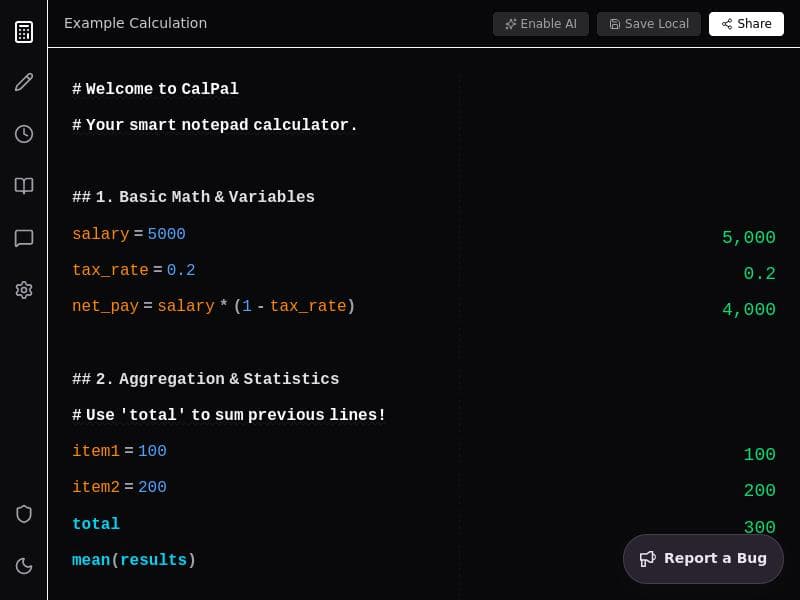
Most calculators give you answers but lose the context. CalPal is a literate calculator that combines a text editor with a calculation engine, letting your math tell a story. The standout feature is the BYOK AI Assistant (Gemini). It solves "Blank Page Syndrome"—just ask it to "Draft a travel budget" or "Estimate MVP costs," and it generates the line items instantly for you to tweak. It's 100% free, private (local-only data), and browser-based.
详细描述
CalPal is an innovative literate calculator designed to transform the way users approach mathematical calculations by integrating a text editor with a powerful calculation engine. Unlike traditional calculators that simply provide numerical answers without context, CalPal allows users to combine notes and numbers seamlessly, enabling their math to tell a coherent story. This unique approach makes it ideal for situations where understanding the rationale behind calculations is as important as the results themselves. At its core, CalPal aims to bridge the gap between note-taking and computation, making it a versatile tool for budgeting, quick estimates, and any task that benefits from contextualized calculations. One of CalPal's standout features is its BYOK AI Assistant, powered by Gemini. This AI-driven assistant addresses the common challenge known as "Blank Page Syndrome" by generating relevant line items based on simple prompts. For example, users can ask the assistant to "Draft a travel budget" or "Estimate MVP costs," and it will instantly produce a structured list of expenses or cost components that can be further customized. This feature not only accelerates the planning process but also helps users who may be unsure where to start with their calculations. Additionally, CalPal supports example calculations, allowing users to see sample workflows and learn how to maximize the tool's capabilities. The interface of CalPal is designed to be friendly and intuitive, resembling a notebook calculator that encourages users to type notes and numbers together naturally. This design choice makes it particularly effective for budgeting and quick estimates, where users often need to jot down assumptions, explanations, and calculations in one place. CalPal operates entirely in the browser, ensuring that all data remains local and private, which is a significant advantage for users concerned about data security. The tool is 100% free to use with a freemium pricing model, making it accessible to a wide range of users without upfront costs. CalPal is best suited for professionals, freelancers, students, and anyone who frequently works with numbers and needs to maintain context around their calculations. For instance, project managers can draft detailed cost estimates with accompanying notes, financial planners can create transparent budgets, and students can document their problem-solving process step-by-step. Its AI assistance is particularly valuable for users who struggle with starting complex calculations or need inspiration for structuring their data. In comparison to traditional calculators or spreadsheet software, CalPal offers a unique blend of note-taking and computational power in a single interface. While spreadsheets provide extensive calculation capabilities, they often lack the simplicity and narrative flow that CalPal offers. Conversely, standard calculators do not support contextual notes or AI-driven assistance. CalPal fills this niche by offering a lightweight, privacy-focused, and AI-enhanced tool that is easy to use without sacrificing depth. However, there are some considerations to keep in mind. Since CalPal is browser-based and processes data locally, it may not support extensive collaboration features or cloud syncing found in some competing tools. Users requiring multi-user editing or integration with enterprise software might find it limited in this regard. Additionally, while the AI assistant is powerful, it depends on the clarity of user prompts and may require some manual adjustments to generated content. Despite these minor limitations, CalPal stands out as a highly effective tool for anyone looking to combine narrative and numbers in a seamless, private, and intelligent environment.
工具功能
- Type notes and numbers together
- Perfect for budgeting and quick estimates
- Friendly notebook calculator interface
- Supports example calculations
- Enables AI assistance
描述
CalPal is a unique literate calculator that blends text editing with powerful calculations, allowing users to tell a story with their math. Featuring an AI assistant that instantly drafts budgets and estimates from simple prompts, it’s perfect for professionals and students seeking contextualized, private, and browser-based calculation tools.
Most calculators give you answers but lose the context. CalPal is a literate calculator that combines a text editor with a calculation engine, letting your math tell a story. The standout feature is the BYOK AI Assistant (Gemini). It solves "Blank Page Syndrome"—just ask it to "Draft a travel budget" or "Estimate MVP costs," and it generates the line items instantly for you to tweak. It's 100% free, private (local-only data), and browser-based.
详细描述
CalPal is an innovative literate calculator designed to transform the way users approach mathematical calculations by integrating a text editor with a powerful calculation engine. Unlike traditional calculators that simply provide numerical answers without context, CalPal allows users to combine notes and numbers seamlessly, enabling their math to tell a coherent story. This unique approach makes it ideal for situations where understanding the rationale behind calculations is as important as the results themselves. At its core, CalPal aims to bridge the gap between note-taking and computation, making it a versatile tool for budgeting, quick estimates, and any task that benefits from contextualized calculations. One of CalPal's standout features is its BYOK AI Assistant, powered by Gemini. This AI-driven assistant addresses the common challenge known as "Blank Page Syndrome" by generating relevant line items based on simple prompts. For example, users can ask the assistant to "Draft a travel budget" or "Estimate MVP costs," and it will instantly produce a structured list of expenses or cost components that can be further customized. This feature not only accelerates the planning process but also helps users who may be unsure where to start with their calculations. Additionally, CalPal supports example calculations, allowing users to see sample workflows and learn how to maximize the tool's capabilities. The interface of CalPal is designed to be friendly and intuitive, resembling a notebook calculator that encourages users to type notes and numbers together naturally. This design choice makes it particularly effective for budgeting and quick estimates, where users often need to jot down assumptions, explanations, and calculations in one place. CalPal operates entirely in the browser, ensuring that all data remains local and private, which is a significant advantage for users concerned about data security. The tool is 100% free to use with a freemium pricing model, making it accessible to a wide range of users without upfront costs. CalPal is best suited for professionals, freelancers, students, and anyone who frequently works with numbers and needs to maintain context around their calculations. For instance, project managers can draft detailed cost estimates with accompanying notes, financial planners can create transparent budgets, and students can document their problem-solving process step-by-step. Its AI assistance is particularly valuable for users who struggle with starting complex calculations or need inspiration for structuring their data. In comparison to traditional calculators or spreadsheet software, CalPal offers a unique blend of note-taking and computational power in a single interface. While spreadsheets provide extensive calculation capabilities, they often lack the simplicity and narrative flow that CalPal offers. Conversely, standard calculators do not support contextual notes or AI-driven assistance. CalPal fills this niche by offering a lightweight, privacy-focused, and AI-enhanced tool that is easy to use without sacrificing depth. However, there are some considerations to keep in mind. Since CalPal is browser-based and processes data locally, it may not support extensive collaboration features or cloud syncing found in some competing tools. Users requiring multi-user editing or integration with enterprise software might find it limited in this regard. Additionally, while the AI assistant is powerful, it depends on the clarity of user prompts and may require some manual adjustments to generated content. Despite these minor limitations, CalPal stands out as a highly effective tool for anyone looking to combine narrative and numbers in a seamless, private, and intelligent environment.
常见问题
What is CalPal?
CalPal is a literate calculator that combines a text editor with a calculation engine, enabling users to type notes and numbers together so their math tells a story. It includes an AI assistant to help generate calculation templates and line items based on user prompts.
How much does CalPal cost?
CalPal operates on a freemium model, offering a 100% free version with core features available to all users. Additional premium features, if any, would be accessible through paid plans.
Who is CalPal best for?
CalPal is ideal for professionals, freelancers, students, and anyone who needs to combine contextual notes with calculations, such as budgeting, quick estimates, project cost planning, and educational purposes.
What are the main features of CalPal?
Key features include the ability to type notes and numbers together, a friendly notebook calculator interface, support for example calculations, AI assistance via the BYOK AI Assistant (Gemini) that drafts budgets and estimates, and local-only data processing for privacy.
Does CalPal offer a free trial?
CalPal is 100% free to use with its core features available immediately, so no separate free trial is necessary.
What integrations does CalPal support?
CalPal is a browser-based tool focusing on local data privacy and does not currently advertise integrations with third-party apps or services.
How does CalPal work?
CalPal works by combining a text editor and calculation engine in a single interface, allowing users to write notes and perform calculations together. Its AI assistant can generate calculation templates based on user prompts, and all data is processed locally in the browser to ensure privacy.
评价
暂无评价。成为第一个分享使用体验的人。




















































