
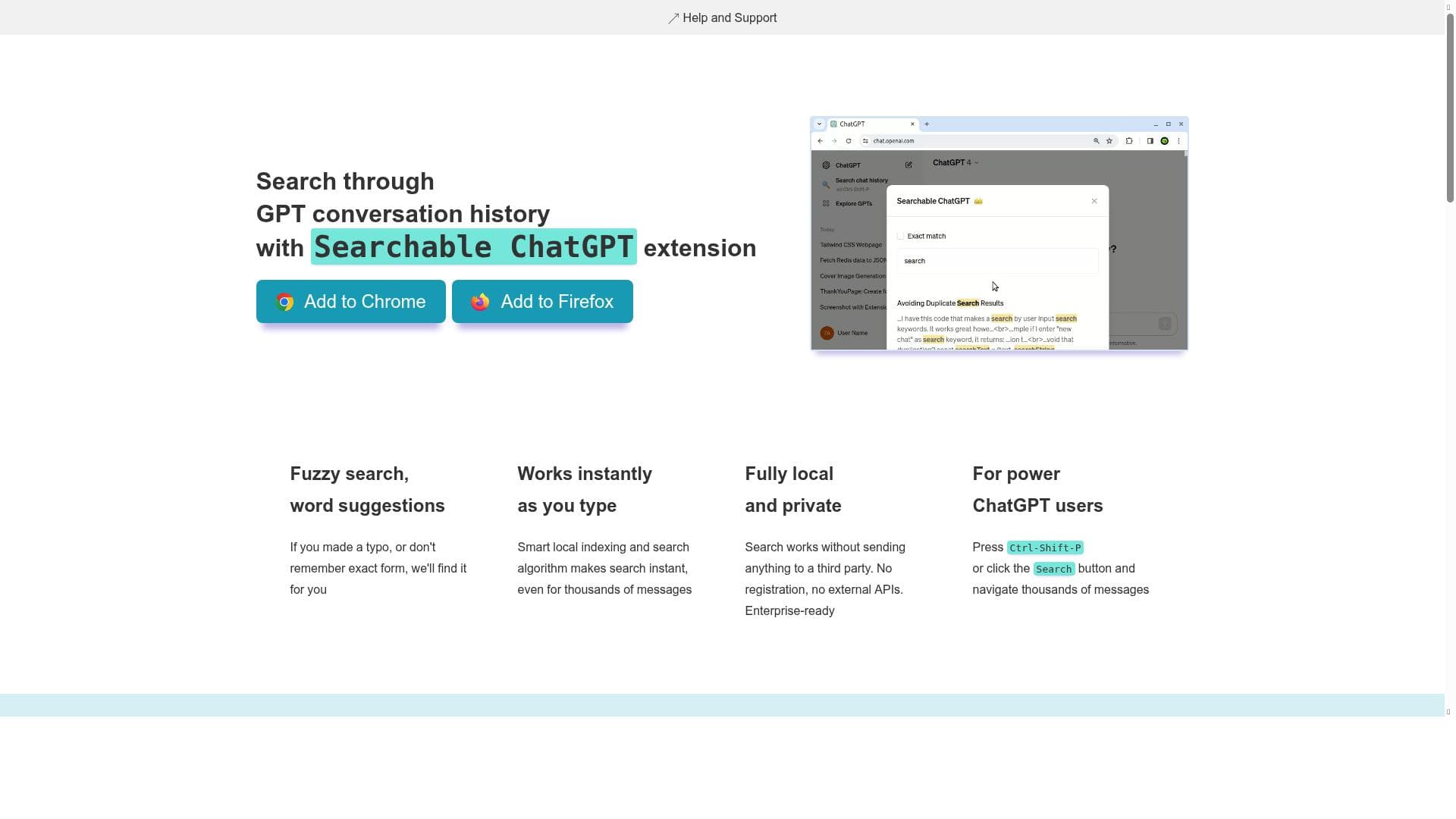


Searchable ChatGPT is a privacy-focused browser extension that lets you instantly search your entire ChatGPT conversation history locally, without sending any data to external servers. Ideal for frequent ChatGPT users who need fast, fuzzy search with keyword suggestions, it integrates seamlessly into the web UI and supports hotkeys for quick access.

Description
Search ChatGPT conversation history instantly. Fully local and private. Press sidebar button or hotkey - 🔍 Exact/fuzzy search ChatGPT conversation history - 🔘 Keyword suggestions - 📄 Searches through message contents and chat titles - 🔒 Works locally and never sends your data. Does not make any calls to external APIs for searching - ✅ No ads, no tracking/analytics, no 3rd party code - 🖱️ Integrates seamlessly in web UI, works with both Light and Dark themes - ⌨️ Hotkey: Ctrl-Shift-P Demo: https://www.youtube.com/watch?v=7QeoI0P2PGU How does it work: It creates a local index of all the chats and messages you have. It also adds a button in the sidebar and a hotkey to open the search (⌨️ Ctrl-Shift-P). When you type in the search box, it uses the local index to find the messages that match your query. You can search for any word or phrase that was ever mentioned in any of your chats.
Detailed Description
Searchable ChatGPT is a powerful browser extension designed to instantly search through your entire ChatGPT conversation history with ease and privacy. Its core purpose is to enable users to quickly locate specific messages or chat threads from their past interactions with ChatGPT without compromising data security. Unlike many cloud-based search tools, Searchable ChatGPT operates fully locally on your device, ensuring that none of your chat data is sent to external servers or third-party APIs. This makes it an ideal solution for users who value privacy and want to maintain complete control over their conversation history. The tool integrates seamlessly into the ChatGPT web interface, adding a convenient sidebar button and supporting a hotkey (Ctrl-Shift-P) for rapid access to its search functionality. At the heart of Searchable ChatGPT is a smart local indexing system that builds and maintains an up-to-date index of all your chats and messages. This index allows for instant search results as you type, providing a smooth and responsive user experience. The search supports both exact and fuzzy matching, which means it can handle typos and suggest relevant keywords to help refine your queries. Users can search not only the contents of messages but also chat titles, making it easier to find conversations by topic or context. The extension works flawlessly with both Light and Dark themes of the ChatGPT interface, ensuring a consistent visual experience. Searchable ChatGPT is best suited for frequent ChatGPT users who accumulate large volumes of conversation data and need an efficient way to retrieve past information. Professionals, researchers, writers, and developers who rely on ChatGPT for brainstorming, coding help, or content creation can benefit greatly from this tool. It is particularly useful for those who want to revisit previous answers, track ideas, or reference earlier discussions without manually scrolling through long chat histories. Additionally, privacy-conscious users who prefer local data processing over cloud-based solutions will find Searchable ChatGPT especially appealing. The tool follows a freemium pricing model. The free version allows users to perform searches with a limit of three results per query, which is sufficient for casual users or those just testing the extension. For power users or professionals requiring unrestricted access, a paid version removes the search result limits and may offer additional enhancements. Importantly, Searchable ChatGPT does not require any registration or external API calls, simplifying the user onboarding process and ensuring privacy. Compared to alternative solutions, Searchable ChatGPT stands out due to its fully local operation and privacy-first design. Many other chat history search tools rely on cloud processing or require users to upload their data, which can raise security concerns. Moreover, the integration directly into the ChatGPT web UI and support for hotkeys streamline the workflow, avoiding the need to switch between multiple apps or interfaces. While some competitors may offer more advanced analytics or cross-platform syncing, Searchable ChatGPT’s focus on simplicity, speed, and privacy makes it a unique and valuable tool. One limitation to consider is that the extension’s search capabilities depend on the local indexing of chats, so initial setup may take some time if you have an extensive chat history. Also, the free version’s search result cap may be restrictive for users with very large datasets, necessitating the paid upgrade. Since it is a browser extension, it is primarily designed for desktop web use and may not support mobile environments or other ChatGPT clients. Nonetheless, for users seeking a private, fast, and integrated search experience within ChatGPT’s web interface, Searchable ChatGPT offers a compelling solution.
Tool Features
- Fuzzy search with word suggestions to handle typos
- Instant search results as you type using smart local indexing
- Fully local and private with no data sent to third parties
- No registration or external API required
- Supports searching both chat names and chat messages
- Keeps the index up to date after initial fetch
- Hotkey support (Ctrl-Shift-P) for quick access
- Free version limits results to 3 per search; paid version removes limits
Description
Searchable ChatGPT is a privacy-focused browser extension that lets you instantly search your entire ChatGPT conversation history locally, without sending any data to external servers. Ideal for frequent ChatGPT users who need fast, fuzzy search with keyword suggestions, it integrates seamlessly into the web UI and supports hotkeys for quick access.
Search ChatGPT conversation history instantly. Fully local and private. Press sidebar button or hotkey - 🔍 Exact/fuzzy search ChatGPT conversation history - 🔘 Keyword suggestions - 📄 Searches through message contents and chat titles - 🔒 Works locally and never sends your data. Does not make any calls to external APIs for searching - ✅ No ads, no tracking/analytics, no 3rd party code - 🖱️ Integrates seamlessly in web UI, works with both Light and Dark themes - ⌨️ Hotkey: Ctrl-Shift-P Demo: https://www.youtube.com/watch?v=7QeoI0P2PGU How does it work: It creates a local index of all the chats and messages you have. It also adds a button in the sidebar and a hotkey to open the search (⌨️ Ctrl-Shift-P). When you type in the search box, it uses the local index to find the messages that match your query. You can search for any word or phrase that was ever mentioned in any of your chats.
Detailed Description
Searchable ChatGPT is a powerful browser extension designed to instantly search through your entire ChatGPT conversation history with ease and privacy. Its core purpose is to enable users to quickly locate specific messages or chat threads from their past interactions with ChatGPT without compromising data security. Unlike many cloud-based search tools, Searchable ChatGPT operates fully locally on your device, ensuring that none of your chat data is sent to external servers or third-party APIs. This makes it an ideal solution for users who value privacy and want to maintain complete control over their conversation history. The tool integrates seamlessly into the ChatGPT web interface, adding a convenient sidebar button and supporting a hotkey (Ctrl-Shift-P) for rapid access to its search functionality. At the heart of Searchable ChatGPT is a smart local indexing system that builds and maintains an up-to-date index of all your chats and messages. This index allows for instant search results as you type, providing a smooth and responsive user experience. The search supports both exact and fuzzy matching, which means it can handle typos and suggest relevant keywords to help refine your queries. Users can search not only the contents of messages but also chat titles, making it easier to find conversations by topic or context. The extension works flawlessly with both Light and Dark themes of the ChatGPT interface, ensuring a consistent visual experience. Searchable ChatGPT is best suited for frequent ChatGPT users who accumulate large volumes of conversation data and need an efficient way to retrieve past information. Professionals, researchers, writers, and developers who rely on ChatGPT for brainstorming, coding help, or content creation can benefit greatly from this tool. It is particularly useful for those who want to revisit previous answers, track ideas, or reference earlier discussions without manually scrolling through long chat histories. Additionally, privacy-conscious users who prefer local data processing over cloud-based solutions will find Searchable ChatGPT especially appealing. The tool follows a freemium pricing model. The free version allows users to perform searches with a limit of three results per query, which is sufficient for casual users or those just testing the extension. For power users or professionals requiring unrestricted access, a paid version removes the search result limits and may offer additional enhancements. Importantly, Searchable ChatGPT does not require any registration or external API calls, simplifying the user onboarding process and ensuring privacy. Compared to alternative solutions, Searchable ChatGPT stands out due to its fully local operation and privacy-first design. Many other chat history search tools rely on cloud processing or require users to upload their data, which can raise security concerns. Moreover, the integration directly into the ChatGPT web UI and support for hotkeys streamline the workflow, avoiding the need to switch between multiple apps or interfaces. While some competitors may offer more advanced analytics or cross-platform syncing, Searchable ChatGPT’s focus on simplicity, speed, and privacy makes it a unique and valuable tool. One limitation to consider is that the extension’s search capabilities depend on the local indexing of chats, so initial setup may take some time if you have an extensive chat history. Also, the free version’s search result cap may be restrictive for users with very large datasets, necessitating the paid upgrade. Since it is a browser extension, it is primarily designed for desktop web use and may not support mobile environments or other ChatGPT clients. Nonetheless, for users seeking a private, fast, and integrated search experience within ChatGPT’s web interface, Searchable ChatGPT offers a compelling solution.
Frequently Asked Questions
What is Searchable ChatGPT?
Searchable ChatGPT is a browser extension that enables users to instantly search through their entire ChatGPT conversation history using a local, privacy-focused indexing system. It provides exact and fuzzy search capabilities directly within the ChatGPT web interface without sending any data to external servers.
How much does Searchable ChatGPT cost?
Searchable ChatGPT offers a freemium pricing model. The free version limits search results to three per query, while the paid version removes this limit and may include additional features. No registration or external API usage is required.
Who is Searchable ChatGPT best for?
It is best suited for frequent ChatGPT users such as professionals, researchers, writers, and developers who need to efficiently retrieve past conversations. It also appeals to privacy-conscious users who prefer local data processing over cloud-based solutions.
What are the main features of Searchable ChatGPT?
Key features include exact and fuzzy search with keyword suggestions, instant search results via smart local indexing, full privacy with no data sent externally, support for searching both chat titles and message contents, seamless integration into the ChatGPT web UI with Light and Dark theme support, and hotkey access using Ctrl-Shift-P.
Does Searchable ChatGPT offer a free trial?
Yes, the free version of Searchable ChatGPT allows users to try the tool with limited search results (up to three per search) without any registration or payment, effectively serving as a free trial.
What integrations does Searchable ChatGPT support?
Searchable ChatGPT integrates directly into the ChatGPT web interface as a browser extension. It does not currently support integrations with other platforms or external applications.
How does Searchable ChatGPT work?
The extension creates a local index of all your ChatGPT chats and messages on your device. It adds a sidebar button and supports a hotkey (Ctrl-Shift-P) to open the search interface. When you enter a query, it searches the local index instantly to find matching messages or chat titles without sending any data externally.
Socials
Use ToolReviews
No reviews yet. Be the first to share your experience.




















































