BlogThe Real Difference Between Chatting With AI and Owning It
The Real Difference Between Chatting With AI and Owning It
 Shashank Jain
7 nov 2026
4 min lezen
Most people's first experience with AI chat happens through a browser tab connected to someone else's servers. It works, until you start typing things you wouldn't want stored indefinitely on a company's infrastructure: draft contracts, health questions, half-formed business ideas. That's the moment a lot of users start looking for a local ai chat setup instead, one where the conversation never leaves their own hardware.

The Real Difference Between Chatting With AI and Owning It
Most people's first experience with AI chat happens through a browser tab connected to someone else's servers. It works, until you start typing things you wouldn't want stored indefinitely on a company's infrastructure: draft contracts, health questions, half-formed business ideas. That's the moment a lot of users start looking for a local ai chat setup instead, one where the conversation never leaves their own hardware.
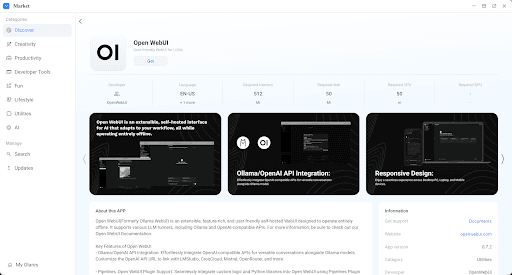
Open WebUI has become one of the most popular ways to get that experience, pairing a familiar chat interface with models running entirely on infrastructure you control. This article walks through what actually changes when you switch, and how to set it up in a way that holds up beyond a first test conversation.
What a Local Chat Interface Actually Gives You
Open WebUI looks and feels like the hosted chat apps most people are used to: a message thread, a model selector, conversation history in a sidebar. The difference is entirely underneath the surface. Every message you send gets processed by a model running on your own machine or private server, and the conversation history lives in a database you control rather than a vendor's cloud account.
That distinction matters most for anyone using AI chat as part of actual work rather than casual questions. Consultants drafting client strategy, developers pasting in proprietary code snippets for review, or anyone discussing financial details they'd rather not hand to a third party all benefit from a setup where nothing gets logged on someone else's servers by default.
Setting Up Open WebUI Around a Model You Trust
The interface itself connects to a backend model runtime, most commonly Ollama, which handles the actual inference. Getting the two working together is a matter of pointing Open WebUI at the local API endpoint, after which the chat interface behaves exactly like a hosted assistant, just backed by a model you chose and control.
Picking a Model for Everyday Conversation
Not every open-source model is a good fit for conversational use. Some are tuned heavily for coding, others for following long instructions rather than casual back-and-forth. It's worth testing two or three candidate models against your actual typical questions before settling on one, since the "best" model on paper isn't always the one that feels most natural in day-to-day conversation.
Managing Conversation History and Context
One underrated benefit of running the interface yourself is full control over how long conversations are retained and how much context gets fed back into the model on each turn. You can keep extensive history for an ongoing project without worrying about it being mined for anything beyond your own use, since the storage layer is yours from the start.
Making It Part of Your Daily Routine
A chat setup only earns its place if it's reliable enough to reach for without a second thought. That means the backend needs to start automatically, survive a reboot, and not require a manual restart every time you sit down to use it. This is the part that trips up a lot of people who set up a local model once, use it for a week, then quietly go back to a hosted app because the local version stopped working and they didn't want to troubleshoot it.
Running the whole stack through a platform built for self-hosted apps, like Olares, removes most of that friction. The chat app and its model backend get managed together, with the kind of process supervision and storage handling that a hand-rolled setup usually lacks, so the interface stays available without ongoing manual upkeep.
Where This Approach Falls Short
It's worth being honest about the trade-offs. Local models, especially on modest hardware, won't match the largest hosted models on every complex reasoning task. And you're responsible for updates, model swaps, and troubleshooting instead of a vendor's support team. For casual, low-stakes questions, a hosted chat app is still simpler. The case for local chat gets stronger specifically as the sensitivity or frequency of your usage increases.
Deciding When Local Chat Is Worth the Switch
A local AI chat setup isn't about rejecting hosted tools outright, it's about matching the tool to what you're actually discussing. For sensitive or high-frequency conversations, running Open WebUI on your own infrastructure removes the question of where your words end up entirely.
Try it alongside your existing chat app for a couple of weeks, see where it holds up and where it doesn't, and let that real usage decide how much of your conversation moves over permanently.
Gerelateerde tags
AI ToolsGerelateerde categorieën
AI-toolsLaat je AI-tool uitlichten in artikelen zoals dit
Bereik gebruikers die actief AI-tools ontdekken op PoweredbyAI en bouw SEO-backlinks die je zichtbaarheid in Google verbeteren.
Vertrouwd door 25,000+ AI-tools en groeiende startups
Laat je AI-tool uitlichten in blogs en artikelen met veel verkeer
Word uitgelicht op PoweredByAI en bereik gebruikers die actief tools zoals die van jou ontdekken. Bouw krachtige SEO-backlinks die je helpen te ranken in Google en consistent organisch verkeer opleveren.
Gesponsorde blogfeatures met gerichte reach
Gastartikelen met do-follow-backlinks
Contextuele linkplaatsingen voor een SEO-boost
Vertrouwd door 25,000+ AI-tools en groeiende startups
Enjoyed this? Talk AI tools with other founders and builders.
Join our Slack community