Destacado en:Best AI Transcription Tools
Destácate →🚀 Zaprep: Tus redes sociales al máximo. Empezar gratis — automatiza 1,000 DMs/mes y convierte el engagement en leads. con 1,000 DMs automatizados/mes.
Enviar tu herramienta
10,000+ herramientas de IA ya listadas
10K+Herramientas
400K+/moVistas
105K+/moVisitantes


¿Es esta tu herramienta de IA? Reclámala hoy.
Verifica la propiedad, gestiona tu perfil y desbloquea funciones de crecimiento.
✦
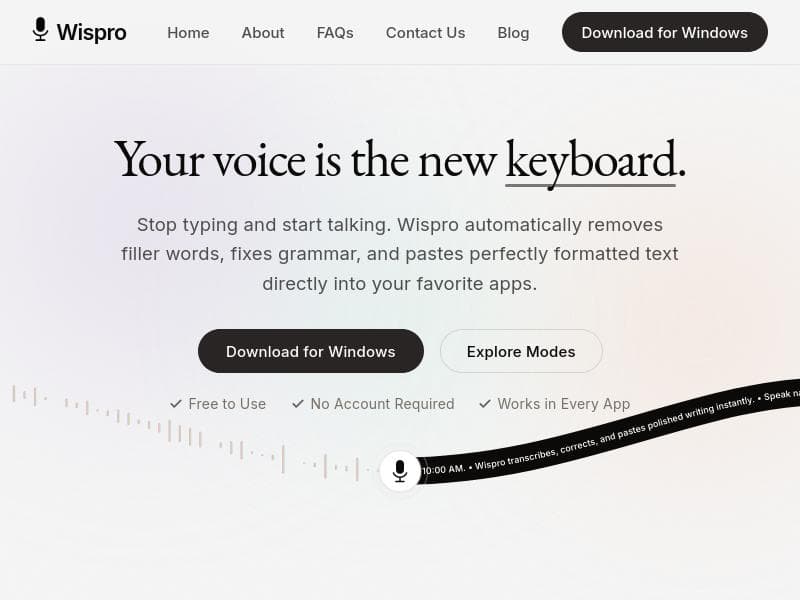
Wispro transforms natural speech into polished, formatted text instantly across all Windows apps, removing filler words and fixing grammar in real-time. Perfect for writers, professionals, and students seeking a free, easy-to-use voice dictation assistant that eliminates typing and boosts productivity.

Descripción
Wispro turns your voice into writing, instantly. Just talk, messy or unfiltered, and Wispro pastes clean, ready-to-use text directly into whatever you're working on. It adapts to how you think, not just how you speak. Basic Mode captures every word exactly as said. Smart Mode cuts filler words and rambling, formatting it into polished prose. Command Mode turns a spoken instruction into finished writing, emails, replies, whole drafts, on the spot. One voice. Three ways to write.
Descripción detallada
Wispro is a powerful desktop voice dictation assistant designed to revolutionize the way users create written content on Windows devices. Its core purpose is to convert natural, conversational speech into polished, well-formatted prose that can be instantly pasted into any application across the Windows ecosystem. By enabling users to stop typing and start talking, Wispro streamlines the writing process, making it faster and more efficient, especially for those who find typing cumbersome or time-consuming. The tool leverages advanced speech recognition technology combined with real-time language processing to deliver clean, error-free text without the need for manual editing. One of Wispro's standout features is its ability to automatically remove filler words such as "um," "uh," and "like," which often clutter spoken language but detract from professional written content. This ensures that the dictated text is concise and clear. Additionally, Wispro performs real-time grammar correction, fixing common mistakes as the user speaks. This feature is particularly valuable for users who want to maintain a high standard of writing without the hassle of proofreading and editing after dictation. Another key capability is Wispro's seamless integration with all Windows applications. Unlike many dictation tools that require exporting text or using specific platforms, Wispro pastes the formatted text directly into whatever app the user is working in, whether it’s a word processor, email client, web browser, or messaging app. This global functionality enhances workflow flexibility and convenience. Wispro requires no account setup, which lowers the barrier to entry and respects user privacy by minimizing data collection. It is also free to use, making it accessible to a wide audience without financial commitment. The tool is activated via a hotkey, allowing users to start dictating quickly and naturally without interrupting their workflow. This tool is ideal for a variety of users including writers, students, professionals, and anyone who frequently creates text on a Windows PC. Writers can use Wispro to draft articles, stories, or reports more quickly by speaking their thoughts aloud. Students benefit from the ability to take notes or compose essays without typing fatigue. Professionals who handle emails, documentation, or presentations can increase productivity by dictating instead of typing. Moreover, individuals with physical disabilities or repetitive strain injuries will find Wispro particularly helpful as it reduces the need for keyboard use. In terms of pricing, Wispro is completely free with no hidden fees or subscription plans. This makes it an attractive option compared to many paid dictation software solutions that require monthly or annual payments. The lack of account requirements also means users can start using the tool immediately without registration or providing personal information. Compared to alternatives like Dragon NaturallySpeaking or Windows Speech Recognition, Wispro offers a unique combination of real-time filler word removal, grammar correction, and universal pasting functionality without the complexity of account management or cost. While Dragon offers extensive customization and professional-grade accuracy, it comes at a high price and steeper learning curve. Windows Speech Recognition is built-in but lacks the advanced text polishing features Wispro provides. Wispro strikes a balance by offering a lightweight, user-friendly experience focused on delivering clean, formatted text quickly. However, there are some limitations to consider. Wispro currently supports only Windows platforms, so Mac and Linux users cannot benefit from it. As a free tool, it may not have the extensive customization options or advanced voice command capabilities found in premium dictation software. Additionally, while it removes filler words and corrects grammar, users should still review complex documents for context-specific accuracy. Background noise and microphone quality can also impact speech recognition performance, as with any voice dictation tool. Overall, Wispro is a highly practical and accessible voice dictation assistant that enhances productivity by turning natural speech into polished writing instantly across all Windows applications. Its combination of automatic filler word removal, grammar correction, and seamless pasting makes it a standout choice for users seeking a free, no-account-required solution to streamline their writing workflow.
Características de la herramienta
- Turns natural speech into polished, formatted prose
- Automatically removes filler words
- Fixes grammar in real-time
- Pastes text directly into any Windows application
- Works globally across all Windows apps
- No account required
- Free to use
Descripción
✦
Wispro transforms natural speech into polished, formatted text instantly across all Windows apps, removing filler words and fixing grammar in real-time. Perfect for writers, professionals, and students seeking a free, easy-to-use voice dictation assistant that eliminates typing and boosts productivity.
Wispro turns your voice into writing, instantly. Just talk, messy or unfiltered, and Wispro pastes clean, ready-to-use text directly into whatever you're working on. It adapts to how you think, not just how you speak. Basic Mode captures every word exactly as said. Smart Mode cuts filler words and rambling, formatting it into polished prose. Command Mode turns a spoken instruction into finished writing, emails, replies, whole drafts, on the spot. One voice. Three ways to write.
Descripción detallada
Wispro is a powerful desktop voice dictation assistant designed to revolutionize the way users create written content on Windows devices. Its core purpose is to convert natural, conversational speech into polished, well-formatted prose that can be instantly pasted into any application across the Windows ecosystem. By enabling users to stop typing and start talking, Wispro streamlines the writing process, making it faster and more efficient, especially for those who find typing cumbersome or time-consuming. The tool leverages advanced speech recognition technology combined with real-time language processing to deliver clean, error-free text without the need for manual editing. One of Wispro's standout features is its ability to automatically remove filler words such as "um," "uh," and "like," which often clutter spoken language but detract from professional written content. This ensures that the dictated text is concise and clear. Additionally, Wispro performs real-time grammar correction, fixing common mistakes as the user speaks. This feature is particularly valuable for users who want to maintain a high standard of writing without the hassle of proofreading and editing after dictation. Another key capability is Wispro's seamless integration with all Windows applications. Unlike many dictation tools that require exporting text or using specific platforms, Wispro pastes the formatted text directly into whatever app the user is working in, whether it’s a word processor, email client, web browser, or messaging app. This global functionality enhances workflow flexibility and convenience. Wispro requires no account setup, which lowers the barrier to entry and respects user privacy by minimizing data collection. It is also free to use, making it accessible to a wide audience without financial commitment. The tool is activated via a hotkey, allowing users to start dictating quickly and naturally without interrupting their workflow. This tool is ideal for a variety of users including writers, students, professionals, and anyone who frequently creates text on a Windows PC. Writers can use Wispro to draft articles, stories, or reports more quickly by speaking their thoughts aloud. Students benefit from the ability to take notes or compose essays without typing fatigue. Professionals who handle emails, documentation, or presentations can increase productivity by dictating instead of typing. Moreover, individuals with physical disabilities or repetitive strain injuries will find Wispro particularly helpful as it reduces the need for keyboard use. In terms of pricing, Wispro is completely free with no hidden fees or subscription plans. This makes it an attractive option compared to many paid dictation software solutions that require monthly or annual payments. The lack of account requirements also means users can start using the tool immediately without registration or providing personal information. Compared to alternatives like Dragon NaturallySpeaking or Windows Speech Recognition, Wispro offers a unique combination of real-time filler word removal, grammar correction, and universal pasting functionality without the complexity of account management or cost. While Dragon offers extensive customization and professional-grade accuracy, it comes at a high price and steeper learning curve. Windows Speech Recognition is built-in but lacks the advanced text polishing features Wispro provides. Wispro strikes a balance by offering a lightweight, user-friendly experience focused on delivering clean, formatted text quickly. However, there are some limitations to consider. Wispro currently supports only Windows platforms, so Mac and Linux users cannot benefit from it. As a free tool, it may not have the extensive customization options or advanced voice command capabilities found in premium dictation software. Additionally, while it removes filler words and corrects grammar, users should still review complex documents for context-specific accuracy. Background noise and microphone quality can also impact speech recognition performance, as with any voice dictation tool. Overall, Wispro is a highly practical and accessible voice dictation assistant that enhances productivity by turning natural speech into polished writing instantly across all Windows applications. Its combination of automatic filler word removal, grammar correction, and seamless pasting makes it a standout choice for users seeking a free, no-account-required solution to streamline their writing workflow.
Preguntas frecuentes
What is Wispro?
Wispro is a desktop voice dictation assistant for Windows that converts natural speech into polished, formatted prose. It automatically removes filler words, corrects grammar in real-time, and pastes the clean text directly into any application on your Windows PC.
How much does Wispro cost?
Wispro is completely free to use with no subscription fees or hidden costs.
Who is Wispro best for?
Wispro is ideal for writers, students, professionals, and anyone who frequently creates text on a Windows computer. It’s especially useful for those who want to speed up writing, reduce typing fatigue, or improve accessibility.
What are the main features of Wispro?
Key features include turning natural speech into polished prose, automatic removal of filler words, real-time grammar correction, and the ability to paste formatted text directly into any Windows application without needing an account.
Does Wispro offer a free trial?
Wispro is free to use and does not require a trial period or account registration.
What integrations does Wispro support?
Wispro works globally across all Windows applications, allowing you to paste dictated text directly into any app, including word processors, email clients, browsers, and messaging platforms.
How does Wispro work?
Users activate Wispro via a hotkey, then speak naturally. Wispro captures the speech, removes filler words, corrects grammar in real-time, and instantly pastes the clean, formatted text into the active Windows application.
Reseñas
0 reseñas
Aún no hay reseñas. Sé el primero en compartir tu experiencia.
Herramientas patrocinadas











































Herramientas recomendadas
Mantente al día con las últimas herramientas de IA
Obtén las últimas novedades, únete a nuestro boletín
Leído y confiado por 50,000+ lectores
Únete a la comunidad de IA más grande
¡Nuestra comunidad y equipo están aquí para ayudarte!
Tus comentarios ayudarán a Alice AI a mejorar en futuras versiones.








Enviar tu herramienta


PoweredByAI.app es un directorio de herramientas de IA que ayuda a personas, empresas y creadores a descubrir las mejores herramientas de IA para escritura, programación, diseño, productividad y más.
© 2026 , Producto de011BQ. Todos los derechos reservados.