

¿Es esta tu herramienta de IA? Reclámala hoy.
Verifica la propiedad, gestiona tu perfil y desbloquea funciones de crecimiento.
TicoAI is a revolutionary AI assistant that lives on your Windows screen, combining voice interaction with real-time visual guidance to help you navigate any app effortlessly. Ideal for professionals and casual users alike, it answers your questions out loud and points exactly where to click, making complex tasks simpler and faster.

Descripción
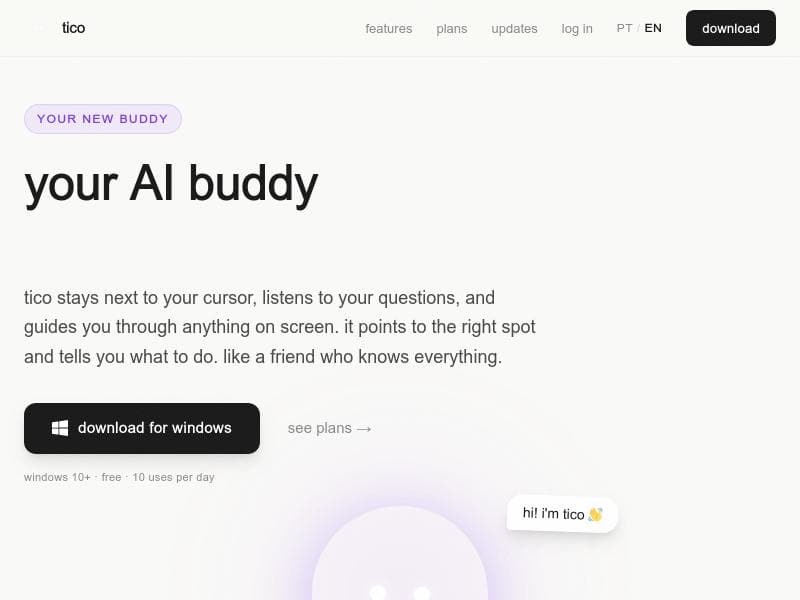
tico is an AI buddy that lives on your Windows screen. press a hotkey, ask anything by voice, and tico sees your screen, answers out loud, and points to exactly where you need to click. it works with any app — blender, vscode, davinci resolve, browsers, anything. tico searches the web when needed, speaks multiple languages, and guides you like a friend who knows everything. free to start, no card required.
Descripción detallada
TicoAI is an innovative AI-powered personal assistant designed to seamlessly integrate with your Windows desktop environment, offering a unique and interactive way to enhance productivity and streamline workflows. Unlike traditional AI assistants that rely solely on voice or text input, TicoAI lives directly on your screen, staying next to your cursor and visually perceiving everything displayed. This allows it to provide contextual, real-time guidance by not only answering your questions out loud but also pointing exactly to where you need to click or interact within any application. Whether you're working in complex software like Blender, coding in VSCode, editing videos in DaVinci Resolve, or browsing the web, TicoAI acts as a knowledgeable companion that understands your screen context and helps you navigate tasks effortlessly. At its core, TicoAI leverages advanced voice recognition and screen analysis powered by Claude AI, enabling it to comprehend spoken queries and visually interpret the interface elements on your screen. This combination allows it to deliver precise, actionable instructions rather than generic responses. For example, if you ask how to apply a filter in DaVinci Resolve, TicoAI will not only explain the steps but also highlight the exact button or menu you need to click. It supports multiple languages, making it accessible to a global user base. Additionally, TicoAI can search the web when it needs to supplement its knowledge, ensuring you get comprehensive answers. Security is a priority, with 256-bit encryption safeguarding your data and interactions. TicoAI is best suited for Windows users who frequently multitask across various applications and require hands-on assistance to speed up learning curves or troubleshoot complex software. This includes creative professionals, developers, video editors, and even casual users who want an intelligent assistant that can guide them through unfamiliar apps or workflows without switching contexts. Its ability to visually point and speak simultaneously makes it ideal for users who benefit from multimodal instruction rather than text-only help. The tool is particularly valuable for those who prefer voice commands over typing and want a more interactive, friend-like AI companion that understands their screen environment. Regarding pricing, TicoAI offers a freemium model that allows users to start for free with no credit card required. The free plan includes up to 10 uses per day, which is sufficient for casual users or those wanting to test the assistant’s capabilities. For power users or professionals needing more frequent assistance and additional features, paid plans are available, although specific pricing tiers and feature breakdowns are detailed on their website. This flexible pricing approach makes TicoAI accessible to a wide range of users, from beginners to enterprise professionals. Compared to other AI assistants, TicoAI stands out by combining voice interaction with real-time screen analysis and visual guidance. Most AI helpers either respond via text or voice without the ability to visually interact with your screen elements. TicoAI’s unique cursor-adjacent presence and ability to point to exact UI components provide a more intuitive and efficient user experience. While tools like Cortana or Google Assistant offer voice commands, they lack the deep screen contextual awareness that TicoAI provides. This makes TicoAI a superior choice for users who need detailed, step-by-step help within complex applications. However, there are some considerations to keep in mind. Currently, TicoAI is only available for Windows 10 and above, limiting accessibility for Mac or Linux users. The free plan’s daily usage cap may also restrict heavy users unless they upgrade. Additionally, as an AI reliant on screen recognition, its effectiveness can vary depending on the complexity and customization of the user’s interface or software themes. Users should also be aware of privacy implications despite encryption, as the tool requires screen access to function. Overall, TicoAI offers a groundbreaking approach to AI assistance on Windows, blending voice, vision, and interaction to create a truly helpful digital buddy.
Características de la herramienta
- Stays next to your cursor and sees everything on your screen
- Responds to voice questions and guides you through tasks
- Points to the right spot on screen and instructs what to do
- Powered by Claude AI
- 256-bit encryption for security
- Available for Windows 10 and above
- Offers free plan with 10 uses per day and paid plans with more features
Descripción
TicoAI is a revolutionary AI assistant that lives on your Windows screen, combining voice interaction with real-time visual guidance to help you navigate any app effortlessly. Ideal for professionals and casual users alike, it answers your questions out loud and points exactly where to click, making complex tasks simpler and faster.
tico is an AI buddy that lives on your Windows screen. press a hotkey, ask anything by voice, and tico sees your screen, answers out loud, and points to exactly where you need to click. it works with any app — blender, vscode, davinci resolve, browsers, anything. tico searches the web when needed, speaks multiple languages, and guides you like a friend who knows everything. free to start, no card required.
Descripción detallada
TicoAI is an innovative AI-powered personal assistant designed to seamlessly integrate with your Windows desktop environment, offering a unique and interactive way to enhance productivity and streamline workflows. Unlike traditional AI assistants that rely solely on voice or text input, TicoAI lives directly on your screen, staying next to your cursor and visually perceiving everything displayed. This allows it to provide contextual, real-time guidance by not only answering your questions out loud but also pointing exactly to where you need to click or interact within any application. Whether you're working in complex software like Blender, coding in VSCode, editing videos in DaVinci Resolve, or browsing the web, TicoAI acts as a knowledgeable companion that understands your screen context and helps you navigate tasks effortlessly. At its core, TicoAI leverages advanced voice recognition and screen analysis powered by Claude AI, enabling it to comprehend spoken queries and visually interpret the interface elements on your screen. This combination allows it to deliver precise, actionable instructions rather than generic responses. For example, if you ask how to apply a filter in DaVinci Resolve, TicoAI will not only explain the steps but also highlight the exact button or menu you need to click. It supports multiple languages, making it accessible to a global user base. Additionally, TicoAI can search the web when it needs to supplement its knowledge, ensuring you get comprehensive answers. Security is a priority, with 256-bit encryption safeguarding your data and interactions. TicoAI is best suited for Windows users who frequently multitask across various applications and require hands-on assistance to speed up learning curves or troubleshoot complex software. This includes creative professionals, developers, video editors, and even casual users who want an intelligent assistant that can guide them through unfamiliar apps or workflows without switching contexts. Its ability to visually point and speak simultaneously makes it ideal for users who benefit from multimodal instruction rather than text-only help. The tool is particularly valuable for those who prefer voice commands over typing and want a more interactive, friend-like AI companion that understands their screen environment. Regarding pricing, TicoAI offers a freemium model that allows users to start for free with no credit card required. The free plan includes up to 10 uses per day, which is sufficient for casual users or those wanting to test the assistant’s capabilities. For power users or professionals needing more frequent assistance and additional features, paid plans are available, although specific pricing tiers and feature breakdowns are detailed on their website. This flexible pricing approach makes TicoAI accessible to a wide range of users, from beginners to enterprise professionals. Compared to other AI assistants, TicoAI stands out by combining voice interaction with real-time screen analysis and visual guidance. Most AI helpers either respond via text or voice without the ability to visually interact with your screen elements. TicoAI’s unique cursor-adjacent presence and ability to point to exact UI components provide a more intuitive and efficient user experience. While tools like Cortana or Google Assistant offer voice commands, they lack the deep screen contextual awareness that TicoAI provides. This makes TicoAI a superior choice for users who need detailed, step-by-step help within complex applications. However, there are some considerations to keep in mind. Currently, TicoAI is only available for Windows 10 and above, limiting accessibility for Mac or Linux users. The free plan’s daily usage cap may also restrict heavy users unless they upgrade. Additionally, as an AI reliant on screen recognition, its effectiveness can vary depending on the complexity and customization of the user’s interface or software themes. Users should also be aware of privacy implications despite encryption, as the tool requires screen access to function. Overall, TicoAI offers a groundbreaking approach to AI assistance on Windows, blending voice, vision, and interaction to create a truly helpful digital buddy.
Preguntas frecuentes
What is TicoAI?
TicoAI is an AI-powered personal assistant that resides on your Windows screen, responding to voice commands, visually analyzing your screen, and guiding you by pointing to the exact spots you need to interact with across any application.
How much does TicoAI cost?
TicoAI offers a freemium pricing model with a free plan that includes 10 uses per day and no credit card required. Paid plans with additional features and higher usage limits are available and detailed on their website.
Who is TicoAI best for?
TicoAI is ideal for Windows users who work across multiple complex applications such as developers, creative professionals, video editors, and anyone seeking interactive, voice-driven assistance that visually guides them through tasks.
What are the main features of TicoAI?
Key features include staying next to your cursor to see your screen, responding to voice questions, pointing to exact screen locations for guidance, multilingual support, web search integration, 256-bit encryption for security, and compatibility with Windows 10 and above.
Does TicoAI offer a free trial?
Yes, TicoAI’s free plan acts as a trial with 10 uses per day and requires no credit card, allowing users to experience its core functionalities before deciding to upgrade.
What integrations does TicoAI support?
TicoAI works with any application on Windows, including popular software like Blender, VSCode, DaVinci Resolve, web browsers, and more, since it visually interacts with whatever is on your screen.
How does TicoAI work?
TicoAI uses Claude AI to process your voice commands and visually analyze your screen in real-time. It then responds out loud and points to the exact UI elements you need to interact with, providing step-by-step guidance tailored to your current context.
Redes sociales
Usar herramientaReseñas
Aún no hay reseñas. Sé el primero en compartir tu experiencia.




















































