


¿Es esta tu herramienta de IA? Reclámala hoy.
Verifica la propiedad, gestiona tu perfil y desbloquea funciones de crecimiento.
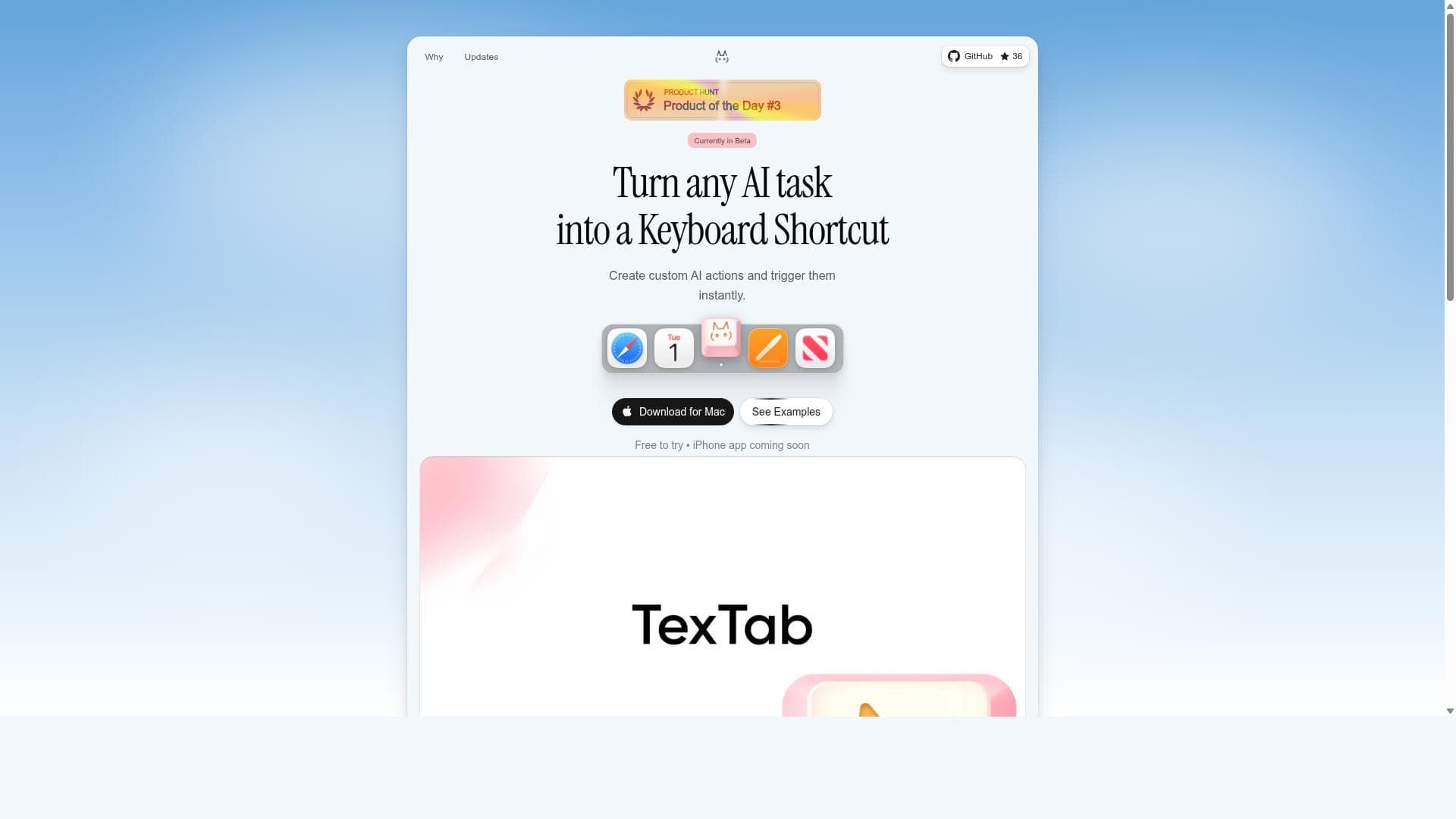
TexTab is a macOS-exclusive personal library and quick capture tool that combines private, local-first note taking with powerful visual bookmarking and keyboard shortcuts. It’s perfect for professionals and creatives seeking a fast, organized way to capture and curate ideas, links, and visuals without compromising privacy.

Descripción
Create custom AI actions and trigger them instantly with keyboard shortcuts. Translate, summarize, rewrite, and more.
Descripción detallada
TexTab is a powerful personal library and quick capture tool designed exclusively for macOS users who want to efficiently organize their thoughts, ideas, links, visuals, and more. At its core, TexTab serves as a productivity app that streamlines note taking, visual bookmarking, and content curation through intuitive keyboard shortcuts. This local-first application emphasizes privacy by enabling users to keep their notes and data stored locally on their devices, ensuring private note taking without reliance on cloud services unless the user opts for it. TexTab’s design caters to individuals who need a seamless way to capture fleeting ideas and organize diverse content types in one place, making it an indispensable tool for knowledge workers, creatives, researchers, and anyone looking to boost their productivity on macOS. TexTab’s key features include a robust personal library that allows users to categorize and manage their thoughts and ideas systematically. The quick capture tool is optimized for speed, enabling users to instantly save links, visuals, screenshots, and notes with minimal friction. Visual bookmarking is another standout feature, providing a screenshot organizer that helps users visually manage saved content, making retrieval intuitive and fast. Keyboard shortcuts are deeply integrated throughout the app, allowing users to perform actions swiftly without interrupting their workflow. The inbox feature acts as a central hub for collecting ideas and content before organizing them into the library, supporting efficient content curation. Additionally, TexTab supports voice notes, enabling users to capture audio memos on the go, which is particularly useful for those who prefer verbal note taking or need to record ideas hands-free. TexTab is best suited for macOS users who require a versatile and private note-taking solution that goes beyond traditional text notes. It is ideal for professionals such as writers, designers, developers, and researchers who juggle multiple types of content and need a unified system to capture and organize information quickly. Students and lifelong learners can also benefit from TexTab’s ability to curate and manage study materials, references, and ideas visually and textually. The app’s focus on keyboard shortcuts appeals to power users who value speed and efficiency in their workflows. Regarding pricing, TexTab is offered as a free application, making it accessible to a wide range of users without upfront costs. This zero-price point lowers the barrier to entry, allowing users to explore its features fully before deciding if they want to integrate it into their daily productivity toolkit. While the current information does not specify premium plans or additional paid tiers, the free offering itself is comprehensive enough to cover the needs of most individual users. When compared to alternatives, TexTab stands out due to its macOS-native design and emphasis on local-first, private note taking combined with quick capture capabilities. Unlike cloud-dependent note apps, TexTab prioritizes user privacy and offline access. Its visual bookmarking and screenshot organization features provide a richer experience than simple text-based note apps. However, unlike some heavyweight knowledge management platforms, TexTab focuses on speed and simplicity, avoiding overly complex features that might overwhelm users. This makes it a great middle ground between minimal note apps and full-fledged personal knowledge bases. One consideration for potential users is that TexTab is currently exclusive to macOS, which limits cross-platform usage for those who work across multiple operating systems. Additionally, while it offers voice notes, the extent of its integration with other apps or cloud services is not detailed, which might be a limitation for users seeking extensive third-party integrations. Users who require collaboration features or cloud syncing might find TexTab less suitable compared to other apps. Nevertheless, for users prioritizing privacy, speed, and a visually oriented personal library on macOS, TexTab provides a compelling and well-rounded solution.
Características de la herramienta
- Personal library for organizing thoughts and ideas
- Quick capture tool for links, visuals, and notes
- Visual bookmarking and screenshot organizer
- Keyboard shortcuts for enhanced productivity
- Local first notes with private note taking
- Inbox for ideas and content curation
- Voice notes support
Descripción
TexTab is a macOS-exclusive personal library and quick capture tool that combines private, local-first note taking with powerful visual bookmarking and keyboard shortcuts. It’s perfect for professionals and creatives seeking a fast, organized way to capture and curate ideas, links, and visuals without compromising privacy.
Create custom AI actions and trigger them instantly with keyboard shortcuts. Translate, summarize, rewrite, and more.
Descripción detallada
TexTab is a powerful personal library and quick capture tool designed exclusively for macOS users who want to efficiently organize their thoughts, ideas, links, visuals, and more. At its core, TexTab serves as a productivity app that streamlines note taking, visual bookmarking, and content curation through intuitive keyboard shortcuts. This local-first application emphasizes privacy by enabling users to keep their notes and data stored locally on their devices, ensuring private note taking without reliance on cloud services unless the user opts for it. TexTab’s design caters to individuals who need a seamless way to capture fleeting ideas and organize diverse content types in one place, making it an indispensable tool for knowledge workers, creatives, researchers, and anyone looking to boost their productivity on macOS. TexTab’s key features include a robust personal library that allows users to categorize and manage their thoughts and ideas systematically. The quick capture tool is optimized for speed, enabling users to instantly save links, visuals, screenshots, and notes with minimal friction. Visual bookmarking is another standout feature, providing a screenshot organizer that helps users visually manage saved content, making retrieval intuitive and fast. Keyboard shortcuts are deeply integrated throughout the app, allowing users to perform actions swiftly without interrupting their workflow. The inbox feature acts as a central hub for collecting ideas and content before organizing them into the library, supporting efficient content curation. Additionally, TexTab supports voice notes, enabling users to capture audio memos on the go, which is particularly useful for those who prefer verbal note taking or need to record ideas hands-free. TexTab is best suited for macOS users who require a versatile and private note-taking solution that goes beyond traditional text notes. It is ideal for professionals such as writers, designers, developers, and researchers who juggle multiple types of content and need a unified system to capture and organize information quickly. Students and lifelong learners can also benefit from TexTab’s ability to curate and manage study materials, references, and ideas visually and textually. The app’s focus on keyboard shortcuts appeals to power users who value speed and efficiency in their workflows. Regarding pricing, TexTab is offered as a free application, making it accessible to a wide range of users without upfront costs. This zero-price point lowers the barrier to entry, allowing users to explore its features fully before deciding if they want to integrate it into their daily productivity toolkit. While the current information does not specify premium plans or additional paid tiers, the free offering itself is comprehensive enough to cover the needs of most individual users. When compared to alternatives, TexTab stands out due to its macOS-native design and emphasis on local-first, private note taking combined with quick capture capabilities. Unlike cloud-dependent note apps, TexTab prioritizes user privacy and offline access. Its visual bookmarking and screenshot organization features provide a richer experience than simple text-based note apps. However, unlike some heavyweight knowledge management platforms, TexTab focuses on speed and simplicity, avoiding overly complex features that might overwhelm users. This makes it a great middle ground between minimal note apps and full-fledged personal knowledge bases. One consideration for potential users is that TexTab is currently exclusive to macOS, which limits cross-platform usage for those who work across multiple operating systems. Additionally, while it offers voice notes, the extent of its integration with other apps or cloud services is not detailed, which might be a limitation for users seeking extensive third-party integrations. Users who require collaboration features or cloud syncing might find TexTab less suitable compared to other apps. Nevertheless, for users prioritizing privacy, speed, and a visually oriented personal library on macOS, TexTab provides a compelling and well-rounded solution.
Preguntas frecuentes
What is TexTab?
TexTab is a personal library and quick capture tool for macOS that helps users organize thoughts, ideas, links, visuals, and more. It functions as a productivity app enabling efficient note taking, visual bookmarking, and content curation through keyboard shortcuts.
How much does TexTab cost?
TexTab is currently available for free, allowing users to access its full range of features without any upfront cost.
Who is TexTab best for?
TexTab is ideal for macOS users such as writers, designers, researchers, students, and knowledge workers who need a fast, private, and organized way to capture and manage diverse content types including notes, links, visuals, and voice memos.
What are the main features of TexTab?
Key features include a personal library for organizing ideas, a quick capture tool for links and visuals, visual bookmarking with screenshot organization, extensive keyboard shortcuts for productivity, local-first private notes, an inbox for idea curation, and support for voice notes.
Does TexTab offer a free trial?
TexTab is offered as a free application, so there is no need for a trial period since users can access the app and its features at no cost.
What integrations does TexTab support?
TexTab primarily focuses on local-first note taking and does not emphasize cloud or third-party integrations. Specific integrations are not detailed, suggesting it is designed mainly as a standalone macOS productivity app.
How does TexTab work?
TexTab works by allowing users to quickly capture and organize various types of content such as notes, links, screenshots, and voice memos using keyboard shortcuts. It stores data locally on macOS devices, providing a private and efficient personal library and inbox for content curation.
Redes sociales
Usar herramientaReseñas
Aún no hay reseñas. Sé el primero en compartir tu experiencia.




















































