PDF Generator in ChatGPT
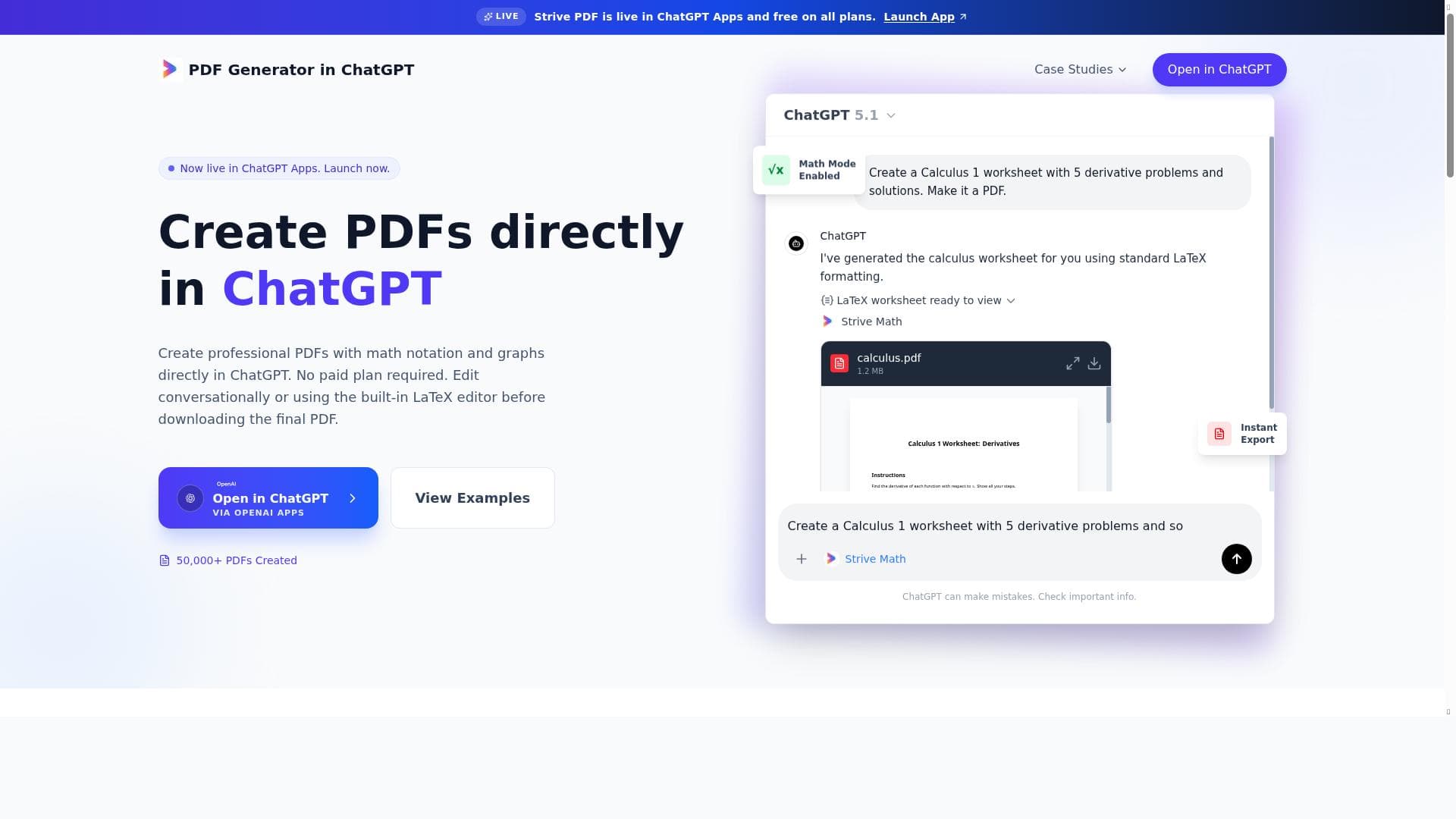


PDF Generator in ChatGPT is a free, integrated tool that lets users create professional PDF documents directly within ChatGPT using simple natural language prompts. Ideal for educators, students, and professionals needing math-rich worksheets or reports, it supports full LaTeX without requiring any technical knowledge and offers instant PDF export with no login or paid plans.

Descripción
The **PDF Generator in ChatGPT** is a free tool that lets you create professional PDF documents directly inside ChatGPT, making it ideal for teachers, students and anyone who needs neat worksheets or reports It supports full LaTeX for complex formulas and graphics, but you don’t need any LaTeX knowledge - just describe what you want, edit the document in-chat, and export the finished PDF instantly without logging in or wrestling with formatting software.
Descripción detallada
PDF Generator in ChatGPT is an innovative and free tool designed to enable users to create professional-quality PDF documents seamlessly within the ChatGPT environment. Its core purpose is to simplify the process of generating well-formatted PDFs without requiring users to leave the chat interface or grapple with complex formatting software. This makes it especially valuable for educators, students, and professionals who frequently need to produce clean, organized worksheets, reports, or documents that may include complex mathematical formulas and graphics. By integrating directly into ChatGPT, the tool leverages natural language input, allowing users to describe their desired document content and structure in plain English, which the system then converts into a polished PDF output. This approach removes the traditional barriers of document creation, such as learning LaTeX or mastering desktop publishing tools, making professional document generation accessible to a wider audience. One of the standout features of PDF Generator in ChatGPT is its robust support for full LaTeX syntax. This capability is critical for users who need to include intricate mathematical notation, equations, or scientific graphics in their documents. However, the tool is designed so that no prior LaTeX knowledge is necessary; users can simply describe the formulas or graphical elements they want, and the system translates these descriptions into accurate LaTeX-rendered content. Additionally, the tool supports live editing within the chat, enabling users to iteratively refine their documents in real time before exporting the final PDF. This interactive workflow enhances user control and ensures the output meets their exact needs. Another key feature is that the PDF Generator is completely free to use, with no paid plans or subscription requirements, making it accessible to anyone with a ChatGPT account. The live integration within ChatGPT Apps further streamlines the user experience by embedding document creation directly into the conversational AI platform. PDF Generator in ChatGPT is best suited for teachers who need to create customized worksheets or lesson plans, students preparing assignments or study materials, and professionals who require quick generation of reports or presentations with complex content. For example, a math teacher can describe a worksheet with specific problem types and formulas, have the tool generate a neatly formatted PDF, and then distribute it to students without additional formatting work. Similarly, students can compile notes or project reports that include graphs and equations without needing specialized software. The tool’s ease of use and powerful formatting capabilities make it a versatile solution for anyone needing high-quality PDFs on demand. In terms of pricing, PDF Generator in ChatGPT is entirely free, with no hidden costs or premium tiers. This is a significant advantage over many traditional PDF creation tools that require purchasing software licenses or subscribing to cloud services. Users can access all features without logging in beyond their ChatGPT account, and there are no limitations on document complexity or export frequency. When compared to alternative PDF creation tools, PDF Generator in ChatGPT stands out due to its seamless integration with conversational AI, eliminating the need to switch between multiple applications. Unlike standalone LaTeX editors or desktop publishing software, it offers a natural language interface that lowers the learning curve. However, while it excels at generating documents with mathematical content and structured layouts, it may not yet match the advanced design customization options available in professional desktop publishing suites. Additionally, since it operates within ChatGPT, users need internet access and a compatible device to use the tool. Notable limitations include the reliance on ChatGPT’s current capabilities, which means very complex or highly customized document designs might require manual adjustments after export. Also, as a relatively new integration, some users may encounter occasional formatting quirks or require time to adapt to the workflow. Despite these considerations, PDF Generator in ChatGPT represents a powerful and accessible solution for generating professional PDFs quickly and efficiently, especially for educational and technical content creators.
Características de la herramienta
- Create professional PDFs directly in ChatGPT
- Supports math notation and graphs
- No paid plan required
- Live integration in ChatGPT Apps
Descripción
PDF Generator in ChatGPT is a free, integrated tool that lets users create professional PDF documents directly within ChatGPT using simple natural language prompts. Ideal for educators, students, and professionals needing math-rich worksheets or reports, it supports full LaTeX without requiring any technical knowledge and offers instant PDF export with no login or paid plans.
The **PDF Generator in ChatGPT** is a free tool that lets you create professional PDF documents directly inside ChatGPT, making it ideal for teachers, students and anyone who needs neat worksheets or reports It supports full LaTeX for complex formulas and graphics, but you don’t need any LaTeX knowledge - just describe what you want, edit the document in-chat, and export the finished PDF instantly without logging in or wrestling with formatting software.
Descripción detallada
PDF Generator in ChatGPT is an innovative and free tool designed to enable users to create professional-quality PDF documents seamlessly within the ChatGPT environment. Its core purpose is to simplify the process of generating well-formatted PDFs without requiring users to leave the chat interface or grapple with complex formatting software. This makes it especially valuable for educators, students, and professionals who frequently need to produce clean, organized worksheets, reports, or documents that may include complex mathematical formulas and graphics. By integrating directly into ChatGPT, the tool leverages natural language input, allowing users to describe their desired document content and structure in plain English, which the system then converts into a polished PDF output. This approach removes the traditional barriers of document creation, such as learning LaTeX or mastering desktop publishing tools, making professional document generation accessible to a wider audience. One of the standout features of PDF Generator in ChatGPT is its robust support for full LaTeX syntax. This capability is critical for users who need to include intricate mathematical notation, equations, or scientific graphics in their documents. However, the tool is designed so that no prior LaTeX knowledge is necessary; users can simply describe the formulas or graphical elements they want, and the system translates these descriptions into accurate LaTeX-rendered content. Additionally, the tool supports live editing within the chat, enabling users to iteratively refine their documents in real time before exporting the final PDF. This interactive workflow enhances user control and ensures the output meets their exact needs. Another key feature is that the PDF Generator is completely free to use, with no paid plans or subscription requirements, making it accessible to anyone with a ChatGPT account. The live integration within ChatGPT Apps further streamlines the user experience by embedding document creation directly into the conversational AI platform. PDF Generator in ChatGPT is best suited for teachers who need to create customized worksheets or lesson plans, students preparing assignments or study materials, and professionals who require quick generation of reports or presentations with complex content. For example, a math teacher can describe a worksheet with specific problem types and formulas, have the tool generate a neatly formatted PDF, and then distribute it to students without additional formatting work. Similarly, students can compile notes or project reports that include graphs and equations without needing specialized software. The tool’s ease of use and powerful formatting capabilities make it a versatile solution for anyone needing high-quality PDFs on demand. In terms of pricing, PDF Generator in ChatGPT is entirely free, with no hidden costs or premium tiers. This is a significant advantage over many traditional PDF creation tools that require purchasing software licenses or subscribing to cloud services. Users can access all features without logging in beyond their ChatGPT account, and there are no limitations on document complexity or export frequency. When compared to alternative PDF creation tools, PDF Generator in ChatGPT stands out due to its seamless integration with conversational AI, eliminating the need to switch between multiple applications. Unlike standalone LaTeX editors or desktop publishing software, it offers a natural language interface that lowers the learning curve. However, while it excels at generating documents with mathematical content and structured layouts, it may not yet match the advanced design customization options available in professional desktop publishing suites. Additionally, since it operates within ChatGPT, users need internet access and a compatible device to use the tool. Notable limitations include the reliance on ChatGPT’s current capabilities, which means very complex or highly customized document designs might require manual adjustments after export. Also, as a relatively new integration, some users may encounter occasional formatting quirks or require time to adapt to the workflow. Despite these considerations, PDF Generator in ChatGPT represents a powerful and accessible solution for generating professional PDFs quickly and efficiently, especially for educational and technical content creators.
Preguntas frecuentes
What is PDF Generator in ChatGPT?
PDF Generator in ChatGPT is a free tool that allows users to create professional PDF documents directly inside the ChatGPT interface by describing their desired content in natural language. It supports complex math notation and graphics through full LaTeX integration, enabling easy generation of worksheets, reports, and other documents without needing specialized formatting software.
How much does PDF Generator in ChatGPT cost?
PDF Generator in ChatGPT is completely free to use with no paid plans or subscription fees. Users can access all features without any cost.
Who is PDF Generator in ChatGPT best for?
This tool is ideal for teachers, students, and professionals who need to create neatly formatted PDFs that include complex mathematical formulas, graphs, or structured content. It’s especially useful for educators preparing worksheets, students compiling reports, and anyone needing quick, professional document creation without technical expertise.
What are the main features of PDF Generator in ChatGPT?
Key features include the ability to create professional PDFs directly within ChatGPT, support for full LaTeX to render complex math notation and graphics, live in-chat document editing, instant PDF export, no requirement for LaTeX knowledge, and completely free access with no paid plans.
Does PDF Generator in ChatGPT offer a free trial?
Since PDF Generator in ChatGPT is entirely free to use, there is no need for a free trial. All features are accessible at no cost.
What integrations does PDF Generator in ChatGPT support?
PDF Generator in ChatGPT is natively integrated within ChatGPT Apps, allowing users to generate PDFs directly during their chat sessions without switching platforms or using external software.
How does PDF Generator in ChatGPT work?
Users simply describe the content and structure of the PDF they want using natural language within ChatGPT. The tool then processes these instructions, including any math formulas or graphics described, using LaTeX rendering to create a polished document. Users can edit the document live in-chat and export the finished PDF instantly without logging in or using separate formatting tools.
Reseñas
Aún no hay reseñas. Sé el primero en compartir tu experiencia.




















































