Hosted Agents in Cluing


¿Es esta tu herramienta de IA? Reclámala hoy.
Verifica la propiedad, gestiona tu perfil y desbloquea funciones de crecimiento.
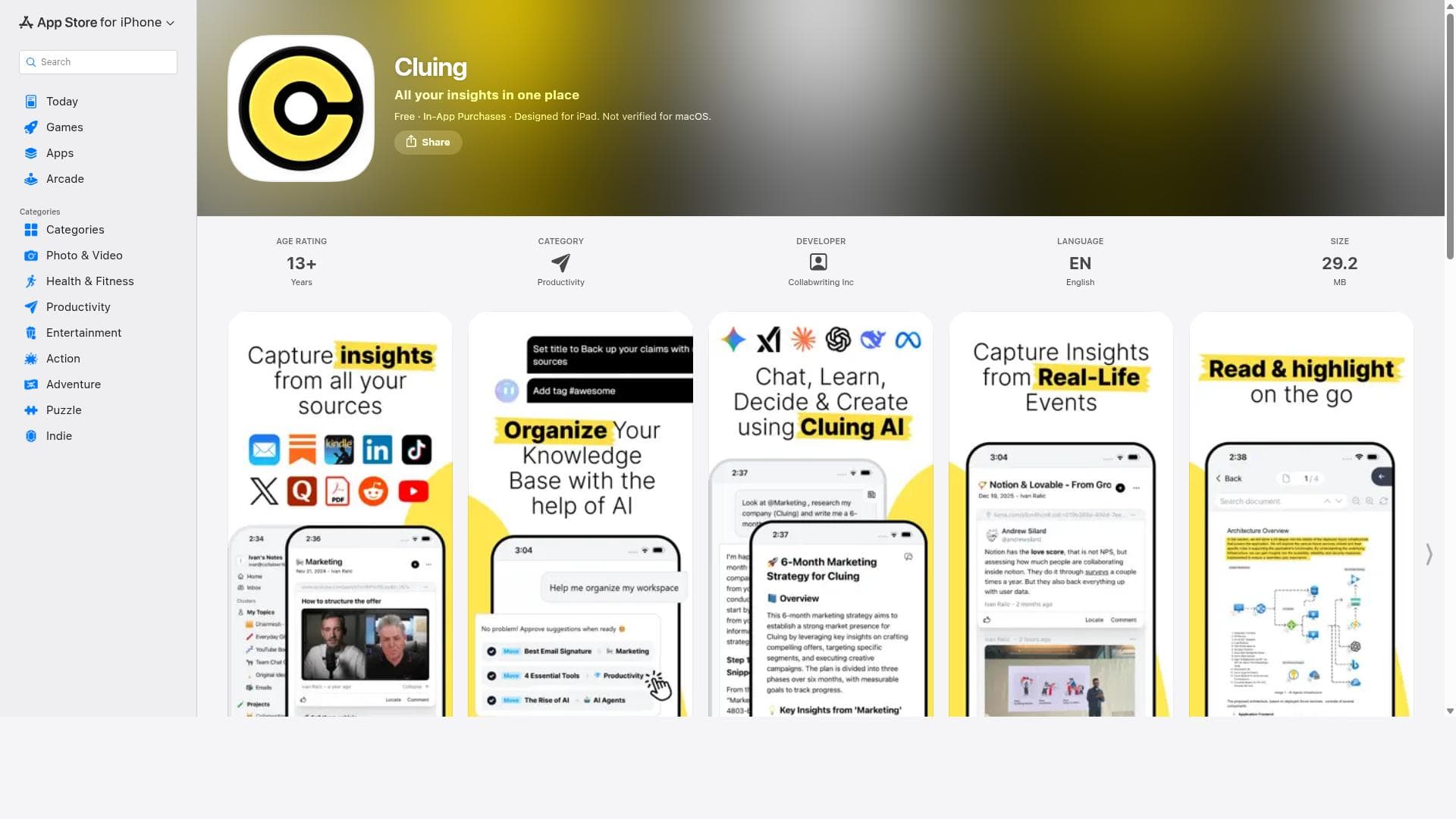
Cluing is a focused iPhone app that combines task management, note-taking, and reminders into one seamless productivity tool. Ideal for busy professionals, students, and freelancers, it helps users stay organized and efficient by consolidating daily activities and important information in an intuitive interface.

Descripción
Cluing Hosted Agents take agents off one person’s laptop and into a collaborative workspace. Start work from your computer, continue on your phone, and hand it over to teammates without losing context. Evolving skills update as you collect new insights and agents become a team asset. Anyone can now assign tasks, publish their work, and connect to any external tool with an API or MCP with Cluing's custom connectors. Close the laptop - the work will keep going.
Descripción detallada
Cluing is a comprehensive productivity and organization app designed specifically for iPhone users, available exclusively on the App Store. Its core purpose is to streamline the management of daily tasks, notes, and reminders, helping users stay organized and efficient throughout their day. By consolidating essential productivity tools into a single, user-friendly interface, Cluing aims to reduce the cognitive load associated with juggling multiple apps and scattered information. It is particularly well-suited for individuals seeking a minimalist yet powerful solution for task and time management on their iOS devices. At the heart of Cluing’s functionality is its robust task management system. Users can create, categorize, and prioritize tasks with ease, enabling them to focus on what matters most. The app supports setting deadlines and due dates, ensuring timely completion of important activities. Alongside task management, Cluing offers a versatile note-taking feature that allows users to jot down ideas, meeting notes, or any relevant information quickly. These notes can be organized efficiently within the app, making retrieval simple and intuitive. Another standout capability is the reminder setting feature. Cluing enables users to schedule reminders for tasks and notes, providing timely alerts that help prevent missed deadlines or forgotten commitments. The app’s design emphasizes efficient organization of daily activities by allowing users to group related tasks and notes, creating a cohesive workflow. This organizational structure supports better planning and execution of daily responsibilities, whether for personal use, professional projects, or academic purposes. Cluing is ideal for a wide range of users including busy professionals, students, freelancers, and anyone who values productivity and organization on the go. For professionals, it serves as a reliable assistant to track meetings, deadlines, and project milestones. Students can benefit from managing assignments, study schedules, and class notes all in one place. Freelancers and creatives will appreciate the ability to quickly capture ideas and manage client tasks without switching between multiple apps. Regarding pricing, Cluing is available as a free download on the App Store, making it accessible to a broad audience. While the app provides essential features at no cost, users should check the App Store listing for any in-app purchases or premium plans that may unlock additional functionalities or enhanced support. This pricing model allows users to try the app risk-free and upgrade if they require more advanced features. When compared to alternatives such as Apple’s native Reminders and Notes apps or third-party tools like Todoist and Evernote, Cluing distinguishes itself through its integrated approach tailored specifically for iPhone users. Its streamlined interface reduces complexity while maintaining powerful organizational capabilities. Unlike some competitors that focus heavily on either task management or note-taking, Cluing balances both, providing a unified experience. However, it may lack some advanced collaboration features or cross-platform support found in other apps, which could be a consideration for users needing multi-device synchronization or team-based project management. Notable limitations of Cluing include its platform exclusivity to iOS devices, which restricts access for users on Android or desktop platforms. Additionally, while the app excels in individual productivity, it may not fully meet the needs of large teams requiring extensive collaboration tools or integrations with enterprise software. Users should also consider the learning curve associated with adopting a new app and evaluate whether Cluing’s feature set aligns with their specific workflow requirements. Overall, Cluing offers a compelling, focused solution for iPhone users aiming to enhance their productivity through effective task, note, and reminder management in a single app.
Características de la herramienta
- Task management
- Note taking
- Reminder setting
- Efficient organization of daily activities
Descripción
Cluing is a focused iPhone app that combines task management, note-taking, and reminders into one seamless productivity tool. Ideal for busy professionals, students, and freelancers, it helps users stay organized and efficient by consolidating daily activities and important information in an intuitive interface.
Cluing Hosted Agents take agents off one person’s laptop and into a collaborative workspace. Start work from your computer, continue on your phone, and hand it over to teammates without losing context. Evolving skills update as you collect new insights and agents become a team asset. Anyone can now assign tasks, publish their work, and connect to any external tool with an API or MCP with Cluing's custom connectors. Close the laptop - the work will keep going.
Descripción detallada
Cluing is a comprehensive productivity and organization app designed specifically for iPhone users, available exclusively on the App Store. Its core purpose is to streamline the management of daily tasks, notes, and reminders, helping users stay organized and efficient throughout their day. By consolidating essential productivity tools into a single, user-friendly interface, Cluing aims to reduce the cognitive load associated with juggling multiple apps and scattered information. It is particularly well-suited for individuals seeking a minimalist yet powerful solution for task and time management on their iOS devices. At the heart of Cluing’s functionality is its robust task management system. Users can create, categorize, and prioritize tasks with ease, enabling them to focus on what matters most. The app supports setting deadlines and due dates, ensuring timely completion of important activities. Alongside task management, Cluing offers a versatile note-taking feature that allows users to jot down ideas, meeting notes, or any relevant information quickly. These notes can be organized efficiently within the app, making retrieval simple and intuitive. Another standout capability is the reminder setting feature. Cluing enables users to schedule reminders for tasks and notes, providing timely alerts that help prevent missed deadlines or forgotten commitments. The app’s design emphasizes efficient organization of daily activities by allowing users to group related tasks and notes, creating a cohesive workflow. This organizational structure supports better planning and execution of daily responsibilities, whether for personal use, professional projects, or academic purposes. Cluing is ideal for a wide range of users including busy professionals, students, freelancers, and anyone who values productivity and organization on the go. For professionals, it serves as a reliable assistant to track meetings, deadlines, and project milestones. Students can benefit from managing assignments, study schedules, and class notes all in one place. Freelancers and creatives will appreciate the ability to quickly capture ideas and manage client tasks without switching between multiple apps. Regarding pricing, Cluing is available as a free download on the App Store, making it accessible to a broad audience. While the app provides essential features at no cost, users should check the App Store listing for any in-app purchases or premium plans that may unlock additional functionalities or enhanced support. This pricing model allows users to try the app risk-free and upgrade if they require more advanced features. When compared to alternatives such as Apple’s native Reminders and Notes apps or third-party tools like Todoist and Evernote, Cluing distinguishes itself through its integrated approach tailored specifically for iPhone users. Its streamlined interface reduces complexity while maintaining powerful organizational capabilities. Unlike some competitors that focus heavily on either task management or note-taking, Cluing balances both, providing a unified experience. However, it may lack some advanced collaboration features or cross-platform support found in other apps, which could be a consideration for users needing multi-device synchronization or team-based project management. Notable limitations of Cluing include its platform exclusivity to iOS devices, which restricts access for users on Android or desktop platforms. Additionally, while the app excels in individual productivity, it may not fully meet the needs of large teams requiring extensive collaboration tools or integrations with enterprise software. Users should also consider the learning curve associated with adopting a new app and evaluate whether Cluing’s feature set aligns with their specific workflow requirements. Overall, Cluing offers a compelling, focused solution for iPhone users aiming to enhance their productivity through effective task, note, and reminder management in a single app.
Preguntas frecuentes
What is Cluing?
Cluing is an iPhone app designed to enhance productivity by offering integrated task management, note-taking, and reminder features to help users organize their daily activities efficiently.
How much does Cluing cost?
Cluing is available as a free download on the App Store. While it offers essential features at no cost, there may be optional in-app purchases or premium plans for additional functionalities.
Who is Cluing best for?
Cluing is best suited for iPhone users such as busy professionals, students, freelancers, and anyone looking for a streamlined way to manage tasks, notes, and reminders in one app.
What are the main features of Cluing?
The main features include task management with prioritization and deadlines, versatile note-taking capabilities, reminder setting for timely alerts, and efficient organization of daily activities.
Does Cluing offer a free trial?
Cluing is free to download and use, which effectively serves as a free trial. Users should check the App Store for any details on premium features or subscription trials.
What integrations does Cluing support?
Cluing primarily functions as a standalone app focused on iPhone productivity. There is no public information indicating support for third-party integrations or cross-platform synchronization.
How does Cluing work?
Cluing works by allowing users to create and organize tasks, take notes, and set reminders all within a single app interface, helping them manage their daily activities and important information efficiently on their iPhone.
Redes sociales
Usar herramientaReseñas
Aún no hay reseñas. Sé el primero en compartir tu experiencia.




















































