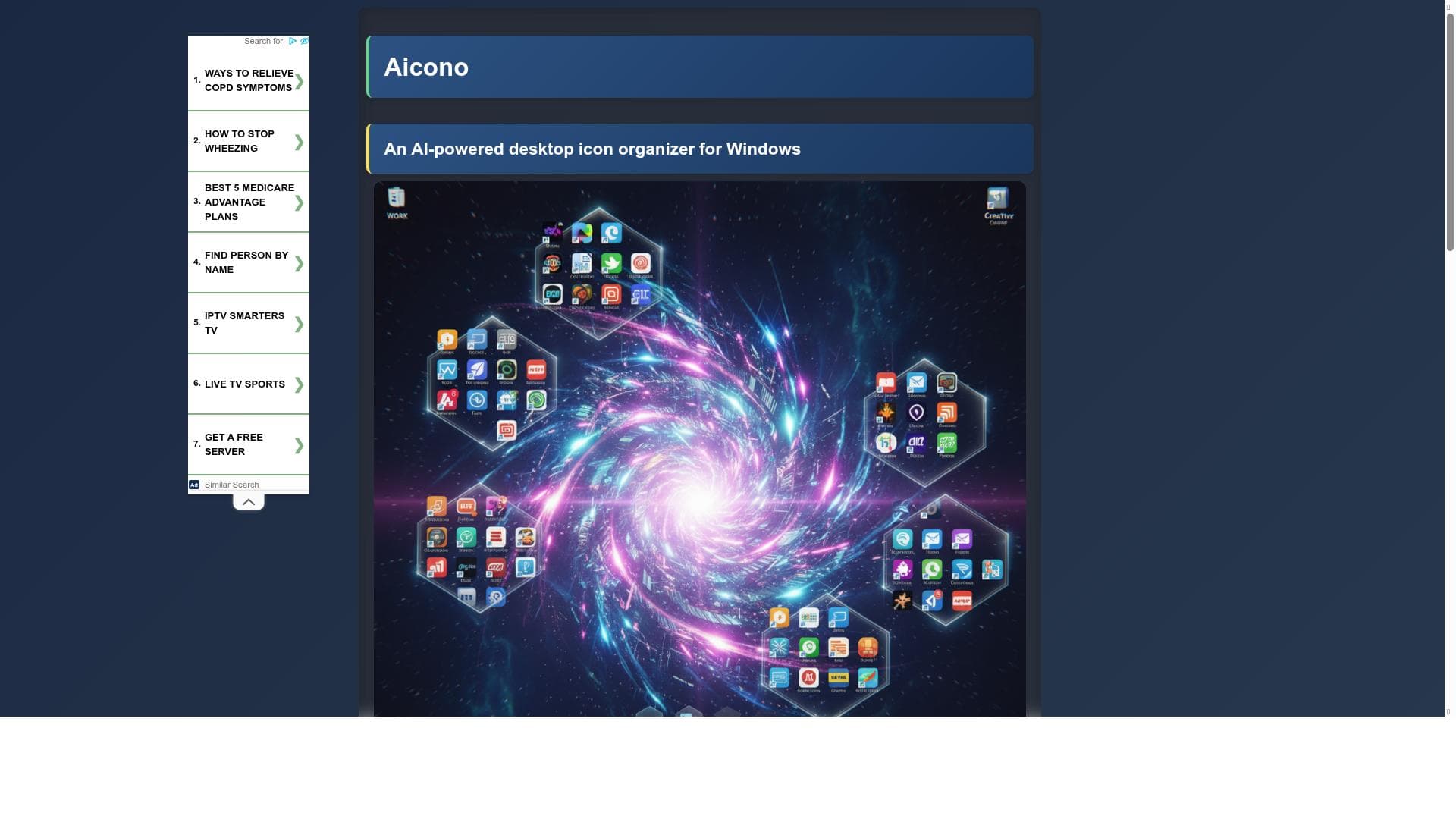


Aicono is a free, AI-powered Windows utility that automatically groups and arranges desktop icons by semantic similarity, turning cluttered desktops into organized, high-density grids. Ideal for professionals and power users, it offers advanced customization, visual editing, and supports multiple AI backends for tailored desktop management.

Descripción
Aicono is a lightweight Windows utility that automatically groups and arranges desktop icons by semantic similarity, turning a cluttered desktop into a stable, high‑density grid that stays organized over time. It uses a fast local model for name/content similarity and a grid‑like layout for quick visual scanning, with adjustable spacing, filters, and WYSIWYG for instant access.
Descripción detallada
Aicono is a specialized Windows utility designed to transform cluttered and disorganized desktops into neatly arranged, semantically grouped icon grids. Its core purpose is to enhance desktop productivity and visual clarity by automatically categorizing and spatially arranging desktop icons based on their semantic similarity. Unlike traditional manual icon organization, Aicono leverages a fast, local AI model that analyzes icon names and content to intelligently group related items such as Work, Games, and Utilities. This semantic grouping helps users quickly locate and access their files and applications, reducing the time spent searching through a chaotic desktop environment. The tool’s key features revolve around its AI-powered grouping and spatial layout capabilities. It automatically categorizes icons into logical groups, positioning these groups cohesively within a user-defined desktop area. The layout ensures groups are clearly separated and prevents icon overlap, maintaining a clean and stable grid that persists over time. Users can customize the desktop region where icons are arranged, allowing for flexible workspace management. Aicono also offers a visual preview (WYSIWYG) before applying any changes, enabling users to see and approve the new layout. Its full WYSIWYG canvas editor further empowers users to drag and drop icons between groups, rename items, rearrange groups, and adjust group boundaries visually, providing complete control over desktop organization. Advanced model management is another standout feature. Aicono supports connections to multiple large language model (LLM) backends, including cloud-based services like OpenAI and Mistral, as well as on-premises and local models such as Lemonade, Llamacpp, LM Studio, and Ollama. This flexibility allows users to tailor the AI backend to their preferences, balancing speed, privacy, and accuracy. Additionally, all settings—from AI models to layout parameters—are fully configurable through an intuitive interface. The tool is also portable, requiring no installation; users can simply run the executable and start organizing immediately. Aicono is best suited for Windows users who maintain a large number of desktop icons and seek a smarter, automated way to organize them. This includes professionals juggling multiple projects, gamers managing various game shortcuts, and general users who prefer a tidy and efficient desktop workspace. Its semantic grouping is particularly beneficial for users who want their desktop to reflect logical categories without manual sorting. The customizable layout and visual editing features make it ideal for those who want both automation and manual control. Regarding pricing, Aicono is offered completely free of charge, making it accessible to a wide audience without subscription or licensing fees. This free availability combined with its advanced AI capabilities presents a compelling value proposition compared to other desktop organization tools that may require payment or offer limited automation. When compared to alternatives, Aicono stands out due to its AI-driven semantic grouping and flexible model integration. Many desktop organization utilities rely on static rules or manual grouping, whereas Aicono’s use of local and cloud AI models enables dynamic, context-aware categorization. Its WYSIWYG canvas editor and customizable working area provide a level of visual control uncommon in similar tools. However, users should consider that the tool is Windows-only and may require some familiarity with AI model selection for advanced customization. Additionally, while the local AI model is fast, the accuracy of grouping may vary depending on icon naming conventions and available metadata. In summary, Aicono offers a powerful, AI-enhanced solution for desktop icon management that combines automation with user-driven customization. Its free, portable nature and support for multiple AI backends make it a versatile choice for users looking to declutter and optimize their Windows desktop environment. Potential users should be aware of its platform limitation and the need to experiment with settings to achieve the best results for their specific desktop setup.
Características de la herramienta
- AI-Powered Grouping: Automatically categorizes icons logically into groups like Work, Games, and Utilities.
- Spatial Layout: Positions icon groups cohesively, clearly separated, and fits within a custom working area without overlaps.
- Customizable Area: Select specific desktop regions for icon placement.
- Visual Preview (WYSIWYG): See and approve the new layout before applying changes.
- Full WYSIWYG Canvas Editor: Drag and drop icons between groups, rearrange groups, rename items, and adjust group boundaries visually.
- Advanced Model Management: Connect to multiple cloud, on-prem, and local LLM backends including OpenAI, Mistral, Lemonade, Llamacpp, LM Studio, Ollama, and others.
- Fully Configurable: All settings, from AI models to layout, are adjustable through the interface.
- Portable App: No installation required, just run and go.
Descripción
Aicono is a free, AI-powered Windows utility that automatically groups and arranges desktop icons by semantic similarity, turning cluttered desktops into organized, high-density grids. Ideal for professionals and power users, it offers advanced customization, visual editing, and supports multiple AI backends for tailored desktop management.
Aicono is a lightweight Windows utility that automatically groups and arranges desktop icons by semantic similarity, turning a cluttered desktop into a stable, high‑density grid that stays organized over time. It uses a fast local model for name/content similarity and a grid‑like layout for quick visual scanning, with adjustable spacing, filters, and WYSIWYG for instant access.
Descripción detallada
Aicono is a specialized Windows utility designed to transform cluttered and disorganized desktops into neatly arranged, semantically grouped icon grids. Its core purpose is to enhance desktop productivity and visual clarity by automatically categorizing and spatially arranging desktop icons based on their semantic similarity. Unlike traditional manual icon organization, Aicono leverages a fast, local AI model that analyzes icon names and content to intelligently group related items such as Work, Games, and Utilities. This semantic grouping helps users quickly locate and access their files and applications, reducing the time spent searching through a chaotic desktop environment. The tool’s key features revolve around its AI-powered grouping and spatial layout capabilities. It automatically categorizes icons into logical groups, positioning these groups cohesively within a user-defined desktop area. The layout ensures groups are clearly separated and prevents icon overlap, maintaining a clean and stable grid that persists over time. Users can customize the desktop region where icons are arranged, allowing for flexible workspace management. Aicono also offers a visual preview (WYSIWYG) before applying any changes, enabling users to see and approve the new layout. Its full WYSIWYG canvas editor further empowers users to drag and drop icons between groups, rename items, rearrange groups, and adjust group boundaries visually, providing complete control over desktop organization. Advanced model management is another standout feature. Aicono supports connections to multiple large language model (LLM) backends, including cloud-based services like OpenAI and Mistral, as well as on-premises and local models such as Lemonade, Llamacpp, LM Studio, and Ollama. This flexibility allows users to tailor the AI backend to their preferences, balancing speed, privacy, and accuracy. Additionally, all settings—from AI models to layout parameters—are fully configurable through an intuitive interface. The tool is also portable, requiring no installation; users can simply run the executable and start organizing immediately. Aicono is best suited for Windows users who maintain a large number of desktop icons and seek a smarter, automated way to organize them. This includes professionals juggling multiple projects, gamers managing various game shortcuts, and general users who prefer a tidy and efficient desktop workspace. Its semantic grouping is particularly beneficial for users who want their desktop to reflect logical categories without manual sorting. The customizable layout and visual editing features make it ideal for those who want both automation and manual control. Regarding pricing, Aicono is offered completely free of charge, making it accessible to a wide audience without subscription or licensing fees. This free availability combined with its advanced AI capabilities presents a compelling value proposition compared to other desktop organization tools that may require payment or offer limited automation. When compared to alternatives, Aicono stands out due to its AI-driven semantic grouping and flexible model integration. Many desktop organization utilities rely on static rules or manual grouping, whereas Aicono’s use of local and cloud AI models enables dynamic, context-aware categorization. Its WYSIWYG canvas editor and customizable working area provide a level of visual control uncommon in similar tools. However, users should consider that the tool is Windows-only and may require some familiarity with AI model selection for advanced customization. Additionally, while the local AI model is fast, the accuracy of grouping may vary depending on icon naming conventions and available metadata. In summary, Aicono offers a powerful, AI-enhanced solution for desktop icon management that combines automation with user-driven customization. Its free, portable nature and support for multiple AI backends make it a versatile choice for users looking to declutter and optimize their Windows desktop environment. Potential users should be aware of its platform limitation and the need to experiment with settings to achieve the best results for their specific desktop setup.
Preguntas frecuentes
What is Aicono?
Aicono is a lightweight Windows utility that automatically groups and arranges desktop icons based on semantic similarity, creating a clean, organized desktop layout that is easy to navigate.
How much does Aicono cost?
Aicono is completely free to use with no subscription or licensing fees.
Who is Aicono best for?
Aicono is best suited for Windows users who have many desktop icons and want an automated, intelligent way to organize them, including professionals, gamers, and general users seeking a tidy workspace.
What are the main features of Aicono?
Key features include AI-powered semantic grouping of icons, spatial layout within customizable desktop areas, a visual WYSIWYG preview and canvas editor for manual adjustments, advanced AI model management supporting multiple backends, full configurability, and a portable, no-installation app.
Does Aicono offer a free trial?
Aicono is free to use and does not require a trial since it is fully available at no cost.
What integrations does Aicono support?
Aicono supports integration with multiple AI backends including cloud services like OpenAI and Mistral, as well as on-premises and local models such as Lemonade, Llamacpp, LM Studio, and Ollama.
How does Aicono work?
Aicono uses a fast local AI model to analyze icon names and content, grouping related icons semantically. It then arranges these groups spatially within a user-defined desktop area, allowing users to preview and manually adjust the layout through a visual editor.
Redes sociales
Usar herramientaReseñas
Aún no hay reseñas. Sé el primero en compartir tu experiencia.




















































