BlogReal-World Use Cases of Humanized AI Writing (2026)
Real-World Use Cases of Humanized AI Writing (2026)
 Shashank Jain
6. Nov. 2026
8 Min. Lesezeit

Real-World Use Cases of Humanized AI Writing
Your AI draft says what you need it to say, but sounds like it could have been written by anyone. The sentences are well written, yet sound oddly formal. People can humanize AI writing to improve the readability and make the text suitable for the audience. How you can do this depends on what you’re writing and for who.
What humanized AI writing actually changes
Humanizing AI text refers to taking the text generated and editing to make it sound more natural whilst retaining the core message. This could take the form of shortening sentences, using more specific verbs, making the tone less formal and reducing predictable sentence structures. Sometimes it can simply mean cutting out half of the paragraph. To change AI writing to human, think about what the sentence needs to do for your reader.
Let’s look at an example:
Before: “We sincerely apologize for any inconvenience that this unfortunate situation may have caused and would like to assure you that our team is actively working toward a resolution.”
After: “Sorry your order arrived late. We're checking what happened and will update you by Friday.”
The second version does more than sound human. It states the problem and gives the customer a useful next step. That Friday promise must, of course, be something the team can actually keep.
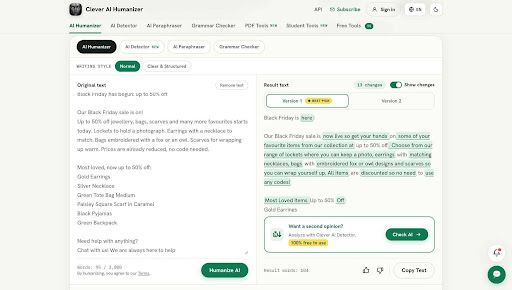
You can humanize AI content with a dedicated editing tool when a draft has the right substance but just feels quite stiff. Whilst an AI content humanizer can help you with the flow and tone, it won’t add any new evidence, personal experience or accurate info. Always double check any changes you’ve made.
Blogs and SEO content
Your blog draft might have the right headings but no personality. It could give no information on when the feature doesn’t work, just repeat what other sites say or use the same opening sentence for each section.
Start by adding personal observations from the author. For a tutorial on some software, mention what the user should look for in the menu, what step might not work and what they should expect to see. Then use editing tools to make the explanations flow. A generic line such as “This solution offers a seamless experience” is less helpful than “You can preview the file before deciding whether to save it.”
Google's guidance on generative AI content, updated October 1, 2026, explains that generative models predict likely word sequences rather than retrieve facts, so their output can contain errors. Google notes that any AI generated content should be manually checked for accuracy. This could include title tags, meta descriptions, structured data and alt text. They also mention the quality rater guidelines for scalable content. Humanizing is just one step in editing your content.
If you’re using AI writing tools to write at scale, you may humanize your content to make it more readable. However, you should still check that the final page contains original information. A smooth paragraph won’t make a copied outline or unverified product statement more helpful.
Marketing emails and landing pages
Marketing content often has the most generic tone. If you ask your model to write a promotional piece for your newsletter or new app, it might generate very generic statements that could fit dozens of unrelated products.
Keep your promotions clear. Whether it’s an email campaign, ensure the offer, deadline and call to action are clear. Avoid generic excitement and instead use a specific reason why your reader should care. Instead of saying “Discover a powerful way to manage your workflow”, say “See what approvals are still waiting for your team”. This makes the issue relatable.
On landing pages, ensure the headline is relevant to the product. Keep the features named the same as on the interface. Remove any benefits that you can’t back up. The aim isn’t to make the tone friendly, but to ensure that the reader knows what they’ll receive.
Workplace emails, reports, and customer replies
Professional content should be easy to understand but shouldn’t be too casual. This will depend on who you’re writing to.
If you’re sending a project update to a manager, start with the decision, deadline or block. If you’re writing an internal report, ensure that the stats, dates and disclaimers are kept. When replying to customer support, ensure you answer their question before explaining how the company works.
Instead of saying “We’re currently looking into potential next steps for implementation”, say “The pilot is finished. We need finance approval before we can start rolling out.” This gives your colleagues something to act on.
Be careful with confidential material. Don't paste customer records, private contracts, unreleased financial figures, or personal data into an external service without checking your organization's rules and the tool's privacy terms. Sometimes the safe option is to edit locally.
Social media and product descriptions
Short content can be unforgiving. Social media only has a few lines to explain why the story matters. Product descriptions should answer practical questions.
When using social media, rephrase your AI caption to focus on one specific detail. Mention where the event took place, a standout quote, outcome or question. Avoid generic statements such as “What are your thoughts?”. Ensure you’ve given people something to respond to.
Product descriptions should keep stats. If your backpack is made from recycled polyester and fits a 15 inch laptop, keep these stats accurate. Whilst humanizing can help explain what the features mean in practice, don’t make it sound like it’s waterproof when it’s water resistant.
Ultimately, your text should be unique, accurate and instantly helpful.
CVs, cover letters, and personal statements
A polished application can still feel impersonal. AI often creates generic statements such as “passionate”, “results driven” or “excited to contribute”.
Instead of saying “I’ve shown excellent leadership skills”, add a specific example from your real experience. Explain how you managed a project, solved a problem or helped a team. Only add a result if you can back it up.
CVs should be carefully edited. Ensure the job titles, dates, certifications and stats are accurate. A humanizer can help improve your bullet points, but don’t adjust how responsible you were or add any skills you don’t have.
Personal statements require extra care. An editor can help you clarify your own ideas, they can’t create your own history. Some universities and employers will have rules around how you can use AI. Always check the relevant policy.
Using AI if English isn’t your first language
If English isn’t your first language, using an AI draft can help you put your ideas across. However, the final text can sometimes sound much more formal than you intended. Or it might use idioms that you wouldn’t normally use.
A sensible edit will keep your original meaning but make the tone more suitable for your audience. For example, changing “I would be grateful if you could furnish me with the requested information” to “Could you send me the details?” whilst keeping the meaning the same. However, if you’re writing an explanation for an academic purpose, you may need to use a more precise phrase. Not all natural content is informal.
Some writers also worry about detection scores. You can use a real or AI checker to inspect which sentences have patterns associated with machine-generated text. But an AI writing detector offers an estimate, not proof of authorship. A free AI checker should never replace review of drafts, sources, and writing history.
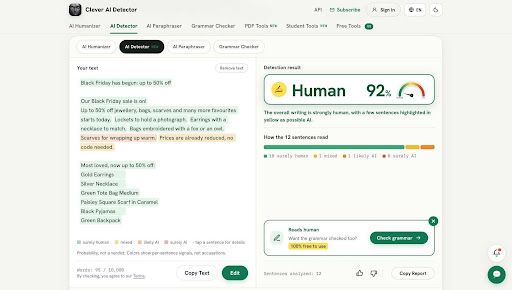
There is a good reason for caution. A 2023 study published in Patterns found that seven tested detectors incorrectly flagged an average of 61.3% of essays in a sample written by non-native English speakers. That figure describes the tools and texts studied, not every detector today. It is a reminder to edit for clarity rather than chase a score.
Pick the right editing tool
Often people will use the terms humanizer, paraphraser and rewriter interchangeably. Whilst they can overlap, they have slightly different purposes.
- Humanizer – Adjusts tone, phrasing, and sentence flow when the draft already says the right thing.
- Paraphraser – Restates an existing passage in different words while aiming to preserve its meaning.
- Rewriter – Makes broader changes to organization, emphasis, or expression when the draft needs substantial work.
A good content rephraser is useful when a sentence is repetitive or confusing. Double check that the meaning hasn’t changed, especially if there are technical terms or stats.
If you're comparing options advertised as the most reliable AI humanizer, don't judge them only by an AI-detection score. Try the same short sample in each tool and ask whether it preserves facts, follows your preferred tone, and reduces the editing work you still need to do. An AI to human text converter is only useful if the result is worth keeping.
When humanizing is the wrong move
Sometimes you don’t want your text to sound too casual. Specific wording can be important for legal, medical, technical or contract purposes. A small change in the style could cause confusion with instructions or create a promise that wasn’t intended.
Leave quotations untouched and cite them correctly. Don't automatically rewrite safety warnings, product specifications, legal clauses, regulated disclosures, code, or formulas. If a specialist must approve the wording, treat that review as necessary rather than optional.
There are limits even in ordinary writing. A humanizer cannot verify a statistic, locate a missing source, or repair a weak argument. It also cannot make prohibited AI assistance acceptable under a school or workplace policy. If the underlying draft is wrong, fix the substance first.
How to check your final text
One useful way to check your humanized AI writing is to ask whether the text helps your reader. A quick final check can help spot any errors.
- Check the underlying facts. Confirm names, figures, deadlines, product claims, and links against reliable sources.
- Ensure the tone is suitable for your audience. A support reply, a job application, and a technical guide should not share the same voice.
- Check that the tool hasn’t added any new promises, removed any disclaimers or changed your meaning.
- Read it aloud once. Cut anything you wouldn't naturally say, then make sure each paragraph still answers a real question.
Whilst humanizing can be useful to make your stiff and accurate text easier to understand, it can’t replace the knowledge, judgement and responsibility of the person putting their name to the text.
Verwandte Tags
AI ToolsVerwandte Kategorien
KI-ToolsLass dein KI-Tool in Artikeln wie diesem vorstellen
Erreiche Nutzer, die aktiv KI-Tools auf PoweredbyAI entdecken, und baue SEO-Backlinks auf, die deine Sichtbarkeit bei Google verbessern.
Vertraut von 25,000+ KI-Tools und wachsenden Startups
Lass dein KI-Tool in reichweitenstarken Blogs & Artikeln vorstellen
Werde auf PoweredByAI vorgestellt und erreiche Nutzer, die aktiv Tools wie deins entdecken. Baue starke SEO-Backlinks auf, die dir beim Google-Ranking helfen und stetigen organischen Traffic bringen.
Gesponserte Blog-Features mit gezielter Reichweite
Gastartikel mit Do-Follow-Backlinks
Kontextuelle Linkplatzierungen für SEO-Boost
Vertraut von 25,000+ KI-Tools und wachsenden Startups
Enjoyed this? Talk AI tools with other founders and builders.
Join our Slack community