Uitgelicht in:Best AI Audio Tools
Word uitgelicht →🚀 Zaprep: je socials on steroids. Start gratis — automatiseer 1.000 DM's/maand en zet engagement om in leads. met 1.000 geautomatiseerde DM's/maand.


Is dit jouw AI-tool? Claim hem vandaag.
Verifieer eigenaarschap, beheer je profiel en ontgrendel groeifeatures.
✦
Notchware uniquely transforms the MacBook notch into a live information hub displaying music playback, battery status, and AI agent alerts, enhancing productivity for macOS users. Ideal for developers and power users, it integrates AI notifications from Claude Code, Codex, and Cursor directly into the notch on macOS 14.6 and later.

Beschrijving
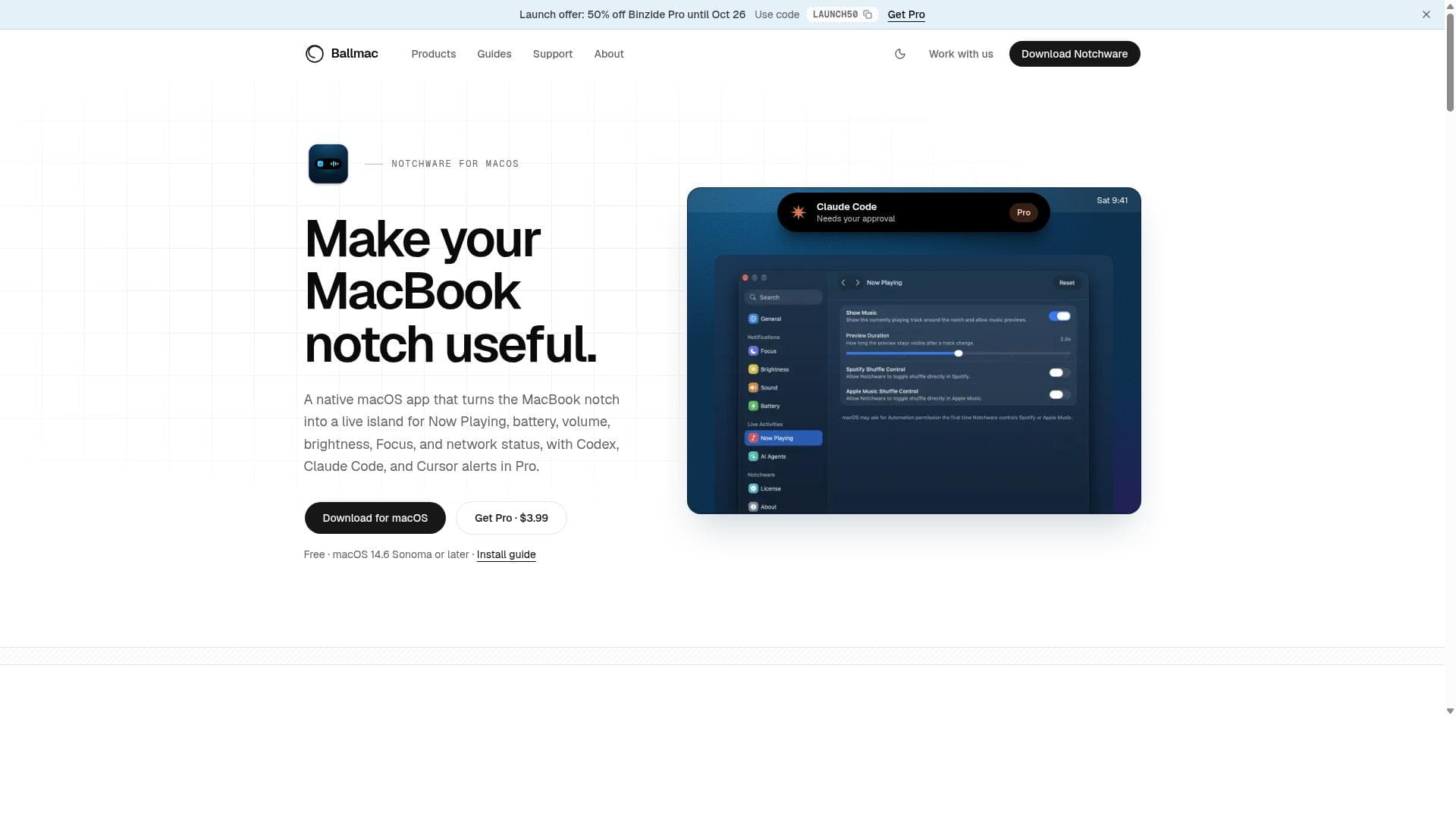
That notch at the top of your MacBook does nothing. Notchware turns it into a live island: Now Playing with artwork and playback controls, plus battery, volume, brightness, Focus, and Wi-Fi status right where you look. Notchware Pro ($3.99 one-time) adds Codex, Claude Code, and Cursor alerts, so you know the moment an agent needs approval or finishes, without watching the terminal. Native SwiftUI. No account, no analytics, no cloud. macOS 14.6+.
Gedetailleerde beschrijving
Notchware is a specialized macOS application designed to transform the often underutilized MacBook notch into a dynamic and informative live island. Its core purpose is to enhance the MacBook user experience by displaying real-time information directly within the notch area, a feature available on macOS 14.6 and later. By repurposing the notch, Notchware provides users with immediate access to essential data such as music playback details, battery status, system alerts, and notifications from integrated AI agents, all without interrupting workflow or requiring additional screen space. One of the standout features of Notchware is its ability to show Now Playing music information in the notch. This allows users to glance at their current track, artist, and playback status without opening a music app or pulling down a menu. Additionally, Notchware displays battery and system status indicators, giving users quick insights into their MacBook’s power levels and system health. Beyond these basic utilities, Notchware integrates alerts from advanced AI agents including Claude Code, Codex, and Cursor. These AI-driven notifications can provide coding assistance, productivity tips, or other contextual alerts, effectively turning the notch into a smart notification hub. The application supports macOS 14.6 and later, ensuring compatibility with the latest MacBook models featuring the notch. Its seamless integration means it runs unobtrusively in the background, updating information in real time and enhancing productivity by reducing the need to switch between apps or check multiple system menus. Notchware is particularly valuable for developers, creatives, and power users who rely on AI tools and want to stay informed about system status and media playback without distraction. In terms of pricing, Notchware is available through Ballmac’s website, with a launch offer that includes a 50% discount on related products like Binzide Pro until a specified date. While specific pricing details for Notchware itself are not explicitly outlined in the provided information, users can visit the official site for the latest offers and purchase options. The app’s value proposition lies in its unique approach to utilizing the MacBook notch, offering a blend of utility and innovation that is not commonly found in other macOS utilities. Compared to alternatives, Notchware stands out by focusing specifically on the notch area as a live information island, whereas most other apps either ignore the notch or treat it as a design inconvenience. Its integration with AI agents such as Claude Code, Codex, and Cursor is a distinctive feature that elevates it beyond simple status display tools, making it a smart assistant embedded in the hardware design. However, users should consider that Notchware requires macOS 14.6 or later, limiting its use to newer MacBook models. Additionally, the reliance on AI agent alerts means its full potential is best realized by users who actively use those AI services. Overall, Notchware is an innovative macOS app that reimagines the MacBook notch as a functional, real-time information display. It is ideal for users who want to maximize their screen space and productivity by having critical updates and AI notifications accessible at a glance. While it may not replace full-featured dashboard apps, its niche focus and seamless integration make it a compelling choice for tech-savvy MacBook users looking to enhance their daily workflow with smart, contextual information.
Toolfeatures
- Turns MacBook notch into a live island for displaying Now Playing music info
- Shows battery and system status in the notch
- Provides alerts from AI agents including Claude Code, Codex, and Cursor
- Supports macOS 14.6 and later
Beschrijving
✦
Notchware uniquely transforms the MacBook notch into a live information hub displaying music playback, battery status, and AI agent alerts, enhancing productivity for macOS users. Ideal for developers and power users, it integrates AI notifications from Claude Code, Codex, and Cursor directly into the notch on macOS 14.6 and later.
That notch at the top of your MacBook does nothing. Notchware turns it into a live island: Now Playing with artwork and playback controls, plus battery, volume, brightness, Focus, and Wi-Fi status right where you look. Notchware Pro ($3.99 one-time) adds Codex, Claude Code, and Cursor alerts, so you know the moment an agent needs approval or finishes, without watching the terminal. Native SwiftUI. No account, no analytics, no cloud. macOS 14.6+.
Gedetailleerde beschrijving
Notchware is a specialized macOS application designed to transform the often underutilized MacBook notch into a dynamic and informative live island. Its core purpose is to enhance the MacBook user experience by displaying real-time information directly within the notch area, a feature available on macOS 14.6 and later. By repurposing the notch, Notchware provides users with immediate access to essential data such as music playback details, battery status, system alerts, and notifications from integrated AI agents, all without interrupting workflow or requiring additional screen space. One of the standout features of Notchware is its ability to show Now Playing music information in the notch. This allows users to glance at their current track, artist, and playback status without opening a music app or pulling down a menu. Additionally, Notchware displays battery and system status indicators, giving users quick insights into their MacBook’s power levels and system health. Beyond these basic utilities, Notchware integrates alerts from advanced AI agents including Claude Code, Codex, and Cursor. These AI-driven notifications can provide coding assistance, productivity tips, or other contextual alerts, effectively turning the notch into a smart notification hub. The application supports macOS 14.6 and later, ensuring compatibility with the latest MacBook models featuring the notch. Its seamless integration means it runs unobtrusively in the background, updating information in real time and enhancing productivity by reducing the need to switch between apps or check multiple system menus. Notchware is particularly valuable for developers, creatives, and power users who rely on AI tools and want to stay informed about system status and media playback without distraction. In terms of pricing, Notchware is available through Ballmac’s website, with a launch offer that includes a 50% discount on related products like Binzide Pro until a specified date. While specific pricing details for Notchware itself are not explicitly outlined in the provided information, users can visit the official site for the latest offers and purchase options. The app’s value proposition lies in its unique approach to utilizing the MacBook notch, offering a blend of utility and innovation that is not commonly found in other macOS utilities. Compared to alternatives, Notchware stands out by focusing specifically on the notch area as a live information island, whereas most other apps either ignore the notch or treat it as a design inconvenience. Its integration with AI agents such as Claude Code, Codex, and Cursor is a distinctive feature that elevates it beyond simple status display tools, making it a smart assistant embedded in the hardware design. However, users should consider that Notchware requires macOS 14.6 or later, limiting its use to newer MacBook models. Additionally, the reliance on AI agent alerts means its full potential is best realized by users who actively use those AI services. Overall, Notchware is an innovative macOS app that reimagines the MacBook notch as a functional, real-time information display. It is ideal for users who want to maximize their screen space and productivity by having critical updates and AI notifications accessible at a glance. While it may not replace full-featured dashboard apps, its niche focus and seamless integration make it a compelling choice for tech-savvy MacBook users looking to enhance their daily workflow with smart, contextual information.
Veelgestelde vragen
What is Notchware?
Notchware is a macOS application that repurposes the MacBook notch into a live island displaying real-time information such as Now Playing music details, battery status, and alerts from AI agents like Claude Code, Codex, and Cursor.
How much does Notchware cost?
Specific pricing details for Notchware are available on its official website. There is a launch offer mentioned for related products with a 50% discount, but users should check the site directly for current pricing and any available promotions.
Who is Notchware best for?
Notchware is best suited for MacBook users running macOS 14.6 or later who want to maximize their productivity by having quick access to music info, battery status, and AI-driven alerts. It is particularly beneficial for developers, creatives, and power users who utilize AI agents like Claude Code, Codex, and Cursor.
What are the main features of Notchware?
The main features include turning the MacBook notch into a live island for displaying Now Playing music information, showing battery and system status, and providing alerts from AI agents such as Claude Code, Codex, and Cursor.
Does Notchware offer a free trial?
The provided information does not specify whether Notchware offers a free trial. Interested users should visit the official website to check for any trial options or demo versions.
What integrations does Notchware support?
Notchware integrates with AI agents including Claude Code, Codex, and Cursor to provide intelligent alerts and notifications directly in the MacBook notch.
How does Notchware work?
Notchware runs on macOS 14.6 and later, continuously updating the MacBook notch area with live information such as current music playback, battery status, and AI agent alerts. It operates unobtrusively in the background, enhancing productivity by making key information instantly visible without interrupting the user’s workflow.
Reviews
0 reviews
Nog geen reviews. Wees de eerste die je ervaring deelt.
Gesponsorde tools











































Aanbevolen tools
Blijf op de hoogte van de nieuwste AI-tools
Krijg de laatste inzichten, schrijf je in voor onze nieuwsbrief
Gelezen en vertrouwd door 50,000+ lezers
Word lid van de grootste AI-community
Onze community en ons team staan voor je klaar!
Jouw feedback helpt Alice AI te verbeteren in toekomstige versies.








Dien je tool in


PoweredByAI.app is een AI-toolsdirectory die individuen, bedrijven en creators helpt de beste AI-tools te ontdekken voor schrijven, coderen, design, productiviteit en meer.
© 2026 , Een product van011BQ. Alle rechten voorbehouden.