In evidenza in:Best AI Education Tools
Mettiti in evidenza →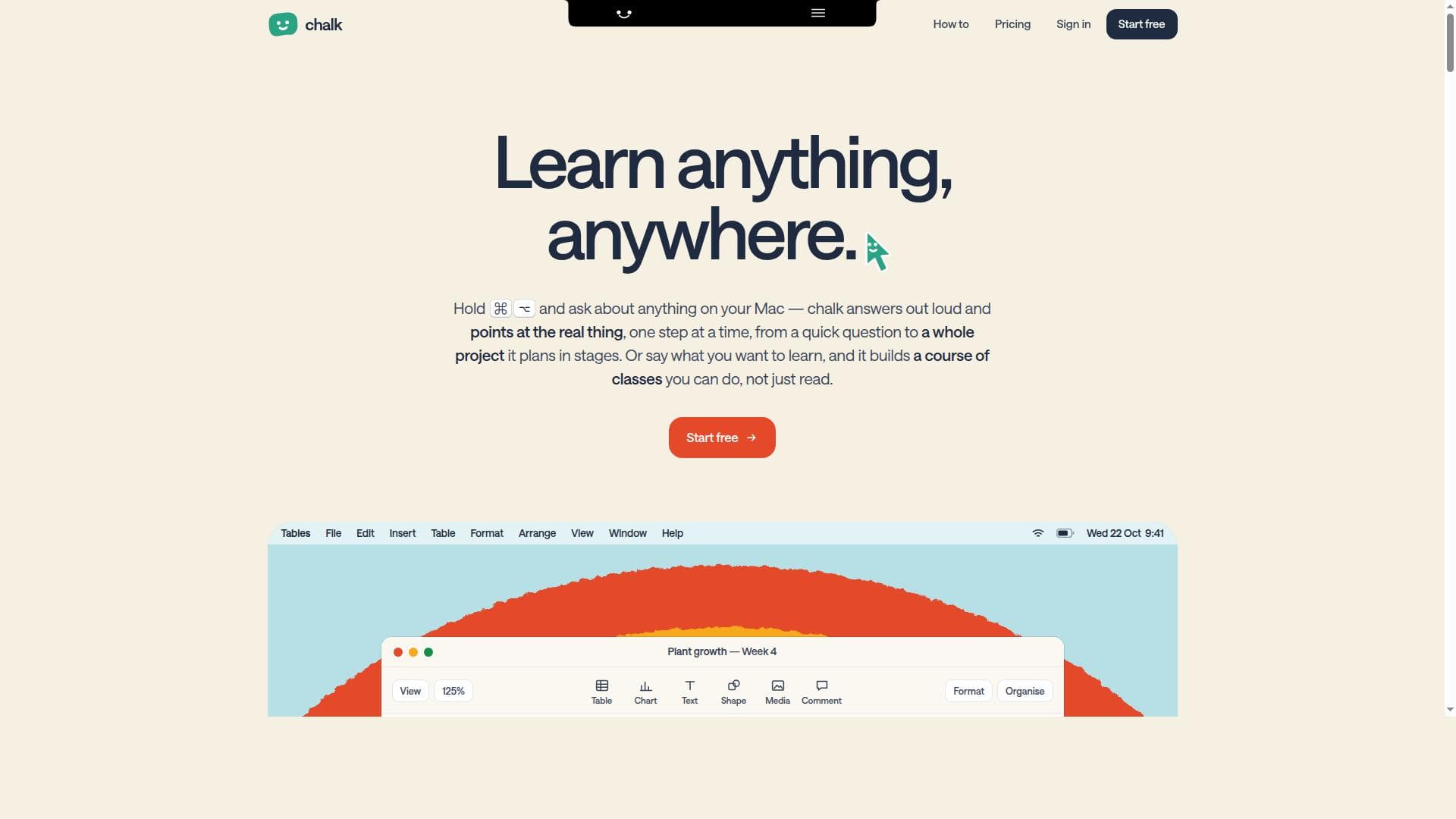


Questo è il tuo strumento IA? Reclama oggi.
Verifica la titolarità, gestisci il profilo e sblocca funzioni di crescita.
✦
Chalk revolutionizes learning on Mac by providing out-loud answers paired with visual, step-by-step pointers directly on your screen. Ideal for students, professionals, and self-learners, it builds custom interactive courses from any topic or personal files, accessible both on Mac and the web.

Descrizione
chalk teaches by showing you. On your Mac, hold ⌘⌥ and ask about anything on your screen: chalk answers out loud, marks the real button, and walks you through one step at a time. Or say what you want to learn, and it draws you a board, plans a course of classes you do (not just read), or takes you through a whole project in stages. It writes up your lectures against your slides, too. Boards and courses work in any browser. Free to start.
Descrizione dettagliata
Chalk is an innovative interactive learning tool designed to transform the way users engage with information on their Mac and the web. Its core purpose is to provide an intuitive, step-by-step guided learning experience by allowing users to ask questions about anything visible on their Mac. Unlike traditional search or help tools, Chalk answers questions out loud and visually points to relevant items directly on the screen, making the learning process highly interactive and contextually rich. This unique approach helps users understand complex tasks or concepts by seeing exactly where to focus their attention, one step at a time. One of Chalk's standout capabilities is its ability to build custom interactive courses from any topic or even personal files. Users can simply state what they want to learn, and Chalk dynamically constructs a tailored curriculum composed of interactive classes. These classes are designed to be engaging and hands-on, allowing learners to absorb information at their own pace with visual and auditory guidance. The platform supports both Mac and web access, ensuring flexibility and convenience for users who want to learn anytime, anywhere. Chalk’s interface is designed to be user-friendly, with a focus on clarity and ease of navigation, making it accessible for learners of all levels. Chalk is ideal for a wide range of users including students, professionals, and lifelong learners who want to deepen their understanding of software, workflows, or any subject matter accessible via their Mac or personal documents. For example, a graphic designer can ask Chalk how to use a specific feature in design software and receive step-by-step visual instructions, while a student can request a course on a particular academic topic generated from their notes or files. Its ability to create personalized learning paths from user content makes it especially valuable for self-directed learners and educators seeking to customize lessons. Regarding pricing, while specific details are not provided in the source content, tools of this nature typically offer tiered plans including free trials or freemium options to allow users to explore core features before committing. Potential users should check the official Chalk website for the most current pricing and subscription models. Its availability on both Mac and web platforms suggests a flexible approach to access, which may include subscription plans tailored to individual or organizational needs. When compared to alternatives, Chalk stands out due to its unique combination of out-loud answers paired with visual on-screen guidance, which is rare among interactive learning tools. Many competitors offer either text-based tutorials or video lessons, but few provide real-time, context-aware pointers that directly interact with the user’s desktop environment. This makes Chalk particularly effective for hands-on learning and troubleshooting. However, users should consider that its full capabilities might be best experienced on Mac devices, and web access may have some limitations depending on browser compatibility and feature support. Notable considerations include the dependency on Mac OS for the full interactive experience, which may limit accessibility for users on other operating systems. Additionally, while Chalk can generate courses from personal files, the quality and relevance of these courses depend on the input content. Users should ensure their files are well-organized and topic-focused to maximize learning outcomes. Finally, as an emerging tool, users might encounter occasional updates or feature enhancements as the platform evolves. In summary, Chalk offers a groundbreaking approach to interactive learning by combining voice-guided answers with visual cues directly on the user’s Mac. Its ability to create custom courses from any topic or personal files, accessible on both Mac and web, makes it a versatile and powerful tool for anyone looking to learn more effectively and efficiently.
Funzioni dello strumento
- Answers questions out loud and visually points at relevant items on Mac
- Builds interactive courses from any topic or user files
- Accessible on both web and Mac platforms
- Supports step-by-step guided learning
- Interactive classes tailored to user queries
Descrizione
✦
Chalk revolutionizes learning on Mac by providing out-loud answers paired with visual, step-by-step pointers directly on your screen. Ideal for students, professionals, and self-learners, it builds custom interactive courses from any topic or personal files, accessible both on Mac and the web.
chalk teaches by showing you. On your Mac, hold ⌘⌥ and ask about anything on your screen: chalk answers out loud, marks the real button, and walks you through one step at a time. Or say what you want to learn, and it draws you a board, plans a course of classes you do (not just read), or takes you through a whole project in stages. It writes up your lectures against your slides, too. Boards and courses work in any browser. Free to start.
Descrizione dettagliata
Chalk is an innovative interactive learning tool designed to transform the way users engage with information on their Mac and the web. Its core purpose is to provide an intuitive, step-by-step guided learning experience by allowing users to ask questions about anything visible on their Mac. Unlike traditional search or help tools, Chalk answers questions out loud and visually points to relevant items directly on the screen, making the learning process highly interactive and contextually rich. This unique approach helps users understand complex tasks or concepts by seeing exactly where to focus their attention, one step at a time. One of Chalk's standout capabilities is its ability to build custom interactive courses from any topic or even personal files. Users can simply state what they want to learn, and Chalk dynamically constructs a tailored curriculum composed of interactive classes. These classes are designed to be engaging and hands-on, allowing learners to absorb information at their own pace with visual and auditory guidance. The platform supports both Mac and web access, ensuring flexibility and convenience for users who want to learn anytime, anywhere. Chalk’s interface is designed to be user-friendly, with a focus on clarity and ease of navigation, making it accessible for learners of all levels. Chalk is ideal for a wide range of users including students, professionals, and lifelong learners who want to deepen their understanding of software, workflows, or any subject matter accessible via their Mac or personal documents. For example, a graphic designer can ask Chalk how to use a specific feature in design software and receive step-by-step visual instructions, while a student can request a course on a particular academic topic generated from their notes or files. Its ability to create personalized learning paths from user content makes it especially valuable for self-directed learners and educators seeking to customize lessons. Regarding pricing, while specific details are not provided in the source content, tools of this nature typically offer tiered plans including free trials or freemium options to allow users to explore core features before committing. Potential users should check the official Chalk website for the most current pricing and subscription models. Its availability on both Mac and web platforms suggests a flexible approach to access, which may include subscription plans tailored to individual or organizational needs. When compared to alternatives, Chalk stands out due to its unique combination of out-loud answers paired with visual on-screen guidance, which is rare among interactive learning tools. Many competitors offer either text-based tutorials or video lessons, but few provide real-time, context-aware pointers that directly interact with the user’s desktop environment. This makes Chalk particularly effective for hands-on learning and troubleshooting. However, users should consider that its full capabilities might be best experienced on Mac devices, and web access may have some limitations depending on browser compatibility and feature support. Notable considerations include the dependency on Mac OS for the full interactive experience, which may limit accessibility for users on other operating systems. Additionally, while Chalk can generate courses from personal files, the quality and relevance of these courses depend on the input content. Users should ensure their files are well-organized and topic-focused to maximize learning outcomes. Finally, as an emerging tool, users might encounter occasional updates or feature enhancements as the platform evolves. In summary, Chalk offers a groundbreaking approach to interactive learning by combining voice-guided answers with visual cues directly on the user’s Mac. Its ability to create custom courses from any topic or personal files, accessible on both Mac and web, makes it a versatile and powerful tool for anyone looking to learn more effectively and efficiently.
Domande frequenti
What is chalk?
Chalk is an interactive learning tool that helps users ask questions about anything on their Mac, providing spoken answers while visually pointing to relevant items step-by-step. It also builds personalized courses from any topic or user files, accessible on both Mac and web platforms.
How much does chalk cost?
Specific pricing details for Chalk are not provided here. Users should visit the official Chalk website to find the latest information on subscription plans, free trials, or any available pricing tiers.
Who is chalk best for?
Chalk is best suited for students, professionals, educators, and lifelong learners who want an interactive, hands-on approach to learning. It is particularly useful for those who want to learn software features, workflows, or any topic by receiving visual and spoken guidance.
What are the main features of chalk?
Key features include out-loud answers to user questions, visual step-by-step pointers on Mac, the ability to build interactive courses from any topic or personal files, accessibility on both Mac and web platforms, and tailored interactive classes based on user queries.
Does chalk offer a free trial?
While not explicitly stated, many tools like Chalk offer free trials or freemium versions. It is recommended to check Chalk’s official website for details on any available trial periods or free access options.
What integrations does chalk support?
Chalk primarily integrates with the Mac operating system to provide visual guidance on-screen and supports web access for courses. Details on additional third-party integrations are not specified and should be verified on the official site.
How does chalk work?
Users ask Chalk questions about anything on their Mac or specify topics they want to learn. Chalk responds by speaking answers aloud and visually pointing to relevant items on the screen step-by-step. It can also generate interactive courses from user files or chosen topics, accessible via Mac or web.
Social

Recensioni
0 recensioni
Ancora nessuna recensione. Sii il primo a condividere la tua esperienza.
Strumenti sponsorizzati






























Strumenti consigliati
Resta aggiornato sui nuovi strumenti IA
Ricevi gli ultimi insight, iscriviti alla newsletter
Letta e scelta da 50,000+ lettori
Unisciti alla più grande community IA
La nostra community e lo staff sono qui per aiutarti!
Il tuo feedback aiuterà Alice AI a migliorare nelle versioni future.