

Ini alat AImu? Klaim hari ini.
Verifikasi kepemilikan, kelola profilmu, dan buka fitur pertumbuhan.
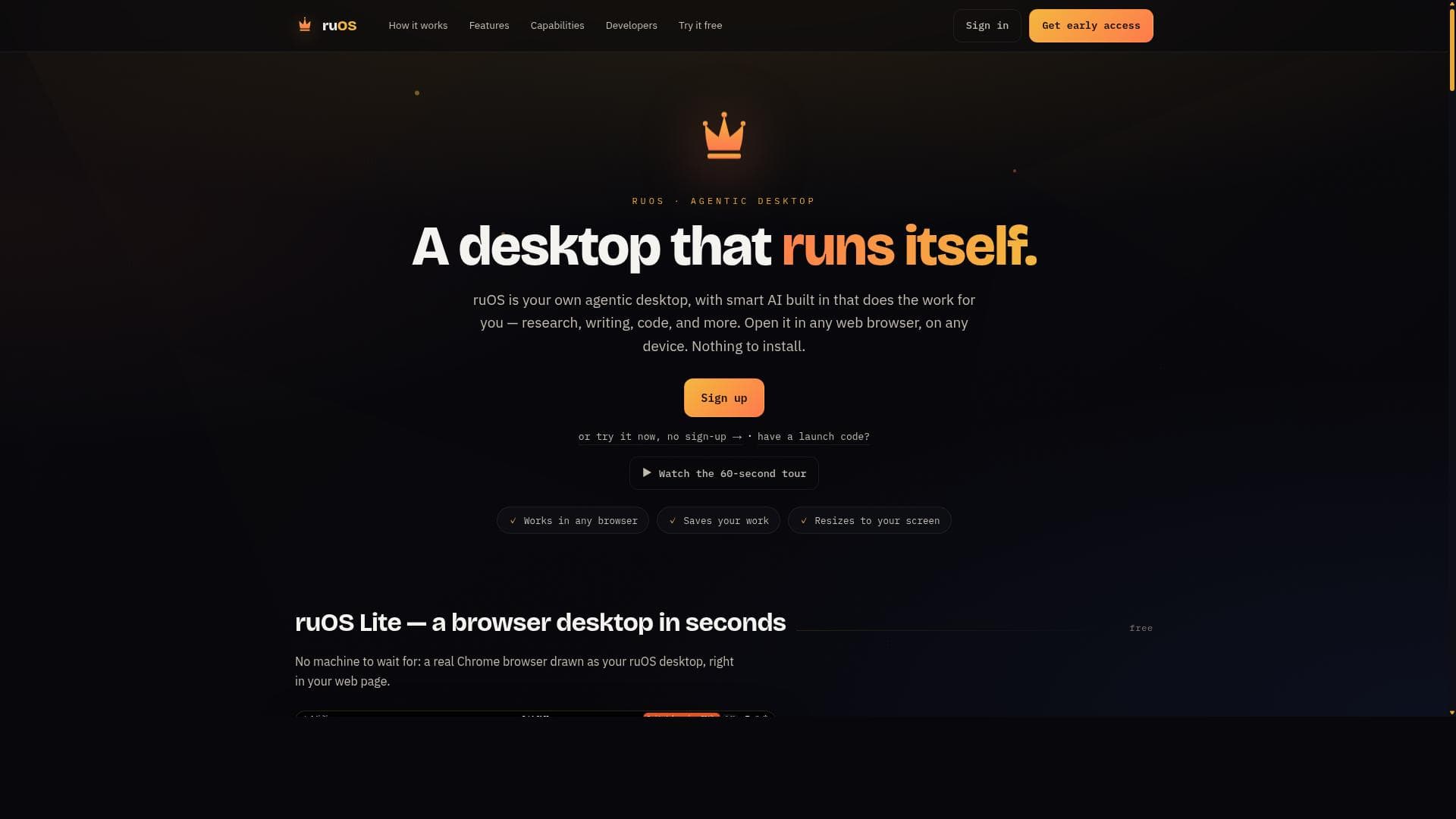
ruOS is a browser-based agentic AI desktop that automates research, writing, and coding tasks, providing a seamless, installation-free experience on any device. Ideal for knowledge workers, developers, and creators, it consolidates powerful AI capabilities into one accessible workspace to dramatically enhance productivity.

Deskripsi
ruOS is a private cloud desktop with an AI team built in. Ask for research, writing or code and the agents (Claude Code, Codex, ruflo swarms) do it while you watch or step away. Opens in any browser on Mac, iPad or Chromebook, nothing to install. Files and AI memory persist across devices. Power users get a real Linux box plus an MCP server, so ChatGPT or Claude can drive it. Try ruOS Lite free in seconds, no sign-up.
Deskripsi Detail
ruOS is an innovative AI-powered desktop environment designed to automate and streamline your digital workflow by performing complex tasks such as research, writing, and coding on your behalf. Unlike traditional software that requires installation and device-specific setups, ruOS operates entirely within any modern web browser, making it accessible on virtually any device without the need for downloads or configuration. This agentic desktop acts as a personal AI assistant embedded directly into your workspace, enabling a seamless and efficient experience that adapts to your needs across platforms. At its core, ruOS integrates smart AI capabilities to autonomously conduct research, synthesize information, generate written content, and produce code snippets, effectively reducing the time and effort users spend on routine or complex tasks. The platform's agentic nature means it can proactively manage workflows, anticipate user needs, and execute multi-step processes with minimal input. This is particularly valuable for professionals who require rapid access to accurate information, content creators who need assistance drafting or editing, and developers looking for code generation and debugging support. Key features of ruOS include its fully agentic desktop environment that combines AI intelligence with an intuitive interface accessible from any web browser. The research functionality allows users to delegate information gathering and summarization tasks, saving hours of manual searching. Writing assistance spans from drafting emails and reports to creative writing, with AI providing suggestions, editing, and content expansion. For coding, ruOS supports code generation, debugging, and optimization, helping developers accelerate their projects. The platform’s browser-based nature ensures cross-device compatibility, enabling users to switch seamlessly between desktops, laptops, tablets, or smartphones without losing context or functionality. ruOS is best suited for a wide range of users including knowledge workers, researchers, writers, software developers, and entrepreneurs who seek to enhance productivity by automating repetitive or time-consuming tasks. For example, researchers can rely on ruOS to compile and summarize academic papers, writers can generate drafts or refine text, and developers can quickly prototype code or troubleshoot issues. Its zero-install approach also makes it ideal for users who prefer lightweight solutions without the hassle of managing software installations or updates. Regarding pricing, ruOS currently offers access through its website with no explicit mention of tiered plans or subscription fees on the landing page. Interested users can explore the platform directly via the browser to evaluate its capabilities. Potential plans may include free access with basic features and premium subscriptions for advanced AI functionalities, though specific pricing details should be confirmed on the official website or through direct inquiry. Compared to alternatives, ruOS stands out by combining an agentic AI assistant directly within a desktop-like environment accessible through any browser, eliminating platform lock-in and installation barriers common with other AI tools. While many AI writing or coding assistants exist as plugins or standalone apps, ruOS’s integrated approach offers a unified workspace where multiple AI-driven tasks coexist seamlessly. This holistic design enhances user experience by reducing context switching and consolidating AI capabilities in one place. However, some considerations include the reliance on internet connectivity since ruOS operates entirely online, which may limit usability in offline scenarios. Additionally, as a relatively new platform, it may have fewer integrations or community resources compared to more established AI tools. Users should also evaluate data privacy policies and security measures, especially when handling sensitive information through a web-based AI desktop. In summary, ruOS delivers a powerful, agentic AI desktop experience that automates research, writing, and coding tasks without installation, accessible on any device via a web browser. Its unique combination of features makes it a compelling choice for professionals seeking to boost productivity with minimal setup, though users should consider connectivity and privacy factors when adopting the platform.
Fitur Alat
- Agentic desktop with built-in smart AI
- Performs research tasks automatically
- Assists with writing and code generation
- Accessible via any web browser on any device
- No installation required
Deskripsi
ruOS is a browser-based agentic AI desktop that automates research, writing, and coding tasks, providing a seamless, installation-free experience on any device. Ideal for knowledge workers, developers, and creators, it consolidates powerful AI capabilities into one accessible workspace to dramatically enhance productivity.
ruOS is a private cloud desktop with an AI team built in. Ask for research, writing or code and the agents (Claude Code, Codex, ruflo swarms) do it while you watch or step away. Opens in any browser on Mac, iPad or Chromebook, nothing to install. Files and AI memory persist across devices. Power users get a real Linux box plus an MCP server, so ChatGPT or Claude can drive it. Try ruOS Lite free in seconds, no sign-up.
Deskripsi Detail
ruOS is an innovative AI-powered desktop environment designed to automate and streamline your digital workflow by performing complex tasks such as research, writing, and coding on your behalf. Unlike traditional software that requires installation and device-specific setups, ruOS operates entirely within any modern web browser, making it accessible on virtually any device without the need for downloads or configuration. This agentic desktop acts as a personal AI assistant embedded directly into your workspace, enabling a seamless and efficient experience that adapts to your needs across platforms. At its core, ruOS integrates smart AI capabilities to autonomously conduct research, synthesize information, generate written content, and produce code snippets, effectively reducing the time and effort users spend on routine or complex tasks. The platform's agentic nature means it can proactively manage workflows, anticipate user needs, and execute multi-step processes with minimal input. This is particularly valuable for professionals who require rapid access to accurate information, content creators who need assistance drafting or editing, and developers looking for code generation and debugging support. Key features of ruOS include its fully agentic desktop environment that combines AI intelligence with an intuitive interface accessible from any web browser. The research functionality allows users to delegate information gathering and summarization tasks, saving hours of manual searching. Writing assistance spans from drafting emails and reports to creative writing, with AI providing suggestions, editing, and content expansion. For coding, ruOS supports code generation, debugging, and optimization, helping developers accelerate their projects. The platform’s browser-based nature ensures cross-device compatibility, enabling users to switch seamlessly between desktops, laptops, tablets, or smartphones without losing context or functionality. ruOS is best suited for a wide range of users including knowledge workers, researchers, writers, software developers, and entrepreneurs who seek to enhance productivity by automating repetitive or time-consuming tasks. For example, researchers can rely on ruOS to compile and summarize academic papers, writers can generate drafts or refine text, and developers can quickly prototype code or troubleshoot issues. Its zero-install approach also makes it ideal for users who prefer lightweight solutions without the hassle of managing software installations or updates. Regarding pricing, ruOS currently offers access through its website with no explicit mention of tiered plans or subscription fees on the landing page. Interested users can explore the platform directly via the browser to evaluate its capabilities. Potential plans may include free access with basic features and premium subscriptions for advanced AI functionalities, though specific pricing details should be confirmed on the official website or through direct inquiry. Compared to alternatives, ruOS stands out by combining an agentic AI assistant directly within a desktop-like environment accessible through any browser, eliminating platform lock-in and installation barriers common with other AI tools. While many AI writing or coding assistants exist as plugins or standalone apps, ruOS’s integrated approach offers a unified workspace where multiple AI-driven tasks coexist seamlessly. This holistic design enhances user experience by reducing context switching and consolidating AI capabilities in one place. However, some considerations include the reliance on internet connectivity since ruOS operates entirely online, which may limit usability in offline scenarios. Additionally, as a relatively new platform, it may have fewer integrations or community resources compared to more established AI tools. Users should also evaluate data privacy policies and security measures, especially when handling sensitive information through a web-based AI desktop. In summary, ruOS delivers a powerful, agentic AI desktop experience that automates research, writing, and coding tasks without installation, accessible on any device via a web browser. Its unique combination of features makes it a compelling choice for professionals seeking to boost productivity with minimal setup, though users should consider connectivity and privacy factors when adopting the platform.
Pertanyaan yang Sering Diajukan
What is ruOS?
ruOS is an agentic AI-powered desktop environment that performs tasks such as research, writing, and coding automatically. It runs entirely in any web browser on any device without requiring installation, offering a seamless AI-driven workspace.
How much does ruOS cost?
Pricing details for ruOS are not explicitly listed on the website. Users can access the platform online to explore its features, and any subscription plans or fees should be confirmed directly through ruOS’s official channels.
Who is ruOS best for?
ruOS is ideal for knowledge workers, researchers, writers, software developers, and entrepreneurs who want to automate and streamline tasks like research, content creation, and coding across devices without installation hassles.
What are the main features of ruOS?
Key features include an agentic desktop with built-in smart AI, automatic research capabilities, writing assistance, code generation and debugging, accessibility via any web browser on any device, and no installation required.
Does ruOS offer a free trial?
The website does not explicitly mention a free trial, but since ruOS operates via the web without installation, users can typically explore its features directly online. For specific trial options, checking the official site or contacting support is recommended.
What integrations does ruOS support?
The current information does not detail specific third-party integrations. ruOS focuses on providing a comprehensive AI-powered desktop experience within the browser, but users should check the official website for updates on integrations.
How does ruOS work?
ruOS works by embedding smart AI agents within a browser-based desktop environment that autonomously performs tasks such as researching information, generating written content, and coding. It requires no installation and is accessible from any device with a web browser.
Sosial
Gunakan AlatUlasan
Belum ada ulasan. Jadilah yang pertama berbagi pengalamanmu.




















































