Tampil di:Best AI Writing Tools
Tampil unggulan →🚀 Zaprep: Sosialmu Supercharged. Mulai gratis — otomasi 1.000 DM/bulan & ubah engagement jadi lead. dengan 1.000 DM otomatis/bulan.


Ini alat AImu? Klaim hari ini.
Verifikasi kepemilikan, kelola profilmu, dan buka fitur pertumbuhan.
✦
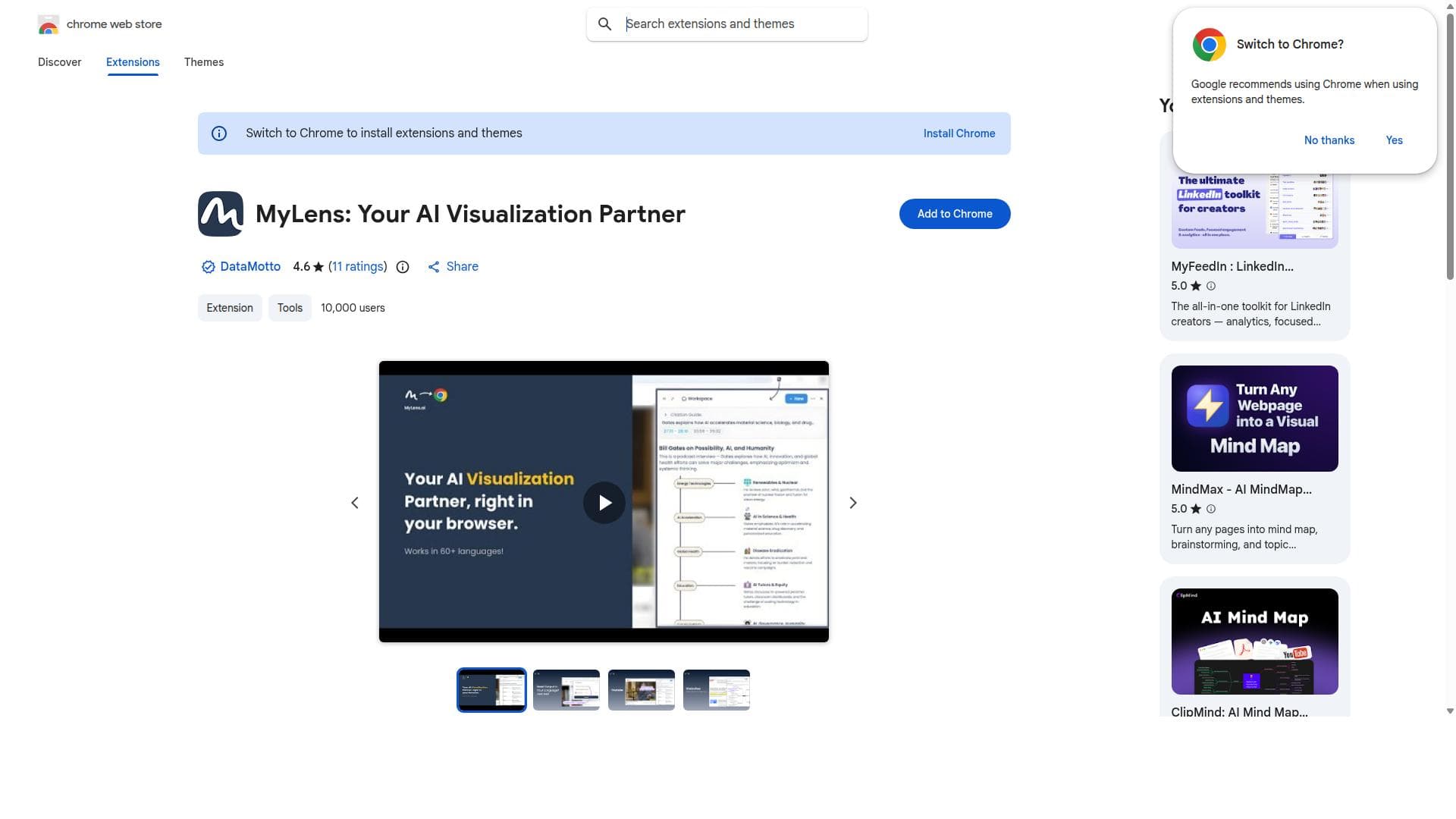
MyLens is a Chrome extension that transforms online content from YouTube, websites, and documents into AI-generated, source-linked visualizations, enhancing comprehension and presentation directly in your browser. Ideal for students, educators, and professionals, it streamlines understanding complex web content through intuitive visuals without leaving Chrome.

Deskripsi
MyLensAI Chrome Extension transforms any webpage or YouTube video into a quick, visual summary. With one click, get key points in mindmaps, timelines, tables, and more. Save time, learn faster, and focus on what matters most.
Deskripsi Detail
MyLens is a sophisticated Chrome extension designed to serve as an AI-powered visualization partner that enhances how users interact with and understand online content. Its core purpose is to analyze content from diverse web sources—including YouTube videos, websites, and documents—and transform that information into AI-generated visualizations that are directly linked to their original sources. This approach not only aids comprehension but also streamlines the presentation of complex data and ideas by converting textual and multimedia content into intuitive visual formats. By working seamlessly within the Chrome browser, MyLens offers users an integrated experience without the need to switch between multiple applications or tools. One of the standout features of MyLens is its ability to analyze content from multiple types of web sources. Whether you are watching a YouTube video, reading an article, or reviewing a document, MyLens can extract key information and generate visual insights that are both informative and easy to interpret. These visualizations are AI-generated and source-linked, meaning that users can trace back the visual data to its original context, ensuring transparency and reliability. The extension operates directly within the Chrome browser, making it highly accessible and convenient for everyday web users. Additionally, MyLens enhances understanding by presenting data visually, which can be particularly beneficial for users who are visual learners or who need to communicate complex information effectively. MyLens is best suited for a wide range of users, including students, educators, content creators, researchers, and professionals who frequently engage with online content and require deeper insights or clearer presentations. For students and educators, it can simplify the process of digesting and teaching complex materials by turning dense text or video content into clear visual summaries. Content creators and marketers can leverage MyLens to generate compelling visuals that enhance storytelling and audience engagement. Researchers and analysts benefit from the tool’s ability to quickly visualize data and findings from various online sources, facilitating faster decision-making and reporting. Regarding pricing, MyLens is available as a Chrome extension, but specific details about subscription plans or premium features are not explicitly provided on the public Chrome Web Store listing. Users interested in advanced capabilities or enterprise solutions may need to contact the developers directly or check for updates on the official website or extension page. The accessibility through the Chrome Web Store suggests at least a free tier or trial version, allowing users to explore basic functionalities before committing to any paid plans. Compared to alternative AI visualization tools, MyLens stands out due to its direct integration with the Chrome browser and its ability to work across multiple content types, including videos, websites, and documents. Many visualization tools require manual data input or operate as standalone applications, whereas MyLens offers an automated, in-browser experience that reduces friction and enhances workflow efficiency. However, unlike some specialized data visualization platforms that offer extensive customization and analytics features, MyLens focuses primarily on immediate, AI-generated visual insights linked to web content, which may limit its use for highly technical or large-scale data projects. Notable limitations of MyLens include its dependency on the Chrome browser, which restricts its use to users who prefer or are required to use Chrome. Additionally, the effectiveness of the AI-generated visualizations depends on the quality and structure of the source content; highly unstructured or multimedia-heavy content might not always yield optimal visual results. Users should also consider privacy and data security implications when using browser extensions that analyze web content. Lastly, the absence of detailed pricing and feature tiers may require users to trial the tool themselves to fully understand its capabilities and limitations. In summary, MyLens is a powerful AI visualization extension that transforms how users interact with online content by generating insightful, source-linked visuals directly within the Chrome browser. Its ease of use, multi-source compatibility, and focus on enhancing comprehension make it a valuable tool for a broad audience, from students to professionals. While it may not replace specialized data analytics software, it fills an important niche for quick, accessible, and visually enriched content analysis on the web.
Fitur Alat
- Analyze content from YouTube, websites, and documents
- Generate AI source-linked visualizations
- Works directly within the Chrome browser
- Enhances understanding of web content through visualization
Deskripsi
✦
MyLens is a Chrome extension that transforms online content from YouTube, websites, and documents into AI-generated, source-linked visualizations, enhancing comprehension and presentation directly in your browser. Ideal for students, educators, and professionals, it streamlines understanding complex web content through intuitive visuals without leaving Chrome.
MyLensAI Chrome Extension transforms any webpage or YouTube video into a quick, visual summary. With one click, get key points in mindmaps, timelines, tables, and more. Save time, learn faster, and focus on what matters most.
Deskripsi Detail
MyLens is a sophisticated Chrome extension designed to serve as an AI-powered visualization partner that enhances how users interact with and understand online content. Its core purpose is to analyze content from diverse web sources—including YouTube videos, websites, and documents—and transform that information into AI-generated visualizations that are directly linked to their original sources. This approach not only aids comprehension but also streamlines the presentation of complex data and ideas by converting textual and multimedia content into intuitive visual formats. By working seamlessly within the Chrome browser, MyLens offers users an integrated experience without the need to switch between multiple applications or tools. One of the standout features of MyLens is its ability to analyze content from multiple types of web sources. Whether you are watching a YouTube video, reading an article, or reviewing a document, MyLens can extract key information and generate visual insights that are both informative and easy to interpret. These visualizations are AI-generated and source-linked, meaning that users can trace back the visual data to its original context, ensuring transparency and reliability. The extension operates directly within the Chrome browser, making it highly accessible and convenient for everyday web users. Additionally, MyLens enhances understanding by presenting data visually, which can be particularly beneficial for users who are visual learners or who need to communicate complex information effectively. MyLens is best suited for a wide range of users, including students, educators, content creators, researchers, and professionals who frequently engage with online content and require deeper insights or clearer presentations. For students and educators, it can simplify the process of digesting and teaching complex materials by turning dense text or video content into clear visual summaries. Content creators and marketers can leverage MyLens to generate compelling visuals that enhance storytelling and audience engagement. Researchers and analysts benefit from the tool’s ability to quickly visualize data and findings from various online sources, facilitating faster decision-making and reporting. Regarding pricing, MyLens is available as a Chrome extension, but specific details about subscription plans or premium features are not explicitly provided on the public Chrome Web Store listing. Users interested in advanced capabilities or enterprise solutions may need to contact the developers directly or check for updates on the official website or extension page. The accessibility through the Chrome Web Store suggests at least a free tier or trial version, allowing users to explore basic functionalities before committing to any paid plans. Compared to alternative AI visualization tools, MyLens stands out due to its direct integration with the Chrome browser and its ability to work across multiple content types, including videos, websites, and documents. Many visualization tools require manual data input or operate as standalone applications, whereas MyLens offers an automated, in-browser experience that reduces friction and enhances workflow efficiency. However, unlike some specialized data visualization platforms that offer extensive customization and analytics features, MyLens focuses primarily on immediate, AI-generated visual insights linked to web content, which may limit its use for highly technical or large-scale data projects. Notable limitations of MyLens include its dependency on the Chrome browser, which restricts its use to users who prefer or are required to use Chrome. Additionally, the effectiveness of the AI-generated visualizations depends on the quality and structure of the source content; highly unstructured or multimedia-heavy content might not always yield optimal visual results. Users should also consider privacy and data security implications when using browser extensions that analyze web content. Lastly, the absence of detailed pricing and feature tiers may require users to trial the tool themselves to fully understand its capabilities and limitations. In summary, MyLens is a powerful AI visualization extension that transforms how users interact with online content by generating insightful, source-linked visuals directly within the Chrome browser. Its ease of use, multi-source compatibility, and focus on enhancing comprehension make it a valuable tool for a broad audience, from students to professionals. While it may not replace specialized data analytics software, it fills an important niche for quick, accessible, and visually enriched content analysis on the web.
Pertanyaan yang Sering Diajukan
What is MyLens?
MyLens is a Chrome extension that acts as an AI visualization partner, analyzing content from YouTube, websites, and documents to create AI-generated, source-linked visualizations that enhance understanding and presentation of online information.
How much does MyLens cost?
Pricing details for MyLens are not explicitly listed on the Chrome Web Store page. It may offer a free tier or trial, but for full pricing and plans, users should check the official website or contact the developers directly.
Who is MyLens best for?
MyLens is best suited for students, educators, content creators, researchers, and professionals who want to better understand and present complex online content through AI-generated visualizations.
What are the main features of MyLens?
Key features include analyzing content from YouTube, websites, and documents; generating AI-powered, source-linked visualizations; working directly within the Chrome browser; and enhancing comprehension through visual insights.
Does MyLens offer a free trial?
While the Chrome Web Store listing suggests accessibility as a browser extension, specific information about a free trial is not provided. Users can install the extension to explore basic features before any potential purchase.
What integrations does MyLens support?
MyLens integrates directly with the Chrome browser and supports content analysis from various web sources such as YouTube videos, websites, and documents viewed within the browser.
How does MyLens work?
MyLens works by analyzing the content you are viewing in Chrome—whether it's a video, webpage, or document—and uses AI to generate visualizations that are linked back to the original source, providing clear and insightful representations of the information.
Sosial
Gunakan AlatUlasan
0 ulasan
Belum ada ulasan. Jadilah yang pertama berbagi pengalamanmu.
Alat Tersponsor













































Alat Rekomendasi
Tetap update soal alat AI terbaru
Dapatkan insight terbaru, gabung newsletter kami
Dibaca dan dipercaya 50,000+ pembaca
Gabung komunitas AI terbesar
Komunitas dan staf kami siap membantu!
Masukanmu akan membantu Alice AI berkembang di versi berikutnya.








Kirim Alatmu


PoweredByAI.app adalah Direktori Alat AI yang membantu individu, bisnis, dan kreator menemukan alat AI terbaik untuk menulis, coding, desain, produktivitas, dan lainnya.
© 2026 , Produk dari011BQ. Hak cipta dilindungi.