🚀 Zaprep: Sosialmu Supercharged. Mulai gratis — otomasi 1.000 DM/bulan & ubah engagement jadi lead. dengan 1.000 DM otomatis/bulan.


Ini alat AImu? Klaim hari ini.
Verifikasi kepemilikan, kelola profilmu, dan buka fitur pertumbuhan.
Faylee revolutionizes bug reporting for web apps by capturing screen activity, console logs, network requests, and user steps into a single shareable link. Ideal for developers and QA teams, it integrates with AI coding assistants like Claude Code to accelerate bug fixes and streamline debugging workflows.

Deskripsi
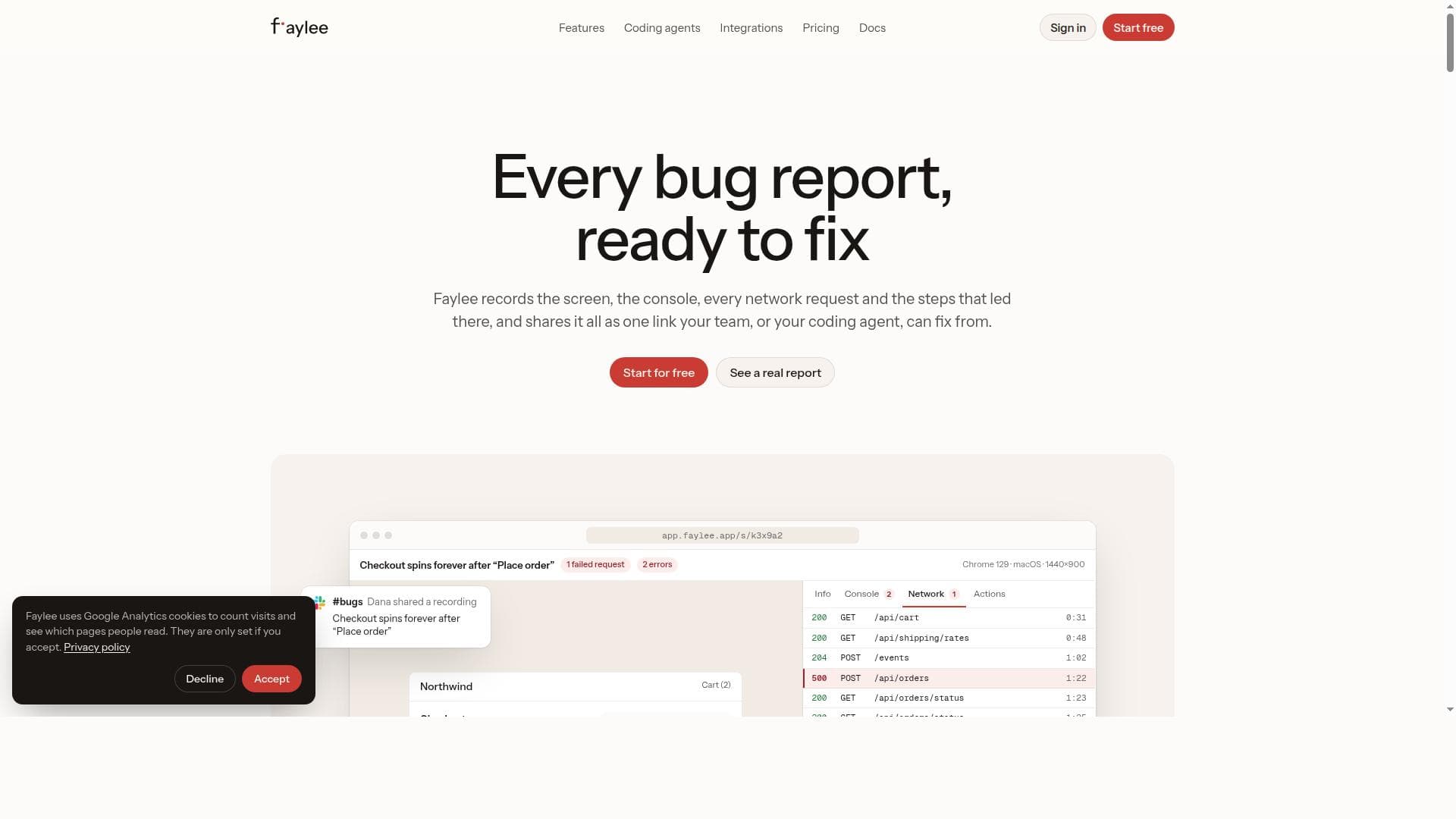
Faylee records the screen, console, every network request and each click behind a bug, on one timeline, and shares it all as one link. Your team opens it and sees exactly what broke, with the failing request already open. Paste the link into Claude Code, Codex or Cursor, and Faylee's MCP server gives the agent the whole report so it can find the cause and fix it. Instant replay saves the last few minutes after a bug already happened. Free for up to 3 members.
Deskripsi Detail
Faylee is a specialized bug reporting tool designed to streamline the debugging process for web applications and coding agents. Its core purpose is to capture comprehensive data about bugs as they occur, consolidating all relevant information into a single, shareable link. This approach enables developers and coding assistants to quickly understand the issue and provide fixes without the need for lengthy back-and-forth communication. Faylee’s unique ability to record screen activity, console logs, network requests, and the exact sequence of user actions leading to a bug makes it an invaluable asset in modern web development workflows. One of Faylee’s standout features is its automatic screen recording capability, which visually captures the bug in real-time. This visual context helps developers see exactly what the user experienced, reducing ambiguity. Alongside this, Faylee logs console output and network requests automatically, providing critical technical details that are often essential for diagnosing complex issues. Additionally, it tracks the precise steps the user took before encountering the bug, creating a detailed reproduction path. All this data is then packaged into a single shareable link, simplifying collaboration and bug tracking. Faylee also integrates seamlessly with coding assistants such as Claude Code, allowing users to hand off the bug report link and receive automated code fixes. This integration significantly accelerates the debugging cycle by leveraging AI-driven coding support. The tool supports popular browsers including Chrome, Edge, Brave, and Arc, ensuring wide compatibility for web developers and testers. Faylee is ideal for web developers, QA engineers, and coding agents who require an efficient and thorough way to report and resolve bugs. It is particularly useful in agile development environments where rapid iteration and quick bug resolution are critical. Coding teams can use Faylee to reduce the time spent on bug triage and improve communication between testers and developers. Additionally, the integration with AI coding assistants makes it a forward-looking solution for teams adopting AI-enhanced development tools. Regarding pricing, Faylee offers its core functionalities for free, making it accessible to individual developers and small teams. This zero-cost entry point allows users to experience the benefits of comprehensive bug reporting without upfront investment. Details on premium plans or enterprise features are not explicitly provided, suggesting the current focus is on broad accessibility and ease of use. Compared to traditional bug reporting tools that rely heavily on manual descriptions and screenshots, Faylee stands out by automating the capture of multi-dimensional bug data and consolidating it into a single link. This reduces human error and miscommunication, which are common pain points in debugging. While other tools may offer partial logging or screen capture, Faylee’s combination of screen recording, console and network logging, step tracking, and AI integration is unique in its comprehensiveness and ease of use. However, users should consider that Faylee currently supports only a limited set of browsers, which may restrict its use in environments where other browsers are standard. Also, as an emerging tool, it may lack some advanced project management or integration features found in more mature bug tracking platforms. Users relying heavily on extensive integrations with other development tools might find Faylee’s ecosystem still developing. In summary, Faylee is a powerful, user-friendly bug reporting tool that enhances the debugging workflow by capturing detailed bug context and enabling AI-assisted fixes. Its free access and browser compatibility make it an excellent choice for web developers and QA professionals seeking to improve bug reporting accuracy and speed.
Fitur Alat
- Records screen activity to capture bugs visually
- Logs console output and network requests automatically
- Tracks the exact steps leading to a bug
- Generates a single shareable link containing all bug data
- Integrates with coding assistants like Claude Code for automated fixes
- Supports Chrome, Edge, Brave, and Arc browsers
Deskripsi
Faylee revolutionizes bug reporting for web apps by capturing screen activity, console logs, network requests, and user steps into a single shareable link. Ideal for developers and QA teams, it integrates with AI coding assistants like Claude Code to accelerate bug fixes and streamline debugging workflows.
Faylee records the screen, console, every network request and each click behind a bug, on one timeline, and shares it all as one link. Your team opens it and sees exactly what broke, with the failing request already open. Paste the link into Claude Code, Codex or Cursor, and Faylee's MCP server gives the agent the whole report so it can find the cause and fix it. Instant replay saves the last few minutes after a bug already happened. Free for up to 3 members.
Deskripsi Detail
Faylee is a specialized bug reporting tool designed to streamline the debugging process for web applications and coding agents. Its core purpose is to capture comprehensive data about bugs as they occur, consolidating all relevant information into a single, shareable link. This approach enables developers and coding assistants to quickly understand the issue and provide fixes without the need for lengthy back-and-forth communication. Faylee’s unique ability to record screen activity, console logs, network requests, and the exact sequence of user actions leading to a bug makes it an invaluable asset in modern web development workflows. One of Faylee’s standout features is its automatic screen recording capability, which visually captures the bug in real-time. This visual context helps developers see exactly what the user experienced, reducing ambiguity. Alongside this, Faylee logs console output and network requests automatically, providing critical technical details that are often essential for diagnosing complex issues. Additionally, it tracks the precise steps the user took before encountering the bug, creating a detailed reproduction path. All this data is then packaged into a single shareable link, simplifying collaboration and bug tracking. Faylee also integrates seamlessly with coding assistants such as Claude Code, allowing users to hand off the bug report link and receive automated code fixes. This integration significantly accelerates the debugging cycle by leveraging AI-driven coding support. The tool supports popular browsers including Chrome, Edge, Brave, and Arc, ensuring wide compatibility for web developers and testers. Faylee is ideal for web developers, QA engineers, and coding agents who require an efficient and thorough way to report and resolve bugs. It is particularly useful in agile development environments where rapid iteration and quick bug resolution are critical. Coding teams can use Faylee to reduce the time spent on bug triage and improve communication between testers and developers. Additionally, the integration with AI coding assistants makes it a forward-looking solution for teams adopting AI-enhanced development tools. Regarding pricing, Faylee offers its core functionalities for free, making it accessible to individual developers and small teams. This zero-cost entry point allows users to experience the benefits of comprehensive bug reporting without upfront investment. Details on premium plans or enterprise features are not explicitly provided, suggesting the current focus is on broad accessibility and ease of use. Compared to traditional bug reporting tools that rely heavily on manual descriptions and screenshots, Faylee stands out by automating the capture of multi-dimensional bug data and consolidating it into a single link. This reduces human error and miscommunication, which are common pain points in debugging. While other tools may offer partial logging or screen capture, Faylee’s combination of screen recording, console and network logging, step tracking, and AI integration is unique in its comprehensiveness and ease of use. However, users should consider that Faylee currently supports only a limited set of browsers, which may restrict its use in environments where other browsers are standard. Also, as an emerging tool, it may lack some advanced project management or integration features found in more mature bug tracking platforms. Users relying heavily on extensive integrations with other development tools might find Faylee’s ecosystem still developing. In summary, Faylee is a powerful, user-friendly bug reporting tool that enhances the debugging workflow by capturing detailed bug context and enabling AI-assisted fixes. Its free access and browser compatibility make it an excellent choice for web developers and QA professionals seeking to improve bug reporting accuracy and speed.
Pertanyaan yang Sering Diajukan
What is Faylee?
Faylee is a bug reporting tool designed for web applications and coding agents that records screen activity, console logs, network requests, and user steps leading to a bug, consolidating all data into a single shareable link for easier debugging.
How much does Faylee cost?
Faylee offers its core bug reporting features for free, providing accessible functionality for individual developers and small teams without upfront costs.
Who is Faylee best for?
Faylee is best suited for web developers, QA engineers, and coding agents who need a comprehensive and efficient way to report bugs and collaborate on fixes, especially in agile development environments.
What are the main features of Faylee?
Key features include automatic screen recording, console output and network request logging, tracking of user steps leading to bugs, generation of a single shareable bug report link, and integration with AI coding assistants like Claude Code.
Does Faylee offer a free trial?
Faylee’s core features are available for free, so there is no need for a separate trial period to evaluate the tool.
What integrations does Faylee support?
Faylee integrates with coding assistants such as Claude Code to enable automated bug fixes based on the detailed reports it generates.
How does Faylee work?
Faylee records the user’s screen, console logs, network requests, and the exact sequence of actions leading to a bug, then packages all this information into a single shareable link that can be handed off to developers or AI coding assistants for quick resolution.
Sosial
Gunakan AlatUlasan
Belum ada ulasan. Jadilah yang pertama berbagi pengalamanmu.
Alat Tersponsor













































Alat Rekomendasi
Tetap update soal alat AI terbaru
Dapatkan insight terbaru, gabung newsletter kami
Dibaca dan dipercaya 50,000+ pembaca
Gabung komunitas AI terbesar
Komunitas dan staf kami siap membantu!
Masukanmu akan membantu Alice AI berkembang di versi berikutnya.








Kirim Alatmu


PoweredByAI.app adalah Direktori Alat AI yang membantu individu, bisnis, dan kreator menemukan alat AI terbaik untuk menulis, coding, desain, produktivitas, dan lainnya.
© 2026 , Produk dari011BQ. Hak cipta dilindungi.