🚀 Zaprep: Sosialmu Supercharged. Mulai gratis — otomasi 1.000 DM/bulan & ubah engagement jadi lead. dengan 1.000 DM otomatis/bulan.
CrewTower Mod for Claude Code


Ini alat AImu? Klaim hari ini.
Verifikasi kepemilikan, kelola profilmu, dan buka fitur pertumbuhan.
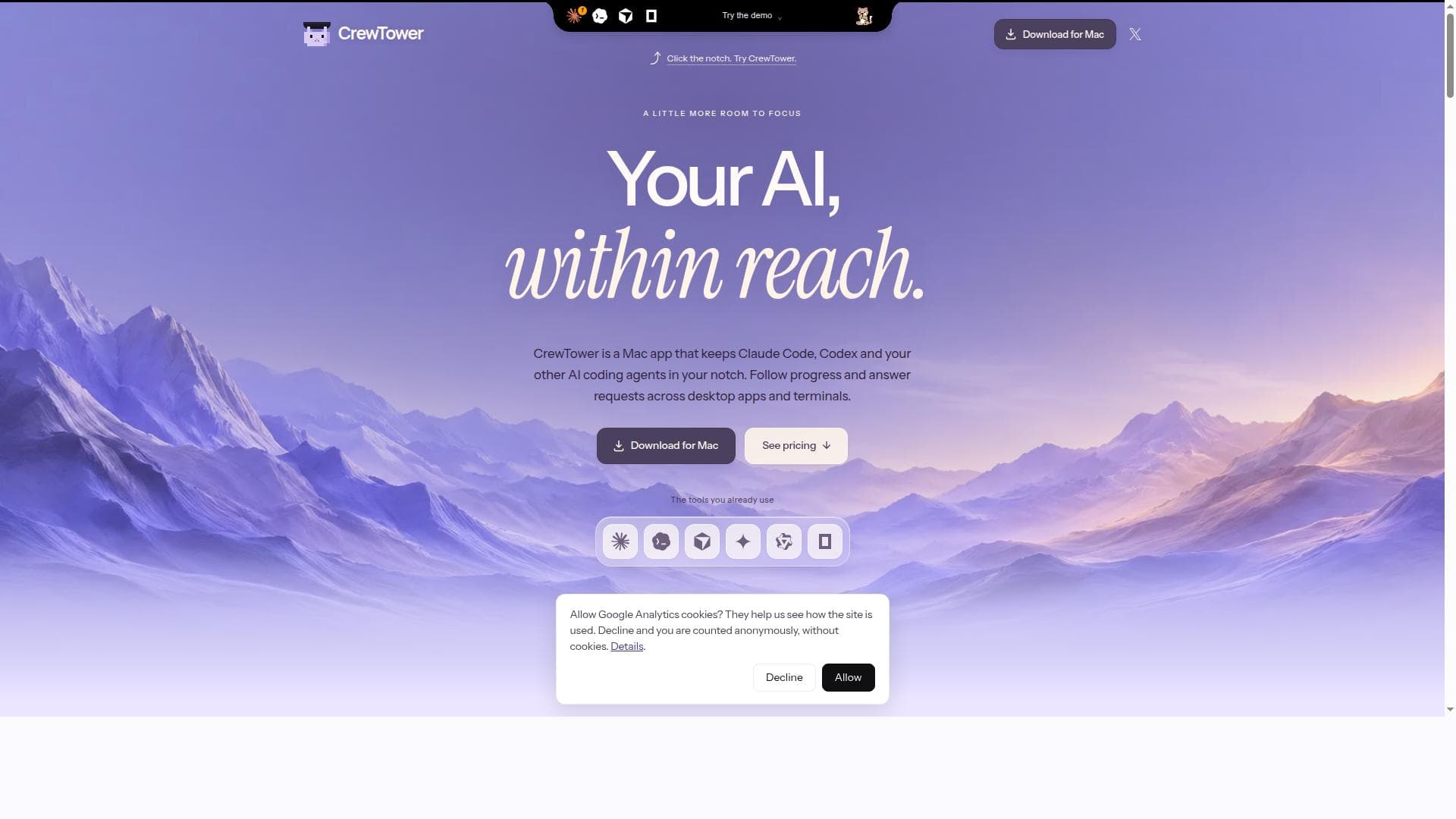
CrewTower uniquely integrates AI coding agents like Claude Code and Codex directly into your Mac’s notch, enabling seamless monitoring, approvals, and session management across desktop and terminal apps. Ideal for developers who want to keep AI assistance within easy reach without disrupting their workflow, CrewTower offers a privacy-focused, one-time purchase solution for macOS users.

Deskripsi
A Claude Code mod that links every Claude session to CrewTower in your Mac's notch. Type Claude's next prompt on its card, stop the turn, compact it, and see what fills its context. Terminal and Claude Desktop. Stays on your Mac, off until you turn it on.
Deskripsi Detail
CrewTower is a specialized macOS application designed to bring supported AI coding agents directly into your Mac’s notch or a small pill interface on other displays. Its core purpose is to provide developers and AI users with a seamless, always-visible interface to monitor, interact with, and manage AI agent sessions across desktop applications and terminal environments. By integrating AI agents like Claude Code and Codex into a compact, accessible interface, CrewTower allows users to check progress, respond to requests, approve actions, and review plans without switching context or leaving their current workflow. This innovative approach enhances productivity by keeping AI-driven coding assistants within immediate reach, directly from the Mac’s notch area. Key features of CrewTower include the ability to monitor multiple supported AI agents simultaneously across desktop apps and terminal sessions. Users can approve requests and answer questions directly from the notch interface when supported by the AI agent, streamlining interactions and reducing the need to switch windows. The tool also enables reviewing plans and sending feedback to AI agents, facilitating an iterative and collaborative coding process. Another standout feature is the ability to jump directly to the relevant desktop session, terminal tab, or pane, ensuring users can quickly resume work where it left off. Additionally, CrewTower provides visibility into available context and provider usage limits, helping users manage their AI resource consumption effectively. Importantly, CrewTower operates entirely on macOS 15 or later and does not upload user data off the Mac, preserving privacy and security. CrewTower is best suited for developers, software engineers, and AI enthusiasts who regularly use AI coding assistants and want a streamlined way to manage multiple AI sessions without disrupting their workflow. It is particularly valuable for those working in complex development environments involving multiple terminal tabs and desktop applications. Use cases include monitoring long-running AI code generation tasks, approving AI-suggested code changes, answering AI-generated questions, and reviewing AI-generated plans or proposals. By centralizing AI interactions in the Mac’s notch, CrewTower reduces friction and context switching, making it ideal for professionals who rely heavily on AI coding tools for productivity and collaboration. Regarding pricing, CrewTower is available for a one-time purchase price of $9.99 USD. There are no subscription fees or recurring charges, making it an affordable investment for developers seeking continuous access to AI agent monitoring and interaction capabilities. While there is no free trial, an interactive demo is available on the website to explore sample sessions, approvals, and plans before purchasing. This pricing model contrasts with many AI tools that rely on subscription plans, offering a straightforward and cost-effective option for Mac users. Compared to alternatives, CrewTower’s unique selling point is its integration into the Mac’s notch, providing a persistent, non-intrusive interface for AI agent management. Unlike standalone AI coding assistants or browser-based tools, CrewTower seamlessly integrates with existing desktop and terminal sessions, offering real-time monitoring and interaction without data leaving the user’s machine. Its privacy-first approach, with no data uploads or analytics tracking, sets it apart from cloud-dependent AI tools. However, its macOS 15+ requirement and dependence on supported AI agents mean it may not suit users on other platforms or those using unsupported AI services. Notable limitations include the lack of a free trial, which may deter some potential users. Additionally, CrewTower’s functionality depends on the AI agent’s support for response connections; unsupported requests must be handled in their original applications. The app also requires Accessibility permissions on macOS to enable certain navigation features, which some users may be cautious about granting. Lastly, CrewTower is designed specifically for Mac users with macOS 15 or later, limiting its accessibility to users on other operating systems. Despite these considerations, CrewTower offers a powerful, privacy-conscious solution for developers seeking to enhance their AI coding workflows through a novel and efficient interface.
Fitur Alat
- Monitor supported AI agents across desktop apps and terminals
- Approve requests and answer questions from the notch when supported
- Review plans and send feedback
- Jump to supported desktop sessions, terminal tabs, and panes
- View available context and provider usage limits
Deskripsi
CrewTower uniquely integrates AI coding agents like Claude Code and Codex directly into your Mac’s notch, enabling seamless monitoring, approvals, and session management across desktop and terminal apps. Ideal for developers who want to keep AI assistance within easy reach without disrupting their workflow, CrewTower offers a privacy-focused, one-time purchase solution for macOS users.
A Claude Code mod that links every Claude session to CrewTower in your Mac's notch. Type Claude's next prompt on its card, stop the turn, compact it, and see what fills its context. Terminal and Claude Desktop. Stays on your Mac, off until you turn it on.
Deskripsi Detail
CrewTower is a specialized macOS application designed to bring supported AI coding agents directly into your Mac’s notch or a small pill interface on other displays. Its core purpose is to provide developers and AI users with a seamless, always-visible interface to monitor, interact with, and manage AI agent sessions across desktop applications and terminal environments. By integrating AI agents like Claude Code and Codex into a compact, accessible interface, CrewTower allows users to check progress, respond to requests, approve actions, and review plans without switching context or leaving their current workflow. This innovative approach enhances productivity by keeping AI-driven coding assistants within immediate reach, directly from the Mac’s notch area. Key features of CrewTower include the ability to monitor multiple supported AI agents simultaneously across desktop apps and terminal sessions. Users can approve requests and answer questions directly from the notch interface when supported by the AI agent, streamlining interactions and reducing the need to switch windows. The tool also enables reviewing plans and sending feedback to AI agents, facilitating an iterative and collaborative coding process. Another standout feature is the ability to jump directly to the relevant desktop session, terminal tab, or pane, ensuring users can quickly resume work where it left off. Additionally, CrewTower provides visibility into available context and provider usage limits, helping users manage their AI resource consumption effectively. Importantly, CrewTower operates entirely on macOS 15 or later and does not upload user data off the Mac, preserving privacy and security. CrewTower is best suited for developers, software engineers, and AI enthusiasts who regularly use AI coding assistants and want a streamlined way to manage multiple AI sessions without disrupting their workflow. It is particularly valuable for those working in complex development environments involving multiple terminal tabs and desktop applications. Use cases include monitoring long-running AI code generation tasks, approving AI-suggested code changes, answering AI-generated questions, and reviewing AI-generated plans or proposals. By centralizing AI interactions in the Mac’s notch, CrewTower reduces friction and context switching, making it ideal for professionals who rely heavily on AI coding tools for productivity and collaboration. Regarding pricing, CrewTower is available for a one-time purchase price of $9.99 USD. There are no subscription fees or recurring charges, making it an affordable investment for developers seeking continuous access to AI agent monitoring and interaction capabilities. While there is no free trial, an interactive demo is available on the website to explore sample sessions, approvals, and plans before purchasing. This pricing model contrasts with many AI tools that rely on subscription plans, offering a straightforward and cost-effective option for Mac users. Compared to alternatives, CrewTower’s unique selling point is its integration into the Mac’s notch, providing a persistent, non-intrusive interface for AI agent management. Unlike standalone AI coding assistants or browser-based tools, CrewTower seamlessly integrates with existing desktop and terminal sessions, offering real-time monitoring and interaction without data leaving the user’s machine. Its privacy-first approach, with no data uploads or analytics tracking, sets it apart from cloud-dependent AI tools. However, its macOS 15+ requirement and dependence on supported AI agents mean it may not suit users on other platforms or those using unsupported AI services. Notable limitations include the lack of a free trial, which may deter some potential users. Additionally, CrewTower’s functionality depends on the AI agent’s support for response connections; unsupported requests must be handled in their original applications. The app also requires Accessibility permissions on macOS to enable certain navigation features, which some users may be cautious about granting. Lastly, CrewTower is designed specifically for Mac users with macOS 15 or later, limiting its accessibility to users on other operating systems. Despite these considerations, CrewTower offers a powerful, privacy-conscious solution for developers seeking to enhance their AI coding workflows through a novel and efficient interface.
Pertanyaan yang Sering Diajukan
What is CrewTower?
CrewTower is a macOS application that brings supported AI coding agents into your Mac’s notch or a small pill interface, allowing you to monitor AI progress, approve requests, answer questions, and jump back to relevant sessions across desktop apps and terminals.
How much does CrewTower cost?
CrewTower is available for a one-time purchase price of $9.99 USD, with no subscription fees or recurring charges.
Who is CrewTower best for?
CrewTower is best suited for developers, software engineers, and AI enthusiasts who use AI coding assistants like Claude Code and Codex and want a streamlined way to manage multiple AI sessions on macOS without disrupting their workflow.
What are the main features of CrewTower?
Key features include monitoring supported AI agents across desktop apps and terminals, approving requests and answering questions from the notch interface, reviewing plans and sending feedback, jumping to supported desktop sessions or terminal tabs, and viewing context and provider usage limits.
Does CrewTower offer a free trial?
No, CrewTower does not offer a free trial. However, an interactive demo is available on the website to explore sample sessions and features before purchasing.
What integrations does CrewTower support?
CrewTower supports AI agents such as Claude Code and Codex, integrating with their sessions in desktop apps and terminals. It follows sessions in the Claude app, ChatGPT app, and supported terminal and editor environments.
How does CrewTower work?
CrewTower runs on macOS 15 or later and integrates with supported AI agents by configuring necessary hooks or plugins. It displays AI session status and requests in the Mac’s notch, allowing users to interact directly without data leaving their Mac. It uses local connections for approvals and answers, and Accessibility permissions help navigate sessions.
Sosial
Gunakan AlatUlasan
Belum ada ulasan. Jadilah yang pertama berbagi pengalamanmu.
Alat Tersponsor











































Alat Rekomendasi
Tetap update soal alat AI terbaru
Dapatkan insight terbaru, gabung newsletter kami
Dibaca dan dipercaya 50,000+ pembaca
Gabung komunitas AI terbesar
Komunitas dan staf kami siap membantu!
Masukanmu akan membantu Alice AI berkembang di versi berikutnya.








Kirim Alatmu


PoweredByAI.app adalah Direktori Alat AI yang membantu individu, bisnis, dan kreator menemukan alat AI terbaik untuk menulis, coding, desain, produktivitas, dan lainnya.
© 2026 , Produk dari011BQ. Hak cipta dilindungi.