

Ini alat AImu? Klaim hari ini.
Verifikasi kepemilikan, kelola profilmu, dan buka fitur pertumbuhan.
Cluinn is a Mac-exclusive AI dictation and meeting assistant that transforms speech into text across any app while providing live call support and post-meeting summaries. Ideal for professionals who want to boost productivity and communication clarity during meetings, Cluinn’s unique blend of transcription, real-time AI assistance, and communication coaching sets it apart.

Deskripsi
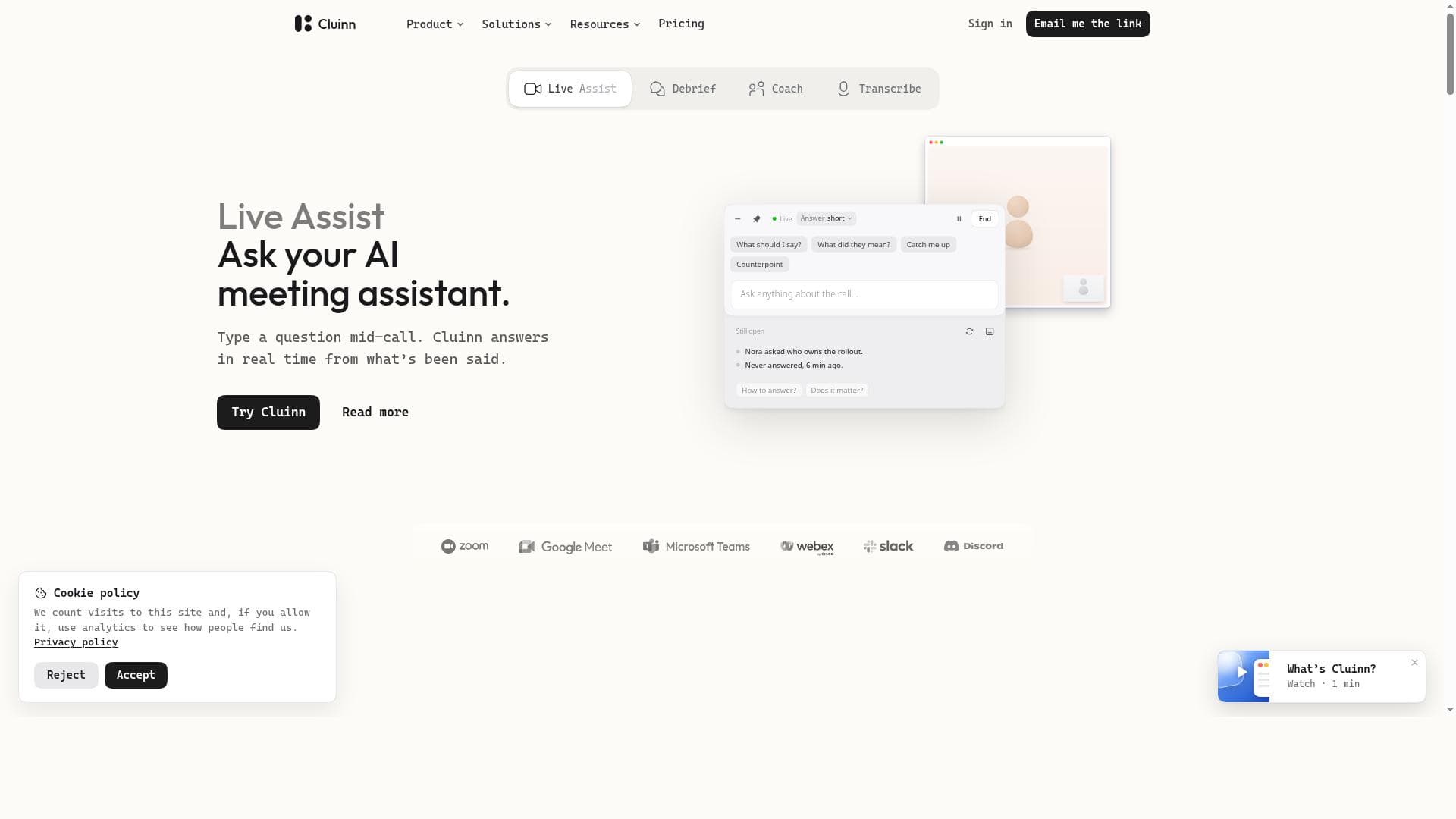
Someone asks a question on a call and you need the answer now. Cluinn listens on your Mac and answers mid-call from what was just said, with no bot joining the meeting. Smart Cards flag a question nobody answered. When the call ends you get the action items, and Coach shows how the call went against a goal you set. It also does AI dictation: speak, and clean text lands in any Mac app. For Apple silicon Macs. 14-day trial; LAUNCH30 takes 30% off for 12 months.
Deskripsi Detail
Cluinn is an advanced AI-powered dictation and meeting assistant specifically designed for Mac users, aiming to revolutionize the way professionals handle meetings, calls, and note-taking. At its core, Cluinn transforms spoken language into written text seamlessly across any Mac application, enabling users to dictate notes, emails, or documents without switching tools or interrupting their workflow. Beyond simple transcription, Cluinn integrates intelligent meeting assistance features that actively participate during calls, providing real-time support and post-call summaries to enhance productivity and communication clarity. One of Cluinn's standout capabilities is its Live Assist feature, an AI meeting assistant that operates live during calls. It listens attentively and can answer questions on the spot, helping users clarify points or retrieve information without disrupting the flow of conversation. This live interaction is complemented by Debrief, an AI-powered note taker that not only captures detailed meeting notes but also extracts actionable insights and answers to questions raised during the call. This ensures that users have a comprehensive record of discussions and clear next steps, reducing the need for manual note-taking and follow-up emails. Cluinn also includes Coach, an AI communication coach designed to improve call effectiveness. It provides feedback and suggestions to help users communicate more clearly and confidently, making it a valuable tool for sales professionals, recruiters, consultants, and founders who rely heavily on verbal communication. The Transcribe feature enhances everyday productivity by converting speech to text directly at the cursor position in any Mac app, allowing effortless dictation wherever needed. Another innovative feature is Smart Cards, which proactively surface relevant information mid-call without requiring user prompts. These cards can highlight key points, reminders, or data, ensuring users stay informed and prepared throughout their conversations. Cluinn is best suited for professionals who frequently engage in meetings, calls, or interviews on Mac devices. Sales teams can benefit from instant answers and follow-up summaries; recruiters can compare candidate responses efficiently; consultants can organize client calls for easy retrieval; and founders can keep track of investor or team discussions with minimal effort. Its seamless integration with any Mac application makes it versatile for a wide range of workflows. Regarding pricing, Cluinn offers several plans tailored to different user needs, typically including a free trial period to explore its features. Paid plans often unlock advanced capabilities such as extended transcription limits, enhanced AI assistance, and priority support. Users should visit Cluinn's official website for the most current pricing details and subscription options. Compared to alternatives, Cluinn stands out by combining robust speech-to-text functionality with active AI meeting assistance and coaching, all optimized for the Mac environment. While many dictation tools focus solely on transcription, Cluinn’s live call interaction and smart contextual features provide a more comprehensive communication enhancement. However, its Mac-only availability may limit users on other platforms, and some advanced features may require a learning curve to fully utilize. In summary, Cluinn offers a powerful suite of AI-driven tools that streamline meeting workflows, improve communication effectiveness, and reduce administrative overhead. Its integration into the Mac ecosystem and focus on live, intelligent assistance make it a compelling choice for professionals seeking to maximize productivity in their calls and meetings.
Fitur Alat
- Live Assist: AI meeting assistant active during calls
- Debrief: AI note taker with answers from any call
- Coach: AI communication coach for calls
- Transcribe: Speech to text at your cursor in any app
- Smart Cards: Cards that speak up mid-call without prompting
Deskripsi
Cluinn is a Mac-exclusive AI dictation and meeting assistant that transforms speech into text across any app while providing live call support and post-meeting summaries. Ideal for professionals who want to boost productivity and communication clarity during meetings, Cluinn’s unique blend of transcription, real-time AI assistance, and communication coaching sets it apart.
Someone asks a question on a call and you need the answer now. Cluinn listens on your Mac and answers mid-call from what was just said, with no bot joining the meeting. Smart Cards flag a question nobody answered. When the call ends you get the action items, and Coach shows how the call went against a goal you set. It also does AI dictation: speak, and clean text lands in any Mac app. For Apple silicon Macs. 14-day trial; LAUNCH30 takes 30% off for 12 months.
Deskripsi Detail
Cluinn is an advanced AI-powered dictation and meeting assistant specifically designed for Mac users, aiming to revolutionize the way professionals handle meetings, calls, and note-taking. At its core, Cluinn transforms spoken language into written text seamlessly across any Mac application, enabling users to dictate notes, emails, or documents without switching tools or interrupting their workflow. Beyond simple transcription, Cluinn integrates intelligent meeting assistance features that actively participate during calls, providing real-time support and post-call summaries to enhance productivity and communication clarity. One of Cluinn's standout capabilities is its Live Assist feature, an AI meeting assistant that operates live during calls. It listens attentively and can answer questions on the spot, helping users clarify points or retrieve information without disrupting the flow of conversation. This live interaction is complemented by Debrief, an AI-powered note taker that not only captures detailed meeting notes but also extracts actionable insights and answers to questions raised during the call. This ensures that users have a comprehensive record of discussions and clear next steps, reducing the need for manual note-taking and follow-up emails. Cluinn also includes Coach, an AI communication coach designed to improve call effectiveness. It provides feedback and suggestions to help users communicate more clearly and confidently, making it a valuable tool for sales professionals, recruiters, consultants, and founders who rely heavily on verbal communication. The Transcribe feature enhances everyday productivity by converting speech to text directly at the cursor position in any Mac app, allowing effortless dictation wherever needed. Another innovative feature is Smart Cards, which proactively surface relevant information mid-call without requiring user prompts. These cards can highlight key points, reminders, or data, ensuring users stay informed and prepared throughout their conversations. Cluinn is best suited for professionals who frequently engage in meetings, calls, or interviews on Mac devices. Sales teams can benefit from instant answers and follow-up summaries; recruiters can compare candidate responses efficiently; consultants can organize client calls for easy retrieval; and founders can keep track of investor or team discussions with minimal effort. Its seamless integration with any Mac application makes it versatile for a wide range of workflows. Regarding pricing, Cluinn offers several plans tailored to different user needs, typically including a free trial period to explore its features. Paid plans often unlock advanced capabilities such as extended transcription limits, enhanced AI assistance, and priority support. Users should visit Cluinn's official website for the most current pricing details and subscription options. Compared to alternatives, Cluinn stands out by combining robust speech-to-text functionality with active AI meeting assistance and coaching, all optimized for the Mac environment. While many dictation tools focus solely on transcription, Cluinn’s live call interaction and smart contextual features provide a more comprehensive communication enhancement. However, its Mac-only availability may limit users on other platforms, and some advanced features may require a learning curve to fully utilize. In summary, Cluinn offers a powerful suite of AI-driven tools that streamline meeting workflows, improve communication effectiveness, and reduce administrative overhead. Its integration into the Mac ecosystem and focus on live, intelligent assistance make it a compelling choice for professionals seeking to maximize productivity in their calls and meetings.
Pertanyaan yang Sering Diajukan
What is Cluinn?
Cluinn is an AI-powered dictation and meeting assistant designed for Mac users that converts speech to text in any Mac application and offers live meeting assistance, including answering questions during calls and summarizing action items afterward.
How much does Cluinn cost?
Cluinn offers various pricing plans tailored to different user needs, often including a free trial. For detailed and up-to-date pricing information, users should visit Cluinn's official website.
Who is Cluinn best for?
Cluinn is ideal for professionals who frequently participate in meetings and calls on Mac devices, such as sales teams, recruiters, consultants, and founders, helping them improve communication efficiency and productivity.
What are the main features of Cluinn?
Key features include Live Assist (AI meeting assistant active during calls), Debrief (AI note taker with answers from calls), Coach (AI communication coach), Transcribe (speech to text at the cursor in any app), and Smart Cards (cards that provide information mid-call without prompting).
Does Cluinn offer a free trial?
Yes, Cluinn typically offers a free trial period allowing users to explore its features before committing to a paid plan.
What integrations does Cluinn support?
Cluinn integrates seamlessly with any Mac application by converting speech to text at the cursor position, enabling dictation and meeting assistance across a wide range of software on Mac.
How does Cluinn work?
Cluinn uses AI to transcribe speech into text in real-time within any Mac app and provides live meeting assistance by listening during calls to answer questions, take notes, summarize action items, and offer communication coaching.
Sosial
Gunakan AlatUlasan
Belum ada ulasan. Jadilah yang pertama berbagi pengalamanmu.