

C'est ton outil IA ? Réclame-le dès aujourd'hui.
Vérifie la propriété, gère ton profil et débloque des fonctionnalités de croissance.
Watchflows is a macOS-exclusive visual workflow automation tool that combines an intuitive canvas with AI-powered nodes and deep system integration to simplify complex task automation. Perfect for professionals and power users, it enables the creation of custom workflows that save time and enhance productivity without requiring coding expertise.

Description
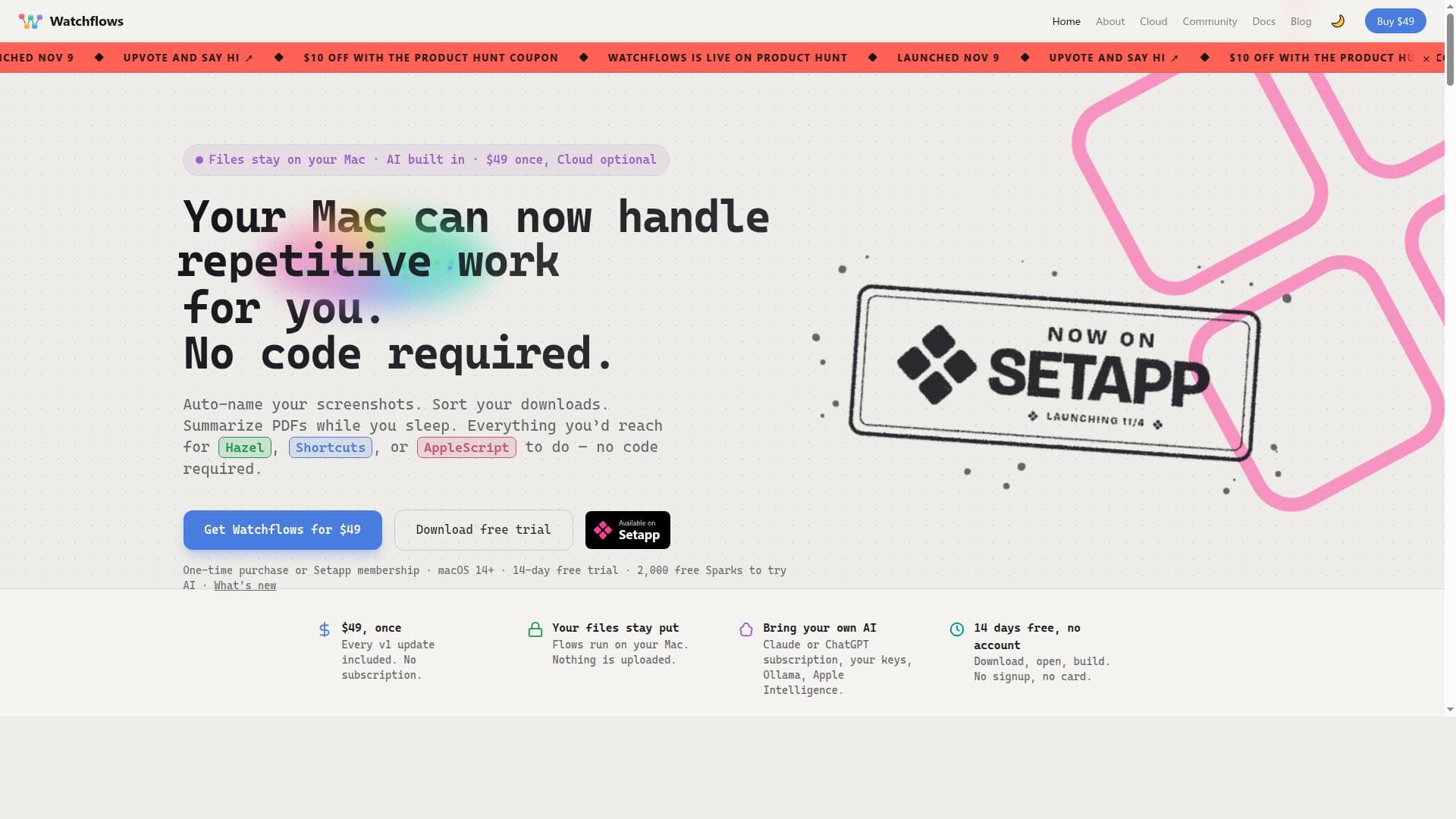
Stop doing the same Mac chores by hand. Watchflows runs them the moment something happens: a file lands in Downloads, you press a hotkey, a webhook arrives, it's 8:30 on a weekday. Wire triggers, conditions, actions and AI on a canvas, or describe it in plain English and the Flow Builder assembles it. AI reads, renames and decides mid-flow, on Watchflows AI, Apple's on-device model, Ollama, or your own keys. Local-first, no account. 14-day free trial, then $49 once. Also on Setapp.
Description détaillée
Watchflows is a sophisticated visual workflow automation tool designed exclusively for macOS users seeking to streamline and enhance their productivity through custom automation. At its core, Watchflows provides a powerful platform where users can visually construct complex workflows using an intuitive canvas interface. This approach eliminates the need for extensive coding knowledge, making automation accessible to a broader audience. By combining a drag-and-drop visual canvas with AI-powered nodes and deep integration with macOS system features, Watchflows empowers users to automate repetitive tasks, orchestrate multi-step processes, and create personalized workflows tailored to their unique needs. One of the standout features of Watchflows is its visual canvas, which allows users to design workflows by connecting nodes representing different actions or triggers. This graphical representation simplifies the process of building and understanding automation sequences. The inclusion of AI nodes adds a layer of intelligent automation, enabling workflows to incorporate decision-making, data processing, and adaptive behavior based on contextual inputs. Furthermore, Watchflows leverages macOS’s native capabilities extensively, offering seamless integration with system features such as file management, notifications, scripting languages like AppleScript, and other macOS automation tools. This deep integration ensures that workflows operate smoothly within the macOS environment, providing enhanced reliability and performance. Watchflows is ideal for a wide range of users, from individual professionals and creatives to small business owners and power users who rely heavily on their Mac for daily tasks. For example, a graphic designer might automate file organization and batch image processing, while a developer could streamline code deployment and testing sequences. The tool’s flexibility also suits administrative professionals automating email sorting, calendar management, or report generation. By simplifying repetitive tasks, Watchflows saves users valuable time and reduces the risk of human error, allowing them to focus on higher-value activities. In terms of pricing, Watchflows is offered as a one-time purchase priced at $49, which provides full access to the tool without recurring subscription fees. This pricing model is attractive for users who prefer a straightforward, upfront investment without ongoing costs. The tool’s value proposition includes continuous updates and support, ensuring users benefit from improvements and new features over time. When compared to alternatives, Watchflows stands out due to its exclusive focus on macOS and its combination of visual workflow design with AI-driven automation nodes. While other automation tools may offer scripting or macro capabilities, Watchflows’ visual approach lowers the barrier to entry and accelerates workflow creation. Its deep macOS integration also provides a more native and seamless experience than cross-platform tools that might lack optimized macOS functionality. However, users seeking automation solutions for other operating systems will need to look elsewhere, as Watchflows is macOS-specific. Notable considerations include the learning curve associated with mastering the visual canvas and AI nodes, which, while user-friendly, still require some time investment to fully leverage their capabilities. Additionally, as a one-time purchase, prospective users should evaluate whether the tool’s features align with their long-term automation needs. While Watchflows excels in macOS automation, it may not support every niche integration or enterprise-level feature found in some subscription-based automation platforms. Overall, Watchflows offers a compelling, cost-effective solution for macOS users aiming to boost productivity through intelligent, customized automation workflows.
Fonctionnalités de l'outil
- Visual canvas for building workflows
- AI nodes integration for intelligent automation
- Deep macOS integration for seamless operation
- Enables creation of powerful custom automations
- Simplifies repetitive tasks to save time
Description
Watchflows is a macOS-exclusive visual workflow automation tool that combines an intuitive canvas with AI-powered nodes and deep system integration to simplify complex task automation. Perfect for professionals and power users, it enables the creation of custom workflows that save time and enhance productivity without requiring coding expertise.
Stop doing the same Mac chores by hand. Watchflows runs them the moment something happens: a file lands in Downloads, you press a hotkey, a webhook arrives, it's 8:30 on a weekday. Wire triggers, conditions, actions and AI on a canvas, or describe it in plain English and the Flow Builder assembles it. AI reads, renames and decides mid-flow, on Watchflows AI, Apple's on-device model, Ollama, or your own keys. Local-first, no account. 14-day free trial, then $49 once. Also on Setapp.
Description détaillée
Watchflows is a sophisticated visual workflow automation tool designed exclusively for macOS users seeking to streamline and enhance their productivity through custom automation. At its core, Watchflows provides a powerful platform where users can visually construct complex workflows using an intuitive canvas interface. This approach eliminates the need for extensive coding knowledge, making automation accessible to a broader audience. By combining a drag-and-drop visual canvas with AI-powered nodes and deep integration with macOS system features, Watchflows empowers users to automate repetitive tasks, orchestrate multi-step processes, and create personalized workflows tailored to their unique needs. One of the standout features of Watchflows is its visual canvas, which allows users to design workflows by connecting nodes representing different actions or triggers. This graphical representation simplifies the process of building and understanding automation sequences. The inclusion of AI nodes adds a layer of intelligent automation, enabling workflows to incorporate decision-making, data processing, and adaptive behavior based on contextual inputs. Furthermore, Watchflows leverages macOS’s native capabilities extensively, offering seamless integration with system features such as file management, notifications, scripting languages like AppleScript, and other macOS automation tools. This deep integration ensures that workflows operate smoothly within the macOS environment, providing enhanced reliability and performance. Watchflows is ideal for a wide range of users, from individual professionals and creatives to small business owners and power users who rely heavily on their Mac for daily tasks. For example, a graphic designer might automate file organization and batch image processing, while a developer could streamline code deployment and testing sequences. The tool’s flexibility also suits administrative professionals automating email sorting, calendar management, or report generation. By simplifying repetitive tasks, Watchflows saves users valuable time and reduces the risk of human error, allowing them to focus on higher-value activities. In terms of pricing, Watchflows is offered as a one-time purchase priced at $49, which provides full access to the tool without recurring subscription fees. This pricing model is attractive for users who prefer a straightforward, upfront investment without ongoing costs. The tool’s value proposition includes continuous updates and support, ensuring users benefit from improvements and new features over time. When compared to alternatives, Watchflows stands out due to its exclusive focus on macOS and its combination of visual workflow design with AI-driven automation nodes. While other automation tools may offer scripting or macro capabilities, Watchflows’ visual approach lowers the barrier to entry and accelerates workflow creation. Its deep macOS integration also provides a more native and seamless experience than cross-platform tools that might lack optimized macOS functionality. However, users seeking automation solutions for other operating systems will need to look elsewhere, as Watchflows is macOS-specific. Notable considerations include the learning curve associated with mastering the visual canvas and AI nodes, which, while user-friendly, still require some time investment to fully leverage their capabilities. Additionally, as a one-time purchase, prospective users should evaluate whether the tool’s features align with their long-term automation needs. While Watchflows excels in macOS automation, it may not support every niche integration or enterprise-level feature found in some subscription-based automation platforms. Overall, Watchflows offers a compelling, cost-effective solution for macOS users aiming to boost productivity through intelligent, customized automation workflows.
Questions fréquentes
What is Watchflows?
Watchflows is a visual workflow automation tool designed specifically for macOS that allows users to build complex, custom automations using a drag-and-drop canvas combined with AI nodes and deep integration with macOS features.
How much does Watchflows cost?
Watchflows is available for a one-time purchase of $49, providing full access to the tool without any recurring subscription fees.
Who is Watchflows best for?
Watchflows is ideal for macOS users such as professionals, creatives, developers, and power users who want to automate repetitive tasks and create custom workflows to boost productivity without needing to write code.
What are the main features of Watchflows?
Key features include a visual canvas for building workflows, AI nodes for intelligent automation, deep macOS integration for seamless operation, and the ability to create powerful custom automations that simplify repetitive tasks.
Does Watchflows offer a free trial?
There is no information indicating that Watchflows offers a free trial; it is available as a one-time purchase.
What integrations does Watchflows support?
Watchflows deeply integrates with macOS system features, including file management, notifications, AppleScript, and other native macOS automation tools, enabling seamless operation within the macOS environment.
How does Watchflows work?
Watchflows works by allowing users to visually design automation workflows on a canvas by connecting various nodes representing actions, triggers, and AI-powered decision points, which then execute tasks automatically within macOS.
Réseaux

Avis
Pas encore d'avis. Sois le premier à partager ton expérience.