









C'est ton outil IA ? Réclame-le dès aujourd'hui.
Vérifie la propriété, gère ton profil et débloque des fonctionnalités de croissance.
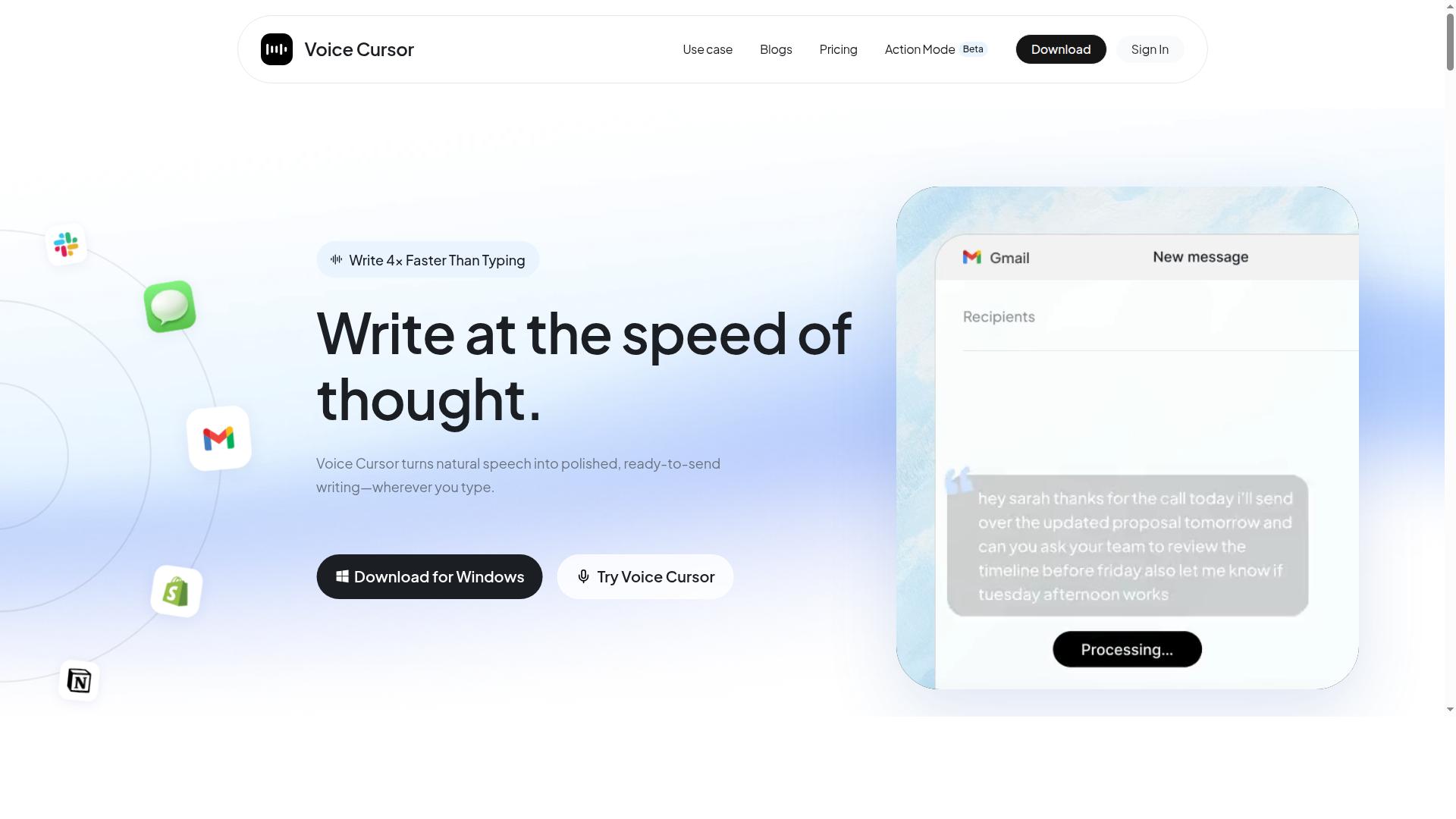
Voice Cursor is an AI-powered voice dictation app that transforms your speech into polished, professional text with automatic grammar correction and filler word removal. Perfect for professionals and writers, it integrates seamlessly with over 20 popular apps like Slack and Gmail to help you write twice as fast using voice typing.

Description
Voice Cursor is a voice interface for your computer. It turns speech into clean, formatted text, lets you edit by voice, fills in saved details, and learns from your spelling corrections. With Action Mode, say what you want done, and Voice Cursor will work out the steps, carry them out across your connected apps, and show you the result.
Description détaillée
Voice Cursor is an advanced AI-powered voice dictation application designed to transform spoken words into flawless written text, enabling users to write faster and more efficiently. At its core, Voice Cursor leverages sophisticated speech-to-text technology combined with artificial intelligence to not only transcribe speech but also enhance the output by automatically correcting grammar, removing filler words, and applying professional formatting. This makes it an ideal tool for anyone looking to streamline their writing process, whether composing emails, messages, or documents. The app’s seamless integration with over 20 popular productivity and communication platforms, including Slack, Gmail, Cursor, and Notion, allows users to dictate text directly within their preferred apps without interrupting their workflow. Voice Cursor’s key features include highly accurate AI-powered voice dictation that converts speech into text in real-time, ensuring minimal errors and a smooth dictation experience. The automatic grammar correction feature intelligently detects and fixes grammatical mistakes, enhancing the professionalism and readability of the text. Additionally, the app removes filler words such as "um," "uh," and "like," which often clutter spoken language, resulting in cleaner, more concise writing. Professional formatting tools further polish the output by structuring paragraphs, adding punctuation, and adjusting capitalization appropriately. Voice Cursor supports multiple operating systems, including macOS, iOS, Android, and Windows, making it accessible across a wide range of devices and user preferences. Voice Cursor is particularly well-suited for professionals, students, writers, and anyone who frequently needs to produce written content quickly and accurately. For example, busy professionals can use it to dictate emails and messages on the go, saving valuable time compared to typing. Content creators and writers can draft articles or documents hands-free, which can enhance creativity and reduce physical strain. Its integration with collaboration tools like Slack and Notion also makes it a valuable asset for teams that rely on quick communication and documentation. Moreover, individuals with disabilities or those who prefer voice input over typing will find Voice Cursor an empowering tool that enhances accessibility. Regarding pricing, Voice Cursor offers a straightforward plan priced at $20 USD, which provides full access to its features and integrations. This pricing reflects the value of the app’s advanced AI capabilities and extensive compatibility with popular productivity tools. While the website does not explicitly mention a free trial, users are encouraged to explore the app’s features through demos or initial usage to assess its fit for their needs. When compared to other voice dictation tools, Voice Cursor stands out due to its combination of AI-driven grammar correction, filler word removal, and professional formatting, which many standard speech-to-text applications lack. Its deep integration with over 20 widely used apps also provides a seamless user experience, allowing dictation to happen directly within the user’s workflow rather than requiring manual transfers or copy-pasting. However, users should consider that Voice Cursor requires an internet connection for its AI processing and may have a learning curve to fully utilize all its formatting and correction features. Additionally, while it supports major operating systems, users on less common platforms may not have access. In summary, Voice Cursor is a powerful voice dictation tool that goes beyond basic transcription by enhancing text quality and integrating smoothly with popular productivity apps. Its focus on speed, accuracy, and professional output makes it a valuable solution for anyone looking to write faster and more effectively using voice technology.
Fonctionnalités de l'outil
- AI-powered voice dictation converting speech to text
- Seamless integration with Slack, Gmail, Cursor, Notion, and 20+ apps
- Automatic grammar correction
- Filler word removal
- Professional text formatting
- Supports macOS, iOS, Android, and Windows operating systems
Description
Voice Cursor is an AI-powered voice dictation app that transforms your speech into polished, professional text with automatic grammar correction and filler word removal. Perfect for professionals and writers, it integrates seamlessly with over 20 popular apps like Slack and Gmail to help you write twice as fast using voice typing.
Voice Cursor is a voice interface for your computer. It turns speech into clean, formatted text, lets you edit by voice, fills in saved details, and learns from your spelling corrections. With Action Mode, say what you want done, and Voice Cursor will work out the steps, carry them out across your connected apps, and show you the result.
Description détaillée
Voice Cursor is an advanced AI-powered voice dictation application designed to transform spoken words into flawless written text, enabling users to write faster and more efficiently. At its core, Voice Cursor leverages sophisticated speech-to-text technology combined with artificial intelligence to not only transcribe speech but also enhance the output by automatically correcting grammar, removing filler words, and applying professional formatting. This makes it an ideal tool for anyone looking to streamline their writing process, whether composing emails, messages, or documents. The app’s seamless integration with over 20 popular productivity and communication platforms, including Slack, Gmail, Cursor, and Notion, allows users to dictate text directly within their preferred apps without interrupting their workflow. Voice Cursor’s key features include highly accurate AI-powered voice dictation that converts speech into text in real-time, ensuring minimal errors and a smooth dictation experience. The automatic grammar correction feature intelligently detects and fixes grammatical mistakes, enhancing the professionalism and readability of the text. Additionally, the app removes filler words such as "um," "uh," and "like," which often clutter spoken language, resulting in cleaner, more concise writing. Professional formatting tools further polish the output by structuring paragraphs, adding punctuation, and adjusting capitalization appropriately. Voice Cursor supports multiple operating systems, including macOS, iOS, Android, and Windows, making it accessible across a wide range of devices and user preferences. Voice Cursor is particularly well-suited for professionals, students, writers, and anyone who frequently needs to produce written content quickly and accurately. For example, busy professionals can use it to dictate emails and messages on the go, saving valuable time compared to typing. Content creators and writers can draft articles or documents hands-free, which can enhance creativity and reduce physical strain. Its integration with collaboration tools like Slack and Notion also makes it a valuable asset for teams that rely on quick communication and documentation. Moreover, individuals with disabilities or those who prefer voice input over typing will find Voice Cursor an empowering tool that enhances accessibility. Regarding pricing, Voice Cursor offers a straightforward plan priced at $20 USD, which provides full access to its features and integrations. This pricing reflects the value of the app’s advanced AI capabilities and extensive compatibility with popular productivity tools. While the website does not explicitly mention a free trial, users are encouraged to explore the app’s features through demos or initial usage to assess its fit for their needs. When compared to other voice dictation tools, Voice Cursor stands out due to its combination of AI-driven grammar correction, filler word removal, and professional formatting, which many standard speech-to-text applications lack. Its deep integration with over 20 widely used apps also provides a seamless user experience, allowing dictation to happen directly within the user’s workflow rather than requiring manual transfers or copy-pasting. However, users should consider that Voice Cursor requires an internet connection for its AI processing and may have a learning curve to fully utilize all its formatting and correction features. Additionally, while it supports major operating systems, users on less common platforms may not have access. In summary, Voice Cursor is a powerful voice dictation tool that goes beyond basic transcription by enhancing text quality and integrating smoothly with popular productivity apps. Its focus on speed, accuracy, and professional output makes it a valuable solution for anyone looking to write faster and more effectively using voice technology.
Questions fréquentes
What is Voice Cursor?
Voice Cursor is an AI-powered voice dictation app that converts your spoken words into accurate, well-formatted text. It enhances your writing by automatically correcting grammar, removing filler words, and applying professional formatting, all while integrating seamlessly with over 20 popular apps.
How much does Voice Cursor cost?
Voice Cursor is priced at $20 USD, which grants full access to its voice dictation features, grammar correction, filler word removal, formatting tools, and integrations.
Who is Voice Cursor best for?
Voice Cursor is ideal for professionals, writers, students, and anyone who wants to write faster and more accurately using voice typing. It’s especially useful for those who frequently compose emails, messages, or documents and want to streamline their workflow.
What are the main features of Voice Cursor?
The main features include AI-powered speech-to-text conversion, automatic grammar correction, filler word removal, professional text formatting, and seamless integration with over 20 apps such as Slack, Gmail, Cursor, and Notion.
Does Voice Cursor offer a free trial?
The website does not explicitly mention a free trial. However, users can explore demos or initial usage options to evaluate the app before committing to a purchase.
What integrations does Voice Cursor support?
Voice Cursor integrates with more than 20 popular applications, including Slack, Gmail, Cursor, Notion, and many others, allowing users to dictate text directly within these platforms.
How does Voice Cursor work?
Voice Cursor uses advanced AI to transcribe your speech into text in real-time. It then automatically corrects grammar, removes filler words, and formats the text professionally. The app works across multiple operating systems and integrates directly with popular apps to streamline your writing process.
Réseaux

Avis
Pas encore d'avis. Sois le premier à partager ton expérience.






















 , Un produit de