🚀 Zaprep : tes réseaux sociaux sous stéroïdes. Commencer gratuitement — automatise 1 000 DM/mois et transforme l'engagement en leads. avec 1 000 DM automatisés/mois.


C'est ton outil IA ? Réclame-le dès aujourd'hui.
Vérifie la propriété, gère ton profil et débloque des fonctionnalités de croissance.
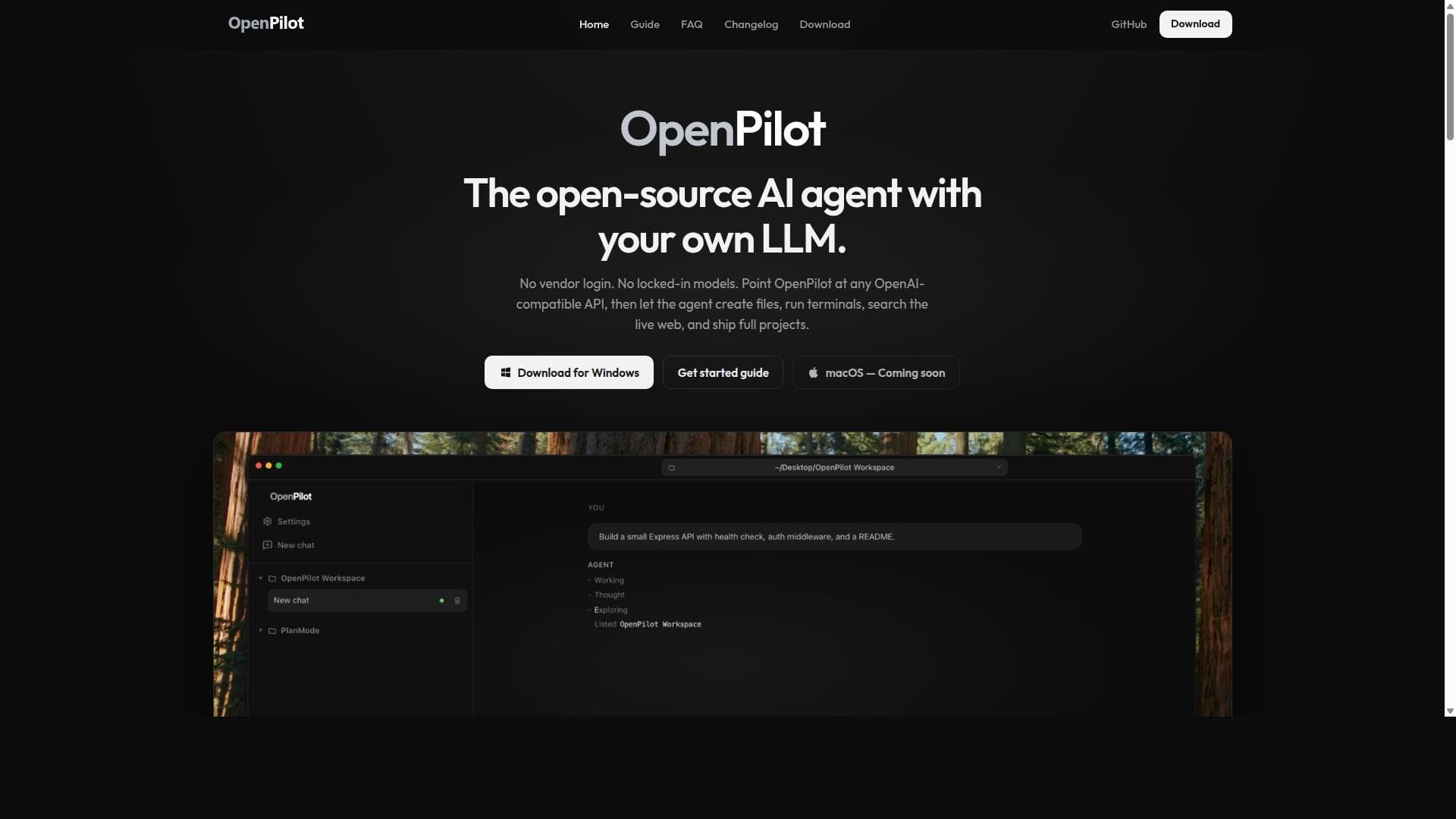
OpenPilot is a local, open-source AI agent that lets you bring your own OpenAI-compatible large language model to your desktop, enabling seamless file management, terminal command execution, and web research without vendor lock-in. Ideal for developers and tech enthusiasts, it offers unmatched flexibility and control for AI-powered project workflows.

Description
OpenPilot is a free, MIT-licensed desktop AI agent. Connect any OpenAI-compatible model (OpenAI, OpenRouter, Ollama, LM Studio), pick a folder, and it reads and edits files and runs commands there. You approve sensitive actions. Windows now, macOS early beta.
Description détaillée
OpenPilot is an innovative open-source AI agent designed to run locally on your desktop, empowering users to harness the power of any OpenAI-compatible large language model (LLM) without being locked into a specific vendor or platform. Its core purpose is to provide developers, researchers, and tech enthusiasts with a versatile AI assistant that can seamlessly integrate into their workflows, enabling file creation, project scaffolding, terminal command execution, web searching, and project shipping—all within a local Electron application. By allowing users to bring their own LLM, OpenPilot offers unparalleled flexibility and control over AI usage, making it a powerful tool for those who want to avoid the constraints of proprietary AI platforms or cloud dependencies. OpenPilot's feature set is robust and developer-centric. It supports creating, reading, editing, and managing files across your workspace, enabling users to scaffold projects and iterate efficiently by leveraging filesystem tools such as grepping and globbing. This means you can interact with your codebase or documents directly through the AI agent, streamlining development and content creation processes. Additionally, OpenPilot can run real terminal commands, including installing dependencies, starting servers, running tests, and more, with the output streamed live back into the chat interface. This live shell integration bridges the gap between AI assistance and actual system operations, making it a practical tool for coding, debugging, and deployment tasks. The application is built as a local Electron app, ensuring no vendor lock-in and full compatibility with any OpenAI-compatible API. This design choice guarantees privacy, security, and control, as your data and AI interactions remain on your machine unless you choose otherwise. OpenPilot also supports advanced AI features such as MCP (Multi-Context Processing), skills, and memory, which are wired directly to the model you select. These capabilities enhance the AI's contextual understanding and allow for more personalized and intelligent interactions over time. Being MIT licensed, OpenPilot is fully open-source, inviting contributions and transparency from the community. OpenPilot is currently available for Windows users, with macOS support coming soon, making it accessible to a broad range of desktop users. Its zero-cost pricing model means anyone can download and use the software without subscription fees or hidden costs, making it an attractive option for individuals and organizations alike. This tool is ideal for developers, AI researchers, and power users who want a customizable AI assistant integrated tightly with their local environment. Use cases include software development workflows where AI can assist in code generation, testing, and deployment; content creation where files need to be managed and edited programmatically; and research scenarios requiring live web searches combined with local data processing. Its open-source nature also makes it a great choice for those who want to experiment with or extend AI capabilities without restrictions. Compared to alternatives, OpenPilot stands out by offering a truly local AI agent experience with no vendor lock-in, unlike many cloud-based AI assistants that require proprietary APIs or subscriptions. Its ability to run terminal commands and manage files directly is a unique feature set that bridges AI assistance with practical system-level operations. However, as an open-source project, it may require more technical know-how to set up and optimize compared to turnkey commercial solutions. Also, while it supports any OpenAI-compatible API, the quality and capabilities of the AI depend on the model you bring, which may vary. Notable limitations include the current Windows-only availability, with macOS support still pending, which restricts its user base temporarily. Additionally, since it relies on external OpenAI-compatible APIs, users must have access to such APIs and manage their own API keys. The local execution environment, while secure, may also require sufficient system resources to run smoothly, especially when using large models. Users should also be comfortable with command-line operations and technical configuration to fully leverage OpenPilot's capabilities. In summary, OpenPilot is a powerful, flexible, and open-source AI agent that brings the intelligence of large language models directly to your desktop environment. Its unique combination of local execution, vendor neutrality, and deep integration with filesystem and terminal operations makes it a standout tool for developers and AI enthusiasts seeking control, privacy, and extensibility in their AI workflows.
Fonctionnalités de l'outil
- Create files, scaffold projects, and iterate in place by reading, writing, editing, grepping, and globbing across your workspace.
- Run real terminal commands such as installing dependencies, starting servers, running tests, and streaming stdout back into the chat.
- Local Electron app with no vendor lock-in, supporting any OpenAI-compatible API.
- Supports MCP, skills, and memory wired to the model you choose.
- MIT licensed open-source software.
- Available for Windows now with macOS support coming soon.
Description
OpenPilot is a local, open-source AI agent that lets you bring your own OpenAI-compatible large language model to your desktop, enabling seamless file management, terminal command execution, and web research without vendor lock-in. Ideal for developers and tech enthusiasts, it offers unmatched flexibility and control for AI-powered project workflows.
OpenPilot is a free, MIT-licensed desktop AI agent. Connect any OpenAI-compatible model (OpenAI, OpenRouter, Ollama, LM Studio), pick a folder, and it reads and edits files and runs commands there. You approve sensitive actions. Windows now, macOS early beta.
Description détaillée
OpenPilot is an innovative open-source AI agent designed to run locally on your desktop, empowering users to harness the power of any OpenAI-compatible large language model (LLM) without being locked into a specific vendor or platform. Its core purpose is to provide developers, researchers, and tech enthusiasts with a versatile AI assistant that can seamlessly integrate into their workflows, enabling file creation, project scaffolding, terminal command execution, web searching, and project shipping—all within a local Electron application. By allowing users to bring their own LLM, OpenPilot offers unparalleled flexibility and control over AI usage, making it a powerful tool for those who want to avoid the constraints of proprietary AI platforms or cloud dependencies. OpenPilot's feature set is robust and developer-centric. It supports creating, reading, editing, and managing files across your workspace, enabling users to scaffold projects and iterate efficiently by leveraging filesystem tools such as grepping and globbing. This means you can interact with your codebase or documents directly through the AI agent, streamlining development and content creation processes. Additionally, OpenPilot can run real terminal commands, including installing dependencies, starting servers, running tests, and more, with the output streamed live back into the chat interface. This live shell integration bridges the gap between AI assistance and actual system operations, making it a practical tool for coding, debugging, and deployment tasks. The application is built as a local Electron app, ensuring no vendor lock-in and full compatibility with any OpenAI-compatible API. This design choice guarantees privacy, security, and control, as your data and AI interactions remain on your machine unless you choose otherwise. OpenPilot also supports advanced AI features such as MCP (Multi-Context Processing), skills, and memory, which are wired directly to the model you select. These capabilities enhance the AI's contextual understanding and allow for more personalized and intelligent interactions over time. Being MIT licensed, OpenPilot is fully open-source, inviting contributions and transparency from the community. OpenPilot is currently available for Windows users, with macOS support coming soon, making it accessible to a broad range of desktop users. Its zero-cost pricing model means anyone can download and use the software without subscription fees or hidden costs, making it an attractive option for individuals and organizations alike. This tool is ideal for developers, AI researchers, and power users who want a customizable AI assistant integrated tightly with their local environment. Use cases include software development workflows where AI can assist in code generation, testing, and deployment; content creation where files need to be managed and edited programmatically; and research scenarios requiring live web searches combined with local data processing. Its open-source nature also makes it a great choice for those who want to experiment with or extend AI capabilities without restrictions. Compared to alternatives, OpenPilot stands out by offering a truly local AI agent experience with no vendor lock-in, unlike many cloud-based AI assistants that require proprietary APIs or subscriptions. Its ability to run terminal commands and manage files directly is a unique feature set that bridges AI assistance with practical system-level operations. However, as an open-source project, it may require more technical know-how to set up and optimize compared to turnkey commercial solutions. Also, while it supports any OpenAI-compatible API, the quality and capabilities of the AI depend on the model you bring, which may vary. Notable limitations include the current Windows-only availability, with macOS support still pending, which restricts its user base temporarily. Additionally, since it relies on external OpenAI-compatible APIs, users must have access to such APIs and manage their own API keys. The local execution environment, while secure, may also require sufficient system resources to run smoothly, especially when using large models. Users should also be comfortable with command-line operations and technical configuration to fully leverage OpenPilot's capabilities. In summary, OpenPilot is a powerful, flexible, and open-source AI agent that brings the intelligence of large language models directly to your desktop environment. Its unique combination of local execution, vendor neutrality, and deep integration with filesystem and terminal operations makes it a standout tool for developers and AI enthusiasts seeking control, privacy, and extensibility in their AI workflows.
Questions fréquentes
What is OpenPilot?
OpenPilot is an open-source AI agent for desktop that allows users to connect any OpenAI-compatible large language model (LLM) to create files, run terminal commands, search the web, and manage projects locally without vendor lock-in.
How much does OpenPilot cost?
OpenPilot is completely free to use as it is open-source software licensed under the MIT license. There are no subscription fees or costs associated with downloading and using the application.
Who is OpenPilot best for?
OpenPilot is best suited for developers, AI researchers, and power users who want a customizable, local AI assistant integrated with their desktop environment, especially those who prefer to avoid vendor lock-in and want to bring their own OpenAI-compatible models.
What are the main features of OpenPilot?
Key features include file creation and editing across your workspace, running real terminal commands with live output streaming, local Electron app deployment with no vendor lock-in, support for MCP, skills, and memory connected to your chosen model, and full open-source availability under the MIT license.
Does OpenPilot offer a free trial?
Since OpenPilot is free and open-source software, there is no need for a free trial. Users can download and use the full application at no cost.
What integrations does OpenPilot support?
OpenPilot supports integration with any OpenAI-compatible API, allowing users to connect various large language models. It also integrates with the local filesystem and terminal, enabling file operations and command execution directly from the AI agent.
How does OpenPilot work?
OpenPilot runs as a local Electron application on your desktop, connecting to any OpenAI-compatible API you provide. It uses this model to assist with tasks such as creating and editing files, running terminal commands, searching the web, and managing project workflows, all while keeping data local and avoiding vendor lock-in.
Avis
Pas encore d'avis. Sois le premier à partager ton expérience.
Outils sponsorisés











































Outils recommandés
Reste au courant des derniers outils IA
Reçois les derniers insights, rejoins notre newsletter
Lu et approuvé par 50,000+ lecteurs
Rejoins la plus grande communauté IA
Notre communauté et notre équipe sont là pour t'aider !
Tes retours aideront Alice AI à s'améliorer dans les prochaines versions.








Soumettre ton outil


PoweredByAI.app est un annuaire d'outils IA qui aide les particuliers, les entreprises et les créateurs à découvrir les meilleurs outils IA pour la rédaction, le code, le design, la productivité, et plus encore.
© 2026 , Un produit de011BQ. Tous droits réservés.