



Mis en avant dans :Best AI Writing Tools
Être mis en avant →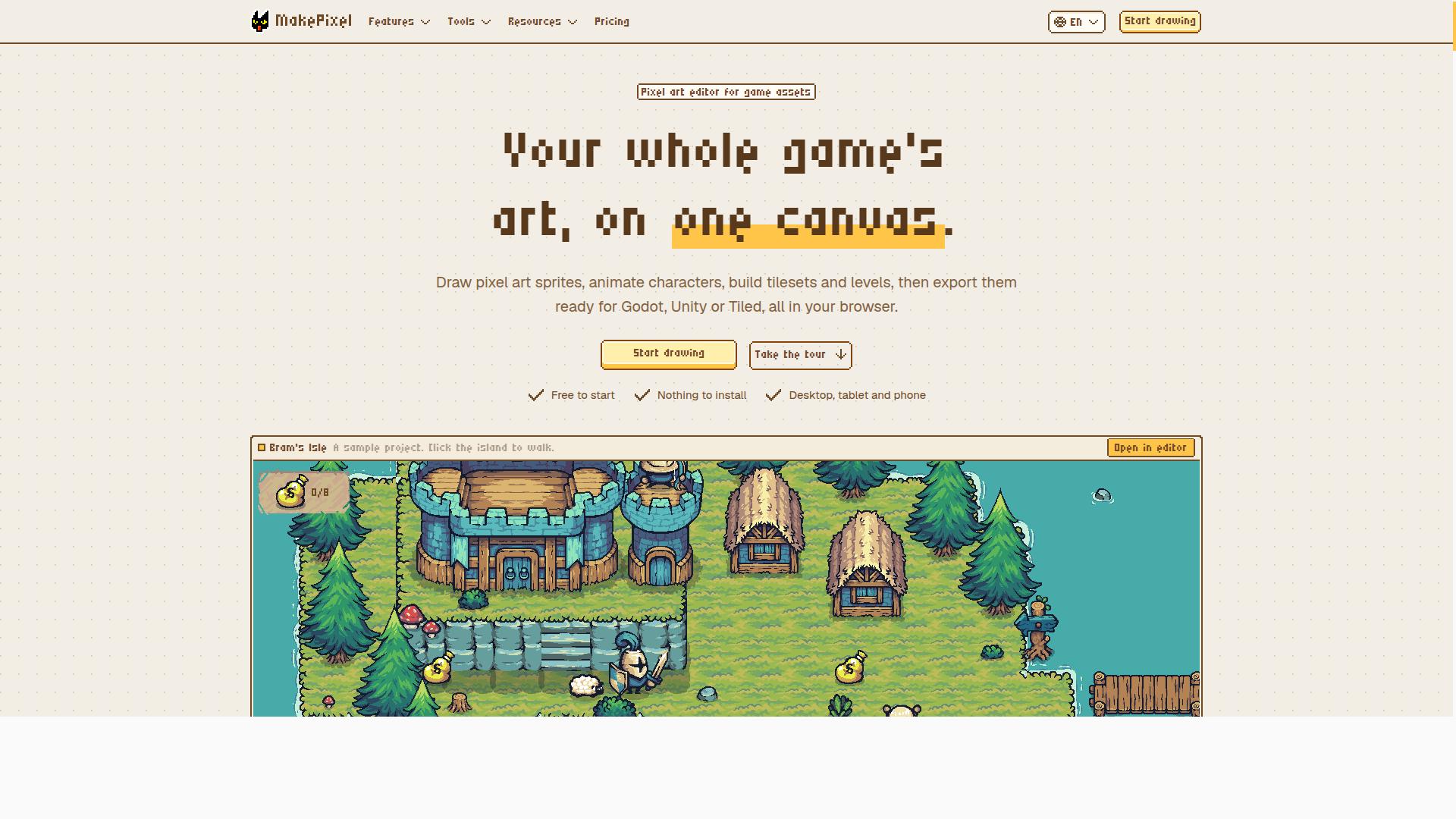


Alternatives mises en avant






C'est ton outil IA ? Réclame-le dès aujourd'hui.
Vérifie la propriété, gère ton profil et débloque des fonctionnalités de croissance.
✦
MakePixel is a versatile browser-based pixel art editor designed for game developers and artists to create, animate, and export pixel art assets seamlessly. With powerful features like large sprite support, image-to-pixel conversion, and direct exports to popular game engines, it’s perfect for indie developers and pixel artists seeking an all-in-one, offline-capable tool accessible on any device.

Description
MakePixel is a pixel art editor for game assets that runs in your browser, iPad included. Animate sprites with the keys you know from Aseprite, draw a few tiles to get a full autotile set, paint levels, and export to Godot, Unity or Tiled. Free to start.
Description détaillée
MakePixel is a comprehensive browser-based pixel art editor tailored specifically for game developers and digital artists focused on pixel art creation. Its core purpose is to provide an all-in-one platform where users can draw sprites, animate characters, and construct tilesets seamlessly on a single canvas. This integration streamlines the game asset creation process by eliminating the need to switch between multiple tools, making it highly efficient for game development workflows. The tool runs entirely in the browser, which means there is no software installation required, and it supports offline work with automatic saving to protect users’ progress even without an internet connection. One of MakePixel's standout features is its ability to export assets directly to popular game engines and formats such as Godot (including SpriteFrames, AnimatedSprite2D scenes, and TileSets with terrains), Unity via its Aseprite Importer, as well as sprite sheets with JSON metadata for Phaser, PixiJS, and GameMaker. It also supports exporting tilesets for Tiled, enabling users to build full levels within the same environment. The editor supports large sprites up to 1024x1024 pixels, with up to 1,024 animation frames, 64 layers, and 256 colors, offering extensive flexibility for complex projects. Additionally, MakePixel can open and save .aseprite files while preserving layers, cels, tags, palettes, blend modes, and opacity, allowing smooth interoperability with the widely used Aseprite software. A unique capability of MakePixel is its image-to-pixel-art converter, which runs locally in the browser. This feature enables users to transform photos, sketches, or upscaled sprites into editable pixel art by selecting size and color palette options. It intelligently detects pixel grids in upscaled or AI-generated pixel art to ensure accurate editing. The interface is optimized for touch devices, featuring pinch-to-zoom, multi-finger tap undo/redo gestures, and a long-press eyedropper tool, making it accessible on tablets and phones. MakePixel is ideal for indie game developers, pixel artists, animators, and hobbyists who require a powerful yet accessible pixel art editor that integrates well with game engines. It suits users who want to create detailed sprites and animations without juggling multiple programs, as well as those who appreciate working offline or on mobile devices. Its ability to build tilesets and levels directly within the editor also appeals to game designers looking to streamline their asset-to-level pipeline. Regarding pricing, MakePixel offers a free tier that includes drawing, animation, tileset creation, and all import/export formats with 50 MB of storage. The Pro plan expands capabilities by adding version history, scene playtesting, AI coding tool connections, additional color themes, and increased storage up to 10 GB. This tier is well-suited for professional developers or teams requiring advanced project management and collaboration features. Compared to alternatives like Aseprite, Piskel, or GraphicsGale, MakePixel stands out by combining sprite editing, animation, tileset building, and level design in one browser-based tool with robust export options to multiple game engines. Unlike many pixel art editors that require installation, MakePixel’s web-based nature and offline support provide unmatched convenience and accessibility. Its image-to-pixel-art converter and touch-friendly interface further differentiate it from competitors. However, users should consider that while MakePixel is powerful, browser-based editors may face performance constraints with extremely large or highly complex projects compared to native desktop applications. Also, while it supports many export formats, some niche or proprietary game engines may require additional conversion steps. Nonetheless, its seamless integration with major engines and comprehensive feature set make it a compelling choice for pixel art creation and game asset development.
Fonctionnalités de l'outil
- Draw sprites, animate characters, and build tilesets on one canvas
- Export assets directly to Godot, Unity, Aseprite, Phaser, PixiJS, GameMaker, and Tiled
- Runs entirely in the browser with offline support and automatic saving
- Supports large sprites up to 1024x1024 pixels with multiple frames, layers, and colors
- Image-to-pixel-art converter that transforms photos or sketches into pixel art
- Touch-friendly interface with pinch to zoom, multi-finger tap undo/redo, and long-press eyedropper
- Supports opening and saving .aseprite files with layers, cels, tags, palettes, and blend modes intact
- Includes version history, scene playtesting, AI coding tool connections, and expanded storage on Pro plan
Description
✦
MakePixel is a versatile browser-based pixel art editor designed for game developers and artists to create, animate, and export pixel art assets seamlessly. With powerful features like large sprite support, image-to-pixel conversion, and direct exports to popular game engines, it’s perfect for indie developers and pixel artists seeking an all-in-one, offline-capable tool accessible on any device.
MakePixel is a pixel art editor for game assets that runs in your browser, iPad included. Animate sprites with the keys you know from Aseprite, draw a few tiles to get a full autotile set, paint levels, and export to Godot, Unity or Tiled. Free to start.
Description détaillée
MakePixel is a comprehensive browser-based pixel art editor tailored specifically for game developers and digital artists focused on pixel art creation. Its core purpose is to provide an all-in-one platform where users can draw sprites, animate characters, and construct tilesets seamlessly on a single canvas. This integration streamlines the game asset creation process by eliminating the need to switch between multiple tools, making it highly efficient for game development workflows. The tool runs entirely in the browser, which means there is no software installation required, and it supports offline work with automatic saving to protect users’ progress even without an internet connection. One of MakePixel's standout features is its ability to export assets directly to popular game engines and formats such as Godot (including SpriteFrames, AnimatedSprite2D scenes, and TileSets with terrains), Unity via its Aseprite Importer, as well as sprite sheets with JSON metadata for Phaser, PixiJS, and GameMaker. It also supports exporting tilesets for Tiled, enabling users to build full levels within the same environment. The editor supports large sprites up to 1024x1024 pixels, with up to 1,024 animation frames, 64 layers, and 256 colors, offering extensive flexibility for complex projects. Additionally, MakePixel can open and save .aseprite files while preserving layers, cels, tags, palettes, blend modes, and opacity, allowing smooth interoperability with the widely used Aseprite software. A unique capability of MakePixel is its image-to-pixel-art converter, which runs locally in the browser. This feature enables users to transform photos, sketches, or upscaled sprites into editable pixel art by selecting size and color palette options. It intelligently detects pixel grids in upscaled or AI-generated pixel art to ensure accurate editing. The interface is optimized for touch devices, featuring pinch-to-zoom, multi-finger tap undo/redo gestures, and a long-press eyedropper tool, making it accessible on tablets and phones. MakePixel is ideal for indie game developers, pixel artists, animators, and hobbyists who require a powerful yet accessible pixel art editor that integrates well with game engines. It suits users who want to create detailed sprites and animations without juggling multiple programs, as well as those who appreciate working offline or on mobile devices. Its ability to build tilesets and levels directly within the editor also appeals to game designers looking to streamline their asset-to-level pipeline. Regarding pricing, MakePixel offers a free tier that includes drawing, animation, tileset creation, and all import/export formats with 50 MB of storage. The Pro plan expands capabilities by adding version history, scene playtesting, AI coding tool connections, additional color themes, and increased storage up to 10 GB. This tier is well-suited for professional developers or teams requiring advanced project management and collaboration features. Compared to alternatives like Aseprite, Piskel, or GraphicsGale, MakePixel stands out by combining sprite editing, animation, tileset building, and level design in one browser-based tool with robust export options to multiple game engines. Unlike many pixel art editors that require installation, MakePixel’s web-based nature and offline support provide unmatched convenience and accessibility. Its image-to-pixel-art converter and touch-friendly interface further differentiate it from competitors. However, users should consider that while MakePixel is powerful, browser-based editors may face performance constraints with extremely large or highly complex projects compared to native desktop applications. Also, while it supports many export formats, some niche or proprietary game engines may require additional conversion steps. Nonetheless, its seamless integration with major engines and comprehensive feature set make it a compelling choice for pixel art creation and game asset development.
Questions fréquentes
What is MakePixel?
MakePixel is a browser-based pixel art editor designed for creating game assets such as sprites, animations, and tilesets all on one canvas. It supports exporting directly to popular game engines and includes features like an image-to-pixel-art converter and offline work with automatic saving.
How much does MakePixel cost?
MakePixel offers a free plan that includes core drawing, animation, tileset creation, and export features with 50 MB of storage. The Pro plan adds version history, scene playtesting, AI coding tool connections, more color themes, and expands storage to 10 GB.
Who is MakePixel best for?
MakePixel is ideal for indie game developers, pixel artists, animators, and hobbyists who want an all-in-one pixel art editor that works offline and on multiple devices. It’s especially useful for those needing seamless integration with game engines like Godot, Unity, and Aseprite.
What are the main features of MakePixel?
Key features include drawing and animating sprites, building tilesets on one canvas, exporting assets to Godot, Unity, Aseprite, Phaser, PixiJS, GameMaker, and Tiled, an image-to-pixel-art converter, offline support with automatic saving, touch-friendly controls, and support for large sprites with multiple frames and layers.
Does MakePixel offer a free trial?
Yes, MakePixel’s core features are available for free with 50 MB of storage. Users can access most tools without time limitations, making it effectively a free trial with optional Pro upgrades for advanced features.
What integrations does MakePixel support?
MakePixel supports exporting assets directly to game engines and frameworks including Godot 4, Unity (via Aseprite Importer), Phaser, PixiJS, GameMaker, and Tiled. It also supports opening and saving .aseprite files with full layer and animation data intact.
How does MakePixel work?
MakePixel runs entirely in the web browser, requiring no installation. It saves work automatically and supports offline use. Users can create pixel art, animate, build tilesets, convert images to pixel art, and export assets directly to supported game engines, all within a touch-friendly interface.
Réseaux
Utiliser l'outilAvis
0 avis
Pas encore d'avis. Sois le premier à partager ton expérience.
Outils sponsorisés




























Outils recommandés
Reste au courant des derniers outils IA
Reçois les derniers insights, rejoins notre newsletter
Lu et approuvé par 50,000+ lecteurs
Rejoins la plus grande communauté IA
Notre communauté et notre équipe sont là pour t'aider !
Tes retours aideront Alice AI à s'améliorer dans les prochaines versions.




 , Un produit de