🚀 Zaprep : tes réseaux sociaux sous stéroïdes. Commencer gratuitement — automatise 1 000 DM/mois et transforme l'engagement en leads. avec 1 000 DM automatisés/mois.


C'est ton outil IA ? Réclame-le dès aujourd'hui.
Vérifie la propriété, gère ton profil et débloque des fonctionnalités de croissance.
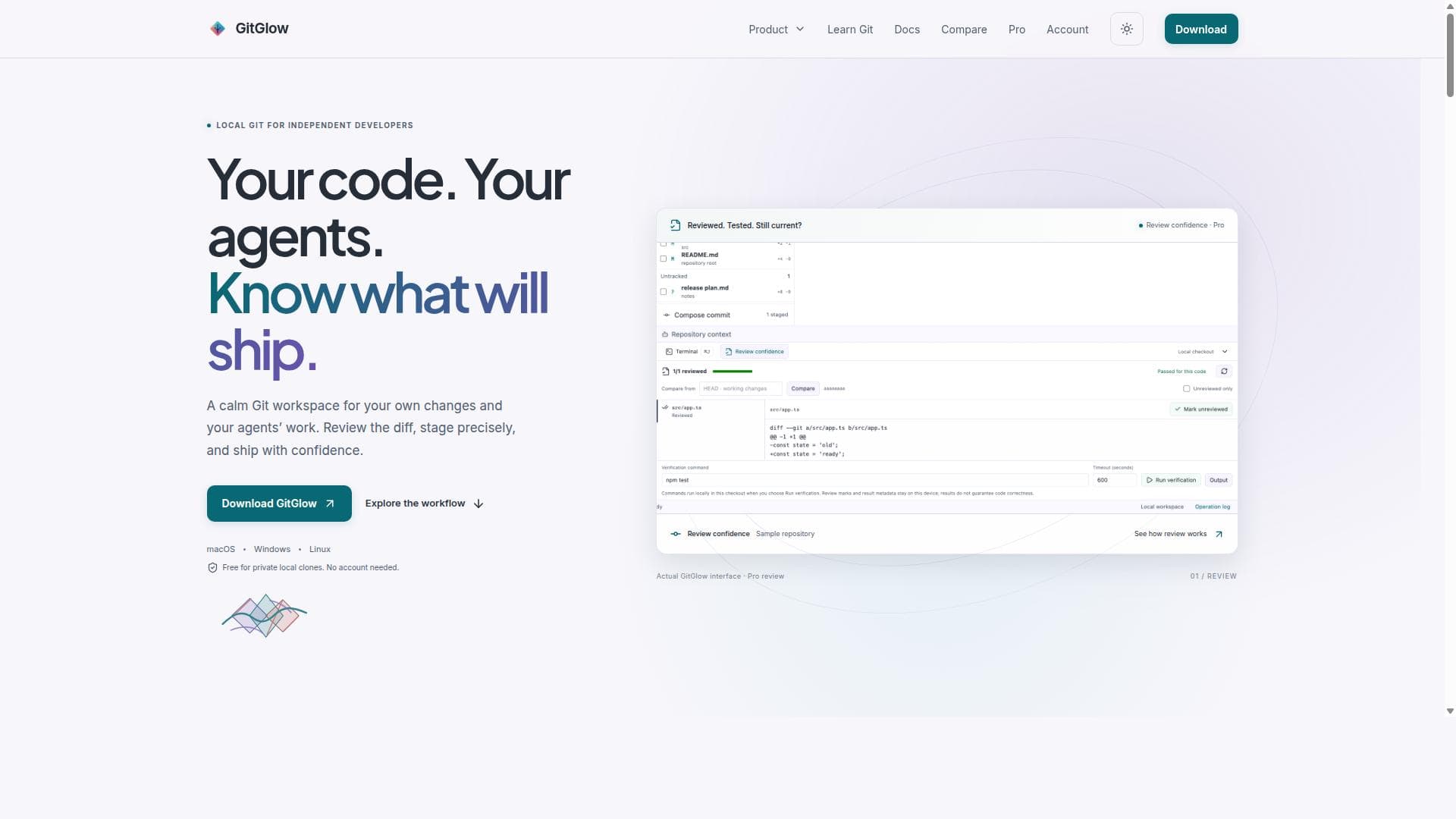
GitGlow is a local-first visual Git workbench that empowers independent developers to stage changes precisely, visualize commit history clearly, and resolve conflicts efficiently—all without needing an account. Its unique integration of coding-agent review and release preparation tools makes it ideal for developers who want full control over their Git workflow in a calm, focused environment.

Description
GitGlow brings precise staging, clear history, and a checkout-aware terminal into one local Git workspace. Pro adds review marks and checks that become stale after edits, plus managed agent and release tools. Free for private local clones; no account needed.
Description détaillée
GitGlow is a powerful local-first visual Git workbench designed to provide developers with a calm, focused environment for managing their Git workflows. Its core purpose is to enable precise staging of changes, clear visualization of commit history, efficient conflict resolution, and streamlined release preparation, all within a single, intuitive interface. By focusing on local-first operations, GitGlow empowers independent developers and small teams to maintain full control over their code without relying on cloud accounts or external services. This approach ensures privacy, speed, and reliability while offering advanced Git capabilities that go beyond traditional command-line tools or basic Git clients. One of GitGlow's standout features is its precise staging capability, which allows users to selectively stage individual changes or hunks with granular control. This precision helps developers craft clean, meaningful commits that improve project history readability and facilitate easier code reviews. The commit history visualization is another core aspect, presenting a clear, graphical representation of branches, merges, and commit timelines. This visual clarity aids developers in understanding project evolution and tracking changes across branches effortlessly. GitGlow also excels in conflict resolution by providing dedicated tools to identify, analyze, and resolve merge conflicts with minimal friction. Its interface highlights conflicting changes and offers intuitive controls to merge code safely. Additionally, GitGlow integrates coding-agent review features, enabling developers to inspect and manage changes introduced by AI coding assistants or other automated tools, ensuring that all code shipped meets quality standards. The release preparation functionality further supports developers by organizing commits and changesets, making it easier to prepare stable releases. The tool supports all major desktop platforms, including macOS, Windows, and Linux, making it accessible to a broad range of developers regardless of their operating system preferences. Importantly, GitGlow is free for private local clones and does not require users to create an account, which lowers the barrier to entry and respects user privacy. GitGlow is best suited for independent developers, solo programmers, and small teams who value a local-first approach to Git management. It is particularly beneficial for those who want to maintain precise control over their commits, visualize complex histories, and handle conflicts without the overhead of cloud-based Git clients. Use cases include preparing clean commits for open source contributions, managing feature branches with clear visual context, and reviewing AI-generated code changes before integration. Regarding pricing, GitGlow offers a free tier that covers private local repositories with no account needed, making it an excellent choice for personal projects and small-scale development. There are also Pro plans available for users who need additional features or enterprise capabilities, although specific pricing details should be checked on their official website. Compared to alternatives like GitKraken, SourceTree, or command-line Git, GitGlow distinguishes itself by emphasizing a local-first design and integrating coding-agent review capabilities. While many Git clients focus on cloud integration or team collaboration features, GitGlow prioritizes a calm and precise local workspace optimized for individual developers. This focus makes it unique in the ecosystem, especially for those who want to avoid cloud dependencies or require enhanced staging and conflict resolution tools. However, some limitations include the potential lack of extensive cloud collaboration features found in other Git clients, which might be a consideration for larger teams or organizations relying heavily on remote Git hosting services. Additionally, while GitGlow supports coding-agent reviews, users unfamiliar with AI coding assistants might not fully leverage this feature. Finally, as a relatively new tool, GitGlow’s ecosystem and community support might not be as mature as some established Git clients. In summary, GitGlow offers a comprehensive, local-first Git experience tailored for developers who want precise control, visual clarity, and integrated AI code review capabilities. Its free availability for private local clones and cross-platform support make it an attractive option for independent developers seeking a calm and confident Git workflow.
Fonctionnalités de l'outil
- Local-first visual Git workbench
- Precise staging of changes
- Commit history visualization
- Conflict resolution tools
- Coding-agent review
- Release preparation
- Supports macOS, Windows, and Linux
- Free for private local clones with no account needed
Description
GitGlow is a local-first visual Git workbench that empowers independent developers to stage changes precisely, visualize commit history clearly, and resolve conflicts efficiently—all without needing an account. Its unique integration of coding-agent review and release preparation tools makes it ideal for developers who want full control over their Git workflow in a calm, focused environment.
GitGlow brings precise staging, clear history, and a checkout-aware terminal into one local Git workspace. Pro adds review marks and checks that become stale after edits, plus managed agent and release tools. Free for private local clones; no account needed.
Description détaillée
GitGlow is a powerful local-first visual Git workbench designed to provide developers with a calm, focused environment for managing their Git workflows. Its core purpose is to enable precise staging of changes, clear visualization of commit history, efficient conflict resolution, and streamlined release preparation, all within a single, intuitive interface. By focusing on local-first operations, GitGlow empowers independent developers and small teams to maintain full control over their code without relying on cloud accounts or external services. This approach ensures privacy, speed, and reliability while offering advanced Git capabilities that go beyond traditional command-line tools or basic Git clients. One of GitGlow's standout features is its precise staging capability, which allows users to selectively stage individual changes or hunks with granular control. This precision helps developers craft clean, meaningful commits that improve project history readability and facilitate easier code reviews. The commit history visualization is another core aspect, presenting a clear, graphical representation of branches, merges, and commit timelines. This visual clarity aids developers in understanding project evolution and tracking changes across branches effortlessly. GitGlow also excels in conflict resolution by providing dedicated tools to identify, analyze, and resolve merge conflicts with minimal friction. Its interface highlights conflicting changes and offers intuitive controls to merge code safely. Additionally, GitGlow integrates coding-agent review features, enabling developers to inspect and manage changes introduced by AI coding assistants or other automated tools, ensuring that all code shipped meets quality standards. The release preparation functionality further supports developers by organizing commits and changesets, making it easier to prepare stable releases. The tool supports all major desktop platforms, including macOS, Windows, and Linux, making it accessible to a broad range of developers regardless of their operating system preferences. Importantly, GitGlow is free for private local clones and does not require users to create an account, which lowers the barrier to entry and respects user privacy. GitGlow is best suited for independent developers, solo programmers, and small teams who value a local-first approach to Git management. It is particularly beneficial for those who want to maintain precise control over their commits, visualize complex histories, and handle conflicts without the overhead of cloud-based Git clients. Use cases include preparing clean commits for open source contributions, managing feature branches with clear visual context, and reviewing AI-generated code changes before integration. Regarding pricing, GitGlow offers a free tier that covers private local repositories with no account needed, making it an excellent choice for personal projects and small-scale development. There are also Pro plans available for users who need additional features or enterprise capabilities, although specific pricing details should be checked on their official website. Compared to alternatives like GitKraken, SourceTree, or command-line Git, GitGlow distinguishes itself by emphasizing a local-first design and integrating coding-agent review capabilities. While many Git clients focus on cloud integration or team collaboration features, GitGlow prioritizes a calm and precise local workspace optimized for individual developers. This focus makes it unique in the ecosystem, especially for those who want to avoid cloud dependencies or require enhanced staging and conflict resolution tools. However, some limitations include the potential lack of extensive cloud collaboration features found in other Git clients, which might be a consideration for larger teams or organizations relying heavily on remote Git hosting services. Additionally, while GitGlow supports coding-agent reviews, users unfamiliar with AI coding assistants might not fully leverage this feature. Finally, as a relatively new tool, GitGlow’s ecosystem and community support might not be as mature as some established Git clients. In summary, GitGlow offers a comprehensive, local-first Git experience tailored for developers who want precise control, visual clarity, and integrated AI code review capabilities. Its free availability for private local clones and cross-platform support make it an attractive option for independent developers seeking a calm and confident Git workflow.
Questions fréquentes
What is GitGlow?
GitGlow is a local-first visual Git workbench designed to provide developers with precise staging, commit history visualization, conflict resolution, coding-agent review, and release preparation tools—all within a calm and intuitive interface.
How much does GitGlow cost?
GitGlow is free for private local clones and does not require users to create an account. There are Pro plans available for additional features, but the core local Git functionality is available at no cost.
Who is GitGlow best for?
GitGlow is best suited for independent developers, solo programmers, and small teams who want a local-first Git client with precise staging, clear commit visualization, and integrated AI coding-agent review capabilities.
What are the main features of GitGlow?
Key features include precise staging of changes, commit history visualization, conflict resolution tools, coding-agent review integration, release preparation support, and cross-platform compatibility with macOS, Windows, and Linux.
Does GitGlow offer a free trial?
GitGlow’s core functionality is free for private local repositories with no account needed, so users can start using it immediately without a trial period.
What integrations does GitGlow support?
GitGlow integrates coding-agent review features to monitor and manage AI-generated code changes. It works locally with Git repositories on macOS, Windows, and Linux but does not rely on cloud accounts or external services.
How does GitGlow work?
GitGlow operates as a local-first Git workbench, allowing developers to review diffs, stage changes precisely, visualize commit history graphically, resolve conflicts, and prepare releases—all within a single desktop application that runs directly on their machine.
Réseaux
Utiliser l'outilAvis
Pas encore d'avis. Sois le premier à partager ton expérience.
Outils sponsorisés











































Outils recommandés
Reste au courant des derniers outils IA
Reçois les derniers insights, rejoins notre newsletter
Lu et approuvé par 50,000+ lecteurs
Rejoins la plus grande communauté IA
Notre communauté et notre équipe sont là pour t'aider !
Tes retours aideront Alice AI à s'améliorer dans les prochaines versions.








Soumettre ton outil


PoweredByAI.app est un annuaire d'outils IA qui aide les particuliers, les entreprises et les créateurs à découvrir les meilleurs outils IA pour la rédaction, le code, le design, la productivité, et plus encore.
© 2026 , Un produit de011BQ. Tous droits réservés.