

C'est ton outil IA ? Réclame-le dès aujourd'hui.
Vérifie la propriété, gère ton profil et débloque des fonctionnalités de croissance.
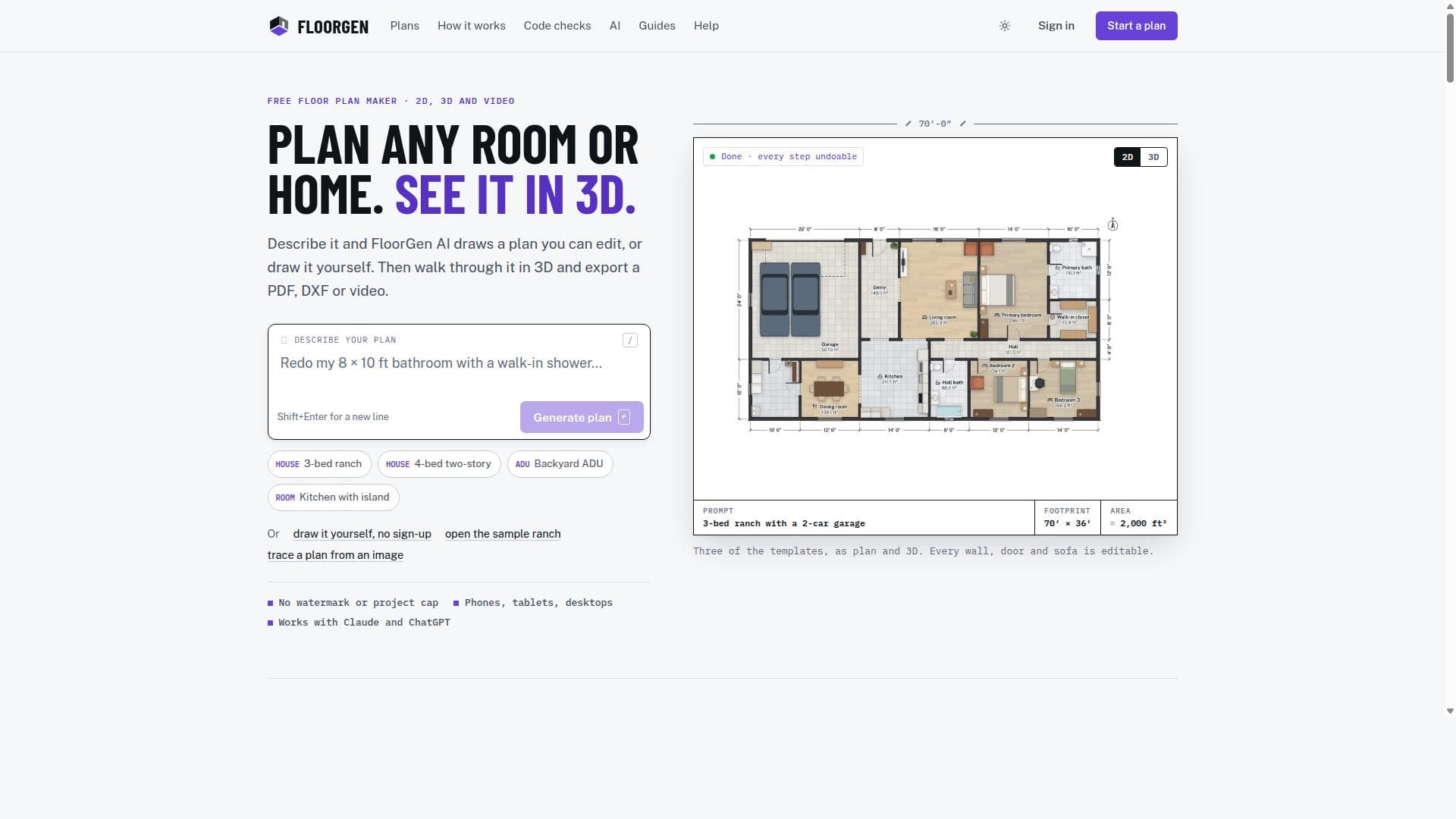
FloorGen is a free, browser-based floor plan maker that lets users draw, furnish, and visualize layouts in 3D without any installation or sign-up. With a vast model library, AI-assisted editing, and multi-format exports, it’s perfect for homeowners, designers, and architects seeking a powerful yet accessible design tool.

Description
Plan a remodel, an ADU or a whole house for free in your browser. Describe it and FloorGen AI builds it, every change an undo step. Then check it against the IRC, walk through it in 3D and print the plan set. Claude and ChatGPT can edit it too.
Description détaillée
FloorGen is a comprehensive, browser-based floor plan maker designed to simplify the process of creating detailed architectural layouts without the need for complex software installations or steep learning curves. Its core purpose is to empower users—from homeowners and interior designers to architects and real estate professionals—to draw or trace floor plans directly in their web browser, making floor planning accessible, efficient, and free. Users can start designing immediately without signing up, which lowers the barrier to entry and encourages experimentation and creativity. The platform supports both metric and imperial units, catering to a global audience and ensuring precision down to 1 mm or 1/16 inch, depending on the chosen measurement system. FloorGen boasts a rich set of features that elevate it beyond a simple drawing tool. Users can furnish their floor plans using an extensive library of about 3,000 models, including furniture, fixtures, and other interior elements, allowing for realistic and functional space planning. The tool also offers 3D walkthroughs, enabling users to visualize their designs in three dimensions and experience the spatial flow before any physical work begins. This immersive feature is particularly valuable for clients and designers to communicate ideas effectively. Export options are diverse and professional-grade, supporting PDF, PNG, DXF, SVG, glTF, MP4, and WebM formats. This flexibility allows users to share, print, or further edit their plans in other CAD or design software. Additionally, FloorGen supports importing images or PDFs of existing plans, which can be traced or semi-automatically converted into editable wall structures, streamlining the digitization of legacy documents. The platform integrates AI assistance to enhance the design process. Signed-in users gain access to an AI chat assistant within the editor, which can help with plan editing, suggest improvements, and perform building code compliance checks based on various regional standards such as IRC (US), NBC (Canada), OBC (Ontario), UK Approved Documents, DIN (Germany), and CDMX (Mexico City). This feature acts as a design aid, helping users avoid common mistakes and ensuring their plans meet local regulations, although it is not a substitute for official permit approval. The AI integration also supports connections to external MCP clients like Claude, ChatGPT, or Cursor, offering advanced plan reading and modification capabilities with full undo support and change tracking. FloorGen is ideal for a wide range of users. Homeowners looking to remodel or furnish their homes can quickly draft plans and visualize changes. Interior designers and decorators benefit from the extensive furnishing library and 3D walkthroughs to present concepts to clients. Architects and builders can use the tool for early-stage design and client communication, especially given its support for CAD-compatible exports and building code checks. Real estate agents might find it useful for creating clear, attractive floor plans to market properties. Its accessibility on phones, tablets, and desktops without installation makes it convenient for on-site use or quick edits. Pricing-wise, FloorGen is free to use with no watermarks, allowing users to draw, furnish, and export plans without cost. Signing up, which is also free, unlocks additional features such as cloud synchronization across devices and AI chat assistance. This model makes it highly accessible for individuals and professionals alike, removing financial barriers while offering premium capabilities for those who register. Compared to alternatives, FloorGen stands out due to its no-install, browser-based approach combined with powerful features like AI-assisted editing and comprehensive export options. Many floor plan tools require downloads, subscriptions, or limit exports behind paywalls. FloorGen’s ability to import and semi-automatically generate walls from images or PDFs is also a notable advantage, speeding up workflows. However, it does not currently support DWG or IFC exports, which might be a limitation for users needing those specific industry-standard formats. Additionally, while the AI building code checks are extensive, they serve as guidance rather than official compliance verification, so users must still consult local authorities. In summary, FloorGen is a versatile, user-friendly floor plan maker that combines ease of use with professional features, making it suitable for a broad audience. Its free access, rich furnishing library, 3D walkthroughs, and AI-powered tools provide a compelling package for anyone involved in floor planning and interior design, although users with advanced CAD needs or requiring official code approvals should consider its limitations.
Fonctionnalités de l'outil
- Draw or trace floor plans free in the browser
- Furnish plans from about 3,000 models
- 3D walkthroughs of floor plans
- Export plans to PDF, PNG, DXF, SVG, glTF, MP4, and WebM
- Supports metric and imperial units with precise measurements
- Import images or PDFs to trace and semi-automatically generate walls
- AI assistant integration for plan editing and building code checks
- Runs on phones, tablets, and desktops with no installation required
Description
FloorGen is a free, browser-based floor plan maker that lets users draw, furnish, and visualize layouts in 3D without any installation or sign-up. With a vast model library, AI-assisted editing, and multi-format exports, it’s perfect for homeowners, designers, and architects seeking a powerful yet accessible design tool.
Plan a remodel, an ADU or a whole house for free in your browser. Describe it and FloorGen AI builds it, every change an undo step. Then check it against the IRC, walk through it in 3D and print the plan set. Claude and ChatGPT can edit it too.
Description détaillée
FloorGen is a comprehensive, browser-based floor plan maker designed to simplify the process of creating detailed architectural layouts without the need for complex software installations or steep learning curves. Its core purpose is to empower users—from homeowners and interior designers to architects and real estate professionals—to draw or trace floor plans directly in their web browser, making floor planning accessible, efficient, and free. Users can start designing immediately without signing up, which lowers the barrier to entry and encourages experimentation and creativity. The platform supports both metric and imperial units, catering to a global audience and ensuring precision down to 1 mm or 1/16 inch, depending on the chosen measurement system. FloorGen boasts a rich set of features that elevate it beyond a simple drawing tool. Users can furnish their floor plans using an extensive library of about 3,000 models, including furniture, fixtures, and other interior elements, allowing for realistic and functional space planning. The tool also offers 3D walkthroughs, enabling users to visualize their designs in three dimensions and experience the spatial flow before any physical work begins. This immersive feature is particularly valuable for clients and designers to communicate ideas effectively. Export options are diverse and professional-grade, supporting PDF, PNG, DXF, SVG, glTF, MP4, and WebM formats. This flexibility allows users to share, print, or further edit their plans in other CAD or design software. Additionally, FloorGen supports importing images or PDFs of existing plans, which can be traced or semi-automatically converted into editable wall structures, streamlining the digitization of legacy documents. The platform integrates AI assistance to enhance the design process. Signed-in users gain access to an AI chat assistant within the editor, which can help with plan editing, suggest improvements, and perform building code compliance checks based on various regional standards such as IRC (US), NBC (Canada), OBC (Ontario), UK Approved Documents, DIN (Germany), and CDMX (Mexico City). This feature acts as a design aid, helping users avoid common mistakes and ensuring their plans meet local regulations, although it is not a substitute for official permit approval. The AI integration also supports connections to external MCP clients like Claude, ChatGPT, or Cursor, offering advanced plan reading and modification capabilities with full undo support and change tracking. FloorGen is ideal for a wide range of users. Homeowners looking to remodel or furnish their homes can quickly draft plans and visualize changes. Interior designers and decorators benefit from the extensive furnishing library and 3D walkthroughs to present concepts to clients. Architects and builders can use the tool for early-stage design and client communication, especially given its support for CAD-compatible exports and building code checks. Real estate agents might find it useful for creating clear, attractive floor plans to market properties. Its accessibility on phones, tablets, and desktops without installation makes it convenient for on-site use or quick edits. Pricing-wise, FloorGen is free to use with no watermarks, allowing users to draw, furnish, and export plans without cost. Signing up, which is also free, unlocks additional features such as cloud synchronization across devices and AI chat assistance. This model makes it highly accessible for individuals and professionals alike, removing financial barriers while offering premium capabilities for those who register. Compared to alternatives, FloorGen stands out due to its no-install, browser-based approach combined with powerful features like AI-assisted editing and comprehensive export options. Many floor plan tools require downloads, subscriptions, or limit exports behind paywalls. FloorGen’s ability to import and semi-automatically generate walls from images or PDFs is also a notable advantage, speeding up workflows. However, it does not currently support DWG or IFC exports, which might be a limitation for users needing those specific industry-standard formats. Additionally, while the AI building code checks are extensive, they serve as guidance rather than official compliance verification, so users must still consult local authorities. In summary, FloorGen is a versatile, user-friendly floor plan maker that combines ease of use with professional features, making it suitable for a broad audience. Its free access, rich furnishing library, 3D walkthroughs, and AI-powered tools provide a compelling package for anyone involved in floor planning and interior design, although users with advanced CAD needs or requiring official code approvals should consider its limitations.
Questions fréquentes
What is FloorGen?
FloorGen is a free, web-based floor plan maker that allows users to draw or trace floor plans directly in their browser, furnish them with thousands of models, create 3D walkthroughs, and export their designs in multiple professional formats.
How much does FloorGen cost?
FloorGen is completely free to use with no watermarks. Signing up, which is also free, unlocks additional features like cloud sync and AI chat assistance.
Who is FloorGen best for?
FloorGen is ideal for homeowners, interior designers, architects, builders, and real estate professionals who need an easy-to-use yet powerful tool for creating, visualizing, and sharing floor plans.
What are the main features of FloorGen?
Key features include browser-based floor plan drawing and tracing, a library of about 3,000 furnishing models, 3D walkthroughs, multi-format exports (PDF, PNG, DXF, SVG, glTF, MP4, WebM), support for metric and imperial units, image and PDF import with semi-automatic wall generation, and AI-assisted plan editing and building code checks.
Does FloorGen offer a free trial?
FloorGen is free to use with no trial period needed. Users can start drawing immediately without signing up, and signing in (also free) unlocks extra features.
What integrations does FloorGen support?
FloorGen integrates AI assistance within the editor and supports connections to external MCP clients such as Claude, ChatGPT, and Cursor for advanced plan editing and modifications.
How does FloorGen work?
FloorGen runs entirely in the web browser on any device, allowing users to draw or trace floor plans, furnish them, and visualize in 3D. Plans can be exported in various formats or imported from images and PDFs. Signing in enables cloud sync and AI-powered editing features.
Réseaux
Utiliser l'outilAvis
Pas encore d'avis. Sois le premier à partager ton expérience.




















































