

C'est ton outil IA ? Réclame-le dès aujourd'hui.
Vérifie la propriété, gère ton profil et débloque des fonctionnalités de croissance.
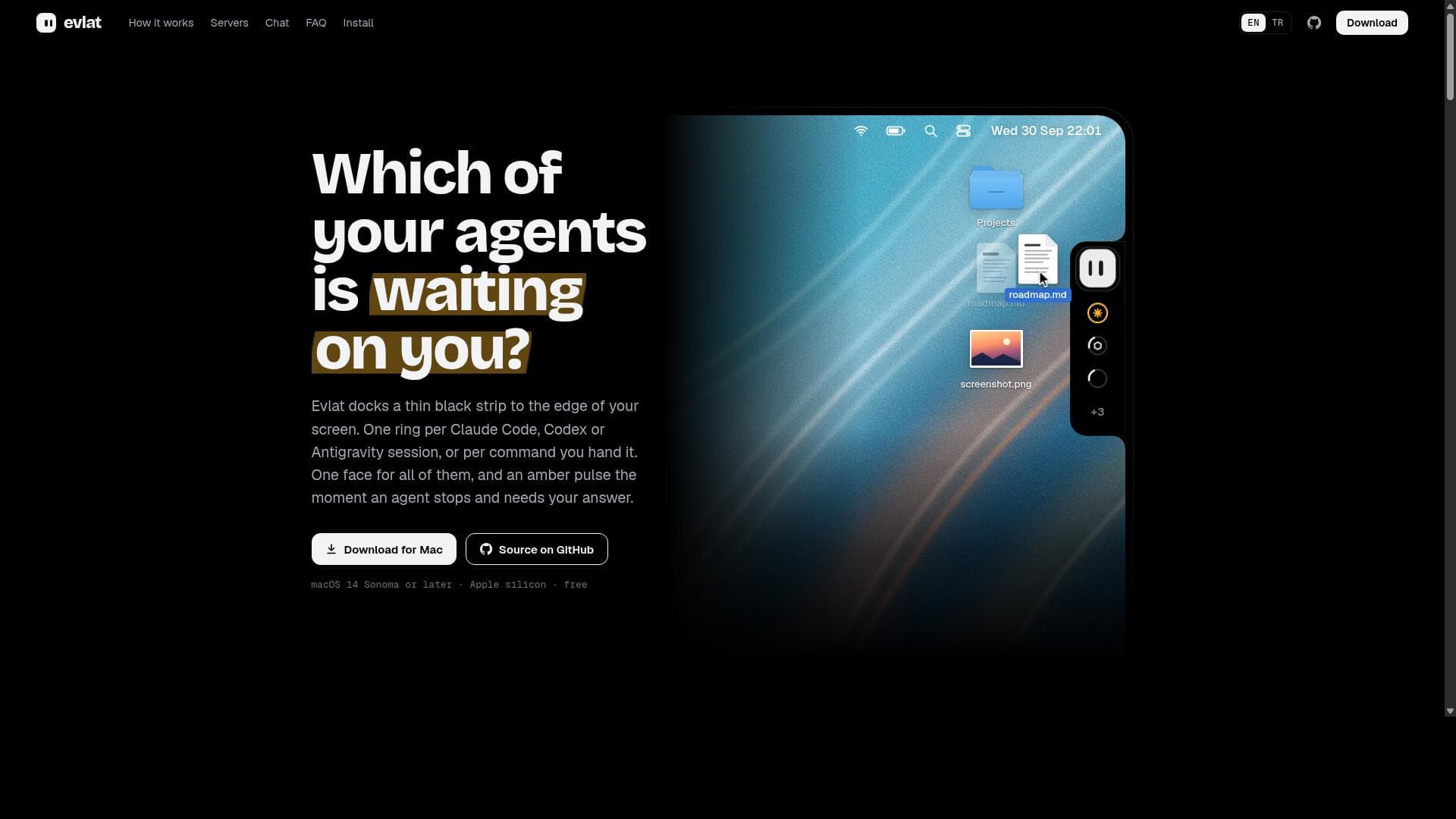
Evlat is a sleek macOS app that docks a thin black strip on your screen edge, visually managing multiple AI agent sessions like Claude Code, Codex, and Antigravity. It uniquely alerts you with an amber pulse when an agent needs your input, making it perfect for developers and AI users juggling several AI interactions simultaneously.

Description
Evlat is a thin strip on your Mac's screen edge, one ring per Claude Code or Codex session. When one needs a permission or an answer, it turns amber; one click opens its terminal tab. It also tracks long commands and remote servers. Native, no permissions.
Description détaillée
Evlat is a specialized macOS application designed to streamline the management of multiple active AI agent sessions by providing a subtle yet effective visual status indicator on your screen. Its core purpose is to help users keep track of various AI interactions—such as those with Claude Code, Codex, or Antigravity—without interrupting their workflow. By docking a thin black strip along the edge of the Mac screen, Evlat offers a minimalist and unobtrusive interface that visually represents each active AI agent session with a distinct ring. This allows users to monitor the status of multiple AI agents simultaneously at a glance. One of Evlat's standout features is its ability to display one ring per active AI session, providing a unified visual status for all connected agents. When an AI agent requires user input or attention, the corresponding ring pulses amber, immediately alerting the user to respond. This feature is particularly useful for developers, writers, or professionals who rely on multiple AI tools concurrently and need to efficiently manage their interactions without constantly switching between apps or windows. Evlat supports sessions from Claude Code, Codex, and Antigravity, making it versatile for a range of AI-powered workflows. Evlat is designed exclusively for macOS 14 Sonoma or later and requires Apple silicon hardware, ensuring optimized performance and seamless integration with the latest Mac systems. Its lightweight design means it occupies minimal screen real estate, maintaining a clean desktop environment while providing critical status updates. The application also supports commands handed to it, extending its utility beyond passive monitoring to active session management. This tool is ideal for tech-savvy users who frequently engage with multiple AI agents, such as software developers using AI coding assistants, content creators leveraging AI for writing or brainstorming, and AI researchers managing several experimental sessions. By consolidating session statuses into a single visual strip, Evlat reduces cognitive load and enhances productivity, allowing users to focus on their tasks without missing important AI prompts. Evlat is offered as a free application, making it accessible to a wide audience without financial barriers. Its open-source nature, with source code available on GitHub, encourages community contributions and transparency. This contrasts with many AI management tools that come with subscription fees or limited free tiers. Compared to alternatives, Evlat stands out due to its minimalistic design and macOS-specific optimization. While other solutions might rely on notifications or complex dashboards, Evlat’s persistent edge strip provides continuous, glanceable status updates without distraction. However, its limitation to macOS 14 Sonoma or later and Apple silicon excludes users on older Macs or other operating systems. Additionally, its focus on a few specific AI agents means it may not support every AI tool a user might employ. In summary, Evlat is a uniquely focused tool that enhances the user experience when working with multiple AI agents on modern Macs. Its elegant interface, real-time session visualization, and attention alert system make it a valuable addition for anyone looking to efficiently manage AI interactions. While it has some platform and integration constraints, its free availability and open-source model offer significant value to the macOS AI user community.
Fonctionnalités de l'outil
- Docks a thin black strip to the edge of your Mac screen
- Displays one ring per active AI agent session
- Supports Claude Code, Codex, and Antigravity sessions
- Shows an amber pulse when an agent needs your answer
- Provides a unified visual status for multiple AI agents
- Designed for macOS 14 Sonoma or later on Apple silicon
Description
Evlat is a sleek macOS app that docks a thin black strip on your screen edge, visually managing multiple AI agent sessions like Claude Code, Codex, and Antigravity. It uniquely alerts you with an amber pulse when an agent needs your input, making it perfect for developers and AI users juggling several AI interactions simultaneously.
Evlat is a thin strip on your Mac's screen edge, one ring per Claude Code or Codex session. When one needs a permission or an answer, it turns amber; one click opens its terminal tab. It also tracks long commands and remote servers. Native, no permissions.
Description détaillée
Evlat is a specialized macOS application designed to streamline the management of multiple active AI agent sessions by providing a subtle yet effective visual status indicator on your screen. Its core purpose is to help users keep track of various AI interactions—such as those with Claude Code, Codex, or Antigravity—without interrupting their workflow. By docking a thin black strip along the edge of the Mac screen, Evlat offers a minimalist and unobtrusive interface that visually represents each active AI agent session with a distinct ring. This allows users to monitor the status of multiple AI agents simultaneously at a glance. One of Evlat's standout features is its ability to display one ring per active AI session, providing a unified visual status for all connected agents. When an AI agent requires user input or attention, the corresponding ring pulses amber, immediately alerting the user to respond. This feature is particularly useful for developers, writers, or professionals who rely on multiple AI tools concurrently and need to efficiently manage their interactions without constantly switching between apps or windows. Evlat supports sessions from Claude Code, Codex, and Antigravity, making it versatile for a range of AI-powered workflows. Evlat is designed exclusively for macOS 14 Sonoma or later and requires Apple silicon hardware, ensuring optimized performance and seamless integration with the latest Mac systems. Its lightweight design means it occupies minimal screen real estate, maintaining a clean desktop environment while providing critical status updates. The application also supports commands handed to it, extending its utility beyond passive monitoring to active session management. This tool is ideal for tech-savvy users who frequently engage with multiple AI agents, such as software developers using AI coding assistants, content creators leveraging AI for writing or brainstorming, and AI researchers managing several experimental sessions. By consolidating session statuses into a single visual strip, Evlat reduces cognitive load and enhances productivity, allowing users to focus on their tasks without missing important AI prompts. Evlat is offered as a free application, making it accessible to a wide audience without financial barriers. Its open-source nature, with source code available on GitHub, encourages community contributions and transparency. This contrasts with many AI management tools that come with subscription fees or limited free tiers. Compared to alternatives, Evlat stands out due to its minimalistic design and macOS-specific optimization. While other solutions might rely on notifications or complex dashboards, Evlat’s persistent edge strip provides continuous, glanceable status updates without distraction. However, its limitation to macOS 14 Sonoma or later and Apple silicon excludes users on older Macs or other operating systems. Additionally, its focus on a few specific AI agents means it may not support every AI tool a user might employ. In summary, Evlat is a uniquely focused tool that enhances the user experience when working with multiple AI agents on modern Macs. Its elegant interface, real-time session visualization, and attention alert system make it a valuable addition for anyone looking to efficiently manage AI interactions. While it has some platform and integration constraints, its free availability and open-source model offer significant value to the macOS AI user community.
Questions fréquentes
What is Evlat?
Evlat is a macOS application that docks a thin black strip along the edge of your screen to visually represent and manage active AI agent sessions such as Claude Code, Codex, and Antigravity. It helps users track multiple AI interactions efficiently by showing one ring per session and pulsing amber when an agent requires user attention.
How much does Evlat cost?
Evlat is available for free, allowing users to download and use it without any cost.
Who is Evlat best for?
Evlat is best suited for macOS users, especially developers, content creators, and AI researchers who work with multiple AI agents simultaneously and need a streamlined way to monitor and respond to their active sessions.
What are the main features of Evlat?
Key features include docking a thin black strip to the edge of the Mac screen, displaying one ring per active AI agent session, supporting Claude Code, Codex, and Antigravity, pulsing amber when an agent needs user input, and providing a unified, unobtrusive visual status for multiple AI agents.
Does Evlat offer a free trial?
Evlat is free to download and use, so there is no need for a separate free trial.
What integrations does Evlat support?
Evlat supports AI agent sessions from Claude Code, Codex, and Antigravity, allowing it to visually track these specific AI interactions on macOS.
How does Evlat work?
Evlat works by docking a thin black strip to the edge of your Mac screen that displays one ring for each active AI agent session. When an agent requires your attention or input, its ring pulses amber, providing a clear visual cue so you can respond promptly without switching between multiple applications.
Avis
Pas encore d'avis. Sois le premier à partager ton expérience.




















































