www.howtowriteacheck
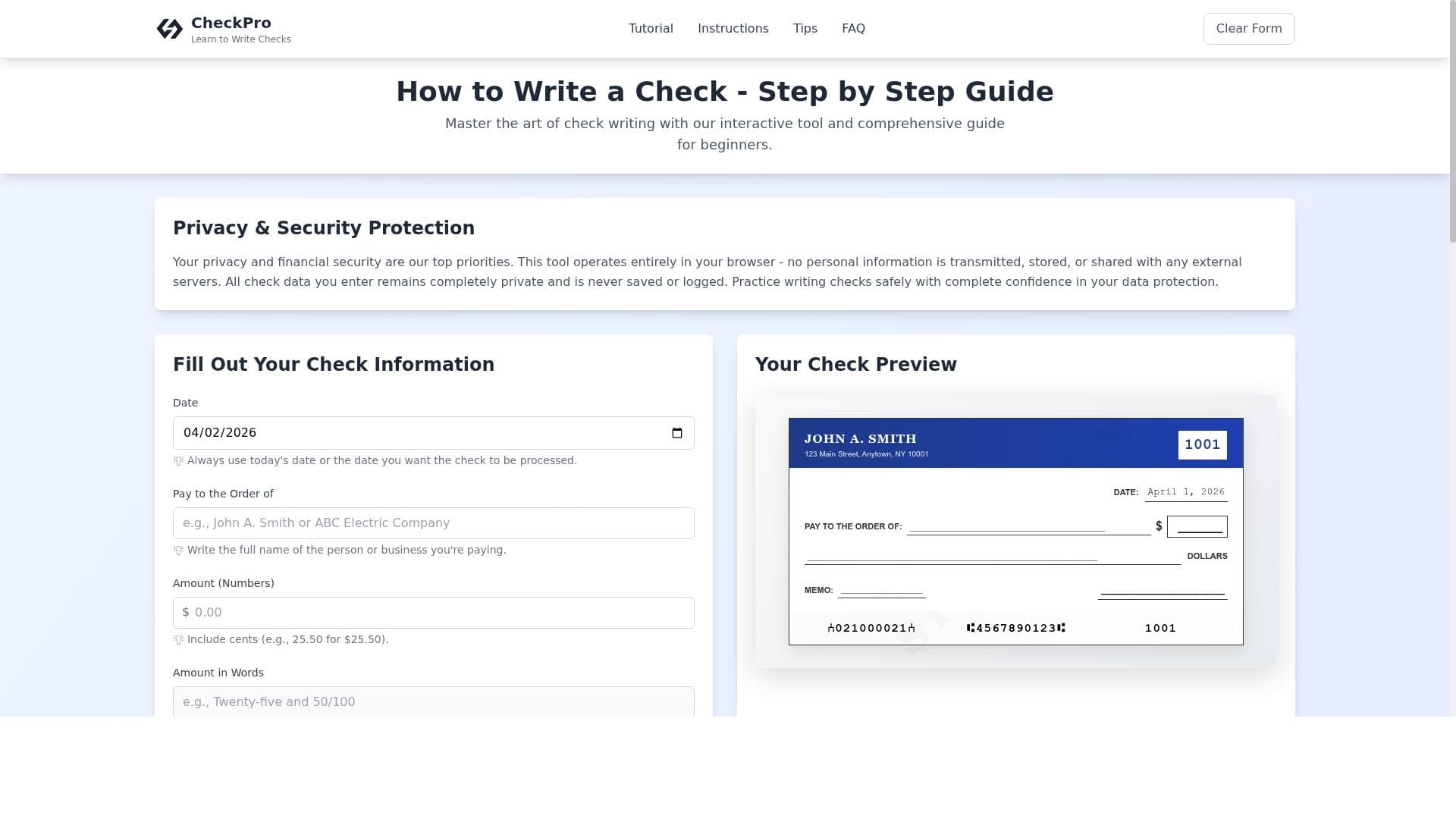


www.howtowriteacheck offers a free, interactive, and easy-to-follow guide for anyone needing to learn or refresh their skills in writing U.S. checks. Perfect for beginners and occasional check writers, it combines step-by-step instructions with practical tips and sample check fillings to ensure accuracy and confidence.

Descripción
I’ve created a straightforward, easy-to-understand website designed to guide users through the process of writing checks in the U.S. Whether you’re a first-time writer or just need a quick refresher, the site provides step-by-step instructions along with interactive tools to ensure accuracy.
Descripción detallada
www.howtowriteacheck is a user-friendly online platform dedicated to helping individuals understand and master the process of writing checks in the United States. Its core purpose is to demystify the often confusing task of check writing by providing clear, straightforward guidance that caters to both first-time check writers and those who may need a quick refresher. The website breaks down the process into manageable steps, ensuring users can confidently complete checks accurately and securely. This is particularly valuable in an era where digital payments dominate but checks remain relevant for certain transactions such as rent payments, personal gifts, or business expenses. The platform’s key features include an interactive guide that walks users through each part of a check, from filling in the date and payee name to writing the amount in both numbers and words. This interactive element allows users to practice virtually, reducing errors when writing physical checks. Step-by-step instructions accompany the guide, clearly explaining the purpose of each field and common pitfalls to avoid. Additionally, www.howtowriteacheck offers practical tips tailored for beginners, such as how to prevent fraud and what to do if a mistake is made. Sample check fillings are provided as visual references, helping users see exactly how a properly completed check should look. This tool is best suited for individuals who are new to writing checks, including young adults managing their finances independently for the first time, or anyone unfamiliar with the traditional check format. It also serves as a handy refresher for those who rarely write checks and want to ensure accuracy. Small business owners and freelancers who occasionally issue checks may find the site helpful for training purposes or to reduce errors in their financial documentation. The straightforward layout and free access make it an accessible resource for educational settings or financial literacy programs. One of the most attractive aspects of www.howtowriteacheck is that it is completely free to use, with no subscription or payment required. This makes it an excellent resource for anyone seeking guidance without financial commitment. Unlike some paid financial education tools or complex banking apps, this website focuses solely on the niche skill of check writing, providing a specialized, no-cost solution. Compared to alternatives, www.howtowriteacheck stands out for its simplicity and interactivity. Many other resources offer static instructions or PDF guides, but this tool’s interactive approach engages users more effectively, enhancing learning retention. While some banking apps provide check-writing tutorials, they often require account registration or are tied to specific financial institutions. This platform is universally accessible and does not require any personal information, making it more privacy-friendly and convenient. However, there are some limitations to consider. The tool is focused exclusively on U.S. check writing conventions, so it is not suitable for users needing guidance on international checks or other payment methods. It also does not integrate with banking software or provide check printing services, so users must still physically write or print their checks elsewhere. Additionally, while the site offers tips on fraud prevention, it does not provide comprehensive financial advice or security features beyond educational content. In summary, www.howtowriteacheck is a specialized, free, and easy-to-use educational platform designed to help users confidently write checks in the U.S. Its interactive guides, step-by-step instructions, and beginner tips make it an invaluable tool for individuals new to check writing or those seeking a quick refresher. While limited to U.S. checks and lacking integration with financial software, its simplicity, accessibility, and focus on accuracy make it a standout resource in its niche.
Características de la herramienta
- Interactive guide for writing checks
- Step-by-step instructions
- Tips for beginners
- Sample check filling
Descripción
www.howtowriteacheck offers a free, interactive, and easy-to-follow guide for anyone needing to learn or refresh their skills in writing U.S. checks. Perfect for beginners and occasional check writers, it combines step-by-step instructions with practical tips and sample check fillings to ensure accuracy and confidence.
I’ve created a straightforward, easy-to-understand website designed to guide users through the process of writing checks in the U.S. Whether you’re a first-time writer or just need a quick refresher, the site provides step-by-step instructions along with interactive tools to ensure accuracy.
Descripción detallada
www.howtowriteacheck is a user-friendly online platform dedicated to helping individuals understand and master the process of writing checks in the United States. Its core purpose is to demystify the often confusing task of check writing by providing clear, straightforward guidance that caters to both first-time check writers and those who may need a quick refresher. The website breaks down the process into manageable steps, ensuring users can confidently complete checks accurately and securely. This is particularly valuable in an era where digital payments dominate but checks remain relevant for certain transactions such as rent payments, personal gifts, or business expenses. The platform’s key features include an interactive guide that walks users through each part of a check, from filling in the date and payee name to writing the amount in both numbers and words. This interactive element allows users to practice virtually, reducing errors when writing physical checks. Step-by-step instructions accompany the guide, clearly explaining the purpose of each field and common pitfalls to avoid. Additionally, www.howtowriteacheck offers practical tips tailored for beginners, such as how to prevent fraud and what to do if a mistake is made. Sample check fillings are provided as visual references, helping users see exactly how a properly completed check should look. This tool is best suited for individuals who are new to writing checks, including young adults managing their finances independently for the first time, or anyone unfamiliar with the traditional check format. It also serves as a handy refresher for those who rarely write checks and want to ensure accuracy. Small business owners and freelancers who occasionally issue checks may find the site helpful for training purposes or to reduce errors in their financial documentation. The straightforward layout and free access make it an accessible resource for educational settings or financial literacy programs. One of the most attractive aspects of www.howtowriteacheck is that it is completely free to use, with no subscription or payment required. This makes it an excellent resource for anyone seeking guidance without financial commitment. Unlike some paid financial education tools or complex banking apps, this website focuses solely on the niche skill of check writing, providing a specialized, no-cost solution. Compared to alternatives, www.howtowriteacheck stands out for its simplicity and interactivity. Many other resources offer static instructions or PDF guides, but this tool’s interactive approach engages users more effectively, enhancing learning retention. While some banking apps provide check-writing tutorials, they often require account registration or are tied to specific financial institutions. This platform is universally accessible and does not require any personal information, making it more privacy-friendly and convenient. However, there are some limitations to consider. The tool is focused exclusively on U.S. check writing conventions, so it is not suitable for users needing guidance on international checks or other payment methods. It also does not integrate with banking software or provide check printing services, so users must still physically write or print their checks elsewhere. Additionally, while the site offers tips on fraud prevention, it does not provide comprehensive financial advice or security features beyond educational content. In summary, www.howtowriteacheck is a specialized, free, and easy-to-use educational platform designed to help users confidently write checks in the U.S. Its interactive guides, step-by-step instructions, and beginner tips make it an invaluable tool for individuals new to check writing or those seeking a quick refresher. While limited to U.S. checks and lacking integration with financial software, its simplicity, accessibility, and focus on accuracy make it a standout resource in its niche.
Preguntas frecuentes
What is www.howtowriteacheck?
www.howtowriteacheck is a free online platform that provides clear, step-by-step guidance and interactive tools to help users learn how to write checks correctly in the United States.
How much does www.howtowriteacheck cost?
The service is completely free to use with no subscription or hidden fees.
Who is www.howtowriteacheck best for?
It is ideal for first-time check writers, individuals who rarely write checks and need a refresher, small business owners, freelancers, and anyone seeking to improve their check-writing accuracy.
What are the main features of www.howtowriteacheck?
Key features include an interactive guide for writing checks, detailed step-by-step instructions, tips specifically for beginners, and sample check fillings to serve as visual examples.
Does www.howtowriteacheck offer a free trial?
Yes, the entire platform is free to use with no trial period or payment required.
What integrations does www.howtowriteacheck support?
The platform does not currently support integrations with banking software or other financial tools; it is a standalone educational resource.
How does www.howtowriteacheck work?
Users access the website to follow interactive, step-by-step instructions that guide them through each part of writing a check, supported by sample examples and tips to ensure accuracy.
Reseñas
Aún no hay reseñas. Sé el primero en compartir tu experiencia.




















































