

¿Es esta tu herramienta de IA? Reclámala hoy.
Verifica la propiedad, gestiona tu perfil y desbloquea funciones de crecimiento.
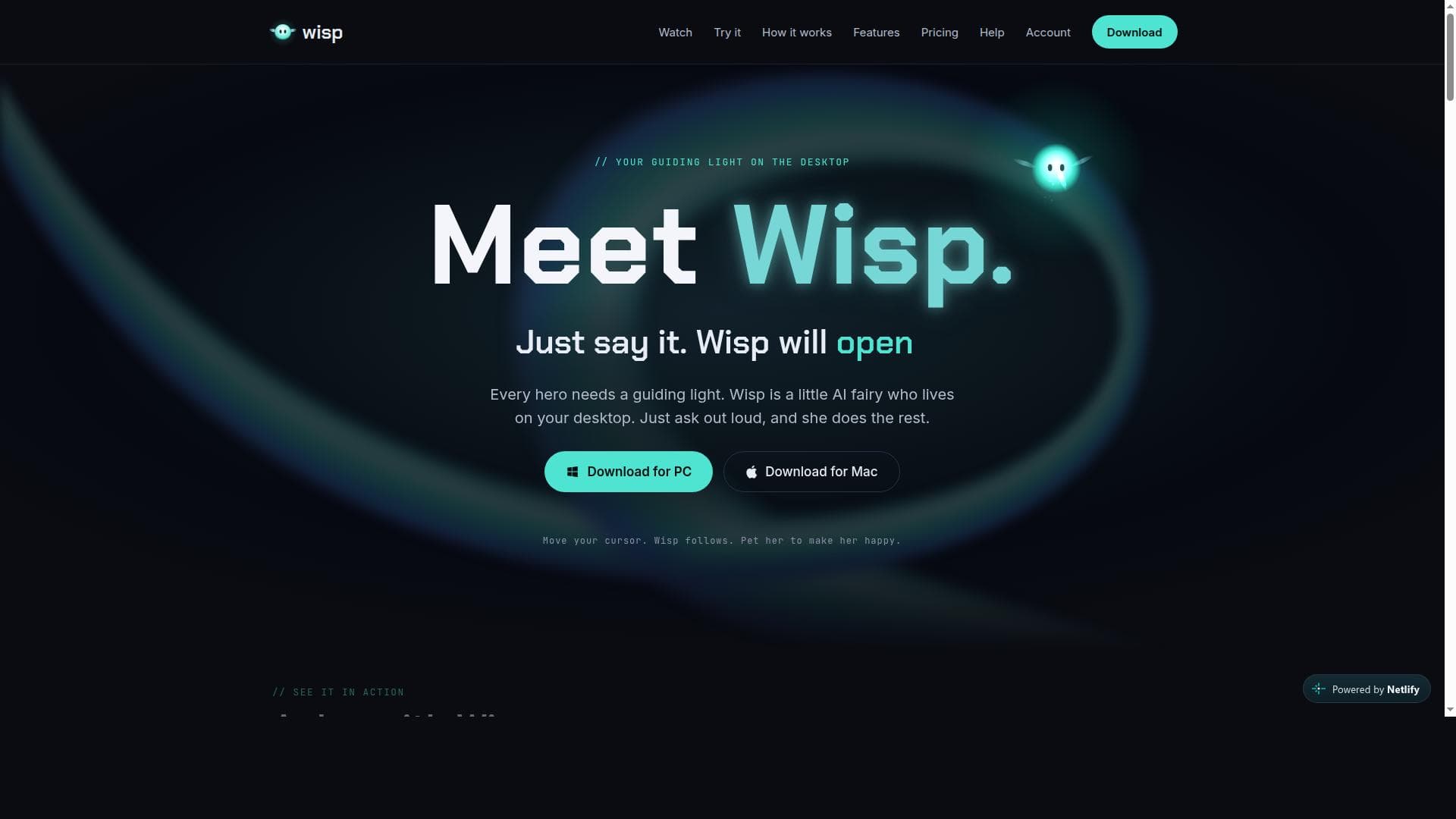
Wisp is a voice-activated AI assistant that transforms desktop interaction by managing apps, windows, and multitasking through natural language commands. Perfect for users seeking an intuitive, hands-free way to boost productivity on Windows and macOS, Wisp combines practical functionality with a charming, interactive presence.

Descripción
Meet Wisp, your guiding light. A little fairy who lives on your desktop and does the rest. Wisp is a small spark of light that floats beside your cursor on your Mac or Windows desktop. She can see your screen, open apps, websites and files, arrange windows, and tidy folders. She also builds small software, draws sketches, makes designs, reads and replies to your email, controls your calendar, Slack, Drive and to-do lists, and plays games with you! Try Wisp for free today!
Descripción detallada
Wisp is an innovative AI-powered desktop assistant designed to transform the way users interact with their computers. By leveraging natural language voice commands, Wisp allows users to control their desktop environment effortlessly, eliminating the need for complex technical skills or manual navigation. Its core purpose is to act as a friendly and intuitive guide that manages applications, windows, and routine busywork tasks, enabling users to focus more on productivity and less on the mechanics of computer operation. Available for both Windows and macOS, Wisp brings a seamless voice-activated experience directly to your desktop, making everyday computing more accessible and enjoyable. At the heart of Wisp’s capabilities is its voice-activated interface, which understands natural language commands to open, close, and switch between apps and windows. This hands-free control extends to multitasking management, where Wisp can handle busywork such as organizing windows or launching multiple applications simultaneously. A unique feature of Wisp is its interactive presence on the desktop: it visually follows the cursor movement and even responds to being petted, adding a personable and engaging element to the user experience. The interface is designed to be user-friendly and approachable, requiring no prior technical expertise, which makes it ideal for users who want a smart assistant without the complexity of traditional automation tools. Wisp is particularly well-suited for professionals, students, and casual users who spend significant time on their computers and seek a more efficient way to manage tasks. For example, busy professionals can use Wisp to quickly open necessary applications or rearrange windows during meetings without interrupting their workflow. Students can benefit from voice commands to switch between research materials, notes, and writing apps, enhancing focus and reducing distractions. Additionally, users with accessibility needs may find Wisp’s voice-first approach especially helpful, as it reduces reliance on keyboard and mouse inputs. Regarding pricing, Wisp offers a straightforward approach with downloadable versions for Windows and macOS available through official release channels. While specific pricing details and subscription plans are not explicitly stated on the primary website, the tool’s availability via GitHub releases suggests a focus on accessibility and community engagement. Potential users are encouraged to visit the official website or GitHub repository for the latest updates on pricing and licensing options. When compared to other desktop assistants and voice control software, Wisp stands out due to its unique combination of natural language processing, desktop integration, and interactive visual feedback. Unlike generic voice assistants that primarily focus on web searches or smart home control, Wisp is specialized for desktop productivity, offering granular control over apps and windows. Its playful, fairy-like persona and cursor-following behavior also differentiate it from more utilitarian tools, providing a more engaging user experience. However, users should consider that Wisp’s functionality is currently limited to Windows and macOS platforms, and it may not support all third-party applications or complex automation scenarios found in more advanced productivity suites. Additionally, as a relatively new tool, it may have fewer integrations and community resources compared to established voice assistants. Users looking for extensive ecosystem integrations or enterprise-level automation might find Wisp’s scope more focused on personal desktop assistance. In summary, Wisp offers a fresh and approachable way to interact with your computer through voice commands, making desktop management simpler and more enjoyable. Its unique features, such as cursor tracking and interactive responses, add charm and personality, while its core capabilities streamline multitasking and busywork. Ideal for a broad range of users from casual to professional, Wisp is a compelling choice for anyone seeking to enhance their desktop productivity with an intelligent, voice-activated assistant.
Características de la herramienta
- Voice-activated desktop assistant
- Controls apps and windows through natural language
- Available for Windows and macOS
- Follows cursor movement and responds to petting
- Handles busywork and multitasking
- User-friendly interface requiring no technical skills
Descripción
Wisp is a voice-activated AI assistant that transforms desktop interaction by managing apps, windows, and multitasking through natural language commands. Perfect for users seeking an intuitive, hands-free way to boost productivity on Windows and macOS, Wisp combines practical functionality with a charming, interactive presence.
Meet Wisp, your guiding light. A little fairy who lives on your desktop and does the rest. Wisp is a small spark of light that floats beside your cursor on your Mac or Windows desktop. She can see your screen, open apps, websites and files, arrange windows, and tidy folders. She also builds small software, draws sketches, makes designs, reads and replies to your email, controls your calendar, Slack, Drive and to-do lists, and plays games with you! Try Wisp for free today!
Descripción detallada
Wisp is an innovative AI-powered desktop assistant designed to transform the way users interact with their computers. By leveraging natural language voice commands, Wisp allows users to control their desktop environment effortlessly, eliminating the need for complex technical skills or manual navigation. Its core purpose is to act as a friendly and intuitive guide that manages applications, windows, and routine busywork tasks, enabling users to focus more on productivity and less on the mechanics of computer operation. Available for both Windows and macOS, Wisp brings a seamless voice-activated experience directly to your desktop, making everyday computing more accessible and enjoyable. At the heart of Wisp’s capabilities is its voice-activated interface, which understands natural language commands to open, close, and switch between apps and windows. This hands-free control extends to multitasking management, where Wisp can handle busywork such as organizing windows or launching multiple applications simultaneously. A unique feature of Wisp is its interactive presence on the desktop: it visually follows the cursor movement and even responds to being petted, adding a personable and engaging element to the user experience. The interface is designed to be user-friendly and approachable, requiring no prior technical expertise, which makes it ideal for users who want a smart assistant without the complexity of traditional automation tools. Wisp is particularly well-suited for professionals, students, and casual users who spend significant time on their computers and seek a more efficient way to manage tasks. For example, busy professionals can use Wisp to quickly open necessary applications or rearrange windows during meetings without interrupting their workflow. Students can benefit from voice commands to switch between research materials, notes, and writing apps, enhancing focus and reducing distractions. Additionally, users with accessibility needs may find Wisp’s voice-first approach especially helpful, as it reduces reliance on keyboard and mouse inputs. Regarding pricing, Wisp offers a straightforward approach with downloadable versions for Windows and macOS available through official release channels. While specific pricing details and subscription plans are not explicitly stated on the primary website, the tool’s availability via GitHub releases suggests a focus on accessibility and community engagement. Potential users are encouraged to visit the official website or GitHub repository for the latest updates on pricing and licensing options. When compared to other desktop assistants and voice control software, Wisp stands out due to its unique combination of natural language processing, desktop integration, and interactive visual feedback. Unlike generic voice assistants that primarily focus on web searches or smart home control, Wisp is specialized for desktop productivity, offering granular control over apps and windows. Its playful, fairy-like persona and cursor-following behavior also differentiate it from more utilitarian tools, providing a more engaging user experience. However, users should consider that Wisp’s functionality is currently limited to Windows and macOS platforms, and it may not support all third-party applications or complex automation scenarios found in more advanced productivity suites. Additionally, as a relatively new tool, it may have fewer integrations and community resources compared to established voice assistants. Users looking for extensive ecosystem integrations or enterprise-level automation might find Wisp’s scope more focused on personal desktop assistance. In summary, Wisp offers a fresh and approachable way to interact with your computer through voice commands, making desktop management simpler and more enjoyable. Its unique features, such as cursor tracking and interactive responses, add charm and personality, while its core capabilities streamline multitasking and busywork. Ideal for a broad range of users from casual to professional, Wisp is a compelling choice for anyone seeking to enhance their desktop productivity with an intelligent, voice-activated assistant.
Preguntas frecuentes
What is Wisp?
Wisp is an AI-powered desktop assistant that allows users to control their computer using natural voice commands. It manages applications, windows, and routine tasks to simplify desktop productivity on Windows and macOS.
How much does Wisp cost?
Wisp is available for download on Windows and macOS, with pricing details available on its official website and GitHub repository. Users should check these sources for the latest information on costs and licensing.
Who is Wisp best for?
Wisp is ideal for professionals, students, and casual users who want an easy, voice-activated way to manage their desktop environment without needing technical expertise. It’s also beneficial for users seeking accessibility-friendly computer control.
What are the main features of Wisp?
Key features include voice-activated control of apps and windows, multitasking and busywork management, availability on Windows and macOS, a user-friendly interface, and an interactive assistant that follows the cursor and responds to petting.
Does Wisp offer a free trial?
Information about a free trial is not explicitly provided. Users are encouraged to visit the official website or GitHub page to learn about any trial options or free versions.
What integrations does Wisp support?
Wisp primarily integrates with desktop applications on Windows and macOS through voice commands. While it supports managing apps and windows, it does not currently offer extensive third-party integrations like some other voice assistants.
How does Wisp work?
Wisp listens for natural language voice commands and executes tasks such as opening or closing apps, switching windows, and handling multitasking. It visually follows the cursor on the screen and provides a friendly, interactive presence to guide users.
Reseñas
Aún no hay reseñas. Sé el primero en compartir tu experiencia.
Herramientas patrocinadas




























Herramientas recomendadas
Mantente al día con las últimas herramientas de IA
Obtén las últimas novedades, únete a nuestro boletín
Leído y confiado por 50,000+ lectores
Únete a la comunidad de IA más grande
¡Nuestra comunidad y equipo están aquí para ayudarte!
Tus comentarios ayudarán a Alice AI a mejorar en futuras versiones.