Destacado en:Best AI Writing Tools
Destácate →🚀 Zaprep: Tus redes sociales al máximo. Empezar gratis — automatiza 1,000 DMs/mes y convierte el engagement en leads. con 1,000 DMs automatizados/mes.
Enviar tu herramienta
25,000+ herramientas de IA ya listadas
25K+Herramientas
400K+/moVistas
105K+/moVisitantes
Supercut - AI Video Editor


¿Es esta tu herramienta de IA? Reclámala hoy.
Verifica la propiedad, gestiona tu perfil y desbloquea funciones de crecimiento.
✦
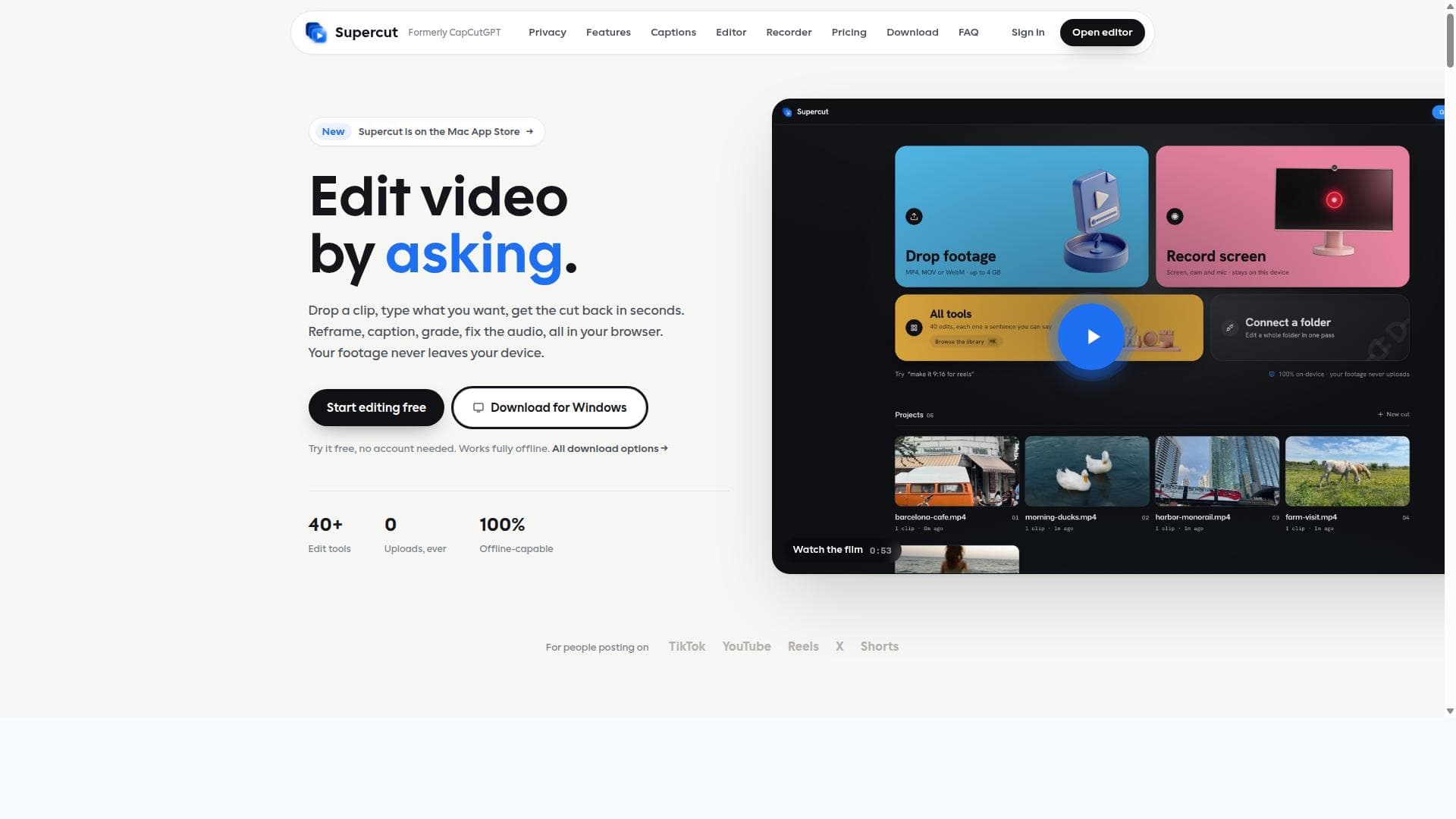
Supercut is a private, browser-based AI video editor that keeps your footage secure by processing everything locally on your device. Perfect for creators who want powerful editing tools like auto-captions, smart reframing, and face blur without uploading videos, Supercut makes video editing fast, easy, and privacy-first.

Descripción
Two front doors: drop a clip and type the edit, or record your screen with auto-zoom on every click. 40 tools, auto captions, folder batch edits, a timeline, 4K desktop export. All on your device. Your footage never uploads. Free to start, no account needed.
Descripción detallada
Supercut is an innovative AI-powered video editing tool designed to operate entirely within your web browser or directly on your device, ensuring complete privacy and security by never uploading your footage to external servers. Its core purpose is to provide users with a powerful, private, and intuitive video editing experience that leverages artificial intelligence to simplify and accelerate the editing process. By combining advanced AI capabilities with a user-friendly interface, Supercut allows creators to edit videos by simply typing instructions in plain English or using a traditional multitrack timeline editor, making video editing accessible to both novices and professionals. One of Supercut's standout features is its 100% browser-based processing, which means all video decoding, editing, and exporting happen locally on your device using WebAssembly technology. This approach guarantees that your video files remain private and secure, as no footage is ever uploaded to the cloud. The tool offers over 40 editing operations, including on-device auto-captioning powered by Whisper transcription, smart reframe with face tracking that automatically adjusts the video framing to keep faces centered, face blur for privacy protection, professional-grade color grading, and audio cleanup to enhance sound quality. Additionally, Supercut includes a built-in screen recorder capable of capturing up to 1440p resolution at 30 or 60 frames per second, making it a versatile solution for content creators who need to record and edit videos seamlessly. Users can choose between two main editing modes: a conversational interface where they type natural language instructions to perform edits, and a multitrack timeline editor that supports video, text, and audio lanes for more granular control. This flexibility caters to different editing styles and skill levels, allowing quick edits through chat commands or detailed timeline-based editing. The transcript-based editing feature also enables users to edit videos by interacting directly with the text transcript, streamlining the process of cutting and rearranging content. Supercut is ideal for content creators, social media managers, educators, marketers, and anyone who values privacy and ease of use in video editing. It is particularly well-suited for creators producing content for platforms like TikTok, Instagram Reels, and YouTube Shorts, where quick turnaround and captioning are essential. Its privacy-first approach also makes it attractive to professionals handling sensitive or proprietary footage who want to avoid cloud-based editing platforms. Regarding pricing, Supercut offers a free tier that allows users to access core features without cost, making it accessible for casual users and those wanting to try the software before committing. For more advanced capabilities and higher usage limits, paid plans are available, though specific pricing details should be checked on the official website as they may vary or be updated. Compared to alternatives, Supercut stands out due to its unique combination of privacy, AI-driven editing, and browser-based operation. Unlike many cloud-based editors that require uploading footage, Supercut ensures all processing is local, addressing privacy concerns that are increasingly important to users. Its natural language editing interface is also a differentiator, simplifying complex editing tasks that typically require technical knowledge. However, because it runs entirely in the browser or on-device, performance may depend on the user's hardware capabilities, which could be a limitation for very large or complex projects. In summary, Supercut is a cutting-edge AI video editor that prioritizes user privacy without sacrificing powerful editing features. Its blend of AI automation, privacy-centric design, and flexible editing modes make it a compelling choice for creators seeking a secure and efficient video editing solution. While it may not replace high-end professional software for all use cases, it offers an excellent balance of convenience, privacy, and functionality for a wide range of users.
Características de la herramienta
- Edit by chatting in plain English
- 100% browser-based processing, no uploads
- On-device auto-captions with Whisper transcription
- Smart reframe with face tracking
- Face blur, color grades, audio cleanup
- 40+ editing operations
- Multitrack timeline editor with video, text, and audio lanes
- Built-in screen recorder supporting up to 1440p at 30 or 60fps
Descripción
✦
Supercut is a private, browser-based AI video editor that keeps your footage secure by processing everything locally on your device. Perfect for creators who want powerful editing tools like auto-captions, smart reframing, and face blur without uploading videos, Supercut makes video editing fast, easy, and privacy-first.
Two front doors: drop a clip and type the edit, or record your screen with auto-zoom on every click. 40 tools, auto captions, folder batch edits, a timeline, 4K desktop export. All on your device. Your footage never uploads. Free to start, no account needed.
Descripción detallada
Supercut is an innovative AI-powered video editing tool designed to operate entirely within your web browser or directly on your device, ensuring complete privacy and security by never uploading your footage to external servers. Its core purpose is to provide users with a powerful, private, and intuitive video editing experience that leverages artificial intelligence to simplify and accelerate the editing process. By combining advanced AI capabilities with a user-friendly interface, Supercut allows creators to edit videos by simply typing instructions in plain English or using a traditional multitrack timeline editor, making video editing accessible to both novices and professionals. One of Supercut's standout features is its 100% browser-based processing, which means all video decoding, editing, and exporting happen locally on your device using WebAssembly technology. This approach guarantees that your video files remain private and secure, as no footage is ever uploaded to the cloud. The tool offers over 40 editing operations, including on-device auto-captioning powered by Whisper transcription, smart reframe with face tracking that automatically adjusts the video framing to keep faces centered, face blur for privacy protection, professional-grade color grading, and audio cleanup to enhance sound quality. Additionally, Supercut includes a built-in screen recorder capable of capturing up to 1440p resolution at 30 or 60 frames per second, making it a versatile solution for content creators who need to record and edit videos seamlessly. Users can choose between two main editing modes: a conversational interface where they type natural language instructions to perform edits, and a multitrack timeline editor that supports video, text, and audio lanes for more granular control. This flexibility caters to different editing styles and skill levels, allowing quick edits through chat commands or detailed timeline-based editing. The transcript-based editing feature also enables users to edit videos by interacting directly with the text transcript, streamlining the process of cutting and rearranging content. Supercut is ideal for content creators, social media managers, educators, marketers, and anyone who values privacy and ease of use in video editing. It is particularly well-suited for creators producing content for platforms like TikTok, Instagram Reels, and YouTube Shorts, where quick turnaround and captioning are essential. Its privacy-first approach also makes it attractive to professionals handling sensitive or proprietary footage who want to avoid cloud-based editing platforms. Regarding pricing, Supercut offers a free tier that allows users to access core features without cost, making it accessible for casual users and those wanting to try the software before committing. For more advanced capabilities and higher usage limits, paid plans are available, though specific pricing details should be checked on the official website as they may vary or be updated. Compared to alternatives, Supercut stands out due to its unique combination of privacy, AI-driven editing, and browser-based operation. Unlike many cloud-based editors that require uploading footage, Supercut ensures all processing is local, addressing privacy concerns that are increasingly important to users. Its natural language editing interface is also a differentiator, simplifying complex editing tasks that typically require technical knowledge. However, because it runs entirely in the browser or on-device, performance may depend on the user's hardware capabilities, which could be a limitation for very large or complex projects. In summary, Supercut is a cutting-edge AI video editor that prioritizes user privacy without sacrificing powerful editing features. Its blend of AI automation, privacy-centric design, and flexible editing modes make it a compelling choice for creators seeking a secure and efficient video editing solution. While it may not replace high-end professional software for all use cases, it offers an excellent balance of convenience, privacy, and functionality for a wide range of users.
Preguntas frecuentes
What is Supercut?
Supercut is a private AI video editor that runs entirely in your browser or on your device, allowing you to edit videos without uploading your footage. It offers over 40 editing tools including auto-captions, smart reframe, face blur, color grading, and audio cleanup, all processed locally for maximum privacy.
How much does Supercut cost?
Supercut offers a free tier with access to core features, making it accessible for casual users. For advanced features and higher usage limits, paid plans are available. Pricing details can be found on the official Supercut website.
Who is Supercut best for?
Supercut is ideal for content creators, social media managers, educators, and marketers who need a fast, private, and easy-to-use video editor. It’s especially useful for those producing content for platforms like TikTok, Instagram Reels, and YouTube Shorts, or anyone concerned about video privacy.
What are the main features of Supercut?
Key features include 100% browser-based video processing with no uploads, editing by typing plain English instructions, on-device auto-captions using Whisper transcription, smart reframe with face tracking, face blur, color grading, audio cleanup, a multitrack timeline editor, transcript-based editing, and a built-in screen recorder supporting up to 1440p at 30 or 60fps.
Does Supercut offer a free trial?
Yes, Supercut provides a free tier that allows users to try the core features without any cost, enabling them to test the software before opting for paid plans.
What integrations does Supercut support?
Supercut primarily operates as a standalone browser-based tool and does not currently advertise direct integrations with other platforms. However, it supports common video formats and export options suitable for uploading to various social media and video platforms.
How does Supercut work?
Supercut works by processing all video editing tasks locally in your browser or device using WebAssembly technology. Users can edit videos by typing natural language instructions or using a multitrack timeline editor. The software applies AI features like auto-captioning and smart reframing without uploading any footage, ensuring privacy and security.
Redes sociales
Usar herramientaReseñas
0 reseñas
Aún no hay reseñas. Sé el primero en compartir tu experiencia.
Herramientas patrocinadas











































Herramientas recomendadas
Mantente al día con las últimas herramientas de IA
Obtén las últimas novedades, únete a nuestro boletín
Leído y confiado por 50,000+ lectores
Únete a la comunidad de IA más grande
¡Nuestra comunidad y equipo están aquí para ayudarte!
Tus comentarios ayudarán a Alice AI a mejorar en futuras versiones.








Enviar tu herramienta


PoweredByAI.app es un directorio de herramientas de IA que ayuda a personas, empresas y creadores a descubrir las mejores herramientas de IA para escritura, programación, diseño, productividad y más.
© 2026 , Producto de011BQ. Todos los derechos reservados.