🚀 Zaprep: Tus redes sociales al máximo. Empezar gratis — automatiza 1,000 DMs/mes y convierte el engagement en leads. con 1,000 DMs automatizados/mes.


¿Es esta tu herramienta de IA? Reclámala hoy.
Verifica la propiedad, gestiona tu perfil y desbloquea funciones de crecimiento.
SimCam revolutionizes iOS app development by enabling camera testing directly on Mac simulators without physical devices. Ideal for developers and testers, it streams live camera feeds, injects images or videos, and generates QR codes within the iOS Simulator, streamlining workflows and boosting productivity.

Descripción
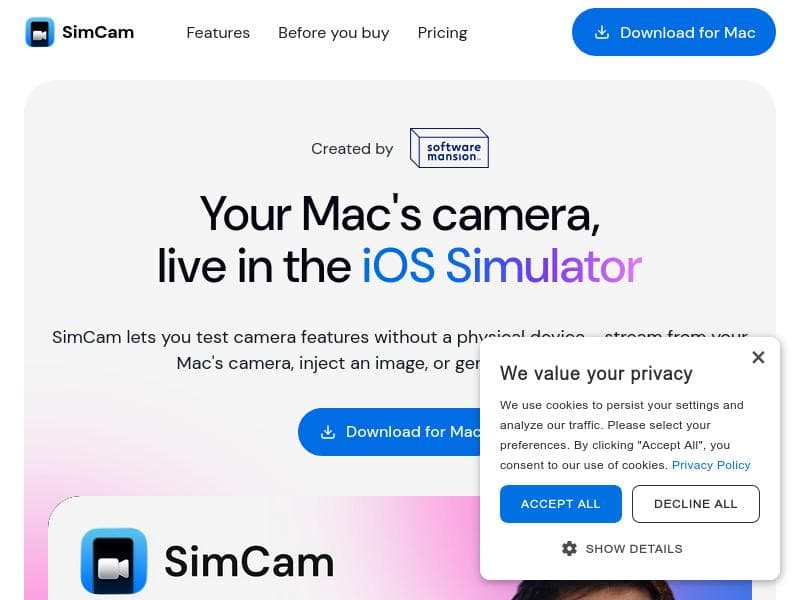
SimCam lets you test camera features without a physical device - stream from your Mac's built-in or external camera, inject an image, or generate a QR code. Includes a CLI letting agents control the camera on iOS simulator.
Descripción detallada
SimCam is a specialized software tool designed to streamline the process of testing camera functionalities on iOS simulators without the need for a physical device. Its core purpose is to enable developers and testers to simulate camera input directly on their Mac, facilitating a more efficient and flexible development workflow for iOS applications that rely on camera features. By eliminating the dependency on physical iPhones or iPads, SimCam significantly reduces the barriers and time involved in testing camera-related functionalities during app development. At its heart, SimCam offers several powerful features that cater specifically to iOS developers. One of its standout capabilities is the ability to stream video directly from a Mac’s built-in or external camera into the iOS Simulator. This means developers can see real-time camera input within the simulator environment, closely mimicking the behavior of an actual device. Additionally, SimCam allows users to inject static images or pre-recorded video files into the simulator’s camera feed. This is particularly useful for testing how an app responds to specific visual inputs or scenarios without needing to physically recreate them. Another innovative feature is the ability to generate QR codes directly within the iOS Simulator, which can be invaluable for apps that rely on QR code scanning or generation. The inclusion of a command-line interface (CLI) further enhances SimCam’s utility by enabling automation and remote control of camera inputs on the simulator, making it a versatile tool for continuous integration and automated testing environments. SimCam is best suited for iOS developers, QA engineers, and mobile app testers who require reliable and repeatable camera input testing without the logistical challenges of managing physical devices. It is especially beneficial for teams working remotely or in environments where access to multiple physical iOS devices is limited. Use cases include testing camera-based features such as barcode scanning, augmented reality applications, photo and video capture functionalities, and any app that processes visual data. By simulating camera input, developers can debug and iterate faster, ensuring higher quality and more robust app performance before deployment. Regarding pricing, SimCam is offered as a one-time purchase, which makes it a cost-effective solution compared to subscription-based alternatives. While the exact price is not detailed here, the one-time purchase model appeals to developers and organizations looking for a straightforward investment without recurring fees. This pricing structure supports long-term use without additional costs, making it attractive for individual developers and small to medium-sized teams. When compared to alternative solutions, SimCam stands out due to its focus on iOS simulator integration and its ability to stream live camera feeds from a Mac. Many other tools require physical devices or lack the flexibility to inject images and videos directly into the simulator. SimCam’s CLI support also provides a level of automation and control that is not commonly found in competing products. However, unlike some cloud-based testing platforms that offer device farms with multiple physical devices, SimCam is limited to simulator environments, which may not capture all nuances of real hardware behavior. Notable limitations of SimCam include its exclusive compatibility with Mac and iOS simulators, which means it is not suitable for Android development or Windows environments. Additionally, while it simulates camera input effectively, it cannot fully replicate hardware-specific camera behaviors such as sensor noise, autofocus, or hardware-accelerated image processing. Users should also consider that some advanced camera features requiring physical hardware interaction might not be testable through simulation alone. Despite these considerations, SimCam remains a highly valuable tool for accelerating iOS app development cycles by providing a robust and flexible camera simulation environment.
Características de la herramienta
- Stream Mac's camera to iOS Simulator
- Inject images or video into the simulator
- Generate QR codes directly in the iOS Simulator
- No physical device needed
- One-time purchase
Descripción
SimCam revolutionizes iOS app development by enabling camera testing directly on Mac simulators without physical devices. Ideal for developers and testers, it streams live camera feeds, injects images or videos, and generates QR codes within the iOS Simulator, streamlining workflows and boosting productivity.
SimCam lets you test camera features without a physical device - stream from your Mac's built-in or external camera, inject an image, or generate a QR code. Includes a CLI letting agents control the camera on iOS simulator.
Descripción detallada
SimCam is a specialized software tool designed to streamline the process of testing camera functionalities on iOS simulators without the need for a physical device. Its core purpose is to enable developers and testers to simulate camera input directly on their Mac, facilitating a more efficient and flexible development workflow for iOS applications that rely on camera features. By eliminating the dependency on physical iPhones or iPads, SimCam significantly reduces the barriers and time involved in testing camera-related functionalities during app development. At its heart, SimCam offers several powerful features that cater specifically to iOS developers. One of its standout capabilities is the ability to stream video directly from a Mac’s built-in or external camera into the iOS Simulator. This means developers can see real-time camera input within the simulator environment, closely mimicking the behavior of an actual device. Additionally, SimCam allows users to inject static images or pre-recorded video files into the simulator’s camera feed. This is particularly useful for testing how an app responds to specific visual inputs or scenarios without needing to physically recreate them. Another innovative feature is the ability to generate QR codes directly within the iOS Simulator, which can be invaluable for apps that rely on QR code scanning or generation. The inclusion of a command-line interface (CLI) further enhances SimCam’s utility by enabling automation and remote control of camera inputs on the simulator, making it a versatile tool for continuous integration and automated testing environments. SimCam is best suited for iOS developers, QA engineers, and mobile app testers who require reliable and repeatable camera input testing without the logistical challenges of managing physical devices. It is especially beneficial for teams working remotely or in environments where access to multiple physical iOS devices is limited. Use cases include testing camera-based features such as barcode scanning, augmented reality applications, photo and video capture functionalities, and any app that processes visual data. By simulating camera input, developers can debug and iterate faster, ensuring higher quality and more robust app performance before deployment. Regarding pricing, SimCam is offered as a one-time purchase, which makes it a cost-effective solution compared to subscription-based alternatives. While the exact price is not detailed here, the one-time purchase model appeals to developers and organizations looking for a straightforward investment without recurring fees. This pricing structure supports long-term use without additional costs, making it attractive for individual developers and small to medium-sized teams. When compared to alternative solutions, SimCam stands out due to its focus on iOS simulator integration and its ability to stream live camera feeds from a Mac. Many other tools require physical devices or lack the flexibility to inject images and videos directly into the simulator. SimCam’s CLI support also provides a level of automation and control that is not commonly found in competing products. However, unlike some cloud-based testing platforms that offer device farms with multiple physical devices, SimCam is limited to simulator environments, which may not capture all nuances of real hardware behavior. Notable limitations of SimCam include its exclusive compatibility with Mac and iOS simulators, which means it is not suitable for Android development or Windows environments. Additionally, while it simulates camera input effectively, it cannot fully replicate hardware-specific camera behaviors such as sensor noise, autofocus, or hardware-accelerated image processing. Users should also consider that some advanced camera features requiring physical hardware interaction might not be testable through simulation alone. Despite these considerations, SimCam remains a highly valuable tool for accelerating iOS app development cycles by providing a robust and flexible camera simulation environment.
Preguntas frecuentes
What is SimCam?
SimCam is a software tool that allows developers to test camera features on iOS simulators without needing a physical device. It streams video from a Mac’s camera, injects images or videos, and generates QR codes directly within the iOS Simulator.
How much does SimCam cost?
SimCam is available as a one-time purchase, providing a cost-effective solution without recurring subscription fees. Specific pricing details can be found on the official website.
Who is SimCam best for?
SimCam is ideal for iOS developers, QA engineers, and testers who need to simulate camera input during app development and testing without relying on physical iOS devices.
What are the main features of SimCam?
Key features include streaming Mac’s built-in or external camera to the iOS Simulator, injecting images or videos into the simulator’s camera feed, generating QR codes within the simulator, and a CLI for controlling the camera input programmatically.
Does SimCam offer a free trial?
There is no information indicating that SimCam offers a free trial. It is offered as a paid, one-time purchase product.
What integrations does SimCam support?
SimCam integrates directly with the iOS Simulator on Mac and offers a command-line interface (CLI) for automation and control, making it compatible with various development and testing workflows.
How does SimCam work?
SimCam works by streaming video from your Mac’s camera or injecting images and videos into the iOS Simulator’s camera input. It also allows QR code generation within the simulator and can be controlled via a CLI for automated testing scenarios.
Redes sociales
Usar herramientaReseñas
Aún no hay reseñas. Sé el primero en compartir tu experiencia.
Herramientas patrocinadas











































Herramientas recomendadas
Mantente al día con las últimas herramientas de IA
Obtén las últimas novedades, únete a nuestro boletín
Leído y confiado por 50,000+ lectores
Únete a la comunidad de IA más grande
¡Nuestra comunidad y equipo están aquí para ayudarte!
Tus comentarios ayudarán a Alice AI a mejorar en futuras versiones.








Enviar tu herramienta


PoweredByAI.app es un directorio de herramientas de IA que ayuda a personas, empresas y creadores a descubrir las mejores herramientas de IA para escritura, programación, diseño, productividad y más.
© 2026 , Producto de011BQ. Todos los derechos reservados.