Destacado en:Best AI Writing Tools
Destácate →🚀 Zaprep: Tus redes sociales al máximo. Empezar gratis — automatiza 1,000 DMs/mes y convierte el engagement en leads. con 1,000 DMs automatizados/mes.
Enviar tu herramienta
25,000+ herramientas de IA ya listadas
25K+Herramientas
400K+/moVistas
105K+/moVisitantes

Reference to Video Generator


✦
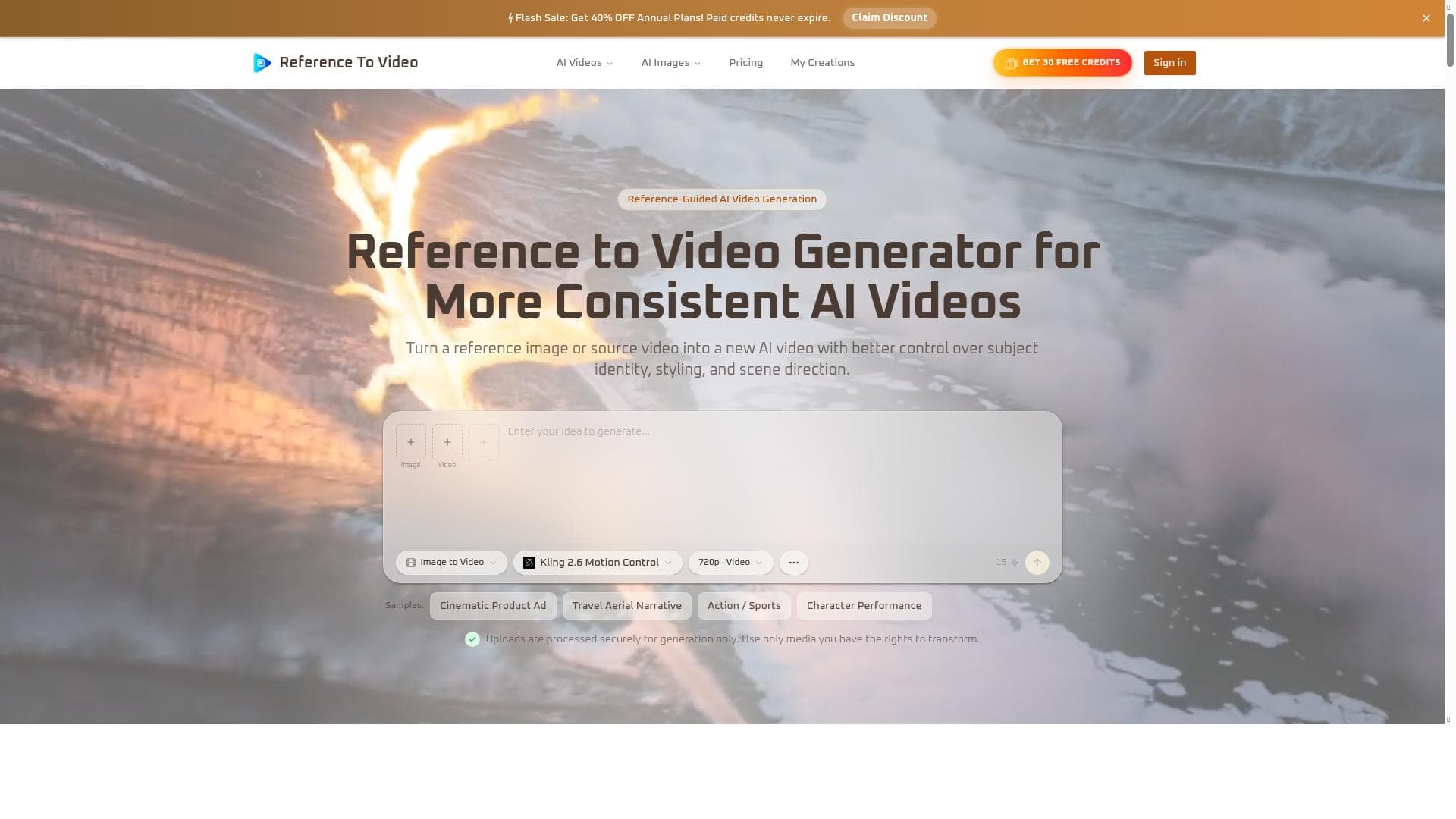
Reference to Video Generator is a versatile AI tool that transforms images and videos into dynamic AI-generated videos, offering image-to-video, video-to-video, and reference-guided creation in one seamless workflow. Its unique multi-model comparison feature empowers creators to experiment and select the best AI model output, making it ideal for digital artists, marketers, and content creators seeking advanced yet accessible AI video generation.

Descripción
Reference to Video Generator is a tool for image-to-video, video-to-video, and reference-guided AI video creation. It allows users to compare top models in one workflow, facilitating advanced AI video generation from source media.
Descripción detallada
Reference to Video Generator is an advanced AI-powered tool designed to transform static images and existing videos into dynamic, high-quality video content. Its core purpose is to enable users to create AI-generated videos through multiple input methods, including image-to-video, video-to-video, and reference-guided video creation. By integrating several top AI video generation models into a single workflow, it streamlines the process of experimenting with different algorithms and styles, allowing creators to achieve the best possible output tailored to their specific needs. This makes it a versatile solution for anyone looking to leverage AI for video production without needing extensive technical expertise. One of the standout features of Reference to Video Generator is its multi-modal input capability. Users can upload a single image and generate a fully animated video sequence, or they can input an existing video to transform or enhance it using AI-driven techniques. The reference-guided AI video creation feature allows users to guide the video generation process based on a reference video or style, enabling highly customized results that maintain consistency with the source material. Additionally, the tool offers a unique model comparison workflow, where users can test and compare outputs from multiple leading AI video models side-by-side. This feature is particularly valuable for creators who want to evaluate different AI approaches and select the best fit for their project without switching between multiple platforms. Reference to Video Generator is ideal for digital artists, video editors, content creators, marketers, and developers who want to incorporate AI-generated videos into their workflows. It suits a wide range of use cases, from creating promotional videos, social media content, and digital art animations to enhancing existing footage with AI effects. The tool’s ability to handle both image and video inputs makes it flexible for various creative projects, whether generating short clips from still images or reimagining entire video sequences. Its user-friendly interface and integrated model comparison also make it accessible for those new to AI video generation, while still offering depth and customization for advanced users. The platform operates on a freemium pricing model, allowing users to access basic features and generate videos at no cost, which is ideal for experimentation and small projects. Paid plans likely unlock higher resolution outputs, faster processing times, access to premium AI models, and additional customization options. This tiered pricing approach ensures that casual users and professionals alike can find a plan that fits their budget and requirements. Detailed pricing information is available on the official website, and users can start with the free tier to evaluate the tool’s capabilities before committing financially. Compared to other AI video generation tools, Reference to Video Generator stands out due to its integrated multi-model comparison workflow. While many platforms focus on a single AI model or generation method, this tool consolidates multiple top-performing models, enabling users to directly compare results and select the best output in one place. This reduces the need to juggle multiple services and simplifies the creative process. Additionally, its support for both image-to-video and video-to-video generation, along with reference-guided creation, provides a broader range of creative possibilities than many competitors. However, as with most AI video tools, output quality can vary depending on input complexity and model limitations. Notable considerations include the potential learning curve associated with understanding the nuances of different AI models and how to best utilize the reference-guided features. Users should also be aware of processing times, which may vary based on video length and resolution, especially on the free tier. Since the tool relies on AI-generated content, results may sometimes require manual refinement or post-processing to meet professional standards. Additionally, users should review any licensing or usage restrictions related to AI-generated videos, particularly for commercial applications. Overall, Reference to Video Generator offers a powerful, flexible, and user-centric platform for AI-driven video creation, making it a valuable asset for a wide range of creative professionals and enthusiasts.
Características de la herramienta
- Image-to-video generation
- Video-to-video generation
- Reference-guided AI video creation
- Comparison of top AI video models in one workflow
Descripción
✦
Reference to Video Generator is a versatile AI tool that transforms images and videos into dynamic AI-generated videos, offering image-to-video, video-to-video, and reference-guided creation in one seamless workflow. Its unique multi-model comparison feature empowers creators to experiment and select the best AI model output, making it ideal for digital artists, marketers, and content creators seeking advanced yet accessible AI video generation.
Reference to Video Generator is a tool for image-to-video, video-to-video, and reference-guided AI video creation. It allows users to compare top models in one workflow, facilitating advanced AI video generation from source media.
Descripción detallada
Reference to Video Generator is an advanced AI-powered tool designed to transform static images and existing videos into dynamic, high-quality video content. Its core purpose is to enable users to create AI-generated videos through multiple input methods, including image-to-video, video-to-video, and reference-guided video creation. By integrating several top AI video generation models into a single workflow, it streamlines the process of experimenting with different algorithms and styles, allowing creators to achieve the best possible output tailored to their specific needs. This makes it a versatile solution for anyone looking to leverage AI for video production without needing extensive technical expertise. One of the standout features of Reference to Video Generator is its multi-modal input capability. Users can upload a single image and generate a fully animated video sequence, or they can input an existing video to transform or enhance it using AI-driven techniques. The reference-guided AI video creation feature allows users to guide the video generation process based on a reference video or style, enabling highly customized results that maintain consistency with the source material. Additionally, the tool offers a unique model comparison workflow, where users can test and compare outputs from multiple leading AI video models side-by-side. This feature is particularly valuable for creators who want to evaluate different AI approaches and select the best fit for their project without switching between multiple platforms. Reference to Video Generator is ideal for digital artists, video editors, content creators, marketers, and developers who want to incorporate AI-generated videos into their workflows. It suits a wide range of use cases, from creating promotional videos, social media content, and digital art animations to enhancing existing footage with AI effects. The tool’s ability to handle both image and video inputs makes it flexible for various creative projects, whether generating short clips from still images or reimagining entire video sequences. Its user-friendly interface and integrated model comparison also make it accessible for those new to AI video generation, while still offering depth and customization for advanced users. The platform operates on a freemium pricing model, allowing users to access basic features and generate videos at no cost, which is ideal for experimentation and small projects. Paid plans likely unlock higher resolution outputs, faster processing times, access to premium AI models, and additional customization options. This tiered pricing approach ensures that casual users and professionals alike can find a plan that fits their budget and requirements. Detailed pricing information is available on the official website, and users can start with the free tier to evaluate the tool’s capabilities before committing financially. Compared to other AI video generation tools, Reference to Video Generator stands out due to its integrated multi-model comparison workflow. While many platforms focus on a single AI model or generation method, this tool consolidates multiple top-performing models, enabling users to directly compare results and select the best output in one place. This reduces the need to juggle multiple services and simplifies the creative process. Additionally, its support for both image-to-video and video-to-video generation, along with reference-guided creation, provides a broader range of creative possibilities than many competitors. However, as with most AI video tools, output quality can vary depending on input complexity and model limitations. Notable considerations include the potential learning curve associated with understanding the nuances of different AI models and how to best utilize the reference-guided features. Users should also be aware of processing times, which may vary based on video length and resolution, especially on the free tier. Since the tool relies on AI-generated content, results may sometimes require manual refinement or post-processing to meet professional standards. Additionally, users should review any licensing or usage restrictions related to AI-generated videos, particularly for commercial applications. Overall, Reference to Video Generator offers a powerful, flexible, and user-centric platform for AI-driven video creation, making it a valuable asset for a wide range of creative professionals and enthusiasts.
Preguntas frecuentes
What is Reference to Video Generator?
Reference to Video Generator is an AI-powered tool that enables users to create videos from images, existing videos, or guided references using multiple top AI video generation models integrated into a single workflow.
How much does Reference to Video Generator cost?
Reference to Video Generator operates on a freemium model, offering free access to basic features with paid plans available for enhanced capabilities such as higher resolution outputs, faster processing, and access to premium AI models.
Who is Reference to Video Generator best for?
The tool is best suited for digital artists, video editors, content creators, marketers, and developers who want to leverage AI for creating or enhancing video content from images or videos.
What are the main features of Reference to Video Generator?
Key features include image-to-video generation, video-to-video transformation, reference-guided AI video creation, and the ability to compare outputs from multiple top AI video models within one workflow.
Does Reference to Video Generator offer a free trial?
Yes, the tool offers a freemium plan that allows users to try core features for free before upgrading to paid plans for additional capabilities.
What integrations does Reference to Video Generator support?
While specific integrations are not detailed, the platform focuses on direct uploads of images and videos and supports multiple AI models within its workflow, facilitating seamless AI video generation without requiring external integrations.
How does Reference to Video Generator work?
Users upload an image or video and optionally provide a reference video or style. The tool then processes the input through various AI models, allowing users to compare results and select the best video output generated by the AI.
Reseñas
0 reseñas
Aún no hay reseñas. Sé el primero en compartir tu experiencia.
Herramientas patrocinadas











































Herramientas recomendadas
Mantente al día con las últimas herramientas de IA
Obtén las últimas novedades, únete a nuestro boletín
Leído y confiado por 50,000+ lectores
Únete a la comunidad de IA más grande
¡Nuestra comunidad y equipo están aquí para ayudarte!
Tus comentarios ayudarán a Alice AI a mejorar en futuras versiones.








Enviar tu herramienta


PoweredByAI.app es un directorio de herramientas de IA que ayuda a personas, empresas y creadores a descubrir las mejores herramientas de IA para escritura, programación, diseño, productividad y más.
© 2026 , Producto de011BQ. Todos los derechos reservados.